

Overprovisioned Cluster in Kubernetes: Causes, Trade-Offs & Best Practices



CPU, memory, and storage resources are good things, and Kubernetes workloads need them to operate. But as the saying goes, it’s possible to have too much of a good thing, which is what happens when you have an overprovisioned cluster in Kubernetes. Excessive cluster overprovisioning wastes infrastructure (and, by extension, money) by allocating more resources than workloads actually need.
With the right provisioning and cluster management strategy, however, it’s possible to strike an optimal balance between Kubernetes resource allocations and consumption. Keep reading for details as we discuss what can make a cluster overprovisioned, how to tell when this is happening, and best practices for ensuring that resource allocations remain in sync with workload requirements.
What does an overprovisioned cluster mean in Kubernetes?
In Kubernetes, having a cluster overprovisioned means that more resources are assigned to the cluster than it requires.
Specifically, an overprovisioned cluster has more of at least one of the following types of resources than its workloads need:
- CPU, which applications use to execute code.
- Memory, which workloads use to store data temporarily when they are running.
- Persistent storage, which hosts data permanently, including after workloads shut down.
- Network bandwidth, which workloads use to move data over the network.
It’s normal for the total resources provisioned for a cluster to exceed those used by some amount. The difference is known as a resource buffer, and it’s important to maintain a healthy buffer so that if resource needs increase quickly (which could happen if, for instance, a number of new clients suddenly connect to a Pod), the cluster can handle them. However, when the buffer becomes unreasonably large, the cluster is overprovisioned to the point where admins should typically take action.
Cluster overprovisioning vs. workload overprovisioning
Importantly, an overprovisioned cluster is distinct from an overprovisioned workload. The latter type of issue occurs in Kubernetes when an individual container or Pod has more resources assigned to it (via Kubernetes requests or a similar mechanism) than it needs. It’s possible for one app to have excess resources even if the cluster as a whole does not.
In contrast, cluster overprovisioning occurs when total cluster CPU, memory, and/or storage assignments are excessive.
Common causes of cluster overprovisioning
Overprovisioned clusters typically result from one of the following challenges, or a combination of them:
- Fear of performance shortcomings: Admins who are worried about Kubernetes performance degradation may provision substantially more resources than workloads need, hoping that assigning excess resources will guarantee better performance.
- Failure to scale: Inadequate node and cluster scaling can lead to situations where resources are overprovisioned, especially if resource requirements go down but allocations remain the same.
- Poor monitoring and observability: Without effective monitoring in place, it’s hard for admins to know how many resources to allocate in the first place.
- Workload failures: Cluster overprovisioning may occur if workloads stop operating, but admins continue to keep resources assigned to them.
Signs your cluster is overprovisioned
The telltale indication of an overprovisioned cluster is a scenario where actual resource consumption is significantly lower than total resource allocations.
“Significantly lower” is subjective, of course, and indeed, it’s normal for there to be some difference between resources assigned and resources utilized (if there wasn’t, there would be no buffer to ensure that your workloads would continue operating normally if they experience an uptick in load). But generally speaking, differences of about 30 percent or more over a prolonged period of time are a sign of an overprovisioned cluster.
Why overprovisioned cluster strategies are used in Kubernetes environments
Developing a strategy to mitigate cluster overprovisioning risks is important because overprovisioned clusters waste money, and the more systematically admins are able to get ahead of excess resource allocations, the more cost-effective their Kubernetes environments will be.
These strategies are especially important for clusters deployed using pay-as-you-go cloud infrastructure. In that case, cloud providers charge immediately for the resources allocated to clusters, regardless of whether those resources are being actively used. So, unless admins address overprovisioned cluster issues quickly, their businesses end up with excess cloud bills.
The financial waste associated with overprovisioned clusters may be less acute for teams that deploy Kubernetes using on-prem infrastructure (in which case they’ve already paid for their servers, and can’t save money by scaling them down) or when using reserved instance cloud server types (which means that they reserve a fixed amount of server capacity ahead of time, and typically can’t scale down without paying an early termination fee). But even in these scenarios, it’s important to know how many resources a Kubernetes cluster actually requires so that admins can plan accordingly for infrastructure capacity over the long term.
| Reason for using the overprovisioning strategy | Description |
|---|---|
| Avoiding financial waste | Clusters that are excessively overprovisioned waste money by requiring organizations to pay for unused infrastructure. |
| Maintaining adequate performance | Some amount of overprovisioning helps ensure that workloads perform well by mitigating the risk that they’ll run out of resources. |
| Aligning costs with provisioning | Infrastructure costs and pricing can vary, so it’s important to think strategically about which level of cluster overprovisioning to accept. |
Tools and mechanisms for managing cluster overprovisioned capacity
Although Kubernetes can’t automatically keep cluster resource allocations in sync with workload requirements, it does provide several tools that can help admins with this process:
- Priority classes: Priority classes are a way of telling Kubernetes which Pods to prioritize when resources become constrained. They don’t prevent cluster overprovisioning, but they can help to reduce the size of the resource buffer allocated to clusters. In cases where resources become scarce (which is more likely to happen when the buffer is small), priority classes tell Kubernetes to evict low-priority Pods as a way of freeing up resources.
- Pod autoscalers: Pod autoscalers can modify resource allocations to individual Pods. Like priority classes, they don’t prevent overprovisioning, but they help to ensure that cluster resources are used more efficiently by allocating each workload with an appropriate amount of resources. This helps avoid scenarios where some workloads are starved of resources (due to issues like overly aggressive resource limits) even though the cluster as a whole is overprovisioned.
- Cluster autoscalers: Cluster autoscalers can automatically add or remove nodes from clusters based on resource requirements.
How cluster overprovisioned buffers work with pause Pods and priority classes
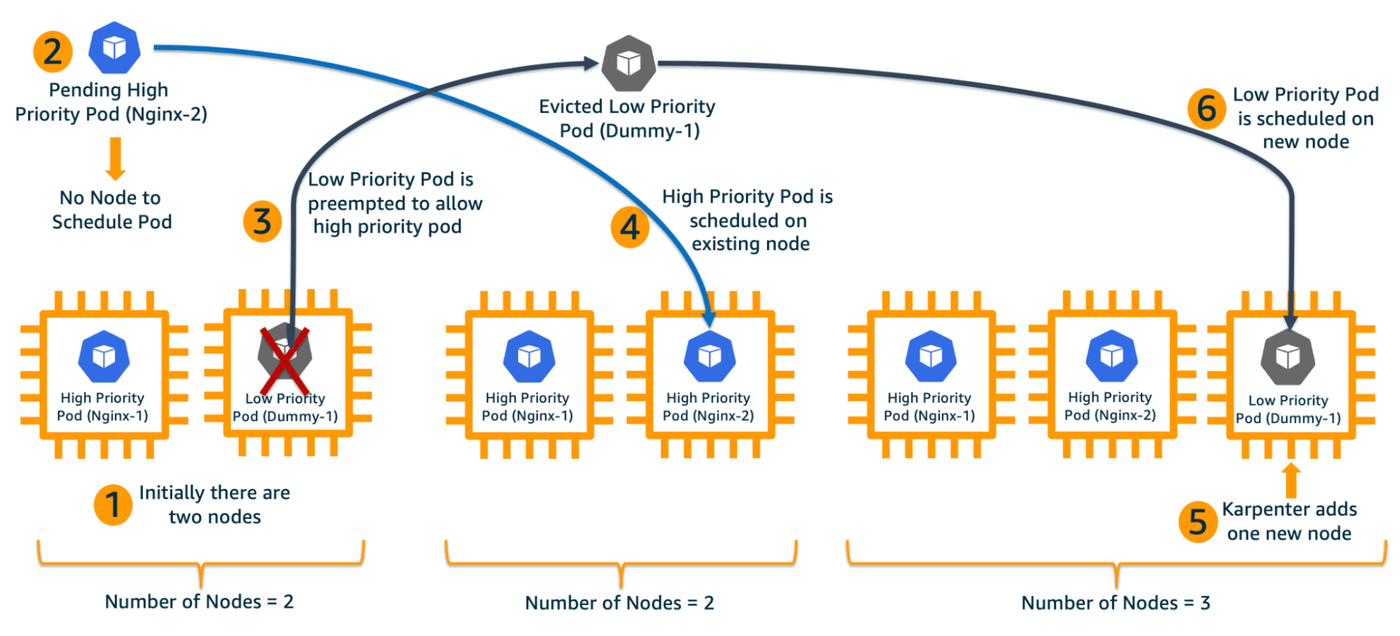
One strategy for addressing overprovisioned cluster challenges involves creating “pause Pods.” These are “dummy” Pods that don’t host any type of meaningful workload. Instead, their purpose is simply to reserve resources. Then, when resources are needed for “real” Pods (meaning those that host important workloads), the pause Pods are automatically evicted, freeing up resources for the higher-priority workloads.
To enable automated eviction, the pause Pods are assigned to a Kubernetes PriorityClass with a very low value. This tells the Kubernetes scheduler that it should evict them first whenever resources become constrained.
This strategy for managing cluster resource allocations is a bit complicated, but the benefit is that it keeps resources in reserve to provide a healthy buffer between what workloads need and how many resources are available.
It would also be possible to add nodes automatically using a cluster autoscaler when more resources are required. The downside of that strategy, though, is that adding nodes takes a bit of time (typically, at least dozens of seconds, and possibly several minutes). In the meantime, there’s a risk that production workloads will be starved of resources. Using pause Pods avoids this issue because resources can be reallocated from the low-priority Pods to higher-priority ones almost instantaneously, without the need to scale the cluster.
Costs and trade-offs of running an overprovisioned cluster
Although most organizations aim to avoid overprovisioned clusters to save money, it can be the case that a team will accept overprovisioning as a trade-off for higher performance and availability guarantees, especially for highly utilized clusters (meaning those that host a large number of workloads). The calculus here is simple enough: The more a cluster is overprovisioned, the more resources it will have to support workloads, and the lower the risk that Pods will fail or slow down due to resource constraints.
It’s also important, as noted above, to provide some type of buffer between resource allocations and actual requirements. The real question admins need to answer is how large they want that buffer to be. Bigger buffers cost more, but they provide the benefit of assuring higher overall performance.
How to detect when a cluster is overprovisioned
To determine whether your cluster is overprovisioned, you need to compare total resource allocations to actual usage.
Unfortunately, there is no built-in way in Kubernetes to calculate total resource allocations across nodes (although you can use kubectl describe to track resources allocated to individual Pods). However, you can typically view resource capacity totals through your cloud console or virtual machine management software (if your nodes are VMs).
As for tracking total resource usage, the command kubectl top nodes shows this data on a node-by-node basis (it doesn’t include information about network bandwidth utilization, which you’d have to track using external tools).
Troubleshooting cluster overprovisioned resource waste
If you believe your cluster is overprovisioned, the following steps and strategies can help resolve the issue without degrading performance:
- Check Pod resource utilization: Use the command kubectl describe pods to view data about resource usage by your Pods. This helps you determine whether any individual Pods are short on resources (which could happen due to misconfigured resource limits, even if your cluster as a whole is overprovisioned). If they are, you’ll want to modify the limits to spread resources more effectively among Pods, which improves overall cluster efficiency.
- Check resource costs: Tools like OpenCost can help you track the actual cost of excess cluster resources. This data helps you determine whether the extra capacity is worth the price; if the cost is minimal, you may choose to accept an overprovisioned cluster.
- Remove nodes: If you believe your cluster is significantly overprovisioned and will remain so indefinitely, you’ll want to remove nodes from it (or replace existing nodes with ones that have smaller resource allocations) to save money.
- Consider cluster autoscaling: To help avoid overprovisioning in the future, you may want to set up a cluster autoscaler.
Common challenges when managing cluster overprovisioned capacity
The major challenge associated with managing overprovisioned clusters is the risk that you’ll scale cluster resource allocations back too aggressively, resulting in insufficient resources being available for your workloads.
The best way to mitigate this issue is to scale down incrementally. For instance, if the difference between resource allocations and usage is 50 percent and your target buffer is 30 percent, don’t cut back to that level immediately. Instead, you could reduce resource allocations by 5 percent each day, while continuing to track resource utilization to ensure that a healthy buffer remains in place.
It’s important as well to consider fluctuations in resource usage over time. Depending on the types of workloads you run and how often you add or remove workloads from your cluster, actual resource requirements may change frequently. For example, a Pod that hosts a retail application might experience higher load (and therefore need more resources) during times of day when shoppers are most active - so it would be normal for your cluster to appear overprovisioned when the customers are asleep, but if you dramatically scale down resource allocations during that time, you may not have enough cluster capacity when traffic goes back up during the day.
It’s also crucial, as we’ve mentioned, to check resource requests and limits for individual Pods. It can be the case that your cluster has significantly more CPU, memory, or storage allocated to it than are actually being used, but at the same time, one or more individual Pods are under-performing because a resource limit is constraining how many resources they can consume. So, before changing cluster provisioning settings, review resource usage on a workload-by-workload basis to ensure that resources are being allocated appropriately across the cluster.
Best practices for managing cluster overprovisioned resources
To manage cluster resources as efficiently as possible and prevent excess overprovisioning, consider the following best practices:
- Use autoscaling: Autoscaling (including both node scaling and horizontal or vertical Pod scaling) is a highly effective way to keep resource capacity and allocations in balance with actual needs. Manual scaling imposes delays and can lead to inconsistent resource allocations (because different admins may manually allocate different levels of resources).
- Know your costs: Knowing how much you’re actually paying for CPU, memory, storage, and networking resources is critical for making strategic decisions about which level of overprovisioning to target.
- Set an overprovisioning buffer goal: Based on your infrastructure costs and performance objectives, determine how much of a buffer you want to maintain, and communicate this decision to all team members. Setting an explicit target ensures that everyone works based on the same assumptions about which level of overprovisioning is acceptable.
- Monitor infrastructure in real time: Real-time monitoring and observability are critical for keeping clusters cost-efficient while also getting ahead of scenarios that could cause workloads to run out of resources.
| Practice | How it helps |
|---|---|
| Use autoscaling | Autoscaling helps keep resource allocations automatically in balance with workload requirements. |
| Know your infrastructure costs | Tracking actual infrastructure costs is useful for determining which level of overprovisioning to accept from a financial standpoint. |
| Set an overprovisioning buffer goal | Setting an explicit goal for overprovisioning based on your organization’s cost and performance goals helps align provisioning practices with high-level strategy. |
| Monitoring infrastructure in real time | Real-time monitoring and observability help ensure that admins know when workloads are running short on the resources they need to perform adequately. |
Real-time visibility into cluster overprovisioned resources with groundcover
Achieving deep visibility into cluster resource usage is where groundcover comes in. With groundcover, you can continuously track resource allocations across all layers of your Kubernetes environments - the cluster as a whole, individual nodes, and individual Pods. You can also correlate this information with data about infrastructure costs to get real-time spending information.
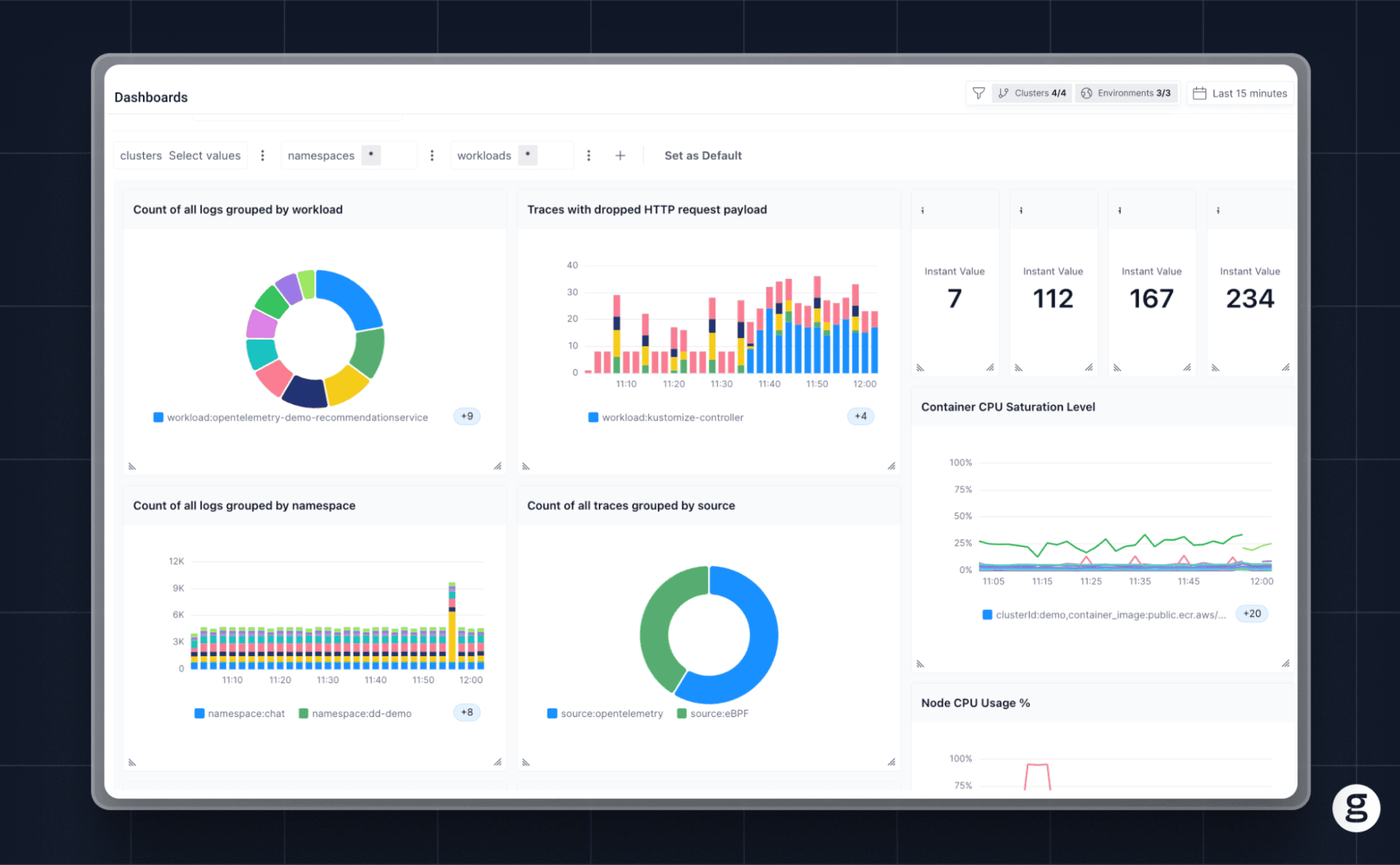
Put together, these insights mean that admins can make effective decisions about how many resources to allocate. They can also identify and resolve inefficient resource usage (such as misconfigured resource requests and limits) and get early warnings about the potential that their workloads will run short of resources.
Avoiding too much of a good thing
The bottom line: It’s normal for Kubernetes clusters to be overprovisioned to some extent, as this helps ensure that workloads won’t be starved of resources. But excessive overprovisioning wastes money, which is why it’s essential for admins to cultivate smart strategies about how they provision cluster resources, then observe their environments in real time to ensure that their plans match workload needs.
FAQs
There is no universal formula for determining buffer sizes, but admins should consider two key factors:
- Infrastructure pricing: The higher your infrastructure costs, and the more flexible your infrastructure capacity is (i.e., the more you are able to scale down and save money, as opposed to being locked into capacity via a pricing model like reserved instances), the more you’ll typically want to avoid significant overprovisioning.
- Workload performance goals: If performance is a top priority, accepting a larger buffer usually makes sense, even though it raises costs.
Overprovisioned clusters don’t typically pose major performance risks. But they do create cost challenges because they waste resources.
groundcover helps admins manage cluster provisioning effectively by providing real-time visibility into actual resource utilization, as well as workload performance. Based on these insights, admins can make informed decisions about how many resources to assign to the cluster, and how large of a resource buffer to maintain, in order to keep costs in check without starving workloads of resources.



