

Kubernetes GPU Monitoring: Key Metrics, Challenges & Best Practices



Once upon a time, the main use case for Graphical Processing Units (GPUs) was running games - and since most Kubernetes workloads are not games, it was rare to have to manage or monitor GPUs inside a Kubernetes cluster.
But that has changed as GPUs have become critical not just for gaming, but also for compute-intensive tasks like AI model training and inference. This has made Kubernetes GPU monitoring an essential component of broader Kubernetes monitoring and observability strategies.
Unfortunately, Kubernetes GPU monitoring can also be a challenging task because conventional monitoring tools offer limited abilities to capture critical GPU performance metrics. But with the right observability tools and techniques, it is possible to monitor GPUs effectively within a Kubernetes cluster.
Read on for details as we explain the ins and outs of Kubernetes GPU monitoring.
What is Kubernetes GPU monitoring, and why does it matter?
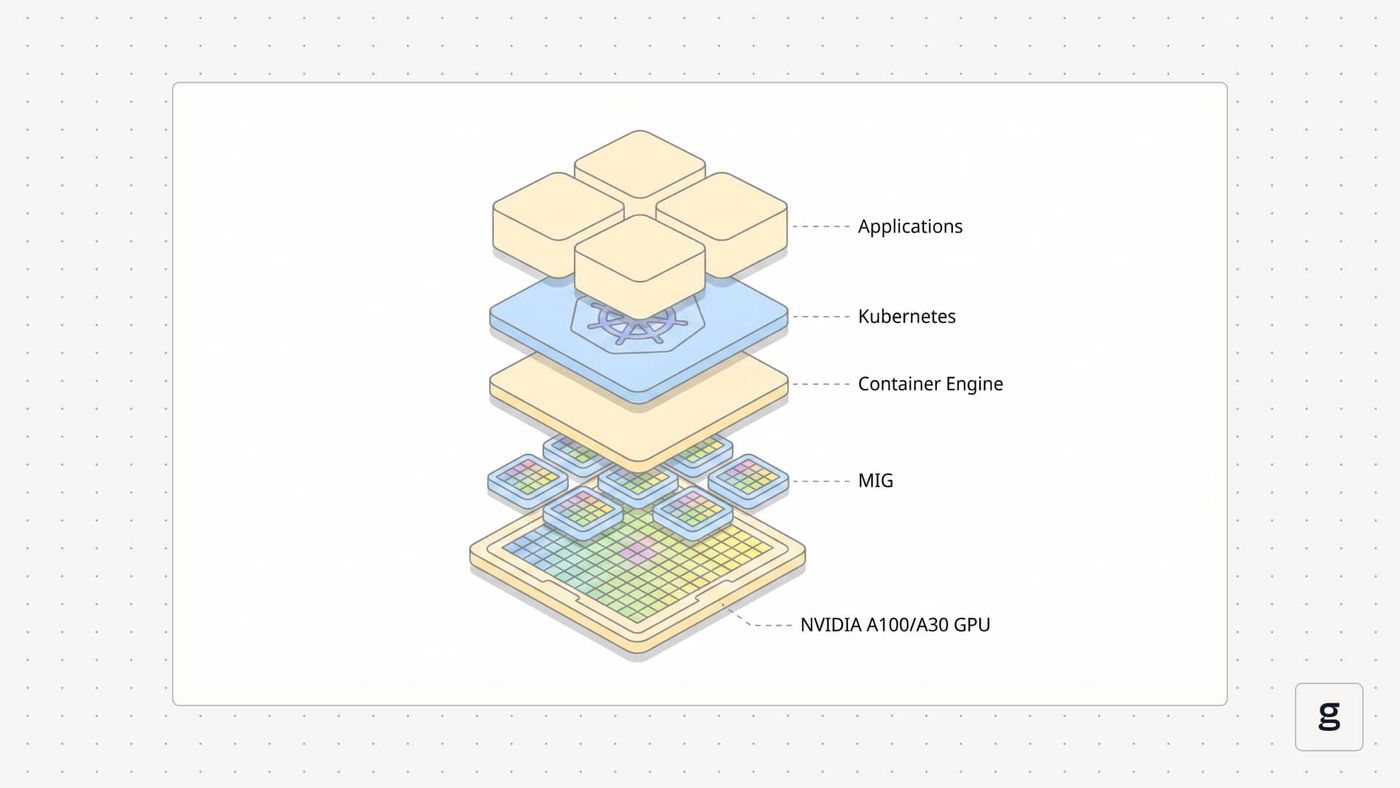
Kubernetes GPU monitoring is the practice of tracking the health and performance of GPU hardware, as well as GPU workloads, within a Kubernetes cluster.
This is important because if workloads require access to GPUs, they won’t perform well if they experience problems accessing or fully utilizing GPU resources. GPU monitoring alerts Kubernetes admins to issues like these so that they can ensure that GPU-dependent containers run at peak performance.
How GPUs are used in Kubernetes environments
As we mentioned, it was rare in the past to include GPUs within Kubernetes clusters. That’s because most traditional Kubernetes workloads are server-side applications that do things like host websites or Web apps. These types of applications don’t need access to GPUs.
However, the AI boom of recent years has made GPUs an increasingly important resource within some Kubernetes clusters. This is mainly because GPUs provide a massive amount of parallel computing capabilities that, in addition to being used to render video, excel at tasks like AI training and inference - and given the explosion of innovation surrounding AI models in recent years, model training and inference have become vital use cases for many organizations.
Beyond AI, GPUs can also accelerate certain other types of server-based workloads, such as imaging analysis and hosting cloud-based virtual reality/augmented reality (VR/AR) applications.
To make GPUs available in Kubernetes, admins must join nodes to the cluster that are equipped with GPUs. The following sections explain in more detail how this process works.
Kubernetes GPU monitoring vs. traditional infrastructure monitoring
In two key respects, Kubernetes GPU monitoring is different from traditional infrastructure monitoring:
- Types of metrics: Monitoring the health and performance of GPUs requires tracking some special types of metrics, like GPU utilization rate, power draw, and temperature. We’ll say more about these below.
- Data collection techniques: Conventional monitoring tools and processes often can’t capture GPU-specific metrics, so the process requires specialized tooling.
Beyond this, the fundamentals of Kubernetes GPU monitoring and conventional infrastructure monitoring are more or less the same: The main goal is to collect data that yields observability insights, then analyze it to detect anomalies that could be a sign of performance issues. Where GPU monitoring differs is in the type of data you look at and how you get that data.
| Aspect | Kubernetes GPU monitoring | Traditional infra. monitoring |
|---|---|---|
| Types of metrics | Include GPU-specific metrics, like GPU utilization and power draw | Focuses on generic metrics, like CPU and memory utilization |
| Data collection method | Requires special data exporters that can pull data from GPU devices | Uses generic data collectors that pull information from nodes, Pods or containers |
How GPUs are used in Kubernetes environments
Again, to use a GPU in Kubernetes, you simply need to include GPU-equipped servers within the cluster you create. This means the nodes must include GPU devices, as well as drivers within the node operating system for using those devices. From there, the Kubernetes scheduler will identify nodes that have GPUs available and assign Pods to them if the Pods require GPUs (we detail how GPU scheduling works in the following section).
Thus, the process for using GPUs in Kubernetes is not all that different from deploying any type of Kubernetes workload. The only real difference is ensuring that you make GPUs available within your cluster.
You must also ensure that GPU workloads are capable of requesting GPUs. Typically, they do this by mounting GPU devices when their containers start. But this is a process that happens within the container, so it’s not really something that a Kubernetes admin has to handle. It’s a task for application developers.
Some special considerations apply to using GPUs in Kubernetes if your nodes are virtual machines rather than physical servers. In that case, containers running on the virtual machines won’t be able to access GPU hardware directly by default, since virtual machines abstract workloads from the underlying physical hardware. However, if the virtualization hypervisor supports passthrough (a method for exposing physical devices through virtual machines), you can enable this so that containers running on the virtual machines will be able to access the GPUs. Here again, though, this isn’t a configuration requirement that applies to Kubernetes; it’s something you need to set up when you are creating your virtual machines, by ensuring that you enable passthrough for them.
How Kubernetes schedules and manages GPU resources
To tell Kubernetes that a Pod requires access to a GPU, you include a resource limit request when configuring the Pod. For example, the following YAML code specifies that a Pod should have one GPU available:
When you deploy a workload with a GPU specification like this, the Kubernetes scheduler will automatically detect which nodes have GPUs available (it does this with assistance from GPU management libraries, such as the NVIDIA Management Library, or NVML). It will then assign the Pod to a node that has sufficient GPUs available to satisfy the resource request specified in the Pod’s YAML code.
By default, the Kubernetes scheduler is only able to assign entire GPUs to a workload, which means that once a GPU is allocated to a Pod, the entire GPU is reserved for exclusive use by that Pod, whether or not the GPU is actually being fully utilized. However, using custom schedulers like KAI from Nvidia, it’s possible to allocate GPUs on a fractional basis, as well as to assign them dynamically. This enables more efficient use of GPUs by allowing Pods to share them.
Core metrics for effective Kubernetes GPU monitoring
As we said, Kubernetes GPU monitoring requires tracking some special metrics that don’t apply to generic infrastructure monitoring. They include:
- GPU utilization: This tracks how much of the GPU’s total compute capacity is being used. Ideally, you want to ensure that the bulk of your GPUs’ capacity is being utilized, while also ensuring that utilization doesn’t reach 100 percent (because that may cause workloads to slow down due to exhaustion of GPU resources).
- GPU memory usage: Measures how much of the GPU’s built-in memory (which is distinct from generic server RAM) is being used. You want to avoid having memory be totally maxed out.
- Temperature: Monitoring GPU temperature is important not just to prevent overheating, but also because if GPUs get too hot, they will usually automatically throttle themselves, which can in turn reduce workload performance.
- Power usage: Monitoring GPU power consumption metrics helps provide context about GPU temperature, since power draw usually correlates closely with temperature. Power usage metrics are also useful if you run a large number of GPUs and want to track their total power consumption so you have visibility into the sustainability and energy-efficiency of your infrastructure.
In most cases, you can track these metrics on a GPU-by-GPU basis, as well as a Pod-by-Pod basis - so if you want to know how much GPU power draw is attributable to a specific Pod, for example, you can do that.
| Metric | Description | Why it matters |
|---|---|---|
| GPU utilization | How much of the GPU’s compute power is being used | Idle or under-utilized devices are a waste of resources. Devices maxed out on utilization may lead to underperformance for workloads |
| GPU memory usage | How much of the GPU’s built-in memory is being used | Idle or under-utilized memory is a waste of resources. Memory being maxed out may lead to underperformance for workloads |
| Temperature | How hot GPUs are | Excessive heat could cause throttling, which slows down workloads. Long-term overheating may also damage devices |
| Power usage | How much power GPUs are drawing | High power usage may cause temperature spikes. Power usage monitoring is also useful for sustainability monitoring and reporting |
How to set up Kubernetes GPU monitoring (step-by-step)
Kubernetes lacks the native ability to collect GPU-specific monitoring metrics. You can’t get this data by default using kubectl in the same way you can view generic metrics, like CPU and memory utilization.
However, you can deploy the tooling necessary to enable Kubernetes GPU monitoring. The following are the key steps:
- Install a GPU metrics exporter tool: First, you need to install software in your cluster that can collect and export GPU-specific metrics. The software to use varies depending on GPU type and generation, but the most common solution is the NVIDIA DCGM Exporter.
- Configure GPU metrics importation: Next, you configure an observability tool to ingest the GPU metrics generated by the exporter.
- View and analyze GPU metrics: Finally, use your observability platform to assess the GPU metrics through techniques like automated anomaly detection or visual dashboards.
NVIDIA offers a GPU Operator for Kubernetes that simplifies the deployment of most of the tooling you’ll need to work effectively with GPUs inside a Kubernetes cluster. But you can also deploy the tools one-by-one if you prefer (or if you want to use solutions other than those supported by the NVIDIA operator).
Kubernetes GPU monitoring for AI, ML, and high-performance workloads
The fundamentals of Kubernetes GPU monitoring are the same regardless of which types of GPU-dependent workloads you’re running. That said, some special considerations apply for high-intensity workloads like AI/ML training and high-performance computing (HPC):
- Utilization is critical: GPUs are expensive, and if you need a lot of them to support workloads like AI, you probably want to ensure they’re being used efficiently. To that end, pay especially close attention to GPU usage metrics to ensure that you don’t have GPUs sitting idle.
- The importance of temperature monitoring: High-intensity workloads are more likely to cause high temperatures, making it especially important to monitor GPU temperature data and get ahead of overheating risks.
- Plan for scalability: Some types of AI and HPC workloads (like AI inference, whose load depends on how many requests an AI model receives at a given point in time, as well as how complex each request is) may fluctuate frequently in scale due to changes in demand. Thus, it’s important to collect and analyze GPU metrics in a way that provides visibility into long-term trends, not just individual points in time.
Improving cost efficiency and performance with Kubernetes GPU monitoring
Given the high cost of GPUs, the ability to ensure GPU efficiency within a Kubernetes cluster is a priority for most organizations. Monitoring helps by allowing you to track utilization rates and identify situations where your GPUs are sitting underutilized.
You can then take action by either manually modifying GPU requests (if you’re using the default Kubernetes scheduler, which can only allocate entire GPUs) or switching to a scheduler that allows for dynamic and shared GPU allocation. The latter approach is preferable because it makes it possible to spread GPU resources across multiple workloads in an efficient way based on how many GPUs (or fractions of a GPU) each workload actually needs.
Challenges in Kubernetes GPU monitoring at scale
The main challenge of GPU monitoring in a large-scale Kubernetes cluster is the difficulty of collecting and interpreting GPU health and performance data when you have dozens or hundreds of GPUs spread across many nodes and workloads. The key to solving this challenge is to ensure that you have granular GPU monitoring capabilities. Instead of simply tracking overall GPU utilization rates, monitor this data on a GPU-by-GPU basis.
Just as important, make sure you track GPU metrics on a per-Pod basis so that you can monitor how much GPU each Pod is consuming. It can also help to differentiate groups of Pods (such as by assigning them to different namespaces) between different organizational units or application types. This helps to attribute costs and perform chargebacks based on exactly which departments are consuming GPU resources at scale.
| Challenge | How to address |
|---|---|
| Large number of devices | Use scalable data collection and observability tools |
| Workloads may share GPUs | Monitor GPUs granularly to gain insights into how each workload is consuming GPU resources |
| GPU metrics may not be actionable | Correlate GPU metrics with other Kubernetes observability data to identify root-cause issues |
Best practices for Kubernetes GPU monitoring in production
To make GPU monitoring in a Kubernetes environment as efficient, effective, and scalable as possible, consider the following best practices:
- Enable granular monitoring: As we mentioned, granularity is key for effective GPU monitoring. You should be able to track vital GPU metrics on both a per-device and per-Pod basis.
- Standardize hardware: If feasible, standardizing the GPU devices you deploy by installing the same type of GPU across all nodes helps to simplify monitoring by allowing you to use the same data collection tools, as well as avoid the quirks that can arise from working with varying hardware devices.
- Don’t overlook temperature monitoring: Although GPU temperature data doesn’t always correlate directly with performance, it’s important to monitor because unexpected temperature anomalies could be a sign of issues like pending hardware failure or device overuse.
- Correlate and contextualize GPU monitoring data: GPU metrics often aren’t enough on their own to get to the root cause of risks and performance issues. You need to correlate GPU data with other observability data, like Pod and node performance metrics.
Tools and approaches for Kubernetes GPU monitoring
There are two main types of tools that you need for effective GPU monitoring on Kubernetes:
- A data exporter, like the NVIDIA DCGM Exporter, or (if you have an AMD GPU) the AMD Device Metrics Exporter. These tools collect GPU metrics from nodes and make them available for scraping.
- An observability tool that can ingest GPU metrics and help you analyze them.
You’ll also want to be able to collect other data from across your containers, Pods and nodes, but you can use standard Kubernetes observability software for this.
Unified Kubernetes GPU monitoring with eBPF-powered observability by groundcover
When it comes to ingesting and making sense of GPU monitoring data, groundcover has you covered. Groundcover allows you to import GPU metrics from scraping tools like Prometheus, then analyze them using a rich set of highly customizable Grafana dashboards.
Plus, because groundcover also monitors all other layers of your Kubernetes environment, it makes it easy to correlate GPU performance insights with container, Pod, and node observability data, helping admins to get to the root cause of issues quickly.
Making the most of Kubernetes GPU monitoring
GPU monitoring may not be a native Kubernetes capability. But it’s an increasingly vital one nonetheless, as GPUs grow into core components of many infrastructure stacks. Hence the importance of being able to collect and analyze GPU monitoring data effectively in a Kubernetes environment, something that you can do with ease with help from groundcover.
FAQs
Node-level GPU monitoring analyzes the performance of individual GPUs, whereas workload-level monitoring looks at how many GPU resources each Pod is consuming. Typically, workload-level monitoring provides more meaningful insight into how GPU resources are being consumed, where bottlenecks may exist, and so on.
Effective GPU monitoring in Kubernetes helps ensure that GPU resources are used efficiently by, for example, identifying situations where some GPUs are being fully utilized while others sit idle. It can also provide insights into issues like GPUs running at excessively high temperatures, which could cause hardware damage or performance reductions (due to automated throttling).
groundcover uses eBPF to import monitoring data, collecting vital metrics directly from the Linux kernel with no sidecars or agents required, and none of the resource overhead that comes with them.
That said, GPU metrics aren't available out of the box. They can be enabled through the official Nvidia DCGM Exporter.



