

Multi-AZ Cluster Costs: Tradeoffs, Risks & Optimization Guide



One of the main reasons for building a cluster of servers in the first place is to increase workload availability and reliability. With a cluster, having one or a few servers fail is not usually a big deal, because your workloads can move to other servers.
But what if an entire collection of servers fails at once - which it might if, for example, all of your servers live in the same cloud availability zone, and that zone goes down due to a networking issue? In that case, your workloads would all go down, too, unless you have servers available in a separate availability zone.
Fortunately, you can protect against scenarios like this by creating multi-AZ clusters. meaning clusters that span multiple availability zones. Read on for details about how to set up a multi-AZ cluster, as well as how to manage challenges like the cost and maintenance implications of multi-zone clusters.
What are multi-AZ clusters?
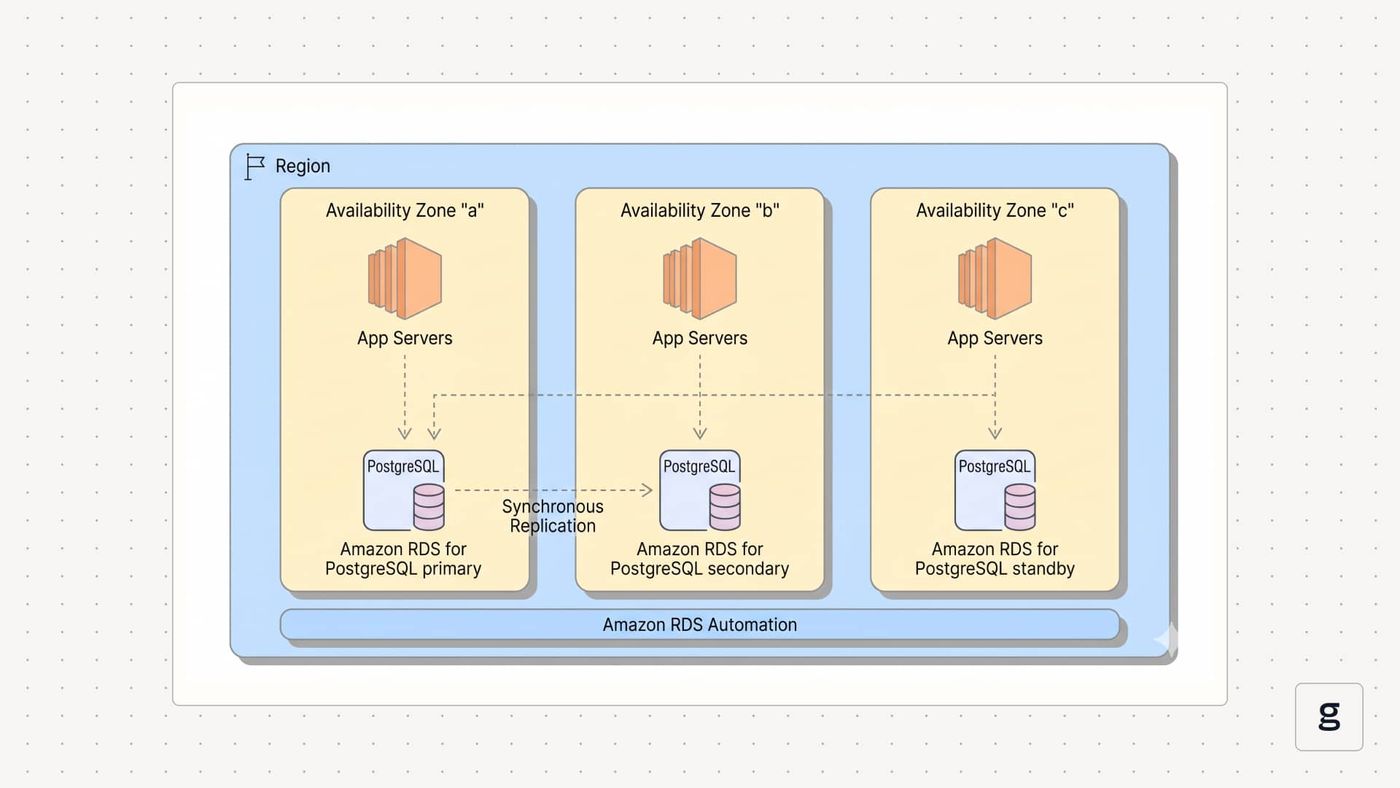
A multi-AZ cluster is one whose servers are spread across two or more availability zones (AZs).
To unpack what that means, let’s talk about availability zones. An availability zone is an isolated segment of a cloud platform. Today’s public clouds offer dozens of distinct availability zones. When you provision cloud infrastructure, you can typically choose a specific availability zone to host it in.
Often, workloads are hosted in just one availability zone. But it’s also possible to deploy servers in more than one availability zone - and if you join those servers together into a single cluster, you end up with a multi-AZ cluster.
You can use a multi-AZ cluster approach with any type of software that supports a clustering architecture - such as Kubernetes, which creates clusters using pools of servers for hosting containers, or Apache Kafka, which can use clusters to host data streams.
Many modern database platforms, such as SQL Server and Amazon Relational Database Service (RDS), can also work using a multi-AZ architecture. Note, however, that the free or low-cost versions of these products often don’t support multi-AZ deployment. For example, under Amazon RDS free tier and SQL Server express edition, you can’t run SQL Server or RDS instances in different AZs because these products limit you to one AZ at a time.
The main benefit of creating a multi-zone cluster is that it boosts reliability. Because availability zones are isolated from each other, the failure of one AZ won’t usually affect others - which means that as long as at least one of the AZs that your cluster uses is still up, your cluster will remain operational as well. Having an AZ go down could decrease your cluster’s hosting capacity (because it will lose connectivity to the servers that were part of the failed AZ), but the cluster itself will still be up.
What drives multi-AZ cluster costs?
While multi-AZ clusters increase reliability, a major tradeoff is that they cost more to operate.
Multi-AZ cost breakdown by component
The key factors that impact multi-AZ cluster cost include:
- Data transfer costs: Cloud providers typically charge data transfer fees (also known as egress fees) whenever data moves between availability zones (even if the zones are in the same cloud region). Since data moves constantly within a multi-AZ cluster, you can end up with high egress fees.
- Replication and caching costs: In some cases, you may need to replicate or cache data within your cluster. This is necessary to mitigate latency issues that would arise if, for example, an application hosted in one of the cluster’s AZs had to fetch data from a different AZ. Replication and caching can reduce latency by keeping data within the same AZ, but these practices also increase hosting costs because they add to the number of servers and backup storage your cluster consumes.
- AZ fees: Although there is often not a direct fee for adding an AZ, this is not always the case. For certain types of cloud services or workloads, you may need to pay extra for using multiple availability zones, even if your total resource consumption is the same.
Multi-AZ cluster costs vs. single-AZ cost models
In general, you should expect a multi-AZ cluster to cost at least twice as much as a single-AZ cluster. This is true even if the total number of servers within your cluster is the same.
For example, imagine that you want to operate a cluster consisting of 100 total servers. If you place half in one AZ and half in another AZ, your total server cost may be the same as it would be if you paid for 100 cloud servers hosted in just one AZ. However, in the multi-AZ setup, you’d need to pay data egress fees. You may also need to duplicate some of your data, resulting in having to pay for more servers than you’d require in a single-AZ setup - so ultimately, your total costs are almost certain to be higher.
| Cost variable | Impact on Single-AZ clusters | Impact on multi-AZ clusters |
|---|---|---|
| Compute infrastructure | Based mainly on how many servers you operate; AZ count is not a major factor. | Based mainly on how many servers you operate; AZ count is not a major factor. |
| Data transfer fees | Low, because data doesn’t move between AZs. | Can be high due to frequent data movement between AZs. |
| Data backup and replication costs | Low, because you don’t need to replicate data across AZs. | Can be high due to the need to replicate data across AZs or create separate backups for each AZ. |
| Networking infrastructure | Low, because you typically need just one load balancer and gateway for the entire cluster. | May be high due to having a separate load balancer and/or gateway for each AZ. |
Why teams use multi-AZ clusters despite higher costs
The primary reason to use a multi-AZ cluster design, even though it costs more, is, again, to increase availability. If you’re deploying mission-critical applications that can’t tolerate downtime, a multi-cluster AZ helps to reduce the risk of disruption. That said, it often doesn’t make sense to use a multi-AZ approach for workloads that are less essential – such as apps that you’re simply testing.
It’s also important to realize that there are still many reasons why a workload may become unavailable even in a multi-AZ setup - such as application bugs, networking failures, or not allocating enough CPU or memory to support a workload’s load. Having more than one AZ on hand won’t prevent downtime or slow performance in these scenarios.
Hidden multi-AZ cluster costs most teams miss
Cloud providers are transparent in stating that they charge for data egress between availability zones, and that having more than one AZ will increase data transfer fees. In this sense, egress is not a “hidden” cost of multi-AZ clusters.
However, it can be easy for admins to underestimate how much data flows between AZs in a multi-zone setup. The total volume can vary depending on which platform you use and which types of workloads you run, but to take a popular example, consider Kubernetes. If a Pod hosted in one AZ within a Kubernetes cluster frequently interacts with a Pod in a different AZ, data will move constantly between them. Over time, this data adds up, leading to high egress fees.
The need for redundant infrastructure components can also be easy to overlook when estimating multi-AZ costs. In addition to paying for data caching or replication, you may need to pay for separate load balancers or gateways for each AZ, which will increase spending.
In short, it’s important to look carefully at exactly how your multi-AZ cluster will operate to get an accurate estimate of total costs.
Observability and debugging overhead in multi-AZ clusters
Another source of increased data transfer - and, therefore, higher costs - in multi-AZ clusters is the need for observability and debugging.
If your observability and debugging tools are hosted in one AZ but collect data from applications hosted in another AZ, the data movement will be subject to egress fees in most cases. These charges wouldn’t apply in a single-AZ cluster, since in that case your observability software could live in the same AZ as your workloads, eliminating the need for egress.
It’s possible to try to minimize observability-related egress by deploying observability tools in each AZ within your cluster. But that approach comes with its own cost overhead because it increases the amount of infrastructure you need to allocate to host observability software.
Measuring and attributing multi-AZ cluster costs accurately
Tracking multi-cluster spending can be tricky. Although cloud cost management tools (such as AWS Pricing Calculator and Cost Explorer) can group spending data based on availability zone, they usually do so only for direct infrastructure spending. For example, they’ll tell you the total cost of the servers that you deploy in each AZ.
However, cloud spending software doesn’t usually provide a highly granular view into the main source of multi-AZ costs, which is data egress fees. Although they can track total egress costs, they won’t show you exactly which data you moved between AZs.
To gain that level of visibility, you must observe network activity within your cluster with enough precision to be able to determine exactly which data is moving between your availability zones, which workloads are sending and receiving it, and whether the data movement is necessary. For instance, in Kubernetes, your observability solution might reveal that data transfers between two Pods located in different AZs account for a large share of your total egress. In that case, you could consider moving one of the Pods so that both reside in the same AZ, eliminating the inter-Pod egress fees.
You may also discover that you’re transferring data that doesn’t need to be transferred at all. For example, an observability tool might be pulling log data from a different AZ, and you never end up analyzing the logs. You could disable the log collector in this case to save on egress spending.
Finally, it’s important to know whether any redundant infrastructure components you’re paying for are actually necessary. This is another area where observability is critical. For instance, if you want to know whether having a separate load balancer for each AZ is necessary for meeting your application performance goals, you’ll need to observe your applications, track how long they take to respond to requests, and assess whether you could achieve your desired level of performance with just one centralized load balancer.
Best practices to reduce multi-AZ cluster costs without sacrificing resilience
To reap the benefits of multi-AZ clusters without overspending, consider the following best practices:
- Keep related workloads in the same AZ: If workloads interact frequently, hosting them in the same AZ can reduce egress fees.
- Implement zone-aware routing: Routing rules or capabilities (like Topology Aware Routing in Kubernetes) are available that aim to keep traffic within the same AZ. Enabling them can reduce egress.
- Use a “pilot light” or “warm standby” strategy for redundancy: These strategies involve keeping scaled-down versions of workloads running in a secondary AZ, while also hosting a separate, primary instance of the workloads in a different AZ. The benefit is that if the primary AZ goes down, you can scale up your secondary instances quickly in the other AZ - so you minimize overhead while retaining the ability to maintain availability during an AZ failure.
- Choose cloud regions and availability zones strategically: Egress pricing often varies depending on which cloud region and/or specific availability zones you select to host your workloads.
- Optimize observability data: Collecting only the data you need for observability purposes, and minimizing the volume of data transferred, helps streamline observability-related costs in multi-AZ clusters.
| Best practice | How it helps |
|---|---|
| Keep related workloads in the same AZ | Workloads that interact frequently will avoid data transfer charges if they operate in the same AZ. |
| Implement zone-aware routing | Zone-aware routing reduces the flow of traffic between AZs, which in turn reduces data transfer costs. |
| Use pilot light or warm standby strategies | Keep scaled-down backup workloads on hand in secondary AZs to lower costs while still maintaining high availability. |
| Choose cloud regions and AZs strategically | Some regions and AZs have lower data transfer pricing than others. |
| Optimize observability data | Avoid unnecessary transfers of logs, metrics, and traces across AZs to save money. |
Controlling multi-AZ cluster costs with deep, eBPF-based visibility using groundcover
groundcover helps to minimize multi-AZ costs in two key ways:
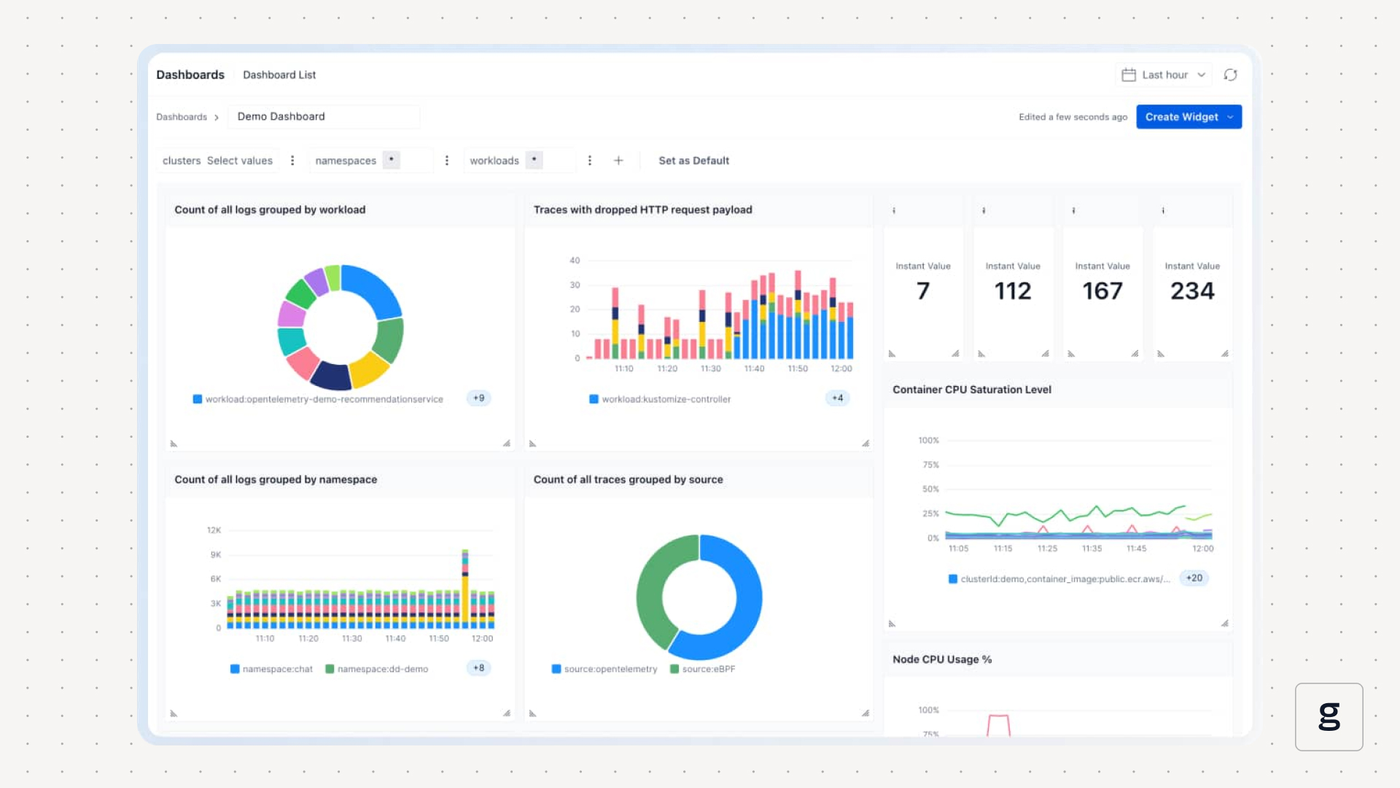
- By providing deep visibility into workloads and network traffic, groundcover allows admins to understand which data is moving between availability zones, avoid unnecessary data transfers and streamline routes - all of which result in lower transfer volumes and lower egress bills.
- groundcover uses eBPF, a hyper-efficient observability framework, for collecting data. eBPF can significantly reduce observability overhead and cut back on the frequency and volume of observability requests, which are also important ways of lowering data transfer costs.
In short, groundcover helps keep observability costs in check, while also providing the visibility necessary to know when you’re overpaying. It’s a double-edged sword, with both edges working in your favor to save money.
Smart approaches to multi-AZ cluster management
Deploying a cluster across multiple availability zones can be a powerful way to boost availability. But poorly configured multi-AZ clusters can also waste a lot of money, which is why it’s important to design multi-AZ architectures in a cost-effective way, while also maintaining the observability capability necessary to know when you’re wasting money.
FAQs
The cost of having multiple availability zones outweighs the benefits if your spending on data transfers and redundant infrastructure is greater than the business value created by having high cluster availability. Generally speaking, the more important your workloads are, and the more efficiently you design and manage your multi-AZ setup, the more value you’ll achieve relative to the cost.
The best way to detect unnecessary traffic between availability zones in Kubernetes is to monitor data flows between containers and Pods using network observability software. You need to be able to see where packets are actually flowing, then determine whether there’s a reason to have them moving between AZs.
Groundcover helps with multi-AZ cost management by providing deep, granular visibility into network data movement. This helps admins determine where packets are moving so that they can make changes (like placing workloads that frequently interact within the same AZ) to reduce cross-AZ traffic movement.



