

Session Affinity: How It Works, When to Use It & Key Pitfalls



In most scenarios involving the deployment of multiple instances of a workload, admins don’t care which backend application instance happens to process a given request. The goal of multi-instance deployments is to improve performance and availability by distributing requests evenly across the workload.
But sometimes, it does matter which client talks to which backend application instance. Keeping this relationship consistent is important for use cases where it’s necessary to preserve session data across requests. This is where session affinity comes in. Session affinity offers a way of maintaining consistency in terms of which server instance handles requests from a specific client, which is an essential benefit in some cases.
On the other hand, session affinity can pose some unique challenges, particularly in complex environments like Kubernetes. It’s complicated to implement, and monitoring and managing session affinity requires specialized observability techniques.
Read on for guidance on all of the above as we unpack what session affinity means, when to use it, and how to implement it effectively in cloud-native environments like Kubernetes.
What is session affinity?
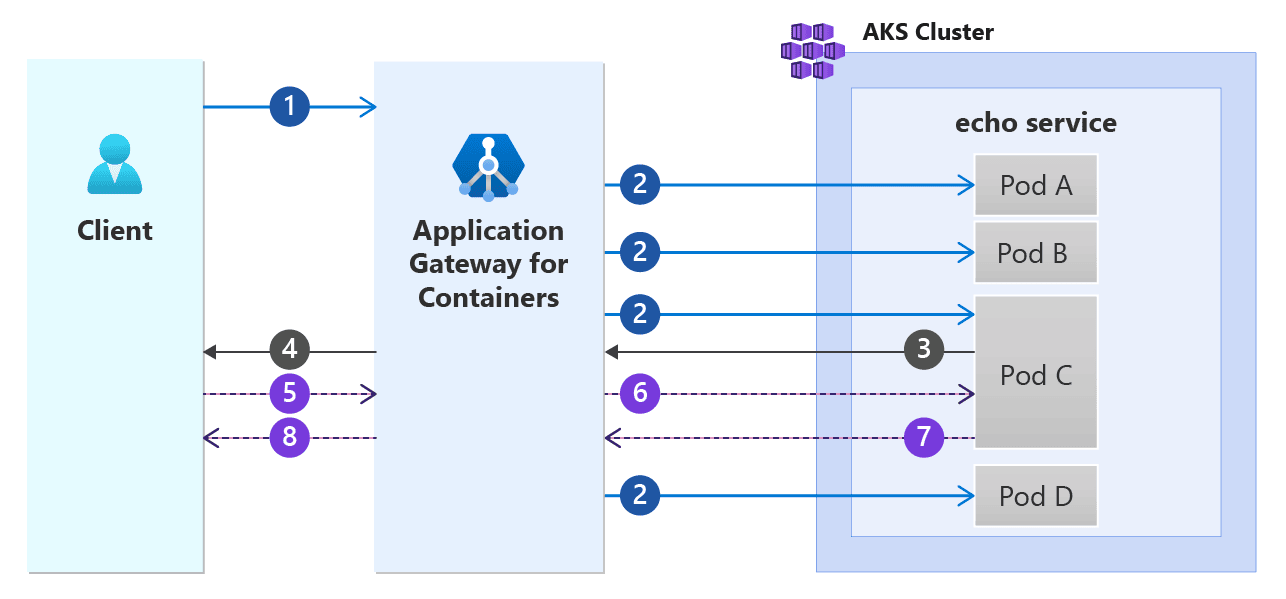
Session affinity, also known as session persistence, is the practice of directing all requests from a particular client to a specific backend application instance.
To enable session affinity, you need two things:
- An application deployment architecture that includes multiple instances of the same application or workload. For instance, you could achieve this in Kubernetes by using ReplicaSets to operate more than one instance of the same Pod.
- A load balancing mechanism that is capable of controlling which client requests reach which application instance.
Session affinity is distinct from the default behavior of most load balancers because generally, load balancers strive simply to balance requests across workload instances, which means that a client’s subsequent requests from a client may flow to different instances than the client’s first request. With session affinity, the load balancer consistently connects each client to the same instance.
Usually, session affinity expires after a predetermined amount of time, typically anywhere from a few hours to a day. If a client reconnects after the session has ended, subsequent requests could be routed to a different server instance, and a new session will open.
Session affinity vs. sticky sessions
Session affinity is often used synonymously with the term sticky sessions. At a high level, both phrases refer to any kind of setup wherein load balancers route each client’s requests to a specific backend server instance.
However, there is technically a difference between session affinity and sticky sessions due to the way they are implemented:
- Session affinity relies on network-based identities (like a client’s IP address) to route client requests to a specific instance. For this reason, session affinity is said to operate at layer 4 (also known as the transport layer) under the OSI model (OSI is a popular conceptual framework for mapping workload hosting stacks).
- Sticky sessions use application-based identities (like cookies) to identify clients and server instances. This is layer 7, or the application layer, according to the OSI model.
How session affinity works in distributed systems
You can use session affinity in a non-distributed environment (such as one where multiple application instances or processes are hosted on a single server) as well as in a distributed system like Kubernetes (where instances are spread across a cluster of servers).
But implementing session affinity is a little more complicated in distributed systems, due to the complexity of the system itself. The main challenge is that network-based application instance identities can change when the instances move between host servers because each server has a distinct IP address.
As a result, load balancers in distributed systems must be capable of tracking workload identities even when networking configurations are modified. Or, they must use a different means of identifying instances. In Kubernetes, for instance, it’s possible to track Pods based on their labels, which remain the same no matter which node happens to host the Pod.
Benefits of session affinity
The main benefit of session affinity is enabling the stateful storage of client data. When a client communicates with the same server instance, that instance is able to retain information about the client persistently. This wouldn’t be possible (at least, not without adding complicated logic to the application to enable instances to share data) if the client talked to different instances, with each instance unaware of what the others are doing.
This consistency is important for use cases such as operating a shopping cart in a retail application or keeping a user logged into an application. In these scenarios, it’s important for a user’s activity to be tracked consistently as the user submits multiple requests.
Session affinity can also provide some performance and user experience benefits in some cases. This is due to the ability to cache data about a specific client within server instances. For instance, if a client submits the same request multiple times, the server instance could use a cached response instead of regenerating the response - but this is only possible if the client connects to the same server instance each time it submits a request, which requires session affinity.
When to use session affinity
The most common reason for using session affinity is when the following two conditions are true:
- You are running multiple instances of an application.
- Your application needs to store client data statefully.
As noted above, session affinity can also provide performance benefits by enabling application instances to cache data locally. However, there are other means of achieving a similar result, such as implementing a centralized cache that application instances share - and so it’s not strictly necessary to use session affinity if caching is your main goal.
When to avoid using session affinity
You shouldn’t use session affinity if you are running a stateless application (meaning one that does not store data persistently). In that case, session affinity adds complexity without providing meaningful benefits.
Session affinity can also be problematic if you require high availability. The risk here is that if you connect each client to a specific workload instance, and that instance goes down, the user sessions connected to that instance will fail. If the session data was stored locally in the failed instance, this could lead to data loss and force clients to reenter information.
For high availability scenarios, it’s usually better to set up a shared data store (which all backend server instances can access) and automatically redirect requests to a different instance if one instance fails. This enables automated failover while still ensuring session affinity.
Session affinity in Kubernetes
In Kubernetes, the goal of session affinity is usually to ensure that each client’s traffic routes to the same backend Pod instance. There are two ways to implement this:
- Using a Kubernetes ingress controller (like NGINX): This is used to route traffic based on network identities, and is an example of layer 7 session affinity. It is the more efficient approach; the downside is that it is somewhat complicated to set up because it requires you to install an ingress controller, which Kubernetes does not have by default.
- Setting service.spec.sessionAffinity to ClientIP: This tells kube-proxy to route requests based on the source client’s IP address of the client. This is a layer 4 approach. It’s simpler to set up, but a major caveat is that it could lead to issues in situations where multiple clients are connecting from behind the same proxy. In that case, the clients would all share the same source address, so kube-proxy would “think” that they are one client, when in fact there are multiple, distinct clients.
Challenges and limitations of session affinity
We’ve touched on some of the challenges and downsides of session affinity already, but to summarize (and expand):
- Requests may not be distributed evenly, which can lead to poorer performance. This happens if some application instances experience heavy load because they are committed to serving clients that send a high volume of requests. Meanwhile, other instances may sit under-utilized, but they can’t help support the high-volume clients because session affinity requires those clients to use their original backend instances.
- Server instances may not be able to scale as quickly because newly added instances won’t be able to work with existing clients. This limitation can make it hard to accommodate heavy load by adding new instances.
- Session affinity can cause clients to lose their session data if they are mapped onto a server instance that fails and the session data resides locally within that instance.
- Changes to client identity (such as a change in IP addresses) could break session affinity because the client will appear from the server’s perspective to be a new client.
- Observability is more complex because admins must factor in mappings between clients and servers when analyzing metrics, logs, and traces.
Best practices for implementing session affinity
To maximize the benefits of session affinity while minimizing limitations, consider the following best practices:
- Use cookie-based routing where possible: In general, cookie-based routing is easier to set up. It’s also not prone to losing session affinity in the event that a client’s or other network ID changes.
- Centralize and/or back up session data: To reduce the risk of permanently losing session data (which can disrupt the user experience by causing issues like the emptying of a user’s shopping cart), store the data centrally or back it up. That way, the failure of a backend instance won’t cause permanent session data loss for clients connected to that instance.
- Streamline session data: In general, less session data is better. It reduces the resources consumed by each workload instance, while also making it easier to move data to other instances if necessary. For this reason, strive to avoid storing session data that is not necessary, and migrate or purge it after the session ends.
- Contextualize observability data based on session affinity: Tag metrics, logs, and traces with session affinity context. This ensures that you can track performance and availability on an instance-by-instance basis. This level of granularity is important for determining whether problems like slow responses are caused by issues specific to one application instance, or a general application problem.
Alternatives to session affinity
Session affinity is not the only way to store user session data persistently.
Another common approach is to centralize all clients’ session data in a shared database. Multiple servers or server instances can connect to the database, so no matter which instance happens to respond to a given client request, it will be aware of previous requests, since they’re all stored in the same location. A downside of this approach is that it may lead to higher latency because it will typically take longer for server instances to connect to the shared database than it would for them to access session data stored locally.
It’s also possible to manage session data on the client side. Usually, this is done by storing session data in a cookie or Web token and including it in each request. This allows server instances to track previous requests without having to store session data server-side. The trade-off is that including session data in each request increases network bandwidth, and it may also increase latency, simply because there is more data to move.
Unified observability for session affinity with groundcover
No matter how you choose to enable session affinity (or a similar setup), groundcover delivers the visibility you need to ensure that your workloads are performing optimally. By granularly tracking the status of each client, server instance, and request, groundcover alerts you to problems like a backend instance that is becoming overwhelmed, or clients whose network IDs have changed, resulting in broken session affinity.
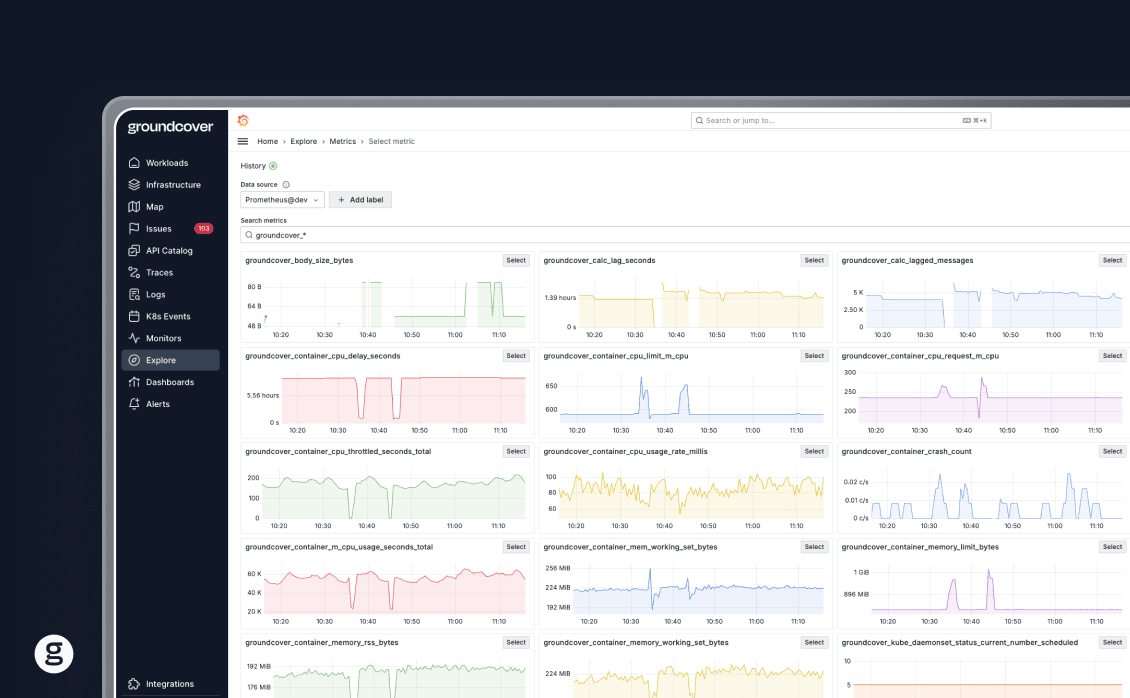
And, because groundcover uses the hyper-efficient eBPF framework to collect data, it’s able to provide deep observability while placing minimal load on your infrastructure (and saving money, to boot).
Getting more from session affinity
Session affinity is a critical practice for supporting certain types of use cases. But it can also be a fraught one, due to the many performance challenges that can arise, and the difficulty of troubleshooting them - especially in complex, distributed systems. Hence the importance of having the right observability tools on your side for monitoring and managing session affinity.
FAQs
To troubleshoot uneven load distribution, start by examining session duration. It may be the case that sessions are too long, causing clients to remain tied to the same backend instance and preventing them from being shifted to other instances that have more resources available. You can configure session affinity to use shorter sessions in this case.
You should also examine your load balancer configuration to ensure that it’s properly directing new clients to instances with adequate resource availability.
To determine whether a workload requires session affinity, consider what the workload is intended to do. If it needs to retain data about a particular client’s activity (like which items are stored in the client’s shopping cart or whether the client is logged in), session affinity is necessary unless your workload stores this data in another way (such as in a shared database). Stateless applications typically don’t have a need for session affinity.
groundcover’s approach to managing session affinity focuses on providing granular visibility. By tracking the status of each client, backend server instance, and request, groundcover helps admins drill down into failures and misconfigurations so that they can find and fix the root cause quickly.



