Agentic Development and Observability: A Practical Guide
Learn how AI agents and groundcover detect SLO breaches, diagnose root causes, automate incident tickets, and suggest fixes using MCP.

If you’re following the Agentic development space you might have seen Wasteland and Gas Town. Gas Town is an open-source multi-agent coding orchestrator built in Go. Gas Town helps manage the tedium of running lots of Claude Code instances simultaneously. It tracks what each agent is doing, preventing things from getting lost, and lets you focus on the actual work rather than the coordination overhead. Wasteland is the federated layer on top of Gas Town. It links thousands of Gas Towns together in a trust network so people can build stuff collaboratively and very fast.
When you read about projects like this it can feel overwhelming. It definitely seems like the direction we’re headed in, but it also feels like a recipe for dangers outlined in Simon Wilson’s lethal trifecta. The lethal trifecta is a framework for understanding when AI agent setups become dangerously exploitable. The three ingredients are:
- Access to private data: the agent can read your emails, files, repos, etc.
- Exposure to untrusted content: the agent processes text or images that an attacker could have planted (web pages, incoming emails, GitHub issues, documents)
- Ability to externally communicate: the agent can make HTTP requests, send emails, create PRs, or do anything that could shuttle data outward
Projects like Gas Town are a security nightmare as they hit all three legs of the trifecta by design, at scale, with minimal human review of each individual action. The concern around actually deploying agentic orchestrators for projects with sensitive data is legitimate and real. Afterall, 97% of organizations with AI-related security incidents lacked proper AI access controls.
In this post we’ll learn how we can build a demo that hits all points of the lethal trifecta. Although the practical risk is low because the data we're working with is benign, the structure of the risk is real. So why build it? Because agentic development is so hot right now? No, but instead because through building these agentic workflows we can better understand how to leverage AI in a meaningful and secure way.
In this guide we’ll learn how to:
- Deploy a buggy microservice to EKS with an intentional N+1 query pattern to induce latency and SLO breaches
- Install the groundcover eBPF sensor to get full observability (metrics, traces, logs) with no code changes or sidecars
- Generate load to trigger SLO breaches that Groundcover detects automatically
- Run an AI agent (Claude Code) that connects to Groundcover via MCP (Model Context Protocol) to autonomously detect breaches, diagnose root causes from distributed traces, file incident tickets in Linear, and suggest code fixes.
No custom agent code is needed — the workflow is defined entirely in a CLAUDE.md file that Claude Code follows, using groundcover and Linear MCP servers as its tools.
Finally, we’ll learn about groundcover's agent mode. And consider how you can use it safely and securely to replicate the workflow here with less effort and how to use it responsibly.
Requirements and setup
To run the SLO Remediation Demo with groundcover you’ll need the following:
To deploy the buggy service (EKS):
- AWS CLI configured with permissions for EKS, ECR
- eksctl
- kubectl
- Docker
- Python 3
To install observability:
- groundcover account — install the eBPF sensor on the EKS cluster. Or an active groundcover cluster with data in it, it doesn't have to be the demo service, the agent just needs something to query. If you have any existing cluster with Groundcover installed, you can point the agent at it to test it.
To run Claude Code as the agent:
- Claude Code installed
- Groundcover MCP connection with Claude Code
- Linear MCP connection with Claude Code
The Buggy Service
The demo service is a FastAPI order-processing API with one intentional performance flaw. It exposes a POST /orders endpoint that accepts orders with multiple line items. For each line item, the service makes two sequential simulated database lookups — each one is a time.sleep with a random delay. For single-item orders the delays are small and the total stays well under 500ms. But for multi-item orders, the sleep ranges increase and the sequential calls stack up: 5 items × 2 lookups × ~120-220ms each adds up fast. The service returns 200 OK every time. There are no errors, no crashes, no failed health checks. It's a pure latency problem. This is the kind of bug that slips past error-based alerting and only shows up when you're watching your SLO dashboards.
How Groundcover sees everything
Once the service is deployed, we install groundcover on the cluster. Groundcover uses an eBPF sensor that runs at the kernel level on every node. It captures HTTP requests, response codes, latencies, and headers — all without any code changes or sidecars injected into your pods. This is fundamentally different from traditional APM that requires you to add SDKs or instrumentation libraries to your application.
The moment that groundcover is installed, it starts seeing every request to the order-service. It generates golden signal metrics (request rate, error rate, latency percentiles), captures distributed traces and collects logs, and correlates them by workload, namespace, pod, and container.
This is what we're going to give Claude access to.
Generating the SLO breach
We run a load generator at 2 requests per second for 60 seconds. The orders have varying numbers of line items, so some requests are fast and some are slow. After the load test, the results are clear: 86 out of 120 requests (72%) breached our 500ms SLO target. The cluster now has fresh trace data from this run.
The agent workflow
The entire agent workflow is defined in a CLAUDE.md file. Claude Code reads the instructions and uses the Groundcover and Linear MCP servers as tools to carry out each step.
Step 1: Detect
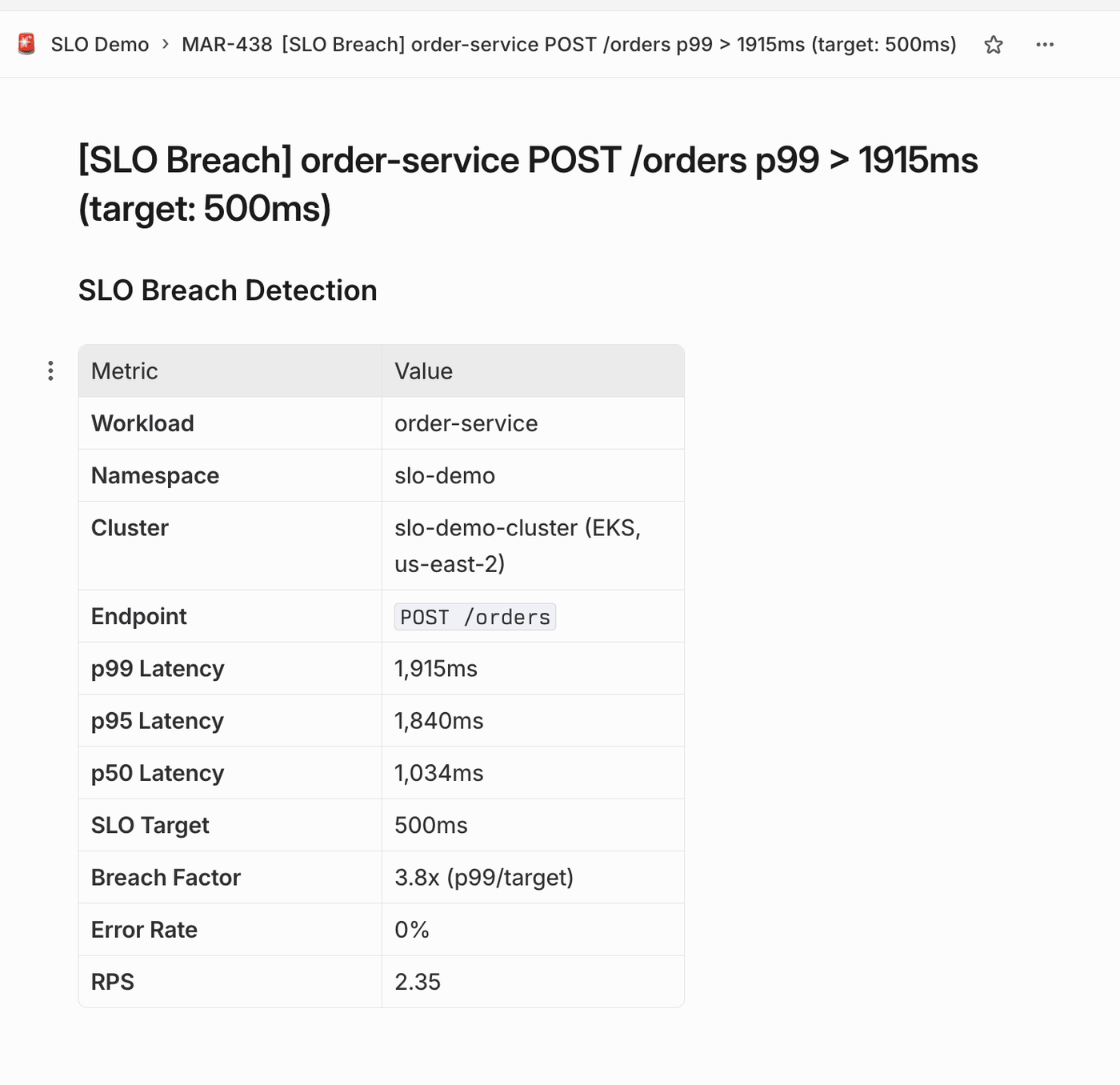
The agent calls Groundcover's get_workloads tool via MCP, asking for workloads in the slo-demo namespace sorted by p99 latency. Groundcover returns the data, and the agent identifies the breach: order-service p99 is 1,878ms — that's 3.8x over the 500ms target.
No dashboards, no manual PromQL queries. The agent asked a question through MCP and got a structured answer.
Step 2: Diagnose
The agent calls query_traces, filtering for order-service HTTP traces in the slo-demo namespace, sorted by latency. It pulls the actual traces that Groundcover captured via eBPF.
From the trace data, the agent produces a diagnosis:
The agent correlated body size with latency, identified the N+1 pattern from the trace spans, and pinpointed the exact lines of code. This is real reasoning from real observability data, not template matching.
Step 3: File a Linear ticket
With the diagnosis in hand, the agent calls save_issue via the Linear MCP. It creates an urgent-priority issue with slo-breach and Bug labels, linked to the SLO Demo project. The ticket includes the current p99, the SLO target, the breach factor, the full root cause analysis, trace evidence, and links back to Groundcover. A human reviewing this ticket has full context without opening a single dashboard.
Step 4: Suggest a code patch
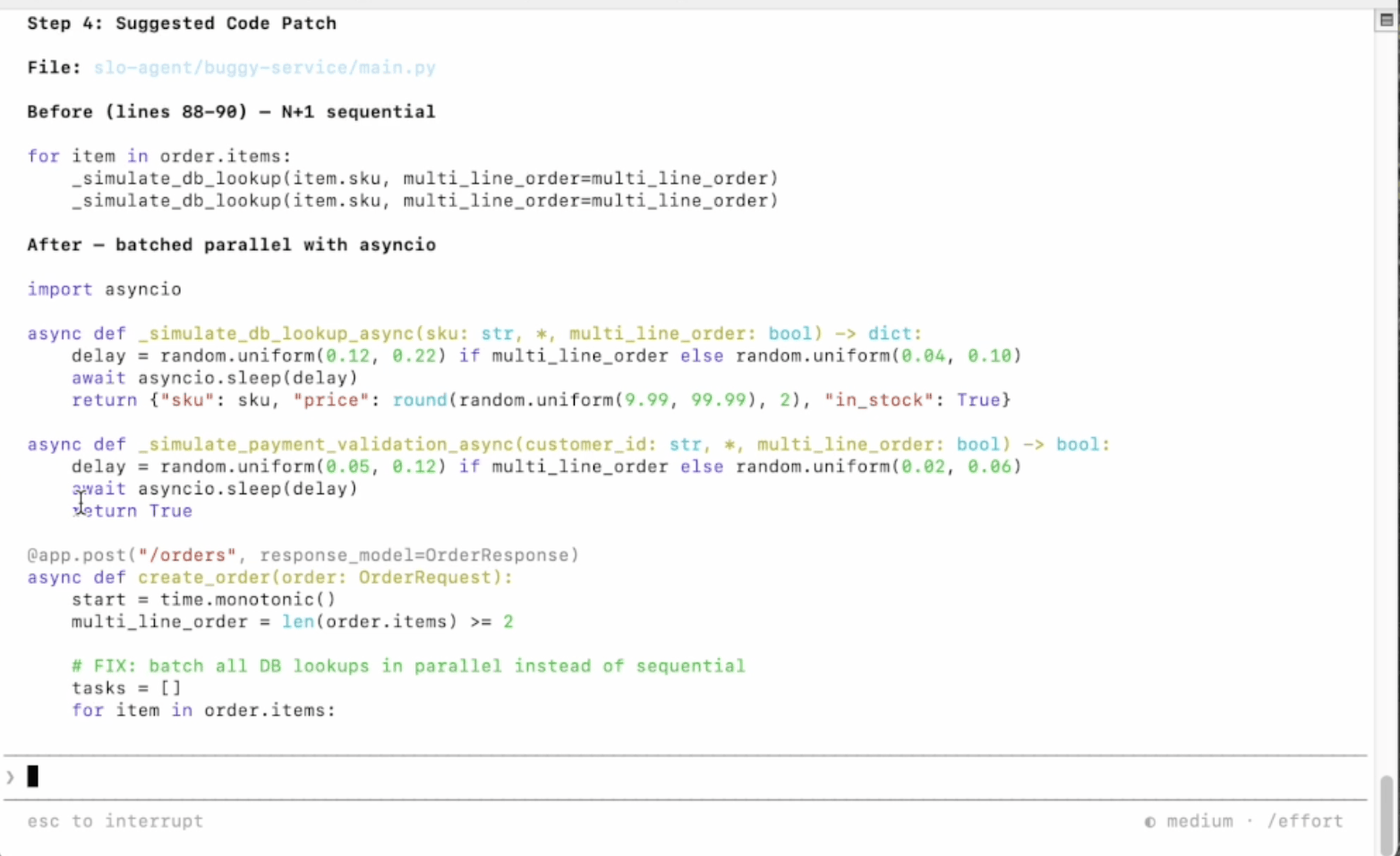
The agent suggests the fix which is to replace the sequential per-item loop with asyncio.gather to batch all database lookups in parallel. It shows the before code and the after code:
What's happening under the hood
The MCP (Model Context Protocol) is what makes this work. MCP is an open standard that lets AI tools connect to external data sources through a consistent interface. Groundcover's MCP and Linear's MCP server expose tools the agent needs to perform the diagnosis and file structured tickets.
Claude Code acts as the MCP client. It connects to both servers, discovers available tools, and uses them during its reasoning process. The CLAUDE.md file provides the workflow instructions for the agent.
The lethal trifecta in practice
Let's be explicit about how this demo hits all three legs of Simon Willison's framework:
- Access to private data: The agent reads production traces, logs, and metrics from Groundcover. That's real infrastructure data — service names, endpoints, pod identities, request patterns. It also has access to the Linear workspace with all teams and projects.
- Exposure to untrusted content: The agent reads trace data from the cluster. Traces can contain user-controlled content, i.e. request headers, query parameters, POST bodies. If someone sent a request with prompt injection in a header, Groundcover would capture it, and the agent would read it.
- Ability to externally communicate: The agent files Linear tickets and could potentially generate patches. A poisoned trace could instruct the agent to exfiltrate data in the ticket description or inject malicious code in a suggested "fix."
For this demo the risk is low because we're working with a controlled demo environment. But the architecture is the same one you'd use in production. The responsible design is that the agent detects, diagnoses, files a ticket, and proposes a patch AND a human reviews and deploys. That human-in-the-loop at the deploy step is what breaks the trifecta. The agent can't autonomously cause damage because its writes are scoped to Linear tickets that a human reads.
Moving toward production: groundcover's agent mode
In this demo we built the agent workflow manually and every one of the external connections we used is surface area for the lethal trifecta.
Groundcover's agent mode changes this equation. Because groundcover runs in your environment via BYOC, the groundcover’s agent operates entirely within your trust boundary. Let’s compare that to what we built. Our agent sent observability data to Claude's API and then wrote results to Linear's API. Two external network boundaries, two opportunities for the trifecta to bite. With agent mode that opportunity is non-existent. The data, reasoning, and actions all stay inside your cloud.
Opting in to agent connectivity–the line between observability and security solutions
Now it’s worth noting that groundcover also supports direct integration with Cursor and other agents. We just talked about the value of that and how connecting observability to an IDE agent outside of your VPC reopens the trifecta. Your Cursor agent now reads production traces, processes code that could contain injected instructions, and can write files and suggest changes. By opting in to use it you’ve poked a hole in your BYOC boundary by choice, presumably because the developer productivity tradeoff is worth it. Hopefully also because you’re also setting guardrails around your MCP connections. The point isn't to avoid connecting these systems. It's to know which doors you're opening and to put the right locks on them.
groundcover is an observability solution, not a security one. BYOC was never meant to be an airgap. It's there for cost control and data residency. Likely, your observability data already flows through network boundaries with APIs, webhooks, integrations with alerting tools. Connecting groundcover to your IDE agent is another integration in that chain, not a fundamentally different class of risk. It's just one you should be deliberate about and take the correct security measures for. In regulated sectors like healthcare and finance, where traces might contain patient data or transaction records, this kind of integration needs to be airgapped and governed with the same rigor as any other system touching regulated data.Not every organization needs that level of control, but if you're in a regulated sector, assume you do.