Writing good Skills and Stop Re-Explaining the Same Investigation Every Incident
Learn how groundcover Skills turn repeat incident triage steps into reusable AI workflows, so on-call teams stop re-explaining the same investigations every time.


It's 2 a.m. Checkout latency is spiking. You open the groundcover Agent and start typing the same thing you typed during the last three incidents, “pull the error logs over the alert window, correlate them with the deploy timeline, trace a failing request, check the database”. By the time you've spelled out the procedure, the on-call who relieves you next week will be typing the exact same paragraph from scratch.
That re-explaining tax is the problem groundcover agent Skills solve. A Skill is a set of reusable instructions you write once, and the groundcover Agent follows them automatically whenever they apply. Instead of reconstructing your triage playbook in every prompt, you write it once (the steps, the conventions, the output format) and the groundcover Agent runs it consistently from then on.
And here's the part worth your attention beyond groundcover: the same pattern has converged across the major AI tools. Anthropic's Claude and OpenAI's ChatGPT now both ship a "Skills" concept built on essentially the same shape, so learning to write a good Skill is no longer a tool-specific trick. It's a portable skill in itself.
Part 1: The pattern is everywhere now
If you already use Claude or ChatGPT for other work, the structure below should feel familiar — because the industry has landed on it from multiple directions.
Anthropic's Claude Skills are folders containing a SKILL.md file with YAML frontmatter (a name and description) plus Markdown instructions. Claude Code skills follow the Agent Skills open standard, which works across multiple AI tools. The same mechanism runs in Claude.ai, in Claude Code, and through the Claude API, where Claude automatically uses a Skill when it's relevant to your request. The open SKILL.md format is the connective tissue holding it together.
OpenAI's ChatGPT Skills arrived in beta in early 2026 (rolled out around April 10). Skills are reusable, shareable workflows that tell ChatGPT how to do a specific task so it does that task more consistently, and they can bundle instructions, examples, and code. A Skill defines when to use a workflow, the steps to follow, and the format of the result, so teams get consistent outputs without repeating the same instructions every prompt.
One distinction worth keeping straight on the OpenAI side: Skills are not Custom GPTs. Skills are reusable workflows that teach ChatGPT how to complete a specific task; GPTs are goal-oriented, custom versions of ChatGPT that extend the expertise of a team. Put plainly, a Skill is a repeatable job and a GPT is a persona. If you want a consistent way to do one concrete task, build a Skill; if you want a broad assistant for a domain, build a GPT.
Part 2: How to write a good Skill
The mechanics differ slightly per product, but the discipline of writing a Skill that the assistant follows reliably is the same everywhere. These are the throughline:
- Write a specific, narrow activation trigger. The "when to use" field is how the assistant decides whether to pull the Skill in. For observability Skills with groundcover, name the services, namespaces, alert shapes, or prompt phrasings that should fire it. Vague triggers like "use for incidents" either miss the prompt or fire on unrelated work.
- Bound the scope, and say what to do when out of scope. List exactly which systems the Skill covers, and instruct the assistant to say so and stop if the request falls outside. This keeps a payments-specific playbook from leaking its assumptions onto an unrelated auth outage.
- Use imperative, ordered steps. Spell out concrete, sequenced actions, i.e.:
- pull error rate by endpoint for the last hour
- list deploys in a ±30 min window around the alert
- trace one failing request and find the first span that error.
Steps like these get followed the same way every run. A vague instruction like "investigate thoroughly" will get a different result each time.
- Pin the output format. Give an exact template. A fixed Impact / Cause / Timeline / Next step / Evidence block means every summary is paste-ready without reformatting.
- Make defaults and exceptions explicit. Default lookback, P95 vs. P99, which metrics to ignore, what to do when data is missing. Every detail should be a decision the assistant would otherwise make inconsistently. Write them down.
- One Skill per workflow. Two Skills with slightly overlapping triggers are fine. One giant Skill covering every scenario is brittle and hard to maintain.
- Iterate when behavior drifts. If the assistant doesn't do what you expected, refine the instructions and run it again. Changes take effect on the next message.
None of these are tied to a particular product. They're the general discipline of writing instructions a model will follow. The examples in the next section show what they look like in practice.
Part 3: Skills in groundcover
A Skill in groundcover is a reusable instruction set the groundcover Agent applies when it's relevant. If you’d otherwise copy and paste the same information about your incident runbooks, naming conventions, investigation playbooks, or any context into every prompt, that should be turned into a Skill. Skills are user-level: each one belongs to the person who created it and is only visible in that user's own Agent conversations. There's no team or org Skill today, so if a teammate wants the same one, they create their own copy. To check out how skills work today in groundcover take a look at this feature in action.
The four fields
Every Skill is built from four fields, and two of them are doing most of the work:
- Name (required): a short identifier shown in the picker, like Incident Triage.
- When to use (required) : a plain-language description of when the Skill should apply. The Agent reads this to decide whether to activate the Skill automatically, so this field is where precision pays off.
- Description (optional): a short summary shown next to the name in the picker.
- Instructions (required): Markdown describing how the Agent should operate when the Skill is active. Treat this like a runbook or a spec.
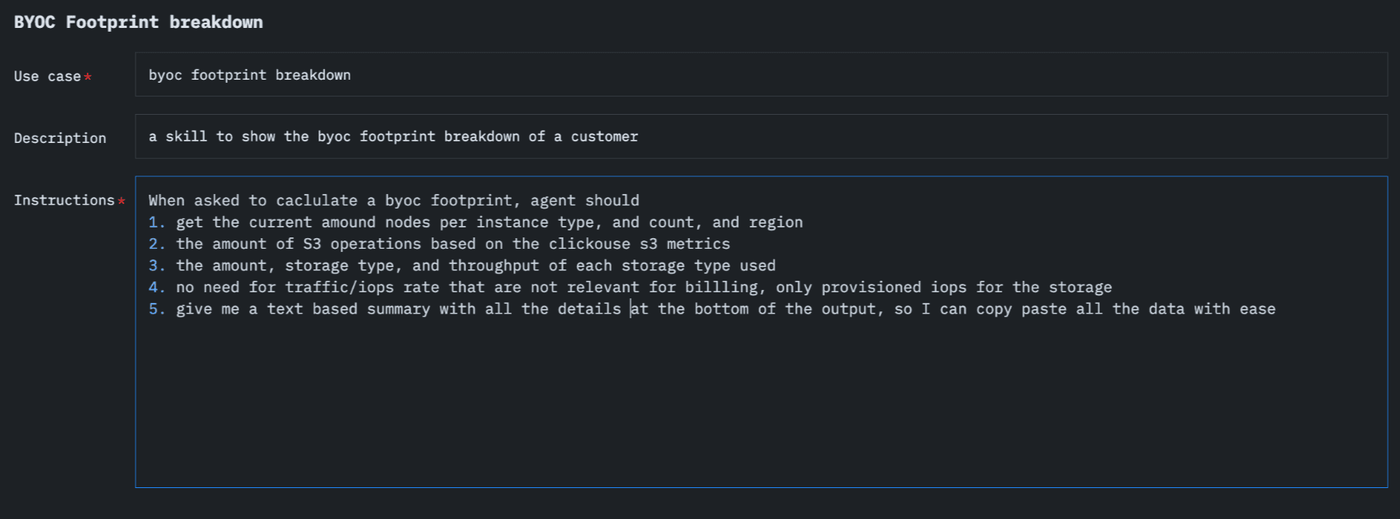
Let’s look at a quick real-world example. At groundcover we run a Skill called BYOC Footprint Breakdown, to report a customer's bring-your-own-cloud resource consumption. When the Agent is asked to calculate a footprint, it gathers the pieces that matter for billing including the node count by instance type and region, S3 operation volume from the ClickHouse S3 metrics, and the amount, storage type, and throughput of each storage tier. It also deliberately skips traffic and IOPS rates that don't affect cost, counting only provisioned storage IOPS. It ends with a plain-text summary of everything, formatted to copy and paste.
The value is in turning a fiddly, easy-to-get-wrong data-gathering task into a repeatable one. Pulling a footprint by hand means remembering which metrics to query, which to exclude, and how to lay the result out. As a Skill, the same numbers get collected the same way every time, the billing-relevant exclusions are applied consistently, and the output lands paste-ready. Anyone on the team can ask for a customer's footprint and get a uniform answer without re-deriving the procedure.
Let the Agent draft one for you
How can you get started writing a Skill? After you perf an RCA, a triage walk-through, a parsing-rule investigation with the Agent ask it to turn that work into a Skill. It drafts the instructions and the approach you took from the conversation. Then you can review the Skill and save.
The quality of the Skill tracks the quality of your ask. A thin ask gets a thin Skill:
A better ask spells out the trigger, the scope, and which parts of the conversation are the reusable pattern versus incidental noise:
The draft is a starting point. Edit any field before saving, or tweak it later from the Skills page.
Two ways a Skill activates
You can trigger a Skill explicitly by typing / in the Agent input and picking one from the list. For example, /incident-triage investigate the alert on checkout-service. Or you can let it happen automatically: the Agent matches your prompt against the When to usefield of each Skill and pulls in whatever fits, so asking it to investigate an incident loads your triage Skill without the slash. Either way, the Agent applies the Skill's Instructions and tells you which Skills it used.
Final Thoughts and Looking Ahead
Today groundcover Skills are scoped to the individual user, but the natural next step is an org-level Skill store where there is a shared repository where a team's hard-won runbooks live once instead of being re-created in every engineer's account. The on-call use case is the obvious payoff. Imagine a recommended investigation attached to each monitor, so whoever picks up the page inherits the same first moves the last person figured out, rather than starting from a blank prompt at 2 a.m. Pair that with a Cursor connector and the loop tightens further as the investigation that starts in the groundcover Agent could carry straight into where you actually fix the code. None of this is shipped yet but it is the direction groundcover is headed.