Kubernetes Secrets Management: Limitations & Best Practices
Explore Kubernetes Secrets Management limitations and best practices to keep your sensitive data secure and avoid misconfigurations.


Last Updated: May 22, 2026
Here’s a not-so-secret fact about secrets in Kubernetes: They can be very challenging to manage. Keeping secrets (such as passwords and tokens) secret is tough because they need to be shared between so many different resources. Admins can easily make mistakes that accidentally expose secrets – and, by extension, the sensitive data they protect – to parties that shouldn’t be able to view them.
The good news, though, is that Kubernetes secrets don’t have to become unsecret. With the right approach, it’s possible to manage secrets safely and securely. Keep reading for details as we walk through the ins and outs of Kubernetes secrets management.
Kubernetes Secret Management: What Are Kubernetes Secrets?
In Kubernetes, secrets are objects that provide access to and manage sensitive data. The main purpose of secrets in Kubernetes is to allow workloads and services to authenticate with each other and unlock resources that need to be protected by access controls. Kubernetes secrets do this by obscuring sensitive authentication data, and then unlocking it only for valid users.
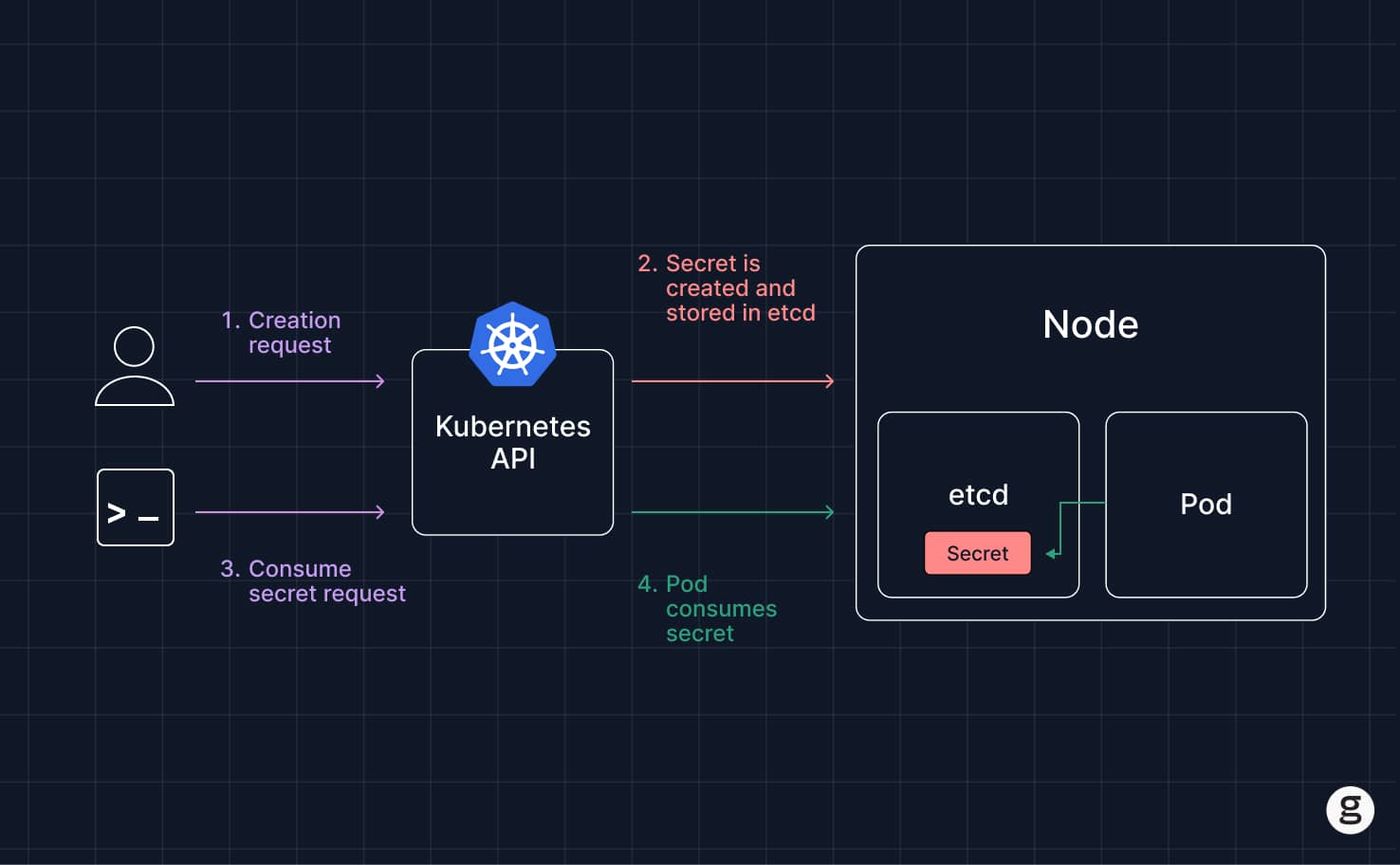
Secrets help to avoid the need to embed passwords, access keys, and other sensitive data directly into configuration files or commands. That practice would be insecure because anyone who can view the text of the files or commands would be able to access the sensitive data.
Note that secrets aren’t unique to Kubernetes; any type of password, key, or other access credential can be considered a secret. However, Kubernetes secrets management is different from that of other environments in some ways because Kubernetes expects admins to work with secrets using specific tools and capabilities. We’ll discuss these more below.
Types of Kubernetes secrets
There are a few types of secrets that may exist within a Kubernetes environment, and each has a specific secret type value while secret names should follow Kubernetes naming rules:
- Opaque secrets: A generic type of secret that can store any type of data defined by users.
- Authentication secrets: Typically used to provide authentication for human users. These Kubernetes secrets usually secure a password and username.
- Service account tokens: Used to manage the identity of a Kubernetes service account (meaning a non-human user that operates with a Kubernetes cluster).
- Bootstrap token secrets: A built-in type used during node bootstrap and cluster join workflows to automate node registration and initial signing tasks.
- Encryption secrets: Encryption secrets can be certificates and keys used to encrypt data via protocols like TLS.
- SSH credentials: Manage authentication via the SSH protocol, which admins commonly use to log into Kubernetes nodes or Kubernetes clusters remotely, typically as ssh authentication secrets of the built-in type kubernetes.io/ssh-auth.
Kubernetes secrets use cases
| Use case | Description |
|---|---|
| Secrets for cloud-native applications | Enables authentication, authorization, and data decryption for applications hosted on Kubernetes. |
| Secrets for Kubernetes service accounts | Helps to manage the identities of service accounts, meaning non-human users inside a Kubernetes cluster. |
At a high level, Kubernetes secrets support any use case that involves authentication or the unlocking of sensitive data within a Kubernetes environment. Diving a level deeper, these use cases fall into two main categories.
1. Secrets for cloud-native applications
One set of use cases for secrets in Kubernetes involves supporting logins and data encryption and decryption for cloud-native applications that run on top of Kubernetes.
For example, imagine you’re deploying a container that needs to connect to a database. You could create secrets that specify the database password and username, and then include a reference to the secrets when configuring the deployment. This would allow the container to access the secret data securely, and would avoid the need to hard-code a password and username into the container or into application code. The same pattern applies when an app calls an external api and needs credentials or keys. Similarly, if you need to pull container images from private registries, you can use secrets for authentication.
2. Secrets for Kubernetes service accounts
Internally, Kubernetes relies on secrets in some cases to manage interactions and requests within the cluster. In particular, it uses secrets to help manage service accounts, which are identities for non-human users or services running within a Kubernetes cluster.
Kubernetes also uses token secrets during bootstrap workflows, especially bootstrap token Secrets for registering new nodes.
How to create Kubernetes secrets
You create secrets in Kubernetes using kubectl, the Kubernetes command-line interface. There are two main methods for setting up a secret.
1. Using literals
First, you can generate secrets directly on the command line using literals, which means you specify the secret values “literally” within the command using the --from-literal flag. For example:
The api server validates the object when the secret is created, including the secret name and expected format for the chosen secret type.
2. From a file
Alternatively, you can reference a file that contains your secrets using the --from-file flag. For example:
For TLS material, Kubernetes expects the certificate to match the given private key when creating a TLS secret from files.
How to use and manage Kubernetes secrets
Once you’ve created a secret, you can make use of it by referring to it whenever you need to provide or manage sensitive data within an application or service.
The simplest way to do this is to inject the secret into a workload as an environment variable so applications can securely access secret data when needed. For example, the following code allows the container my-container to access keys for the secret my-secret using the environment variables $USERNAME and $PASSWORD:
However, mounted secrets are often preferable when you want files on disk instead of env vars.
Alternatively, you can mount the secret as a data volume that is accessible inside a pod using a configuration like the following:
Either approach exposes the secret to the workload, allowing you to supply pods or containers with the sensitive data they need to operate without having to hard-code confidential data directly into your deployment configuration.
Constraints of Kubernetes secrets
Secrets are a step toward protecting sensitive data. However, on their own and under default configurations, secrets in Kubernetes are subject to several important limitations:
- Lack of encryption: Kubernetes stores secrets in etcd, its key-value store, and they are only protected at rest when encryption is configured through the API server. Without that configuration, anyone who can access etcd can readily read the secrets data.
- Challenges with secret rotation: By default, Kubernetes are immutable, and Kubernetes offers no built-in feature for automatically rotating secrets or retaining secrets after they are no longer used. Admins must manage secrets rotation manually.
- Misconfiguration risks: Accidental misconfigurations in Role-Based Access Control (Kubernetes RBAC) policies or deployments could expose secrets to the wrong users or services. Kubernetes doesn’t automatically check or audit configurations to prevent oversights like these.
- Limited integration with external systems: The tooling that Kubernetes offers for creating and managing secrets works only within Kubernetes. This can present a challenge if you need to share secrets with applications or services running outside Kubernetes (a solution is to use an external secrets manager that supports both Kubernetes and other systems; we’ll touch on that in a minute). This becomes even more important in multi-cloud or hybrid environments that rely on cloud native tools.
- Lack of scalability: Because Kubernetes requires secrets to be defined manually on a deployment-by-deployment basis, and because it doesn’t automatically rotate or update secrets, managing dozens or hundreds of secrets by hand takes a lot of time. In this respect, Kubernetes secrets management lacks scalability.
- Limited auditing: On its own, Kubernetes doesn’t provide advanced tooling for tracking when secrets are used. This is a challenge in cases where you need to audit access to secrets by tracking which applications and services have actually used them.
Why and how to create external secrets in Kubernetes
Fortunately, there’s a solution for the deficiencies of Kubernetes’s default approach to secrets management: using external secret management tools, such as HashiCorp Vault or AWS Secrets Manager.
An external secrets manager is third-party software that stores and manages secrets for you as a secret store outside Kubernetes. With this approach, you can generate and house secrets in a secure location (and one that, unlike Etcd, is almost certainly encrypted by default), then import them into Kubernetes when needed.
The exact process for creating and using external secrets in Kubernetes varies depending on which secrets manager you choose. In general, however, the two main steps include:
- Install an operator for the secrets manager: The operator serves as a bridge between the external secret management systems and your Kubernetes cluster. Note that some secrets managers offer Helm charts, which can simplify the installation process.
- Reference secrets: Once you’ve integrated the external secrets manager into Kubernetes, workloads can fetch secrets from the external system instead of storing them directly in Kubernetes.
For teams running on Azure, azure key vault is one option for integrating external secrets with Kubernetes.
Benefits of Kubernetes external secrets
If you need to work with just a handful of secrets, or if security is not a top priority (which may be the case if you’re running a purely experimental Kubernetes cluster where secrets do not protect any high-value data or sensitive data), using Kubernetes’s built-in secrets management tooling may work for you. But for other use cases, consider an external secrets manager, which provides benefits like the following:
If you need to work with just a handful of secrets, or if security is not a top priority (which may be the case if you’re running a purely experimental Kubernetes cluster where secrets do not protect any high-value data or sensitive data), using Kubernetes’s built-in secrets management tooling may work for you. But for other use cases, consider an external secrets manager, which provides benefits like the following:
- Stronger security: The main benefit of external secret management systems is that they store secrets more securely and help protect sensitive data without relying on Kubernetes alone to store everything. Most encrypt secrets by default, and many have features for automatically rotating keys. As we mentioned, Kubernetes doesn’t do these things for internal secrets.
- Comprehensive secrets management: In addition to supporting Kubernetes, external secrets managers are typically compatible with other platforms and services. They can also use the secrets store csi driver or similar methods to deliver secrets from external platforms to workloads. This makes them a convenient way to manage secrets and share them across all of your workloads, not just those based in Kubernetes.
- Enhanced scalability: External secrets managers tend to be easier to scale because they provide features to help automate the process of secret access and management across hundreds or thousands of applications and users.
- Improved auditing: Many teams also rely on third party tools to automate rotation, enforce centralized controls, and track who has access to secrets and when.
Best practices for managing Kubernetes secrets
| Practice | Description |
|---|---|
| Encrypt secrets | Configure encryption for Etcd to protect secrets at rest. |
| Use short-lived secrets | Avoid creating permanent secrets. |
| Audit RBAC configurations | Scan for configurations that accidentally expose or misuse secrets. |
| Rotate secrets | Rotate secrets or keys regularly. |
| Limit access to secrets | Don't share secrets among applications. |
| Secure secrets inside apps | Ensure that applications manage secret data securely after they access it. |
Whether or not your team chooses to use an external secrets manager, there are a variety of best practices that both cluster admins and developers can use to help manage Kubernetes secrets reliably and securely.
Cluster admins
Cluster administrators should:
- Encrypt secrets: Enable encrypt for Etcd to protect secrets data at rest.
- Use short-lived secrets: Where possible, avoid configuring secrets that are used permanently; instead, generate secrets on a one-off basis and delete them after they’re no longer needed.
- Audit RBAC configurations: Analyze RBAC settings to look for mistakes and grant access only where it is required, so secrets are not exposed to unintended users or services. Apply least privilege access for secrets by namespace, workload, and user role.
- Implement secrets rotation: Enforce policies that require secrets to be rotated periodically. While Kubernetes offers no built-in tooling to automate this process, admins could create their own scripts for the purpose, or they could use an external secrets manager that supports automated rotation. Operators can also help keep credentials up to date when external systems support automatic refresh.
Developers
When creating applications to run on Kubernetes, developers can improve security by:
- Avoid hard-coded credentials: As a foundational best practice, developers must avoid hard-coding access credentials into applications; they should use secrets instead.
- Limit secrets access to specific containers: Instead of designing multiple applications to use the same secrets, generate a separate secret for each application. This reduces the scope of damage in the event that one secret falls into the wrong hands.
- Secure secrets data after access: After secrets become accessible to applications as data volume mounts or environment variables, ensure that they manage the secret data securely.
Kubernetes secrets and groundcover
At groundcover, we’re all about Kubernetes monitoring and observability – which means we don’t offer a secrets management tool. What we can do, however, is help you track the status of your Kubernetes nodes, pods, control plane, and everything else. In this way, we provide the critical contextual information teams need to manage all aspects of their Kubernetes environments effectively.
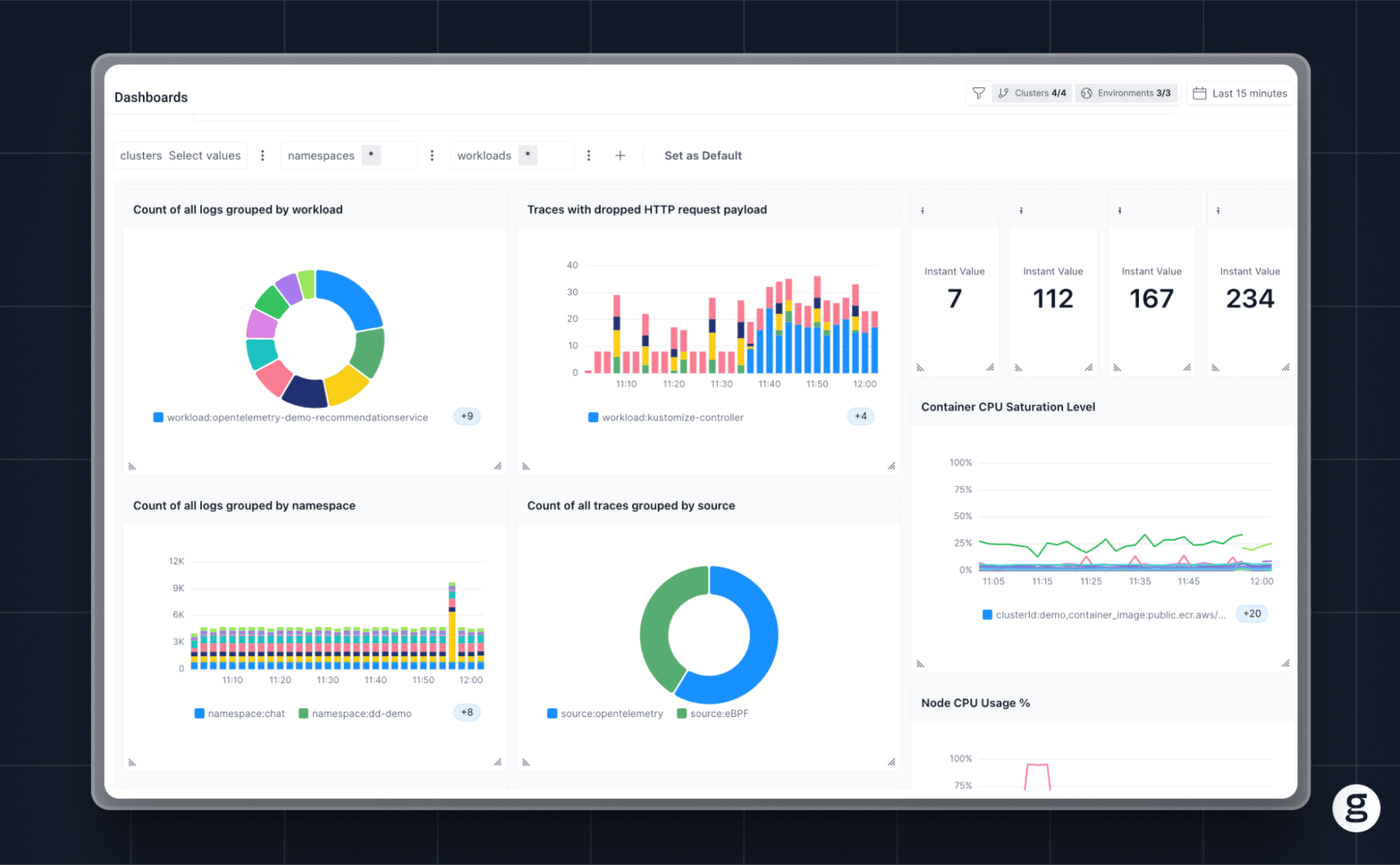
You handle your Kubernetes secrets, and we’ll handle the work of ensuring you know whenever a performance or availability risk arises within your cluster.
The (Kubernetes) secret is out
If you deploy applications of any complexity using Kubernetes, you’ll need to work with secrets. And while Kubernetes’s native ability to manage secrets is limited, it’s easy enough to fill in the gaps by deploying additional secrets management tools, and/or adhering to best practices that help keep your secrets safe and available.