

Capacity Planning in Kubernetes: Challenges & Strategies



Kubernetes makes it easy to add pods and nodes, but it doesn’t solve the hard part: deciding how much CPU and memory to reserve and how much headroom to keep before users see latency or errors. Without clear capacity planning, Kubernetes clusters drift into two extremes. You either overprovision and pay for idle resources, or operate at high utilization and hit throttling and evictions.
In this guide, you’ll learn what capacity planning in Kubernetes is, why it matters, which metrics to track, how to right-size requests and limits, and how to use observability to make better scaling and cost decisions.
What is Capacity Planning in Kubernetes
Capacity planning in Kubernetes is the ongoing process of determining how much CPU, memory, and related resources a cluster needs to meet current and future demand without sacrificing reliability or wasting capacity. Kubernetes does this through a resource model. Each node exposes allocatable CPU and memory after reserving some for the system. Pods and containers then declare CPU and memory requests and limits. These values drive scheduling, runtime enforcement, and Quality of Service classes (Guaranteed, Burstable, BestEffort), which control which pods are evicted first under pressure. Capacity planning must work with this model because it defines what the cluster considers needed versus available resources.
Capacity planning in Kubernetes happens along three main levels: cluster level, workload level, and time-horizon level.
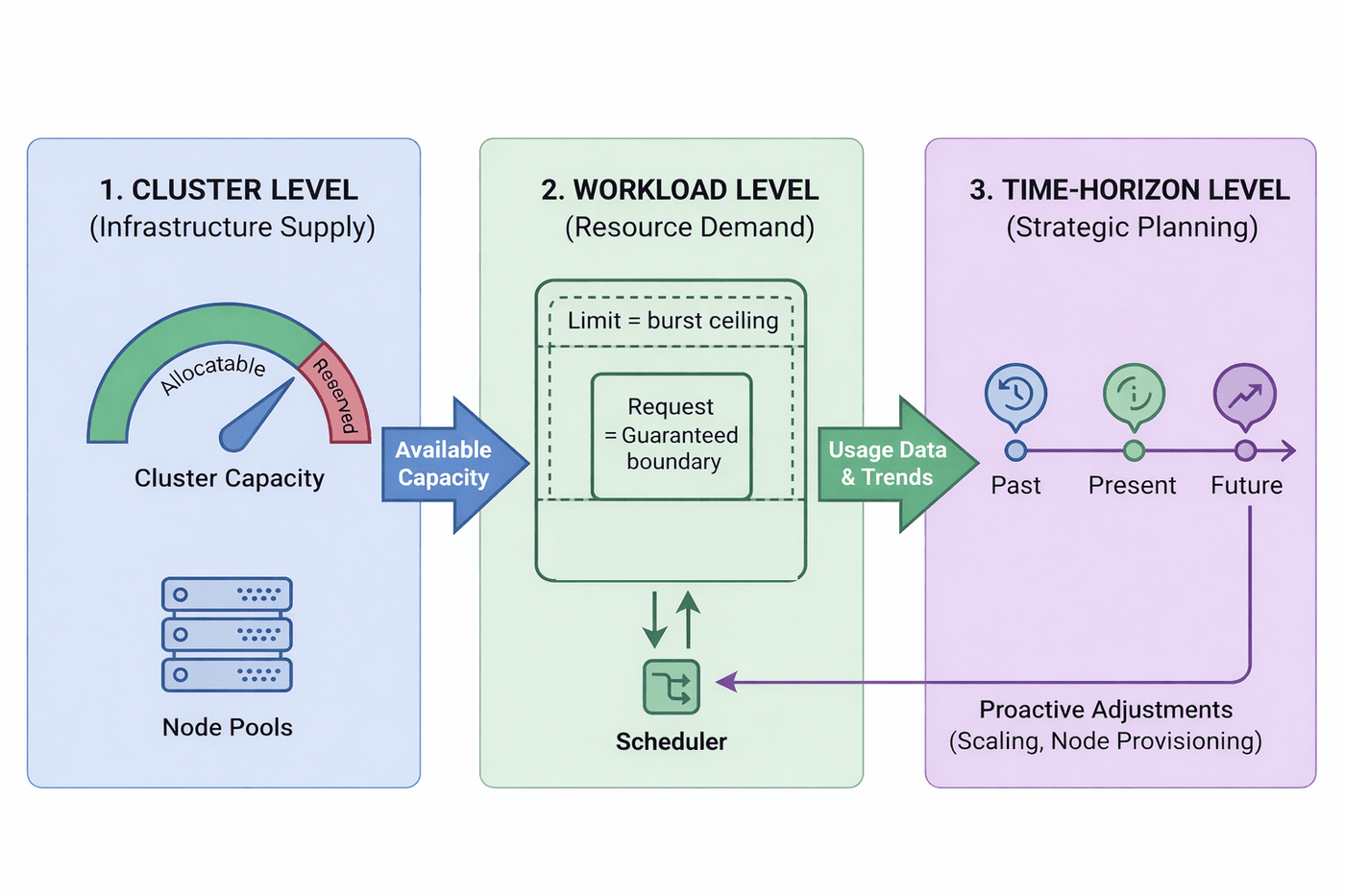
At the cluster level, it focuses on node counts, node sizes, and node pools, and on keeping enough allocatable capacity for peak load and failure scenarios. At the workload level, it focuses on sizing deployments through CPU and memory requests, limits, and autoscaling policies that match how each service scales and fails. At the time-horizon level, it uses historical CPU and memory utilization, growth trends, and expected events such as product launches or seasonal peaks to decide when to add or reshape capacity. Together, these levels provide concrete thresholds, metrics, and review cycles for capacity decisions, rather than last-minute node expansions during incidents.
Why Capacity Planning in Kubernetes Matters
Capacity planning in Kubernetes gives you context before you change any resource requests, limits, node sizes, or autoscaling rules. It makes clear how those changes affect reliability, latency, cloud spend, and how often your team has to deal with capacity incidents.
Reliability and Service Level Objective (SLO) Impact
Capacity planning is a reliability control. When nodes run close to their memory or disk limits, the kubelet starts node-pressure eviction and terminates pods based on quality of service (QoS) and priority to keep the node alive. If you have no planned headroom, that eviction path will regularly hit real workloads during peaks or batch windows. Over time, that shows up as SLO breaches that are really capacity issues, not application bugs.
Performance and User Experience
Capacity gaps often manifest as latency before they become outages. Containers that hit their CPU limits are throttled, which adds jitter and slows request handling even if the node still has spare CPU. Workloads that run with very high CPU utilization for long periods have no room for bursts, garbage collection, or background work. So, the 95th- and 99th-percentile latency climbs while dashboards still show the service as healthy. Clear utilization targets and headroom per workload keep these effects within your latency budgets, rather than surprising you during traffic spikes.
Cloud Spend and Resource Waste
On the cost side, Kubernetes schedules pods based on CPU and memory requests, not just current usage. If requests stay much higher than real CPU and memory utilization, the scheduler fills node capacity on paper and forces extra nodes that workloads do not actually need. That is how clusters end up reporting little free allocatable capacity while large slices of that capacity sit idle in practice. A basic capacity planning loop compares requests to usage, tightens them with explicit safety margins, and lets autoscaling and bin packing work against realistic numbers, so you pay for capacity you actually use.
Operational Stability and Team Focus
Capacity planning also changes how often your team has to handle urgent capacity-related incidents. Without it, limits are discovered in production as waves of pending pods, sudden spikes in eviction, or emergency node scale-ups during busy periods. Engineers spend time reacting to boundary conditions instead of improving the platform. With a simple planning cadence, capacity changes become scheduled work with clear triggers, and you use signals like repeated evictions or persistent high utilization to adjust before users feel the impact.
Key Metrics for Capacity Planning in Kubernetes
Capacity planning only works if you can see both how much capacity your Kubernetes cluster has and how workloads actually use it. You do not need every possible metric. You need a focused set that connects node capacity, current resource usage, and how the platform reacts under pressure.
- Node and cluster capacity: Track node capacity and the allocatable CPU and memory for each node pool. Compare total allocatable CPU and memory to the sum of CPU and memory requests to see how much allocatable capacity is already reserved from the scheduler’s perspective, instead of relying only on average CPU utilization graphs.
- Workload CPU and memory utilization: Measure CPU utilization and memory utilization per deployment, pod, and namespace over time. Look at percentiles (for example, p50, p95) across typical and peak periods, so you know how much CPU and memory workloads actually use instead of guessing.
- Requests, limits, and efficiency ratios: Collect CPU and memory requests, memory requests, and resource limits for each container. Compare these to real usage to find over-requested workloads (wasted capacity) and under-requested workloads (high risk). The key signal is how usage relates to requests, not limits alone.
- Saturation, throttling, and memory pressure: Watch for saturation signals such as CPU throttling and memory pressure. Throttling shows containers hitting their CPU limits, while repeated evictions or OOM kills show memory pressure. These metrics show where capacity is already too tight, even if average CPU and memory utilization still look safe.
- Scheduling and autoscaling behavior: Monitor pending pods, scheduling delays, and how Horizontal Pod Autoscalers and Cluster Autoscalers behave. If pending pods stay high or autoscalers sit at maximum replicas or node counts regularly, you have clear evidence that your capacity plan is lagging behind demand.
These metrics show how much capacity you have, how workloads consume it, where risk is building up, and when the cluster is already struggling to place or scale pods.
How to Perform Capacity Planning in Kubernetes in Simple Steps
Once you have the right metrics, the next step is to turn them into requests, limits, autoscaling settings, and node counts that match how your workloads actually run. The steps below show how to do that in Kubernetes.
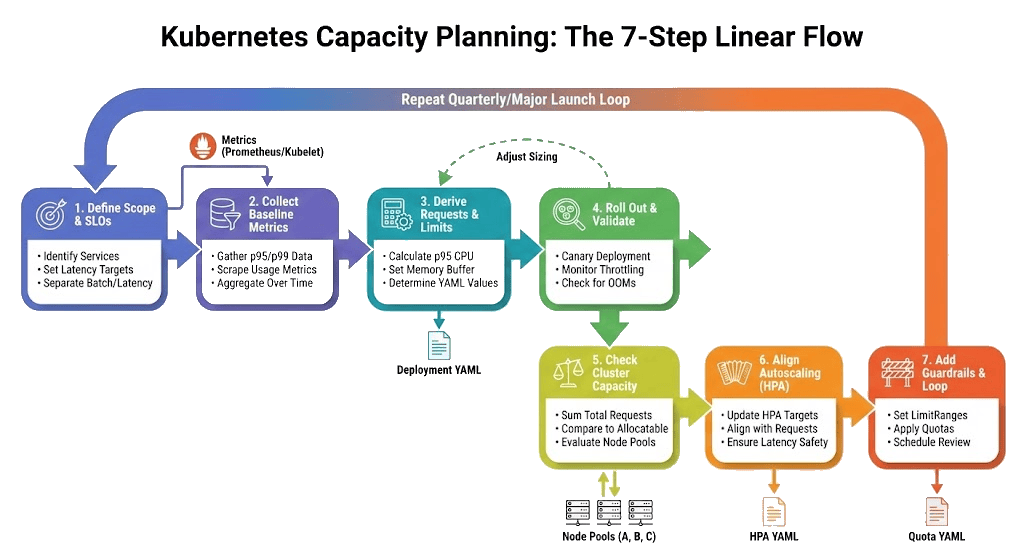
Step 1: Define Scope, SLOs, and Safe Utilization Targets
Start by deciding which parts of the cluster you plan to cover and what success means. List the namespaces and services you care about and write down their SLOs, such as p95 latency and error rate targets. Separate latency-sensitive paths (checkout APIs, user-facing services) from batch or background jobs. Then define safe node-level utilization targets, for example, “keep requested CPU and memory below a chosen fraction of allocatable per node pool,” so you have an explicit buffer in mind before you touch any YAML.
Step 2: Collect Representative Baseline Metrics
Next, you need real usage numbers for those services. For each key workload, collect CPU and memory utilization over a representative period, ideally days or weeks that include normal peaks. Use container-level metrics such as `container_cpu_usage_seconds_total` and `container_memory_working_set_bytes`, aggregated by pod or deployment, and focus on percentiles like p50, p95, and p99 instead of single snapshots.
In a Prometheus setup that scrapes cAdvisor or kubelet metrics, you can derive per-pod CPU usage as a rate in cores. The following query computes the 5-minute CPU usage rate per pod, grouped by namespace and pod name:
This sums the CPU usage of all non-empty containers in each pod and converts the cumulative counter into a per-second rate over the last five minutes. You can feed this series into functions such as `quantile_over_time` to get p95 CPU usage per pod across your baseline window.
For memory, you want the working set, not total memory usage, because working set approximates the non-evictable memory that matters for OOM risk. The following query returns the current memory working set per pod:
This gives you the live memory footprint for each pod in bytes. As with CPU, you then compute p50, p95, and p99 over the baseline period for each deployment or namespace.
Step 3: Derive CPU and Memory Requests and Limits From Data
Translate your baseline percentiles into CPU and memory requests and limits. For latency-sensitive services, set the CPU request to near p95 CPU usage and avoid a CPU limit by default, so the Linux Completely Fair Scheduler (CFS) quota does not throttle containers on the critical path. For batch jobs or noisy multi-tenant workloads, you can add a CPU limit, for example, 1.5–3× the request, when you need stronger isolation and can tolerate some throttling.
For memory, use p99 memory usage as your anchor. Set the memory request near p99, with a small buffer (e.g., 10–20 percent), and set the memory limit to match the request for most production workloads. That keeps memory behavior predictable and aligns declared capacity with what the workload usually needs. Only choose a higher memory limit than the request when you explicitly accept Burstable QoS for less critical services.
If `checkout-api` has p95 CPU at 220m and p99 memory at 420Mi, you might round to a CPU request of `250m` and a memory request and limit of `512Mi`. For a latency-sensitive deployment without a CPU limit, the manifest looks like this:
Here, each pod reserves 250m CPU and 512Mi of memory. Memory has a request and a limit aligned, while the CPU is governed only by the request. That means the pod’s QoS class is Burstable, but you avoid CFS throttling on CPU, and eviction risk on memory only becomes relevant if usage climbs above the 512Mi request, which the p99-plus-buffer sizing is designed to avoid.
In a shared or multi-tenant cluster where you still want a hard CPU ceiling for isolation, you can extend the same resource block with a CPU limit:
This variant keeps the same request profile but caps per-pod CPU at 500m, so one replica cannot consume more than that share even when extra CPU is available, at the cost of possible throttling when the service tries to burst.
Step 4: Roll Out and Validate at the Workload Level
Once you size requests and limits, you need to see how they behave on real traffic. Start by rolling out the new configuration to a small, controlled slice of workloads, such as a canary namespace or a few core services. Avoid changing every deployment at once. That makes it easier to attribute any regressions to the new sizing rather than unrelated changes.
During this phase, focus on a tight set of signals. Compare p95 and p99 CPU and memory utilization to the new requests. Check CPU throttling time per container, OOM kills, pod restarts, and evictions. At the same time, track latency and error rates against the SLOs you defined earlier. If a service with CPU limits shows significant throttling while node-level CPU is not saturated, you likely need higher CPU limits, more replicas, or more headroom in that node pool. If memory usage frequently approaches the request, increase the memory request and limit slightly, or reduce the per-pod footprint. The goal is steady usage that fits comfortably within requests, SLOs met at peak, and no recurring throttling or eviction patterns.
Step 5: Check Cluster Capacity Against Requests
After you right-size key workloads, check whether the cluster has enough allocatable capacity for the new request profile. At this stage, you care about the requested CPU and memory for pods that are actually running compared to the node allocatable CPU and memory in each node pool. That aligns your view with what the scheduler sees, not just raw hardware capacity.
With Prometheus and kube-state-metrics, you can compute a cluster-wide CPU request ratio that only counts Running pods and uses allocatable CPU as the denominator. A common pattern looks like this:
This multiplies per-container CPU requests by a phase filter that is 1 for Running pods and 0 otherwise, then sums across containers. You can build a similar expression for memory using the memory flavor of `kube_pod_container_resource_requests` and `kube_node_status_allocatable{resource="memory"}`. To get per–node pool ratios, group the denominator by node labels (such as instance type or pool name) and filter pods by the same label.
Compare these ratios to the safe utilization targets you chose in Step 1. If a node pool consistently sits above its target, you either add nodes, move to larger node types, rebalance workloads across pools, or tighten obviously oversized requests. This is where workload-level sizing and cluster-level capacity meet.
Step 6: Align Autoscaling With the New Sizing
Once requests are tuned, autoscaling needs to reflect the new numbers. Horizontal Pod Autoscaler (HPA) compares current CPU or custom metrics to targets that are defined relative to requests. If requests were wrong, HPA behavior was also off. With corrected requests, you can revisit HPA settings for each important service and bring them in line with SLOs and traffic patterns.
An HPA definition for checkout-api using CPU might look like this:
Treat `averageUtilization: 70` as a starting point, not a rule. If raising the target saves CPU but pushes p95 or p99 latency beyond the SLO, lower the target and rely on more replicas. Also remember that HPA reacts to averages across pods. It can miss a single hot pod that drives tail latency while the fleet average looks fine. That is why you still need per-pod throttling and latency metrics from Step 4 to catch localized issues.
Step 7: Add Guardrails and Make It a Loop
The last step is to embed these sizing rules into the platform so new workloads do not drift away from them. Use LimitRange to set default and maximum requests and limits per namespace, and ResourceQuota to cap total CPU and memory per namespace. That way, new pods inherit reasonable defaults and cannot silently claim more capacity than your plan allows.
A LimitRange for the payments namespace might be:
Combined with a ResourceQuota that caps total CPU and memory for payments, this keeps new workloads aligned with your sizing strategy and prevents one namespace from consuming most of the cluster capacity. From there, repeat the loop on a regular schedule, such as monthly or quarterly, and whenever you see signs like sustained high utilization, repeated evictions, HPAs pinned at maximum replicas, or large product launches.
Cost Optimization Through Efficient Capacity Planning in Kubernetes
Efficient capacity planning in Kubernetes is a major way to reduce cloud spend without hurting reliability. The goal is to align CPU and memory requests with actual usage, pack pods tightly onto nodes, and let autoscaling turn off excess capacity.
Eliminating Waste in CPU and Memory Requests
Most wasted cost comes from cpu and memory requests that are much higher than actual usage, so the Kubernetes cluster runs more nodes than it needs. Rightsizing uses historical CPU and memory utilization to lower request and resource limits while maintaining a safety margin. When you do this across many workloads, Cluster Autoscaler can safely remove nodes and shrink the bill.
Improving Bin Packing and Node Utilization
Cost is also driven by how well pods fit on nodes. Requests based on p95 and p99 usage create a mix of pod sizes that pack better on allocatable CPU and memory, instead of leaving unusable gaps. With healthier request-to-capacity ratios, you can choose node types that match your workload profile and keep node utilization within the target range through your capacity-planning process in Kubernetes.
Using Autoscaling To Control Spend
Autoscaling only saves money if requests and targets are realistic. When CPU and memory requests match current resource usage, the Horizontal Pod Autoscaler scales replicas up and down in line with demand, and the Cluster Autoscaler can remove underused nodes. You then tune utilization targets and scale-down behavior to balance cost savings against p95 and p99 latency, so spend goes down without breaking SLOs.
Making Cost Visible at Namespace and Team Level
Teams are more willing to adjust CPU and memory requests when they see the impact on costs. Aggregating requests and current resource usage by namespace or team, and mapping them to an approximate cost per vCPU-hour and GiB-hour, shows who drives most of the spend. With that visibility, tightening over-requested workloads and cleaning up idle services become routine parts of capacity planning.
Common Challenges in Kubernetes Capacity Planning
Even with good metrics, capacity planning in Kubernetes runs into recurring patterns of waste and instability. The main issues cluster around workload behavior, shared tenancy, bin packing, and autoscaler behavior.
| Challenge | Description | Solution |
|---|---|---|
| Dynamic and unpredictable workloads | Traffic spikes and fan-out across microservices make CPU and memory patterns noisy and hard to forecast. | Classify workloads by volatility, use historical data plus load tests to predict peaks, and pair rightsizing with autoscaling. |
| Misconfigured requests, limits, and QoS | Requests are missing or inflated, limits are misaligned, and pods land in weaker QoS classes by accident. | Standardize patterns, enforce LimitRange and ResourceQuota, and run regular rightsizing audits or VPA suggestions. |
| Multi-tenancy and noisy neighbors | Multiple teams share a cluster, compete for resources, and can impact each other’s SLOs and stability. | Isolate by namespace and policy, apply per-tenant quotas, use PriorityClass, and expose usage and cost per team. |
| Node fragmentation and bin packing limits | Cluster looks “underused” overall, but nodes are fragmented, so new pods do not fit cleanly into any node. | Favor bin-packing scheduler profiles, align pod sizes with node types, relax unnecessary constraints, and track per-node ratios. |
| Autoscaler interactions and hidden costs | HPA, VPA, and Cluster Autoscaler react to different signals and timelines, often with cost impacts that are not obvious. | Give each autoscaler a clear role, tune thresholds with SLOs and cost in mind, surface their effects in dashboards, and review scaling policies as code. |
These challenges are why capacity planning in Kubernetes works best as a repeatable practice built on clear metrics and feedback loops, rather than a one-time sizing exercise.
Best Practices for Capacity Planning in Kubernetes
Effective capacity planning in Kubernetes starts with clear rules for SLOs, utilization targets, requests, limits, and autoscaling. Here are the key practices you should focus on:
- Start With SLOs and Utilization Targets: Define per-service SLOs (latency and error budgets) and node-level utilization targets for CPU and memory. Use these as the frame for requests, limits, and node pool sizing so “enough capacity” always ties back to reliability goals, not guesses.
- Use a Data-Driven Rightsizing Loop: Base cpu and memory requests on p95 and p99 usage over realistic time windows, not static defaults. Run a regular loop that finds workloads with low usage-to-request ratios, adjusts requests and limits with a buffer, and then validates against SLOs.
- Treat Requests, Limits, and QoS as Policy: Standardize patterns: always set memory requests and limits together for key services, avoid CPU limits for latency-sensitive paths by default, and use limits only when you need strict isolation. Encode these rules into templates or admission policies to ensure capacity planning decisions are consistent.
- Combine Rightsizing and Autoscaling: Use rightsizing to set steady-state requests, then rely on Horizontal Pod Autoscaler and Cluster Autoscaler for elasticity. Give each autoscaler a clear role, tune thresholds with SLOs and cost in mind, and avoid automatic VPA on HPA-managed workloads.
- Optimize Bin Packing and Node Layout: Favor bin-packing scheduler profiles for cost-focused clusters and design pod sizes that fit cleanly into your node types. Review affinity, topology spread, and disruption policies so they do not block draining nodes or create stranded capacity.
- Plan for Multi-Tenancy and Cost Visibility: Organize workloads by team or tenant with namespaces, LimitRanges, and ResourceQuotas that enforce per-tenant boundaries. Add cost and usage breakdowns per namespace, so teams see how their resource requests and cleanups affect cluster spend.
When you follow these best practices, you can size workloads based on real usage, keep node utilization within agreed-upon thresholds, and reduce cloud spend without sacrificing latency or reliability.
Real-World Examples of Effective Capacity Planning in Kubernetes
When you change how Kubernetes workloads request and consume CPU and memory, it directly impacts reliability, latency, and cloud cost. Here are real-world capacity planning scenarios that show what those changes look like.
Rightsizing and Autoscaling a Mixed Cluster
An engineering team running a general-purpose EKS cluster analyzed CPU and memory utilization against resource requests and found many workloads requesting far more than they used. They introduced a rightsizing loop, tightened CPU and memory requests with a buffer, enabled Horizontal Pod Autoscaler and Cluster Autoscaler on the new profile, and scheduled non-critical workloads to scale down outside business hours. Combined with moving much of the worker capacity to cheaper purchasing options, this delivered well over 50% reduction in instance cost for the sample cluster while keeping services healthy under load.
Bin Packing Stateful Workloads in EKS
A managed database provider hosting ClickHouse on EKS observed nodes with low average utilization because the default scheduler spread stateful pods across many machines. They switched to a bin-packing scheduler profile that prefers nodes with higher allocated CPU and memory, aligned pod sizes with node types, and marked system pods as safe to evict so Cluster Autoscaler could drain and remove idle nodes. After the change, they reported roughly 20–30% higher CPU utilization and a similar drop in compute cost without hurting database reliability.
Tuning HPA Targets Against Latency SLOs
A Google Cloud team benchmarking a web service on GKE tested different HPA CPU targets. At a 50% CPU target, the service used more vCPUs but kept p95 latency around their SLO; at 70%, it used roughly half the vCPUs but nearly doubled p95 latency. By pairing a higher CPU target with smaller per-pod CPU requests, they found a middle ground that cut capacity while keeping latency within bounds. That experiment became their pattern for tuning HPA targets and requests together.
Capacity Planning Tools and Approaches in Kubernetes
When capacity planning in Kubernetes, you need tools to measure real CPU and memory usage, adjust workloads and nodes, and enforce guardrails across teams. Here are the main ones.
- metrics and dashboards (Prometheus, cAdvisor, kube-state-metrics, Grafana)
Collect CPU and memory utilization, throttling, and resource requests/limits, then build views that compare usage to requests and requests to node allocatable capacity per node pool and namespace. - Horizontal Pod Autoscaler (HPA): Adjusts the number of pod replicas based on CPU, memory, or custom metrics so each service can grow and shrink with demand once requests reflect real usage.
- Vertical Pod Autoscaler in recommendation mode: Observes historical CPU and memory utilization and suggests new requests and limits, feeding your rightsizing decisions without changing pods directly or conflicting with HPA.
- Cluster Autoscaler: Increases node counts when pods cannot be scheduled and removes underused nodes, keeping the Kubernetes cluster size aligned with total requested capacity and autoscaling behavior.
- scheduler bin-packing profiles: Use `MostAllocated` or similar scheduler settings to place pods on fuller nodes, reduce fragmentation, and make it easier to free whole nodes for scale-down.
- namespace policies with resourcequota and limitrange: Set per-namespace caps for CPU and memory, and enforce default and min/max resource requests and limits so new workloads follow your sizing rules instead of guessing.
- rightsizing loop from p95/p99 usage: On a fixed cadence, compare p95 CPU and p99 memory utilization to current requests, tighten or increase them with a safety margin, and roll changes through GitOps while watching SLOs.
- forecasting and event-aware planning: Combine usage trends with launch plans and seasonal peaks to determine future node pool shapes and budgets, rather than only reacting once the cluster is already close to capacity.
These tools handle the mechanics of capacity planning, but you also need clear visibility into how real traffic drives resource usage and autoscaling across your cluster. This is where groundcover comes in.
Optimizing Resource Utilization and Scaling Decisions with groundcover
Capacity planning gives you the rules for sizing workloads and nodes. groundcover gives you visibility into how real traffic, resources, and autoscalers actually behave against those rules via:
eBPF-Based Telemetry Without Code Changes
groundcover runs an eBPF-based sensor on each node and observes resource usage and network activity directly in the kernel. It collects traces, metrics, and Kubernetes events without sidecars or code changes, then maps them back to pods, services, and nodes. That gives you a precise picture of how workloads consume CPU and memory.
Workload Level Utilization and Idle Capacity
groundcover links measured utilization to Kubernetes requests and limits, so you can see which containers and pods are consistently over- or underusing their allocations. It also highlights idle cluster resources by comparing assigned CPU and memory to real usage across nodes and namespaces. This helps you decide where to right-size requests, consolidate workloads, or reduce node capacity.
Visibility Into Autoscaler Behavior
groundcover tracks how Horizontal Pod Autoscaler and Cluster Autoscaler react to load, including pods stuck in Pending, underused nodes, and sudden node scale-ups. You can see when autoscaling adds more nodes than the workloads actually need, or when replicas increase too late to protect latency. With that context, you can tune HPA targets, node group settings, and bin packing so that scaling behavior aligns with your capacity plan.
Supporting a Continuous Capacity Planning Loop
Over time, groundcover builds a profile of resource usage at pod, node, and cluster levels and relates it to requests, limits, and cost. You can use these trends to adjust workload sizing, node pool shapes, and autoscaling policies, then verify that SLOs and utilization targets still hold under real traffic.
Conclusion
Capacity planning in Kubernetes works best when you treat it as an ongoing engineering practice rather than a one-time sizing task. You set SLOs, track a small set of CPU and memory signals, right-size requests, and tune autoscaling and node pools on a regular cycle.
groundcover helps you do that by showing how real traffic drives resource usage, where autoscalers overreact or lag, and which workloads are wasting or starving capacity. With that visibility, you can turn capacity planning decisions into changes in requests, limits, and scaling policies. That helps you keep reliability, performance, and cloud spend aligned as your Kubernetes usage grows.
FAQs
Key metrics for capacity planning in Kubernetes include CPU utilization percentiles per workload (e.g., p50 and p95), memory utilization percentiles per workload (e.g., p95 and p99), allocatable CPU and memory per node or node pool, and total CPU and memory requests per node pool or namespace. These metrics show how much capacity the cluster can schedule, how much of that capacity is committed through requests, and how much resources services actually consume during normal and peak load.
Use SLOs to set safe utilization targets, then size CPU and memory requests from observed usage with a small buffer. Avoid CPU limits for latency-sensitive services, use limits and tighter packing for batch or multi-tenant work, and only reduce capacity where latency and error rates stay within SLOs.
groundcover uses eBPF to collect per-pod resource usage, traces, and Kubernetes events and tie them to services and nodes. That shows which workloads waste or lack CPU and memory and how autoscalers behave, and its historical views help you choose which workloads to right-size and when to adjust node pools before the cluster becomes constrained.



