

Bin Packing in Kubernetes: Strategies, Challenges & Best Practices



Clusters waste money when resource requests don’t match real resource usage. Kubernetes schedules Pods using requests, so inflated requests force extra capacity and reduce requests-based node utilization even when nodes look idle.
Bin packing in Kubernetes is about placing Pods so the cluster uses fewer nodes while keeping sufficient resources for reliability. This article explains how scheduling enables that, which bin packing strategies matter, and what guardrails help prevent evictions and throttling when density increases.
What Is Bin Packing In Kubernetes?
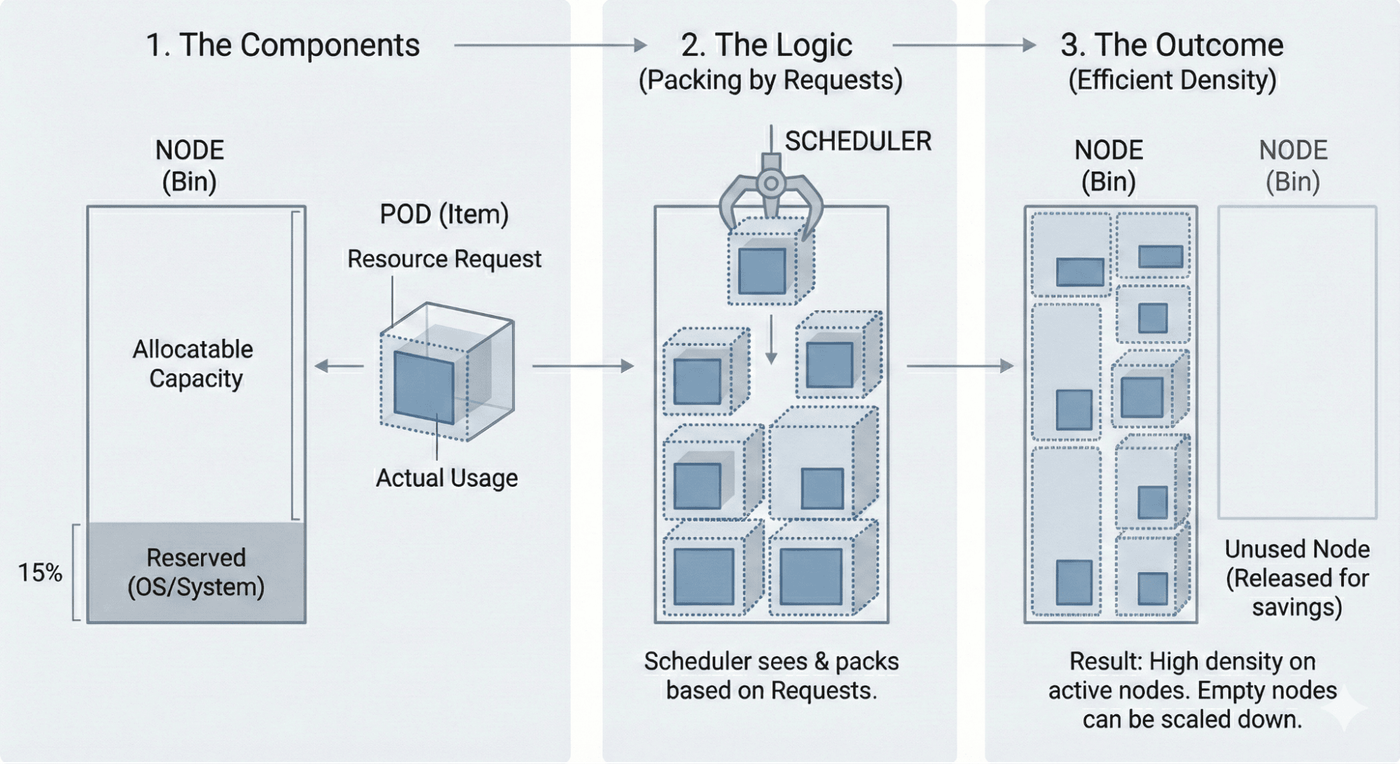
Bin packing in Kubernetes means scheduling Pods onto Nodes so the cluster runs on fewer nodes while keeping sufficient resources for stability. It’s a placement problem. Pods are the items, and Nodes are the bins.
Kubernetes does this through the scheduler. When a Pod is pending, the scheduler looks for nodes that can fit it, then scores the feasible nodes and picks one. The fit decision is based on the Pod’s resource requests, not the container’s real-time usage.
For placement, the scheduler evaluates CPU, memory, and ephemeral-storage requests. If Pod overhead is enabled, that overhead is added to the Pod’s effective requests during scheduling. The scheduler packs against node allocatable, not raw node capacity. Allocatable is what Kubernetes can actually give to Pods after reserving resources for the OS and system components, so packing can’t reach 100 percent of raw capacity.
Imagine three nodes with 4 vCPU and 8GiB allocatable each. You run six stateless Pods that usually use about 250m CPU and 512MiB memory. If each Pod requests 2 vCPU and 4GiB, only two Pods fit per node by requests, so you need three nodes even if the nodes look mostly idle. If each Pod requests 1 vCPU and 1GiB instead, all six fit on two nodes by requests, which makes scale down possible.
How Bin Packing Improves Resource Utilization
Bin packing improves resource utilization by reducing unused capacity across nodes. The goal is to run the same workloads on fewer nodes while still leaving enough headroom for spikes, rollouts, and failures to maximize efficiency.
Utilization depends on which signal you're looking at. The scheduler only sees resource requests, so requests-based utilization is the sum of Pod requests compared to the node allocatable. For placement, the scheduler evaluates CPU, memory, and ephemeral-storage requests as the Pod’s resource requirements during scheduling. Runtime utilization refers to the resources that containers actually consume on the node. If requests are inflated, the node can look idle in metrics while the scheduler still treats it as full and won't place more Pods, which leads to wasted resources.
Bin packing improves utilization by placing Pods in a way that makes requests fill nodes more evenly. That supports optimal resource utilization by reducing the number of half-empty nodes and leaving fewer gaps that can't fit the next Pod. When requests are close to real needs, more Pods fit per node without pushing nodes into constant pressure, which helps with minimizing wasted resources.
Over time, this also makes scaling cleaner. More nodes become empty enough to remove during scale-down, so you're not paying for nodes that aren't doing work
How Kubernetes Scheduling Enables Bin Packing
Bin packing only happens because the Kubernetes scheduler controls where each Pod lands, improving resource utilization by minimizing wasted resources across nodes. When a Pod is Pending, the scheduler runs a simple loop. It finds nodes that can run the Pod, it scores those nodes, and it binds the Pod to the best match.
The pipeline has two parts that matter for bin packing within the kubernetes scheduler framework. Filtering answers “can this Pod fit here” based on requests and node allocatable. Scoring answers “which feasible node is best.” Bin packing is mostly a scoring decision because node scoring decides whether the scheduler prefers fuller nodes or emptier nodes.
This is where NodeResourcesFit comes in. Its primary function is to check whether a node has enough available resources for a Pod’s requests and then rank feasible nodes with scoring strategies. Among the following scoring strategies, a choice that rewards fuller nodes pushes the scheduler toward bin packing, while one that rewards emptier nodes pushes it toward spreading.
Scheduling performance also matters once the cluster gets large. Some constraints increase the amount of work the scheduler must do per Pod. Constraints like inter-pod affinity and topology spread constraints can also disable scheduler optimizations such as opportunistic batching, which can increase scheduling latency under load.
Bin Packing Strategies In Kubernetes Scheduling
Scheduler scoring choices shape bin packing outcomes. Each strategy optimizes for a different placement goal, with trade-offs in node utilization, fragmentation, and scale-down. Let’s see how they differ.
LeastAllocated Strategy
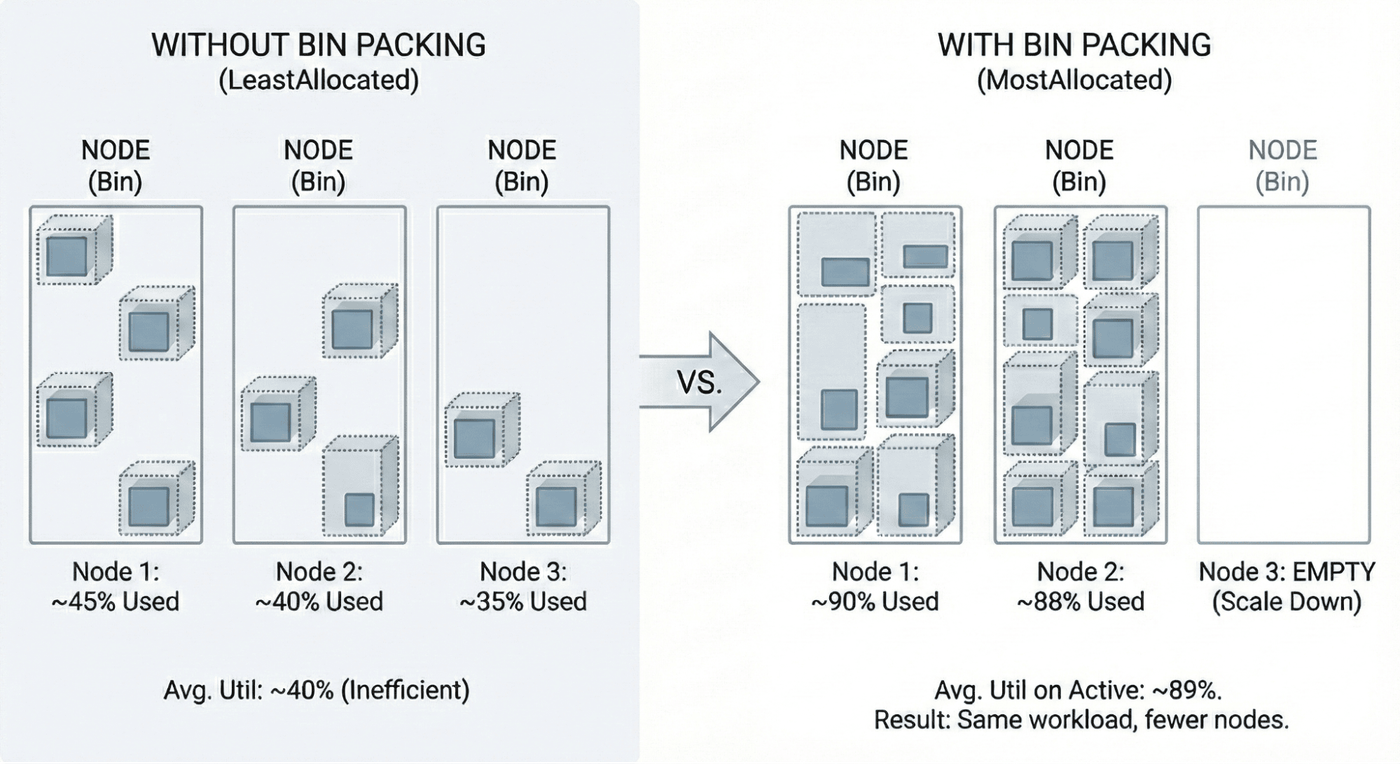
LeastAllocated scores nodes higher when they have more free resources. The usual outcome is spreading Pods across more nodes.
Use it when you want headroom on every node, when request sizing is still unstable, or when you want to reduce noisy-neighbor risk. It can hurt efficiency because it leaves many partially used nodes. That increases fragmentation and often leaves fewer nodes that are empty enough for scale-down.
Track node count, average requests-based utilization, and the percent of nodes under your scale-down threshold. LeastAllocated is the default, but you can still set it explicitly.
This config tells `NodeResourcesFit` to prefer nodes with more available CPU and memory, which spreads Pods across nodes.
MostAllocated Strategy For Bin Packing
LeastAllocated is the default strategy, and it aims to spread the workload evenly across nodes. MostAllocated scores nodes higher when they already have more resources allocated. That fills existing nodes first, favors more heavily utilized nodes, and drives bin packing for higher resource utilization.
The main failure mode is tight packing on requests that underestimate peaks. When load spikes, dense nodes hit memory pressure and CPU contention sooner, which increases eviction and throttling risk. In cloud environments, maximizing resource density can improve cost efficiency, but it also raises the blast radius if too much work lands on node a.
Pair it with guardrails such as priority and preemption for critical workloads, PodDisruptionBudgets for voluntary disruptions, and limits and Horizontal Pod Autoscaling (HPA) where they fit the workload.
This config tells `NodeResourcesFit` to prefer fuller nodes, and it also weights two extended resources so nodes with more of those allocated get scored differently.
RequestedToCapacityRatio Strategy
RequestedToCapacityRatio is a scoring strategy you configure with a curve. The curve maps utilization to score. Depending on the curve, it can behave like packing or like spreading, so it is not inherently bin packing unless you tune it that way. Like MostAllocated, it can be set so the scheduler prefers nodes that are already more utilized, as long as a particular pod still fits, which helps maximize resource density. For example, if Node A is already fuller but still has room for the Pod, Node A would score higher.
Use it when you need different behavior for CPU-heavy and memory-heavy clusters, or when you want to score extended resources. It also helps when you need to balance different resources while giving more emphasis to specific resources that matter most. You can weight resources and shape the curve so the scheduler rewards density up to a target band based on requested resources, rather than always pushing to the fullest node.
This example enables bin packing behavior by scoring higher utilization higher.
This config uses a simple linear shape so nodes with higher utilization get higher scores, which pushes scheduling toward packing. In cloud environments, that can improve cost efficiency, and some teams report cloud cost reductions of up to 66% with MostAllocated when requests are accurate.
NodeResourcesFit Plugin
NodeResourcesFit is the built-in plugin that checks whether a node can satisfy a Pod’s resource requests and then applies resource-based scoring. The strategies above are configured under its `scoringStrategy` options.
It only changes how nodes are scored. It does not fix wrong requests, override topology constraints, or eliminate runtime contention.
Advanced Bin Packing with Custom Schedulers & Plugins
Built-in scoring works for many clusters. But it starts to fall short when different workload classes need different placement rules. This shows up when you run latency-sensitive services alongside batch jobs, or when you mix general workloads with nodes that have GPUs or local SSDs.
Multiple Scheduling Profiles And Multi-Scheduler Patterns
Some workloads can run safely at higher density, and others can’t. Multiple scheduling profiles keep the default behavior for most Pods while letting specific workloads opt into a bin packing profile. Pods opt in by setting spec.schedulerName, which keeps the change scoped. A separate scheduler is another option when a hard boundary between policies is required, or when one workload class needs rules that should not affect the rest of the cluster.
Scheduler Framework Extension Points
Kubernetes scheduling is built on a plugin framework. Plugins can run at extension points such as PreFilter, Filter, Score, and Bind. Most bin packing behavior lives in Score because it selects the best node among the nodes that already passed feasibility checks. PreFilter and Filter matter when feasibility needs custom logic, such as enforcing a placement rule that is not covered by the default plugins.
Simulation And Safe Testing
Scheduler changes can shift placement across the whole cluster. Testing needs to show what changes before rollout. kube-scheduler-simulator can replay scheduling decisions against a snapshot of cluster state and a workload set, then compare different configs. The goal is to catch problems like more Pending Pods, higher scheduling latency, or unexpected interactions with constraints.
Rebalancing With The Descheduler
Even with good scoring, clusters drift over time. Deployments roll, nodes get replaced, and Pods get rescheduled, which often brings back partially used nodes. The descheduler evicts selected Pods under strict rules so they can be scheduled again with the current policy. This can free nodes for scale-down, and bin packing enhances cluster autoscaling by emptying underutilized nodes. Cluster Autoscaler can then recognize those nodes for removal and workload consolidation, but it also introduces churn, so disruption limits and workload rules need to be explicit.
You can keep control by scoping policy changes to the workloads that need them. Validate scheduler changes with realistic simulations before rollout. Use rebalancing only when drift is leaving too many partially used nodes behind.
Cost Optimization Through Bin Packing In Kubernetes
Bin packing affects cost because it changes how many nodes you need to run the same workload, so fewer nodes usually mean lower monthly infrastructure costs for cloud services. When the scheduler can fit the same set of Pods on fewer nodes, you pay for fewer node hours. When packing is poor, you carry extra nodes that don't add much capacity. Here is what you can change.
- Reduce node count by packing requests more efficiently: Bin packing increases how much of each node's allocatable capacity is used by requests. If requests are sized well and the scheduler prefers fuller nodes, more Pods fit per node. That reduces the number of nodes needed for the same workload while still leaving headroom for spikes. Organizations save on infrastructure costs by consolidating containers onto fewer nodes.
- Align bin packing with Cluster Autoscaler behavior: Packing is only a cost win if nodes can be removed. Efficient packing increases the chance that some nodes become empty enough to drain and remove during scale-down. Overly dense packing can block scale-down because there is nowhere to move Pods safely, or disruptions are blocked by constraints, so nodes stay even when average usage is low.
- Treat requests as the cost driver: Requests are what the scheduler reserves. If requests are overstated, the scheduler thinks nodes are full early, so you need more nodes to place the same Pods. If requests are understated, you can pack tightly but hit pressure during spikes. Right-sizing requests is what makes packing both cheaper and stable.
- Use a simple cost model to quantify savings: Monthly compute cost is roughly node_count × node_hourly_price × hours. If bin packing reduces node count, savings are usually close to linear, unless you replace that reduction with larger instances or frequent scale-ups caused by unstable requests.
Bin packing saves money when it lowers node count and still leaves safe headroom. Start with right-sized requests, then use a packing-friendly scoring strategy, and confirm that scale-down can remove nodes; when those pieces work together, it can maximize resource utilization and reduce infrastructure costs by up to 30%.
Common Challenges In Bin Packing In Kubernetes
Bin packing reduces node count, but it can also create problems that show up later under spikes, rollouts, or scaling events. Most issues come from requests that don’t match real usage, constraints that override scoring, and clusters that drift into uneven placement over time.
Over-Provisioned Requests And Right-Sizing
Requests get padded to avoid OOM kills and contention. Kubernetes schedules on requests, so inflated requests block packing even when runtime usage is low, and node count grows.
To get past this, base requests on measured usage and change them in controlled steps. VPA can provide recommendations, but it doesn’t change scheduling behavior. LimitRange and ResourceQuota also help keep requests from drifting upward.
Fragmentation And Workload Shapes
Fragmentation means free resources exist, but not in the right shapes on the same node to fit incoming Pods. Spare CPU on one node and spare memory on another still leaves a Pod Pending.
To reduce fragmentation, standardize node sizes where possible and separate very different resource profiles into node pools. Scoring can also be tuned so placement stops creating unusable leftovers over time.
Higher Density And Isolation Controls
Packing increases noisy-neighbor risk. CPU contention shows up as throttling and latency. Memory pressure can end in OOM kills and evictions. Resource starvation occurs when multiple containers compete for limited resources, increasing resource contention.
To keep density safe, apply isolation only where it carries value. Taints and tolerations reserve pools, node affinity narrows placement, and topology spread constraints protect replica distribution while still allowing packing within a pool or zone. Monitoring node resource utilization helps prevent performance issues caused by overpacking and supports maintaining optimal performance.
Over-Centralization And Failure Blast Radius
Aggressive packing concentrates more Pods on fewer nodes. A node failure then restarts more replicas at once and increases recovery pressure.
To limit blast radius, spread replicas across zones where availability matters and use disruption controls during drains and rollouts. Keep enough headroom in critical pools to absorb a node loss.
Requests, Limits, And QoS Under Pressure
Requests are the scheduler contract. Limits control runtime behavior, and bad limits can cause throttling or OOM kills even when scheduling looked fine.
To avoid that, set requests from measured needs and set limits with intent. QoS class is derived from requests and limits. Under pressure, eviction risk is closely tied to priority and memory usage relative to requests, so underestimated requests make dense nodes fail faster.
Constraints That Override Scoring And How To Trim Them
If affinity, topology rules, taints, or storage constraints eliminate most nodes, scoring has little room to influence placement. Changing scoring won’t help much because the feasible set is already narrow.
To fix this, treat constraints as a budget. Use hard constraints only when they map to a real requirement and keep them minimal for high-churn workloads.
Density, Latency, And Scheduler Throughput
Denser nodes can raise tail latency during spikes when headroom disappears. A cheaper cluster can still perform worse if contention rises at the wrong times.
To keep scheduling fast at scale, avoid stacking heavy constraints. Inter-pod affinity and topology spread constraints add work per scheduling cycle and can reduce scheduler optimizations.
Autoscaling Interactions And Drain Validation
HPA adds replicas based on metrics, and packing changes where those replicas land. If requests are low, scale-ups can pile onto already busy nodes and amplify contention.
To keep autoscaling predictable, remember that VPA changes request recommendations but does not change scoring. Cluster Autoscaler can remove nodes when packing frees capacity, but it can also get stuck when nodes are too full to drain or disruption rules block evictions. Drain validation under real rules is the check that matters.
Use Cases of Kubernetes Bin Packing
Bin packing is not a default setting for every workload. The choice to pack tightly or spread out depends on how easy a Pod is to move, how sensitive it is to contention, and how many placement constraints it carries.
Stateless Applications
Stateless workloads usually tolerate rescheduling well, so packing is often safe. They scale horizontally, recover fast, and don’t depend on fixed storage placement.
For example, a web tier with HPA can pack within each zone while topology spread keeps replicas balanced across zones. A PodDisruptionBudget limits voluntary disruptions so drains and rollouts do not remove too many replicas at once.
Databases And Stateful Workloads
Stateful workloads are sensitive to eviction and usually carry storage constraints that narrow placement. Packing them aggressively can amplify blast radius and make recovery slower because moving Pods is harder.
For example, a database StatefulSet can run in a dedicated node pool with taints and node affinity. Packing stays inside that pool, requests are strict, and headroom is kept for compactions, backups, and peak traffic.
Batch Processing And ML Workloads
Batch workloads often make packing attractive because they can wait for capacity. Higher density reduces idle capacity and can lower baseline node count if job timing is flexible.
For example, nightly jobs can be scheduled to fill nodes after business hours, while priority keeps always-on services from being displaced. When extended resources matter, RequestedToCapacityRatio can be shaped to influence how those resources get packed for optimal performance. For batch or ML jobs, pod topology spread constraints can counteract consolidation if they are set too strictly.
High-Node-Count Clusters
In large clusters, scheduling throughput becomes a primary concern. Heavy constraints increase scheduling work per Pod and can increase pending time during rollouts and scale-ups.
For example, a shared platform cluster can keep default workloads on simple rules and move strict placement workloads into separate profiles. Strategy changes can be tested with simulator runs so scoring changes do not create new pending backlogs.
Best Practices For Effective Bin Packing
Bin packing stays effective when you treat it as an operating model, not a one-time scheduler change. The best results come from keeping requests realistic, limiting fragmentation sources, and watching the signals that show when packing is starting to harm stability.
Right-Sizing Nodes And Containers
Start with node pool design. Fewer node shapes usually reduces fragmentation because placement has fewer “mismatched” targets. Use separate pools only when isolation is required, such as for GPUs, high-memory workloads, or noisy batch jobs.
For containers, use a repeatable right-sizing workflow. Measure usage over a meaningful window, update requests in controlled steps, then re-check eviction and throttling signals. If the workload is spiky, keep headroom rather than chasing the lowest request that “usually works.”
Planning, Testing, And Profiling Workloads
Requests need to match how the workload behaves under real load. Use load tests and production traces to set CPU and memory requests to the percentile that matches the workload's SLO, often p95 or p99 for memory when evictions are costly, so right-sizing helps each node host as many workloads as it safely can.
Scheduler changes should be treated like any other platform change. Use kube-scheduler-simulator to test scoring and constraint changes against realistic snapshots in kubernetes clusters before production rollout. Compare outcomes such as node count, pending time, and constraint satisfaction.
Continuous Monitoring And Adjusting Strategies Over Time
Bin packing never stays done because the workload mix changes. New services add new request shapes, deployments shift placement, and autoscaling changes replica counts, which can recreate fragmentation.
Watch the signals that indicate packing is drifting into risk. Pending Pods, evictions, and node pressure conditions are immediate red flags. Also track “requested vs actual” drift over time, because growing drift usually means requests are becoming stale and packing decisions are getting less reliable.
Leveraging Native Kubernetes Features For Bin Packing
Use scheduler configuration and profiles to scope packing behavior. Keep the default policy for most workloads and apply packing-friendly scoring only where it fits, so one change does not reshape the whole cluster at once.
Use autoscalers and disruption controls to keep dense placement stable. HPA handles load-driven replica growth, VPA provides request recommendations, PDBs constrain voluntary disruption, and priority classes define what should win when capacity tightens.
Use descheduler as a last step when drift accumulates. It can help free nodes for scale-down, but it introduces churn, so it should run with strict rules and clear disruption limits.
How groundcover Optimizes Bin Packing in Kubernetes With Real-Time Resource Insights
Bin packing decisions are made from resource requests, but the cluster’s day-to-day behavior is driven by real resource usage. When those two don’t line up, bin packing becomes either wasteful or risky. groundcover closes that gap by tying real-time, kernel-level signals back to Kubernetes context, so right-sizing and packing decisions are based on what’s actually happening in the cluster.
eBPF-Based Resource Visibility With Kubernetes Context
groundcover uses an eBPF sensor to collect kernel-level signals and map them to Kubernetes objects. That matters for bin packing because it keeps the data high fidelity while still showing it in the same hierarchy you operate in, such as cluster, node, namespace, Pod, and container. It makes it easier to move from “this node looks hot” to “these specific Pods and containers are driving it.”
Requests vs Usage Views for Right-Sizing
Bin packing improves when requests reflect reality. groundcover lets you compare configured requests and limits against observed usage over time, so over-requested and under-requested workloads stand out. That reduces guesswork when updating requests and helps avoid changing requests based on short windows that miss spikes.
Real-Time Signals That Show Packing Risk Early
Packing fails when dense nodes drift into contention. groundcover surfaces runtime signals that point to risk earlier than a node-level average, because the view stays tied to the workloads involved. This is where CPU contention, memory pressure, throttling symptoms, and eviction patterns become easier to connect to specific services.
Spotting Bin Packing Inefficiencies
Fragmentation shows up as “capacity exists, but nothing fits.” You see leftover CPU on many nodes while memory is tight, or the reverse, and Pods stay Pending because no single node can satisfy the full request shape. groundcover’s drill-down views help confirm whether the constraint is resource shape, placement rules, or a few hot workloads skewing node usage.
Over-centralization shows up as too many important Pods landing on too few nodes. That increases the blast radius of node failure and makes drains harder. With node and workload breakdowns, it’s easier to see when packing is concentrating critical tiers and where topology spread, or workload scoping, should be tightened.
Conclusion
Bin packing in Kubernetes is about placing Pods so you run the same workloads on fewer nodes without pushing nodes into pressure. It works when requests reflect real usage, constraints are kept deliberate, and autoscaling and disruption rules don’t block drains.
groundcover helps keep bin packing stable over time by showing requests next to real usage and surfacing node pressure signals in the Kubernetes context, so right-sizing and packing changes are easier to validate.
FAQs
Base requests on observed usage over time and pick a percentile that matches the workload’s risk tolerance. Use VPA as input, then apply changes in controlled steps. Use LimitRange to enforce defaults and avoid missing requests.
Look for high node count with low requests-based utilization, Pending Pods despite apparent free capacity, and Cluster Autoscaler scale-down that rarely removes nodes. Frequent evictions and node pressure events in the densest pools also point to packing risk or bad request sizing.
Yes. groundcover shows requests versus real usage drift in real time, highlights over-requested workloads, and correlates node pressure and evictions with the Pods driving them. It also provides a Kubernetes drill-down, allowing changes to requests or scheduling to be validated quickly.



