

Node Disk Pressure in Kubernetes: Causes, Detection, and Fixes




Key Takeaways
As Kubernetes scales to meet the demands of AI and distributed microservices, the volume of logs, container images, and ephemeral data has reached an all-time high. According to the 2025 CNCF Annual Survey, with 82% of organizations now running Kubernetes in production, effective storage management is no longer optional - it is a prerequisite for cluster stability. In Kubernetes, node disk pressure happens when a node runs low on disk space, the kubelet marks it with DiskPressure=True, evicts pods, and stops scheduling new workloads to protect the cluster.
When a Kubernetes node runs low on available disk space, the kubelet detects the condition through disk space and inode thresholds. This state shows that the node cannot safely run additional workloads because storage usage has crossed safe limits. If left unresolved, disk pressure can lead to pod evictions, scheduling failures, degraded application performance, and broader cluster instability.
For Kubernetes operators, DevOps engineers, platform teams, and IT professionals responsible for keeping production clusters healthy, the challenge is usually tracing pressure back to what is actually consuming storage - container images, logs, ephemeral storage, or volumes. This guide covers the common causes of node disk pressure, how Kubernetes detects it, the symptoms it creates, how to diagnose it on the node and in cluster signals, practical remediation steps, prevention best practices, and observability approaches such as groundcover for catching issues early.
What Is Node Disk Pressure in Kubernetes
Node disk pressure is a node condition in Kubernetes indicating that the node is running out of disk space or ephemeral storage resources. Kubernetes monitors disk usage through the kubelet, which monitors disk space and filesystem inodes on nodes while continuously evaluating consumption for container images, log files, and ephemeral storage. When those thresholds are crossed, Kubernetes sets the diskpressure node condition:
What This Means in Practice
- The node has insufficient free disk space
- Kubernetes may evict pods to reclaim storage
- Once the node reaches a high-usage threshold, Kubernetes stops trying to schedule pods there
- Cluster stability may degrade if disk pressure continues
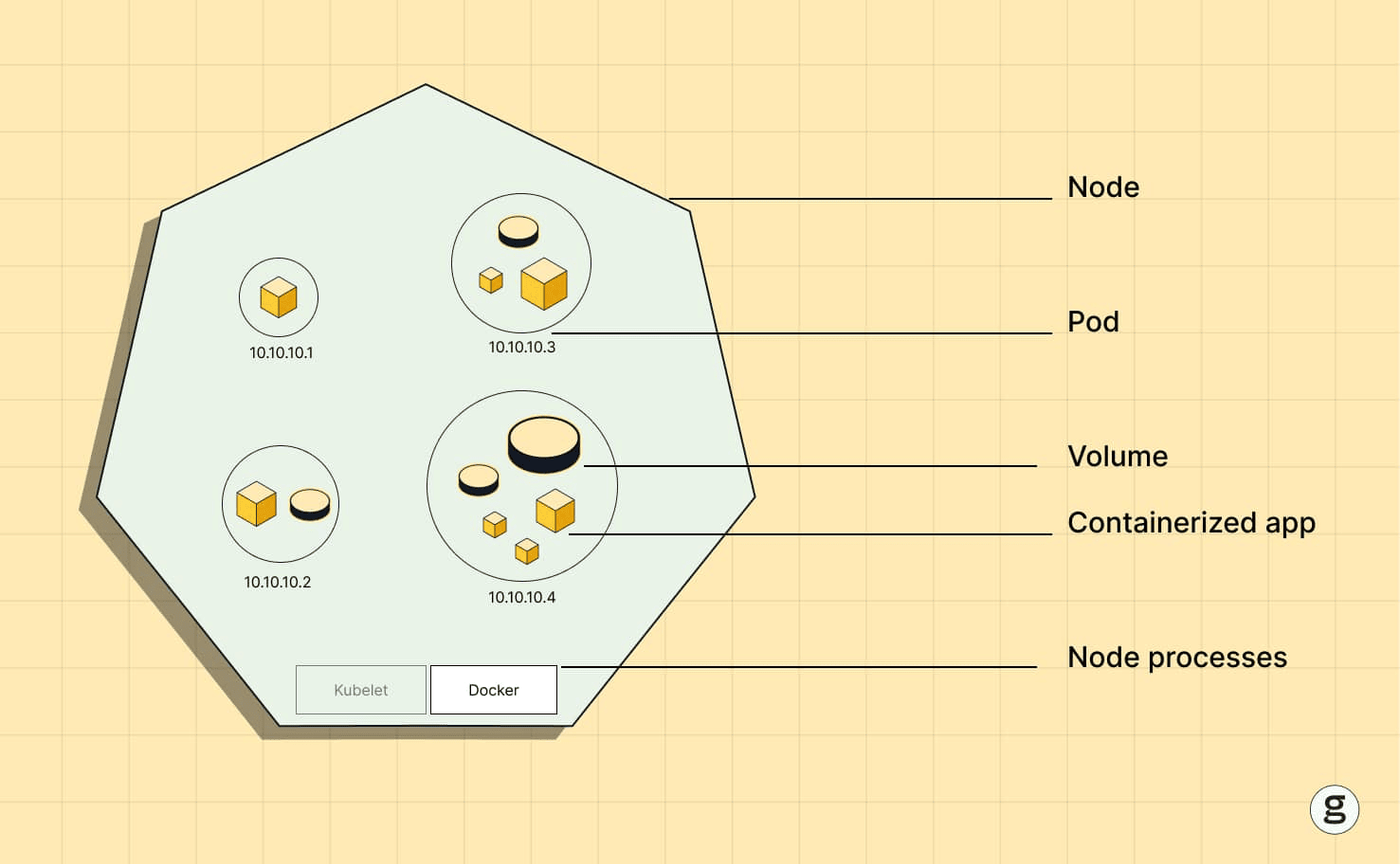
Resources Contributing to Disk Pressure
- Container image layers
- Container log files, especially excessive container logs that grow into large log files
- Ephemeral volumes
- EmptyDir volumes, which are a common cause when local storage is overused
- Image cache
- Temporary files from workloads
Disk pressure is particularly common in clusters running high-volume logging, CI pipelines, data processing workloads, or microservices architectures, because application logs can exhaust local storage quickly.
How Kubernetes Detects and Signals Node Disk Pressure
Kubernetes detects disk pressure through kubelet eviction signals and resource thresholds, including hard and soft eviction threshold settings. The kubelet monitors several filesystem metrics, including:
- Node filesystem usage
- Image filesystem usage
- Available ephemeral storage
- Disk inode availability
When the kubelet monitors filesystem usage and disk space and finds they have crossed configured eviction thresholds, it marks the node with
Disk Pressure Signals Monitored by kubelet
| Signal | Description |
|---|---|
| nodefs.available | Available disk space on node filesystem |
| nodefs.inodesFree | Available inodes |
| imagefs.available | Available disk space for container images |
| imagefs.inodesFree | Free inodes in image filesystem |
Example: Viewing Node Conditions
Example output:
When disk pressure occurs, Kubernetes activates eviction policies to reclaim space.
Symptoms and Impact of Node Disk Pressure on Cluster Workloads
Node disk pressure creates several operational issues in Kubernetes clusters.
Common Symptoms
- Pods entering Evicted status
- New pods failing to schedule
- Containers restarting repeatedly
- Increased application latency
- Log ingestion failures
- Node instability
Impact on Cluster Behavior
- Pod Evictions: Kubernetes removes pods consuming ephemeral storage.
- Scheduling Restrictions: The scheduler avoids nodes under disk pressure.
- Reduced Reliability: Critical workloads may fail to start.
- Observability Gap: Log pipelines may fail if log files consume disk space.
Without proactive monitoring, disk pressure can escalate quickly in large clusters.
Common Causes of Node Disk Pressure in Kubernetes Nodes
Disk pressure typically results from uncontrolled growth of container artifacts, logs, or ephemeral storage, and it occurs when available disk space falls below thresholds.
| Cause | Description | Typical Example |
|---|---|---|
| Excessive Container Logs | Log files accumulate without rotation and can fill disk space quickly if not managed | Applications writing large logs |
| Large Container Images | Image layers consume disk space | ML or analytics images |
| Unused Images | Old images remain cached and container logs and unpruned images can contribute to disk pressure | CI/CD pipelines |
| Ephemeral Storage Usage | Pods store temporary data, and running too many Pods on a node can also cause disk pressure when all the pods compete for local disk | Spark jobs, ETL workloads |
| Persistent Volume Misuse | Incorrect volume configuration; misconfigured storage requests can lead to disk pressure issues | Data stored on node filesystem |
| Crash Loops Generating Logs | Repeated restarts fill disk quickly | Faulty microservices |
| High Container Churn | Frequent deployments increase image storage, while node-level storage changes in storage configurations can reduce free space on the node | Dev/test environments |
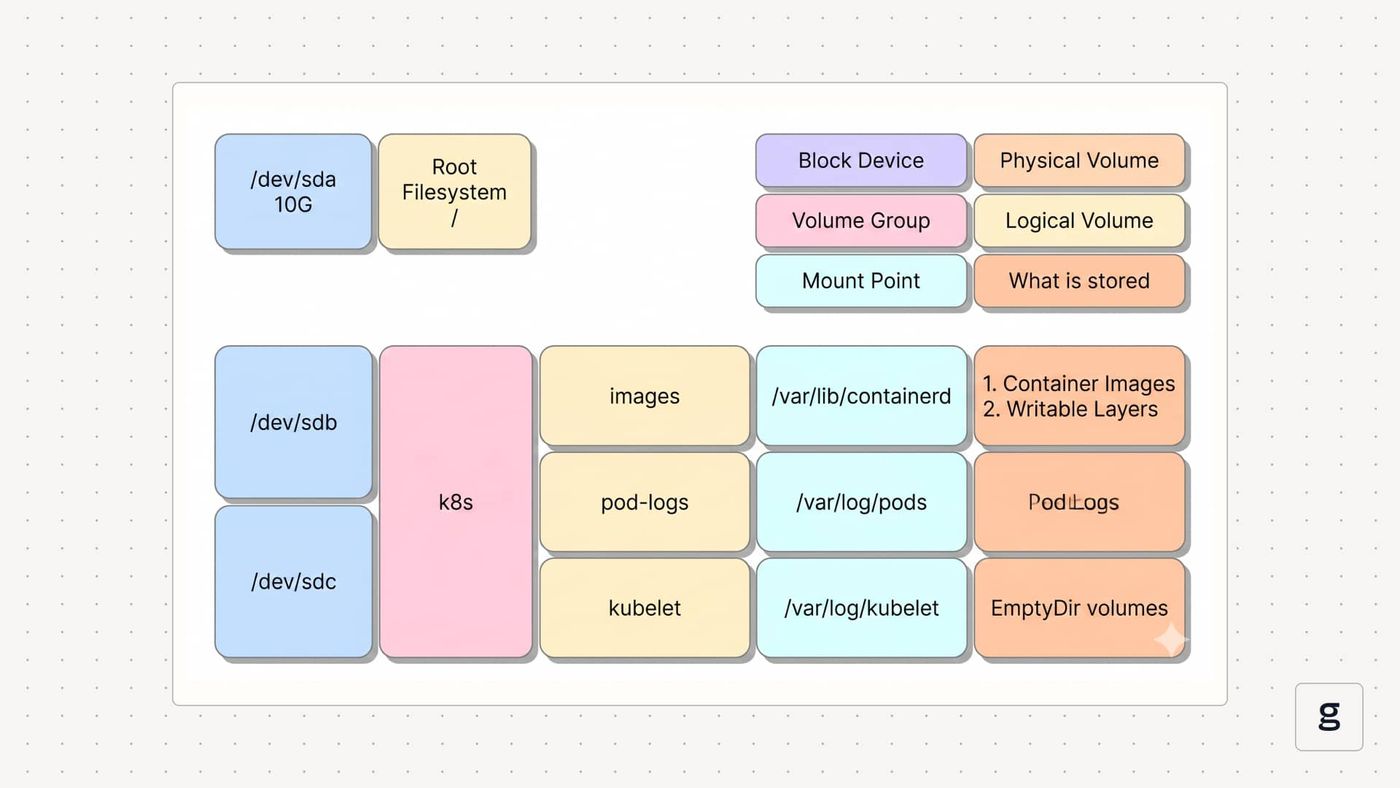
Understanding these root causes helps teams design effective remediation strategies.
How Node Disk Pressure Triggers Pod Evictions and Scheduling Failures
When disk pressure exceeds configured thresholds, Kubernetes can trigger eviction, but in the above scenario the kubelet first attempts to reclaim space before removing Pods. The eviction manager attempts to reclaim resources by removing pods based on QoS class and resource usage, and under disk pressure Pods without ephemeral-storage requests are typically evicted first rather than simply those consuming high ephemeral storage.
Pod Eviction Priority
Pods are evicted in the following order:
- BestEffort pods
- Burstable pods
- Guaranteed pods (last)
Pods consuming high ephemeral storage are evicted first.
Scheduler Behavior
When DiskPressure=True:
- The scheduler avoids the node
- New pods are scheduled on other nodes
- If no nodes are available, pods remain Pending
Example event message:
How to Diagnose Node Disk Pressure in Kubernetes Clusters
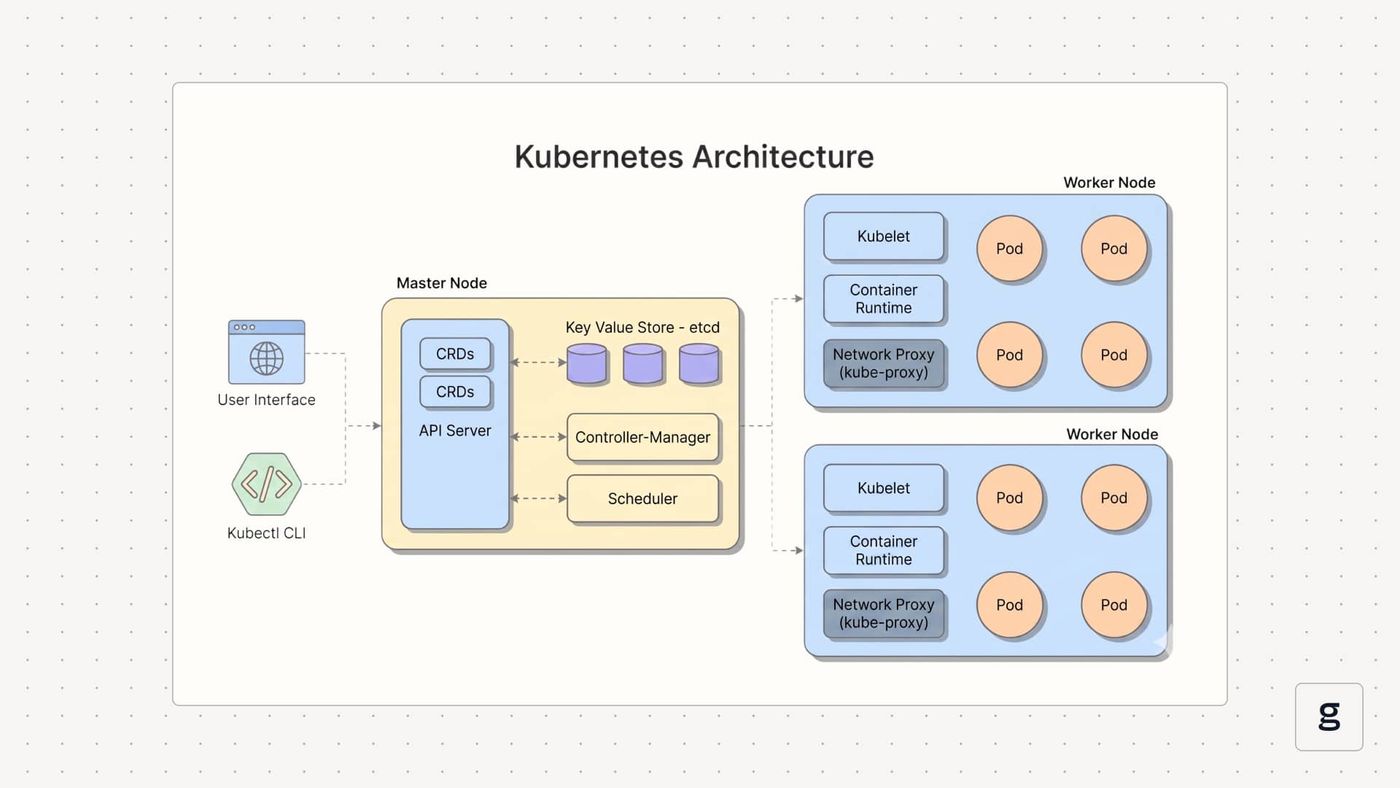
Diagnosing node disk pressure in Kubernetes means looking at two things together: the node conditions Kubernetes is reporting and what's actually consuming storage on the affected nodes themselves. Disk pressure happens when a node burns through its available disk space or ephemeral storage, so the job is figuring out which nodes are in trouble, how their storage is actually being used, and which workloads or leftover artifacts are the ones eating up all the space.
In practice, you work through this in a pretty logical order: you start by checking what Kubernetes thinks is wrong at the node condition level, then you get into the node's filesystem directly to see the real usage numbers, and finally you narrow it down to the specific culprits whether that's bloated container images, runaway log files, or volumes that have grown way beyond what anyone expected when a node is experiencing disk pressure, while also feeding diagnosis into proactive monitoring by tracking disk usage and setting alerts before usage becomes critical.
Checking Node Disk Pressure Status with Kubectl
The most direct way to detect node disk pressure is by checking node conditions using kubectl. Kubernetes nodes report conditions like DiskPressure, MemoryPressure, and PIDPressure, which are updated by the kubelet. When disk usage exceeds configured thresholds, the kubelet sets DiskPressure=True, indicating that the node is running low on available disk space.
Use the following command:
Output example:
Detailed inspection:
Look for:
You can also inspect node conditions via JSON:
Inspecting Disk Usage on Affected Nodes
After identifying a node under disk pressure, the next step is to inspect the node’s disk usage to determine where space is being consumed. Kubernetes workloads store container images, logs, and ephemeral data on the node filesystem, so reviewing filesystem utilization helps identify which directories or partitions are nearing capacity and contributing to the reduced free disk space.
SSH into the affected node and check filesystem usage.
Example output:
Check inode usage:
High inode usage can also trigger disk pressure.
Identifying Images, Logs, and Volumes Causing Node Disk Pressure
The next step is identifying the workloads or artifacts causing the disk pressure. Common contributors include accumulated container images, large or unrotated log files, and excessive ephemeral storage used by pods. Container logs can quickly fill disk space if not managed, especially when old logs are not rotated or cleaned up. Workloads using emptyDir volumes or generating large temporary files can also consume significant disk space, making it important to pinpoint the exact source of the storage usage.
Identify Large Container Images
or
Check Container Logs
or
Check kubelet Directories
Inspect Ephemeral Storage Usage
Look for:
How to Fix Node Disk Pressure in Kubernetes Environments
Fixing node disk pressure in Kubernetes environments involves freeing up disk space on affected nodes and addressing the sources of high disk usage. This can include removing unused container images, cleaning up log files, deleting temporary data from ephemeral storage, or expanding the node’s disk capacity to restore normal cluster operations.
Immediate Remediation Steps
- Remove unused container images
- Clean container logs
- Delete unused pods
- Restart kubelet if required
- Expand the node disk volume if the infrastructure allows.
Cluster-Level Solutions
- Increase node storage
- Use centralized log aggregation
- Reduce image size
- Implement automatic image garbage collection
How to Prevent Node Disk Pressure with Kubelet Configuration and Resource Limits
Preventing disk pressure requires proper kubelet configuration and resource limits, and in the kubelet configuration file default hard eviction thresholds commonly include nodefs.available: "10%".
Example kubelet configuration:
Many teams also set warning or soft thresholds around 85% disk usage, since kubelet and Kubernetes can trigger eviction when usage exceeds 85% before hard conditions are reached.
This instructs kubelet to start evicting pods before disk space becomes critically low.
Configure Ephemeral Storage Limits
Example pod configuration:
This prevents individual pods from consuming excessive disk space.
Configure Log Rotation
These settings prevent uncontrolled log file growth.
Best Practices for Avoiding Node Disk Pressure in Production Clusters
Maintaining stable storage availability on Kubernetes nodes requires proactive operational practices and well-defined resource management policies. Applying consistent storage governance across workloads helps ensure nodes remain healthy and prevents disruptions caused by disk resource exhaustion.
| Best Practice | Description | Benefit |
|---|---|---|
| Enable Log Rotation | Prevent log file growth | Reduces disk consumption |
| Monitor Ephemeral Storage | Track pod storage usage | Early detection |
| Use Smaller Container Images | Optimize Docker builds | Reduces image cache |
| Enable Image Garbage Collection | Remove unused images | Frees disk space |
| Centralize Logs | Use log aggregation systems | Avoid local disk buildup |
| Monitor Disk Usage | Use observability platforms | Detect disk pressure early |
| Enforce Storage Limits | Apply ephemeral storage quotas | Prevent runaway pods |
Following these practices significantly reduces disk pressure incidents.
Real-Time Visibility into Node Disk Pressure with groundcover
Modern Kubernetes observability platforms help teams detect and troubleshoot node disk pressure before it impacts application performance or cluster stability. groundcover provides eBPF-based Kubernetes observability, combining kernel-level telemetry with Kubernetes metrics to give teams real-time visibility into node resources, container behavior, and storage usage across the cluster.
- Real-Time Disk Usage Monitoring Across Nodes and Containers: Platform teams can monitor node resource utilization and storage trends to identify disk pressure risks early using groundcover’s Kubernetes observability platform.
- Automatic Detection of Resource Anomalies Affecting Cluster Health: groundcover provides real-time insights and alerts that help teams detect abnormal storage usage patterns and infrastructure issues before they escalate.
- Deep Container Insights without Requiring Intrusive Instrumentation: Using eBPF-based telemetry, groundcover collects infrastructure and application signals directly from the kernel without requiring code instrumentation or sidecars.
- Faster Troubleshooting of Storage Bottlenecks: By correlating Kubernetes events, container metrics, and infrastructure telemetry, teams can quickly identify workloads responsible for abnormal disk consumption.
Because groundcover uses eBPF-based telemetry, it captures low-level system activity while maintaining minimal overhead on production clusters. This enables DevOps and platform teams to quickly determine:
- which pods are consuming excessive disk space
- which nodes are approaching disk pressure thresholds
- which workloads generate large volumes of logs or ephemeral storage
With this level of real-time visibility, teams can detect and resolve disk pressure issues earlier, improving the reliability and stability of Kubernetes workloads.
Conclusion
Node disk pressure is one of the most common operational issues affecting Kubernetes clusters. When nodes run low on disk space, Kubernetes triggers eviction policies and restricts scheduling to protect cluster stability. Understanding the causes, detection signals, and remediation strategies is essential for maintaining healthy Kubernetes environments.
By implementing proper kubelet configurations, ephemeral storage limits, log rotation policies, and observability tools, teams can proactively manage disk resources and prevent node disk pressure from disrupting workloads. Modern observability platforms such as groundcover provide the real-time insights required to detect disk pressure early and maintain reliable Kubernetes operations.
FAQs
Eviction thresholds should be tuned to create enough reclaim headroom for your image pull and log growth patterns, not merely set to generic defaults.
- Measure worst-case image pull size, peak log burst rate, and average reclaim time per node pool, then set evictionHard and evictionSoft so kubelet reacts before storage becomes operationally unrecoverable.
- Use different thresholds for heterogeneous pools, because GPU, CI, and data-processing nodes usually need more headroom than stateless web-serving nodes.
- Monitor inode pressure separately from capacity pressure, since small-file explosions from logs or temp artifacts can trip evictions even when df -h looks acceptable.
- Pair threshold tuning with image garbage collection policy and log rotation; otherwise kubelet will evict pods repeatedly without removing the underlying cause.
Bigger disks reduce the time to failure, but they do not fix unbounded storage behaviors in workloads, runtimes, or logging pipelines.
- Check whether the issue is structural: oversized images, chatty applications, emptyDir misuse, long image retention, or frequent rollout churn will eventually refill any larger volume.
- Review whether storage is shared across nodefs and imagefs, because mixed-use layouts let image pulls and pod writes compete on the same underlying device.
- Enforce ownership by namespace or workload class with ephemeral-storage limits, so the cluster has policy guardrails instead of relying on node size as the control plane.
- Use trend analysis after remediation; if free space recovers briefly and then resumes the same slope, the real problem is workload behavior, not capacity.
groundcover adds value when disk pressure comes from log growth by helping teams connect storage exhaustion to the specific services, deployments, and behavioral changes generating the log flood.
- Correlate spikes in log volume with pod restarts, new releases, and node events so you can tell whether the root cause is bad application behavior or normal workload expansion.
- Use centralized visibility to keep logs off the node as the long-term system of record, reducing dependence on local disk for retention during incidents.
- Watch for services whose error loops produce both operational noise and infrastructure risk, because the same pattern often drives alert fatigue, disk pressure, and troubleshooting delays.
- Treat log-heavy workloads as cost and reliability risks together; the winning fix is usually better log discipline, sampling, and retention strategy rather than just larger nodes.



