LoadBalancer vs NodePort in Kubernetes: Differences & Use Cases



Key Takeaways
- LoadBalancer is the standard choice for production cloud workloads because it provides a public IP, health checks, and built-in reliability.
- NodePort exposes services through a port on every node, making it simple and cloud-independent but more manual to manage.
- LoadBalancer costs more but reduces operational overhead, while NodePort is cheaper but requires external load balancing and security controls.
- Many teams use a LoadBalancer-backed Ingress for public traffic and NodePort for specific internal or on-premises use cases.
What Is LoadBalancer in Kubernetes?
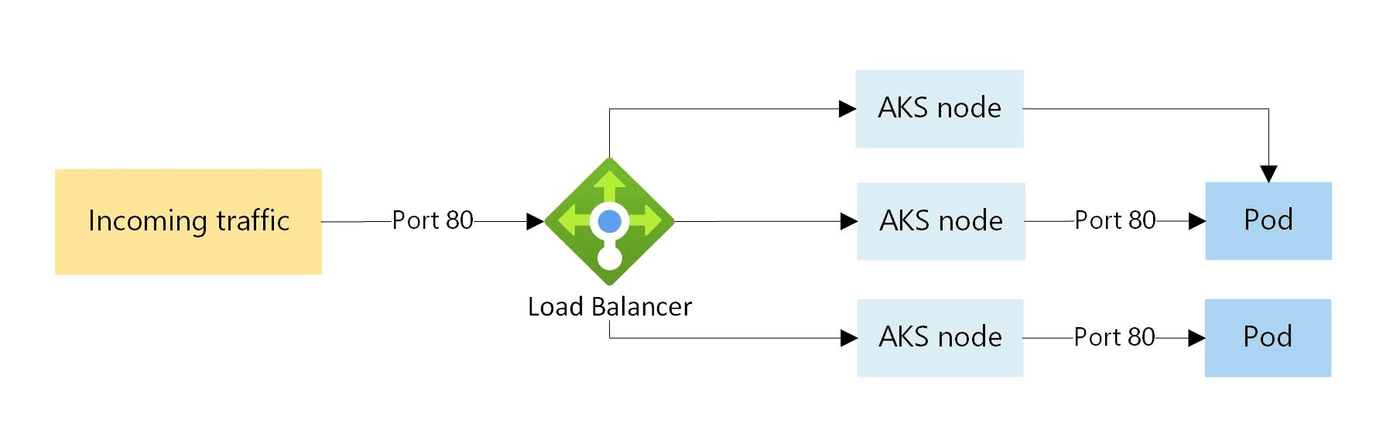
The LoadBalancer service type is the standard way to expose a Kubernetes service to external clients in cloud environments. When you create a service with type: LoadBalancer, Kubernetes reaches out to the underlying cloud provider (AWS, GCP, Azure, etc.) and provisions an external load balancer automatically. That external load balancer gets its own public IP address and routes traffic into your cluster.
Under the hood, a LoadBalancer service still creates both a ClusterIP and a NodePort, it simply layers cloud-managed load balancing on top.
Here's a minimal example:
After applying this, kubectl get svc my-service will eventually show an EXTERNAL-IP assigned by your cloud provider. External clients connect to that IP directly on port 80.
Key Characteristics
- Provisions a cloud-managed load balancer automatically
- Assigns a dedicated external IP address per service
- Supports health checks, SSL termination (with annotations), and traffic policies
- Best suited for production workloads in cloud environments
What Is NodePort in Kubernetes?
NodePort is a simpler, more direct approach. Instead of relying on a cloud provider, Kubernetes opens a specific port on every node in the cluster and routes traffic on that port to the backing pods. External clients can reach the service by hitting any node's IP address at the assigned port.
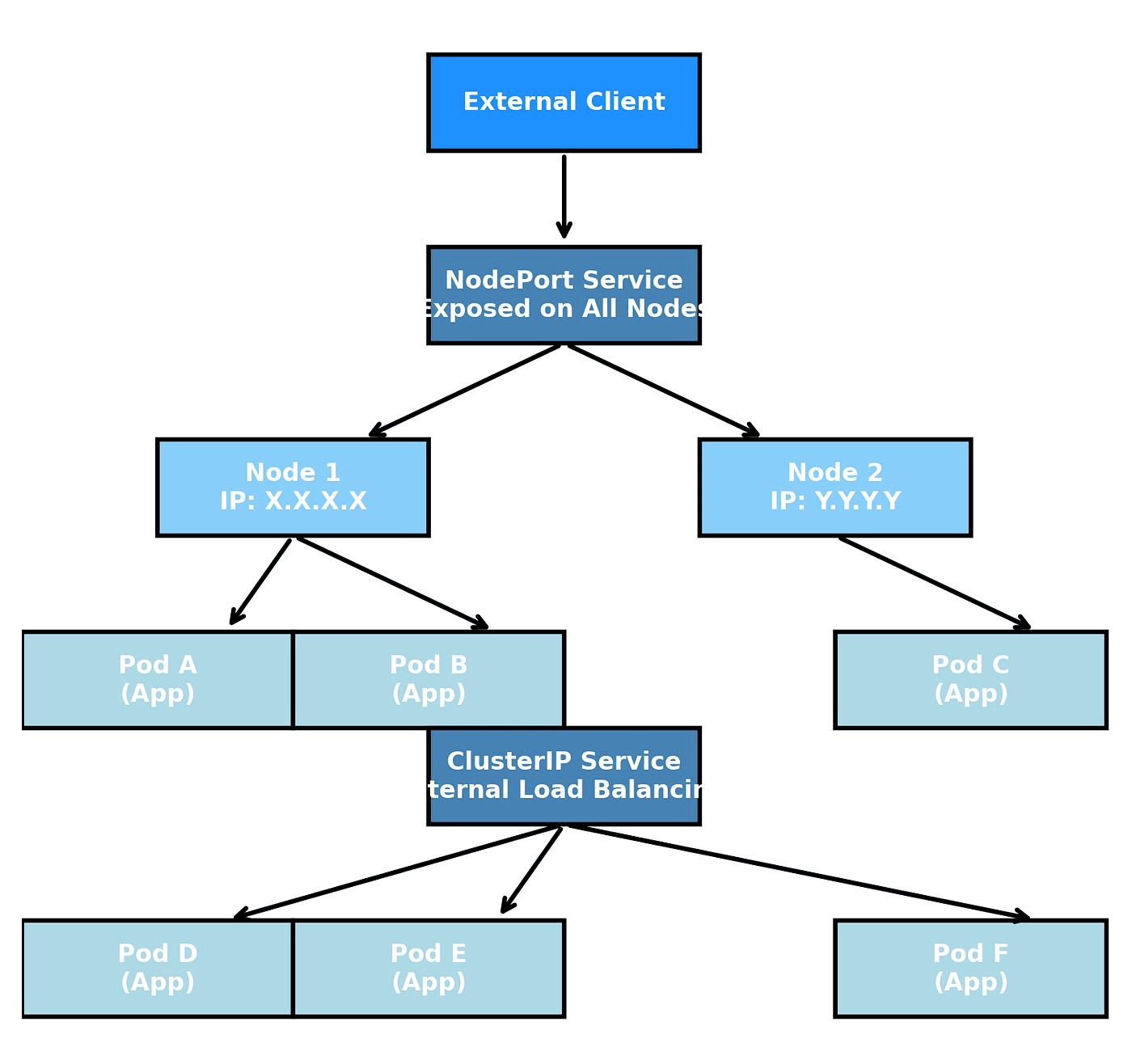
The port range for NodePort is 30000–32767 by default.
With this configuration, external clients access the service at <any-node-ip>:30080. Kubernetes handles the routing from there.
Key Characteristics
- No external load balancer required
- Opens a port on every cluster node
- Port range is limited (30000–32767)
- Works in both cloud and on-premises environments
LoadBalancer vs NodePort: Key Differences
| Feature | LoadBalancer | NodePort |
|---|---|---|
| External IP | Dedicated IP from cloud provider | Uses node IP addresses |
| Cloud dependency | Required (or MetalLB for on-prem) | None |
| Port range | Standard (80, 443, etc.) | 30000–32767 only |
| Cost | Per-service billing from cloud provider | No additional cost |
| High availability | Built-in via cloud LB | Manual setup required |
| SSL termination | Supported via annotations | No cloud-managed TLS; terminate at pod or Ingress level. |
| Best for | Production cloud workloads | Dev/test, on-prem, bare metal |
| Default service type? | No | No (ClusterIP is default) |
| kube-proxy interaction | iptables/IPVS internally (cloud LB routes externally via NodePort first) | iptables/IPVS internally (traffic arrives directly at the NodePort) |
How Traffic Flows Through LoadBalancer and NodePort
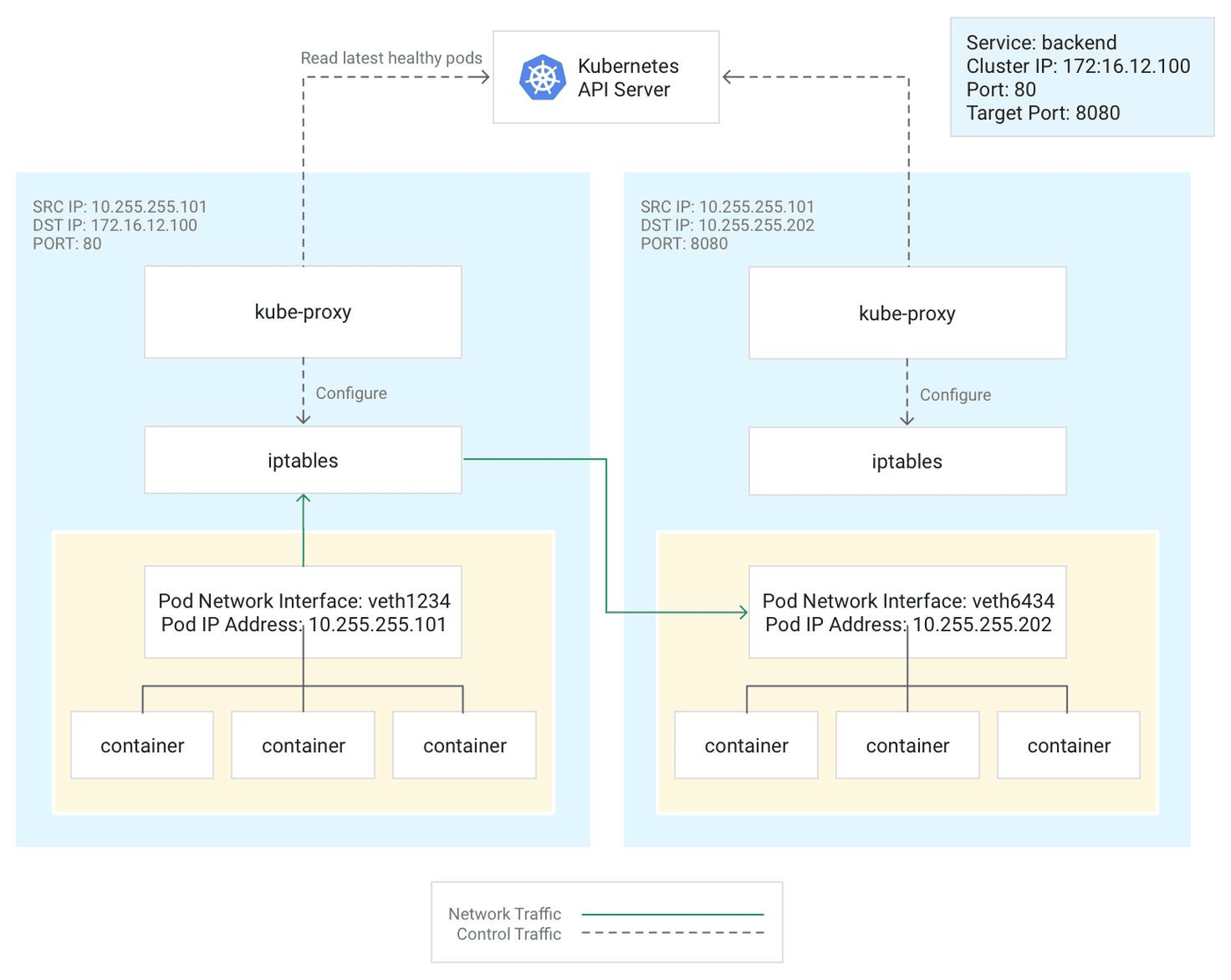
Understanding how traffic moves through each service type helps you make the right architectural decision, and debug things faster when they go wrong.
LoadBalancer Traffic Flow
- A client sends a request to the external load balancer's IP (e.g., 203.0.113.10:80).
- The cloud load balancer forwards the request to one of the nodes’ NodePort (yes, even LoadBalancer uses NodePort internally).
- kube-proxy on the receiving node applies iptables or IPVS rules to route the packet to the correct pod.
- The pod processes the request and responds.
NodePort Traffic Flow
- A client sends a request directly to a node's IP on the NodePort (e.g., 10.0.0.5:30080).
- kube-proxy intercepts the traffic via iptables/IPVS rules.
- Traffic is forwarded to one of the matching pods, potentially on a different node.
- The pod handles the request and returns a response.
One practical implication: because NodePort routes to a random pod across all nodes, you might see asymmetric traffic unless externalTrafficPolicy: Local is configured. This setting applies to both NodePort and LoadBalancer services — it ensures traffic stays on the receiving node, preserving the client's source IP but potentially causing uneven load distribution.
LoadBalancer vs NodePort for Cost, Reliability, and Scale
These three factors usually drive the final decision in real production environments.
- Cost is where LoadBalancer services get expensive fast. Each LoadBalancer service in a cloud environment typically provisions a separate cloud load balancer instance. On AWS, the default in-tree provisioner now creates a Network Load Balancer by default on modern EKS versions (ALB requires the separate AWS Load Balancer Controller); baseline costs typically run $16–25 per month per load balancer, before traffic charges. If you're running ten microservices, that adds up quickly. NodePort has no direct infrastructure cost, but you'll need to manage your own load balancing layer if you need high availability.
- Reliability favors LoadBalancer services in cloud deployments. Cloud load balancers offer built-in health checks, automatic failover, and multi-AZ redundancy. NodePort by itself has no built-in client-side redundancy, if a client or upstream proxy is hardcoded to one node's IP and that node goes down, that path is unreachable. NodePort opens the same port on every node, so distributing traffic across nodes (e.g., with HAProxy in front) provides full high availability.
- The scale is more nuanced. LoadBalancer handles scaling transparently as your cloud provider manages capacity. NodePort scales with your cluster, but the port exhaustion ceiling (only 2,768 ports in the range) can become a constraint in large clusters with many services.
LoadBalancer vs NodePort in Cloud and On-Prem Clusters
The environment you're deploying into fundamentally shapes which option makes sense.
In cloud environments (EKS, GKE, AKS), LoadBalancer is the natural default for any public-facing service. The cloud controller manager integrates natively with the provider's LB APIs. There's minimal setup, and you get health checks and IP management for free.
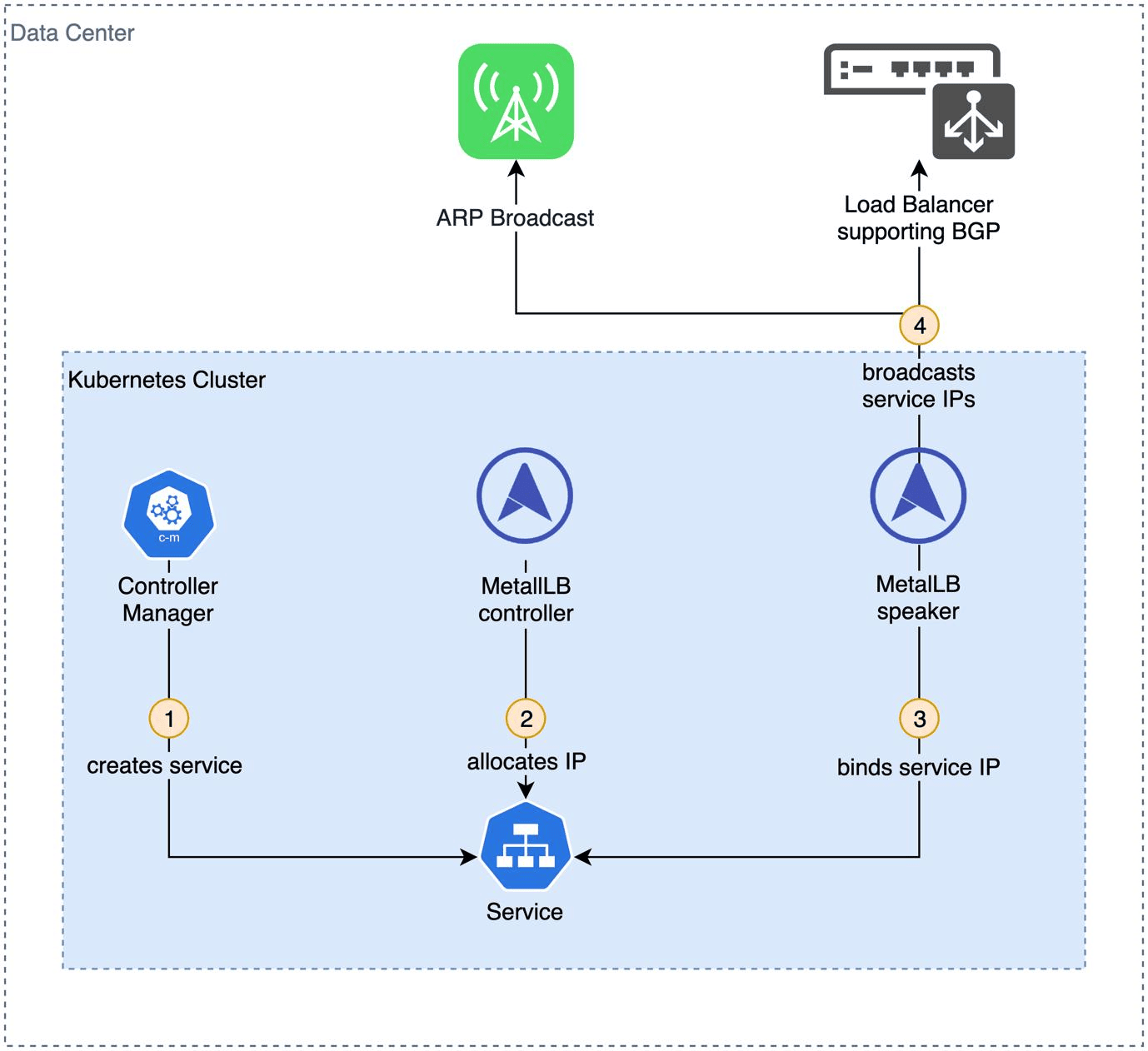
On-premises or bare-metal clusters are a different story. There's no cloud controller to provision a load balancer, so type: LoadBalancer services just sit in a <pending> state indefinitely. The common solutions here are:
- MetalLB: A popular open-source load balancer implementation for bare-metal clusters that assigns IP addresses from a configured pool
- kube-vip: Provides virtual IP management for both control plane HA and services
NodePort is often the pragmatic choice for on-prem setups, especially when paired with an external load balancer like HAProxy or NGINX that sits outside the cluster and distributes traffic across nodes.
For local development, neither is ideal in isolation. Tools like minikube provide a minikube tunnel to simulate LoadBalancer behavior, and NodePort works fine for quick testing since you can access services at localhost:<nodePort> with port forwarding.
Security Considerations for LoadBalancer and NodePort
Exposing services externally always introduces an attack surface. Here's how each type compares from a security standpoint:
| Security Aspect | LoadBalancer | NodePort |
|---|---|---|
| Exposure surface | Single external IP (controlled) | Every node IP on a high port |
| DDoS protection | Cloud provider shields (AWS Shield, etc.) | Directly exposed to internet |
| Network policies | Supported | Supported, but harder to lock down |
| Source IP preservation | Via externalTrafficPolicy: Local | Via externalTrafficPolicy: Local |
| TLS termination | At LB level (managed certs) | Must handle at pod/Ingress level |
| Firewall control | Cloud security groups | Node-level firewall rules required |
| Port scanning risk | Low (standard ports) | Higher (non-standard port range) |
NodePort services deserve careful firewall treatment. Because traffic hits every node on the same port, you should restrict inbound access to those ports at the network/security group level. Leaving NodePorts wide open is a common misconfiguration that turns every node into a public endpoint.
For either service type, combining them with Kubernetes Network Policies is strongly recommended to control pod-to-pod and ingress traffic beyond just what's exposed externally.
When to Use LoadBalancer vs NodePort
There's no universal answer here, the right choice depends on your environment and requirements. That said, these guidelines hold up well in practice.
Use LoadBalancer when:
- You're running in a major cloud provider (AWS, GCP, Azure)
- The service needs a stable, public-facing IP address
- You need built-in health checks and automatic failover
- TLS termination at the load balancer level is a requirement
- The service is business-critical and needs cloud-grade reliability
Use NodePort when:
- You're on bare metal or on-premises without MetalLB
- You need a quick setup for testing or CI/CD pipelines
- You're building an internal tool not meant for public exposure
- You're running a development cluster (minikube, kind, k3s)
- Budget constraints make per-service cloud LB costs prohibitive
Consider Ingress instead of either when:
You need to route HTTP/HTTPS traffic to multiple services from a single external IP. An Ingress controller (e.g., NGINX Ingress) typically uses one LoadBalancer service and routes based on hostnames and paths, dramatically reducing cloud LB costs in microservice architectures.
Common Misconfigurations in LoadBalancer and NodePort Services
These are the issues that show up most frequently in production incidents and debugging sessions.
- LoadBalancer stuck in <pending> state: Almost always caused by deploying on bare metal or a cluster without a cloud controller manager. The fix is MetalLB or kube-vip on-prem, or checking that the cloud controller manager is running in cloud clusters.
- NodePort not accessible from outside the cluster: Usually a firewall or security group issue. The NodePort range (30000–32767) must be explicitly allowed in your network ACLs and security groups.
- Source IP lost on NodePort services: Without externalTrafficPolicy: Local, SNAT rewrites the source IP during inter-node routing. If your application depends on client IPs (rate limiting, logging), this matters.
- Creating a LoadBalancer service per microservice: This leads to exploding cloud costs. Use an Ingress controller with a single LoadBalancer entry point and route internally.
- Hardcoded NodePort numbers in application config: NodePort assignments can change. Use Kubernetes DNS (my-service.namespace.svc.cluster.local) for internal communication and avoid baking port numbers into app configs.
- Missing health check configuration on LoadBalancer: Cloud load balancers will keep routing traffic to unhealthy pods if readiness probes aren't configured correctly on the pods backing the service.
Best Practices for Managing LoadBalancer and NodePort
| Practice | LoadBalancer | NodePort |
|---|---|---|
| Limit external exposure | Use one LB + Ingress for HTTP(S) routing | Restrict ports via security groups/firewall |
| Health checks | Configure pod readiness/liveness probes | Same, kube-proxy depends on pod readiness |
| Source IP | Set externalTrafficPolicy: Local if needed | Same |
| Cost optimization | Share LB with Ingress controller | N/A (no LB cost) |
| TLS | Terminate at LB or use cert-manager | Handle at Ingress or application level |
| Monitoring | Watch LB metrics from cloud provider | Monitor node-level port traffic |
| Documentation | Label services with team and tier info | Same |
A few additional practices worth calling out:
- Use annotations intentionally. Cloud providers expose a lot of LB configuration through service annotations (e.g., service.beta.kubernetes.io/aws-load-balancer-type: nlb). Document which annotations are in use and why.
- Audit your NodePorts regularly. It's easy to accumulate NodePort services in a cluster and forget which ones are still exposed. Periodic audits prevent unnecessary attack surfaces.
- Pair with Network Policies. Don't rely solely on service type for access control. Network policies provide pod-level traffic restrictions that work independently of how traffic enters the cluster.
End-to-End Visibility Into LoadBalancer and NodePort Traffic with groundcover
Even with the right service type and configuration, network issues in Kubernetes are notoriously hard to debug. Traffic can get silently dropped between a load balancer and your pods, latency can spike without an obvious cause, and connection errors rarely point you at the actual culprit. Traditional monitoring tools often stop at the cluster boundary, leaving you to piece together what happened between the cloud LB, kube-proxy, and the pod that ultimately handled (or didn't handle) the request.
groundcover is a Kubernetes-native observability platform built to close exactly that gap. It uses eBPF-based instrumentation to capture network traffic at the kernel level across every node, without requiring code changes, sidecar proxies, or any modification to your existing service definitions.
Debugging LoadBalancer Services with groundcover
For LoadBalancer services, the hardest problems to diagnose are the ones that happen after the cloud load balancer hands off traffic. A request enters the cluster, hits a node via NodePort, gets routed by kube-proxy, and somewhere in that chain, things go wrong. groundcover traces that entire path, giving you per-node latency breakdowns, connection error rates, and request-level traces that tell you exactly which hop introduced the problem.
This is especially valuable when externalTrafficPolicy: Cluster is in play and traffic is bouncing between nodes. What looks like a pod-level error is sometimes a routing inefficiency that only shows up once you can see the full hop-by-hop picture. groundcover's infrastructure monitoring surfaces these node-level metrics alongside pod health in a single view, so you're not jumping between five different dashboards.
Debugging NodePort Services with groundcover
NodePort services create a different set of observability challenges. Because every node exposes the same port, it's common for traffic to land unevenly across nodes, particularly with externalTrafficPolicy: Local, and traditional monitoring won't tell you which nodes are hot, which pods are being starved, or whether your external load balancer (HAProxy, NGINX, etc.) is distributing traffic the way you expect.
groundcover captures per-node network flow data without any instrumentation on your part. You can see which nodes are receiving disproportionate traffic, where connections are failing at the iptables/IPVS layer, and whether kube-proxy rule changes from pod restarts or scaling events are causing transient routing issues.
Unified Visibility Across Your Entire Service Graph
The service catalog automatically discovers every running service in your cluster, its type (LoadBalancer, NodePort, ClusterIP), endpoints, and upstream/downstream dependencies, and maps the live topology. This is particularly useful in microservice architectures where a single user-facing LoadBalancer service fans out to dozens of internal services, some NodePort-exposed for specific integrations.
When something breaks, log management ties logs directly to traces and metrics in a unified timeline. Instead of correlating timestamps across separate tools, you get a single view showing the kube-proxy event, the pod crash, and the application error that preceded the failure, all in sequence.
Getting Started
groundcover runs as a BYOC (bring-your-own-cloud) deployment on your existing AWS, GCP, or Azure environment, so your telemetry never leaves your infrastructure. Setup requires no code changes, no sidecar proxies, and no modification to existing service definitions. Sign up for free to get started; the 14-day trial unlocks all platform capabilities before automatically downgrading to the free tier.
Conclusion
The choice between LoadBalancer and NodePort isn't about which is "better", it's about which fits your infrastructure, budget, and operational requirements. LoadBalancer is the right default for cloud-hosted, production-grade workloads that need reliability, managed TLS, and a clean external IP. NodePort earns its place in on-premises clusters, development environments, and anywhere you need external access without cloud dependencies.
In practice, many mature Kubernetes environments use both: a single LoadBalancer-backed Ingress controller for HTTP traffic, and NodePort services for specific use cases or non-HTTP protocols. Understanding how traffic flows through each type, and what can go wrong, is what separates teams that debug in minutes from those who spend hours in the logs.
FAQs
Because cloud load balancers typically forward traffic to Kubernetes nodes through an automatically managed NodePort before kube-proxy routes requests to pods.
- Understand that a LoadBalancer service layers cloud-managed networking on top of Kubernetes-native service routing.
- Expect traffic to traverse the cloud load balancer, a node, kube-proxy, and then the destination pod.
- When troubleshooting latency, inspect both cloud load balancer metrics and node-level networking behavior.
- Remember that NodePort-related configuration can still affect LoadBalancer traffic patterns.
Learn more about Kubernetes networking.
NodePort is often the better choice for development, testing, on-premises clusters, and environments where cloud load balancer costs or dependencies are undesirable.
- Use NodePort for local clusters such as minikube, kind, or k3s.
- Pair NodePort with HAProxy, NGINX, or another external load balancer for production-grade availability.
- Verify that firewalls and security groups explicitly allow the NodePort range.
- Avoid exposing unnecessary NodePorts, as every node becomes an externally reachable endpoint.
Ingress allows many services to share a single external entry point, reducing infrastructure costs while centralizing routing and TLS management.
- Consolidate HTTP and HTTPS traffic through one LoadBalancer-backed Ingress controller.
- Use hostname- and path-based routing to support large microservice environments.
- Standardize TLS certificate management through cert-manager or the ingress layer.
- Track LoadBalancer sprawl as an operational and cloud-cost optimization metric.
Learn more about Kubernetes Ingress.
eBPF enables kernel-level visibility into network flows, helping teams identify routing failures, latency hotspots, and traffic imbalances without modifying applications.
- Investigate packet paths between load balancers, nodes, kube-proxy, and pods from a single telemetry source.
- Detect node-specific bottlenecks that traditional application monitoring may miss.
- Validate whether scaling events or kube-proxy rule changes correlate with network disruptions.
- Reduce troubleshooting time by correlating infrastructure behavior with service-level symptoms.
Explore our guide to eBPF observability.
BYOC keeps observability telemetry inside your cloud environment, giving teams greater control over data ownership, governance, and compliance requirements.
- Align observability architecture with internal security and regulatory standards.
- Avoid moving sensitive traffic metadata through third-party SaaS storage layers.
- Maintain direct access to raw telemetry for investigations and long-term retention strategies.
- Evaluate observability platforms based on both operational visibility and data-control requirements.
Discover Bring Your Own Cloud observability with groundcover.