
Kubernetes LoadBalancer: Setup, Challenges & Best Practices



A Kubernetes LoadBalancer is easy to use when a single application needs a stable endpoint. This becomes more complex in production, where traffic must move across multiple nodes and zones, pass through provider-specific network controls, and follow separate private or public access paths. In this setup, the Service can be provisioned successfully, but requests may still fail to reach ready backend pods.
That failure usually means the load balancer and Kubernetes disagree on which backends should receive traffic. This article covers how Kubernetes LoadBalancer works, how its external and internal load balancers handle traffic, how it compares to NodePort and Ingress, and the main challenges and best practices for production deployments.
What is a Kubernetes LoadBalancer?
A Kubernetes LoadBalancer is a Service type that exposes an application running in your cluster through an IP address or DNS name. Clients use that address instead of connecting to individual pods or nodes, which can change as workloads restart, move, or scale. This makes it useful for APIs, TCP services, and applications that require a dedicated entry point.
Kubernetes LoadBalancer vs. NodePort vs. Ingress
A LoadBalancer is not the only way to expose applications in Kubernetes. `NodePort` opens ports on cluster nodes, while `Ingress` routes HTTP and HTTPS traffic through hostname and path rules. The table below compares how each method works, where it fits best, and its main limitation.
How the Kubernetes LoadBalancer Works
A Kubernetes LoadBalancer works through two linked processes. First, a controller creates the load balancer resources that receive client traffic. Then Kubernetes uses the Service selector and EndpointSlices to route that traffic to ready backend pods.
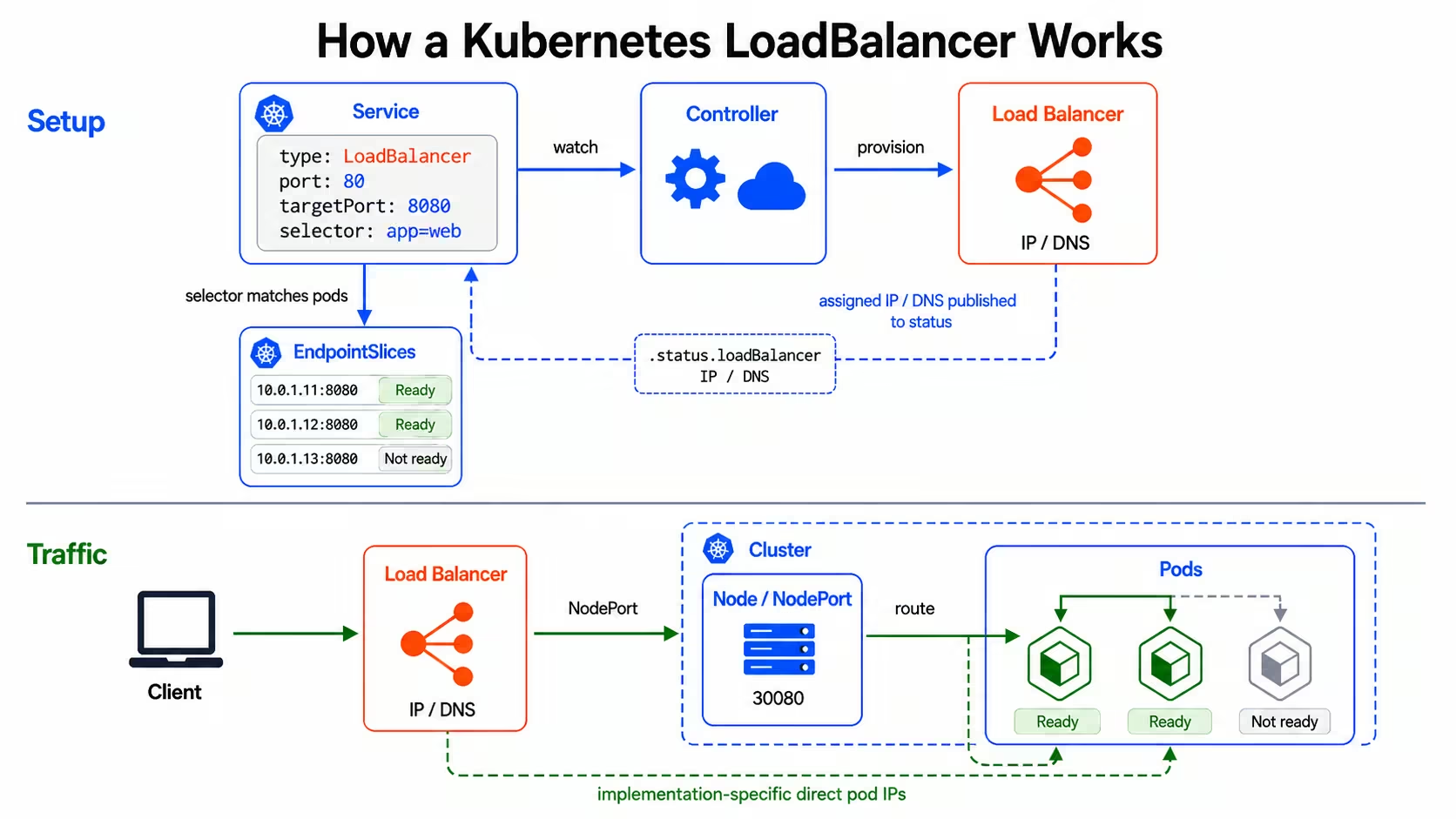
The request path looks like this:
- Kubernetes creates the Service object: A `type: LoadBalancer` Service defines the port that should receive traffic, the target port on the pods, and the selector that identifies the backend pods.
- A controller creates the load balancer resources: For a `LoadBalancer` Service, the actual load balancer is created asynchronously. The controller reads the Service and asks the cloud provider or load balancer implementation to create the required network resources. After provisioning finishes, Kubernetes publishes the assigned IP address or DNS name in `.status.loadBalancer`.
- EndpointSlices track the backend pods: Kubernetes creates EndpointSlices for Services with selectors. These EndpointSlices contain the matching backend IP addresses, ports, and readiness conditions. Controllers and the cluster data plane use that information when routing Service traffic to ready pods.
- The load balancer sends traffic toward the cluster: Client traffic first reaches the load balancer's address. From there, the load balancer sends the request to a node or directly to a pod target, depending on the implementation. Many implementations use a NodePort behind the LoadBalancer Service, while others can route directly to pod IPs.
- The request reaches a ready pod: If traffic enters through a node, `kube-proxy` or the cluster networking layer uses Service and EndpointSlice data to forward the request to a ready backend pod. If the implementation routes directly to pod IPs, the load balancer can send traffic to pod targets without the NodePort hop.
Client requests reach the application only when the load balancer, Service selector, EndpointSlices, health checks, and cluster forwarding rules identify the same ready backends.
Types of Kubernetes LoadBalancers
Kubernetes LoadBalancers are usually grouped by exposure model and implementation. External and internal LoadBalancers define where the Service address is reachable from, while cloud-provider LoadBalancers describe the infrastructure that creates and manages that address.
External LoadBalancers
An external LoadBalancer publishes an Internet Protocol (IP) address or Domain Name System (DNS) name that clients outside the private network can reach. Public users, partner systems, and external services connect through that address when they need direct access to the Kubernetes Service.
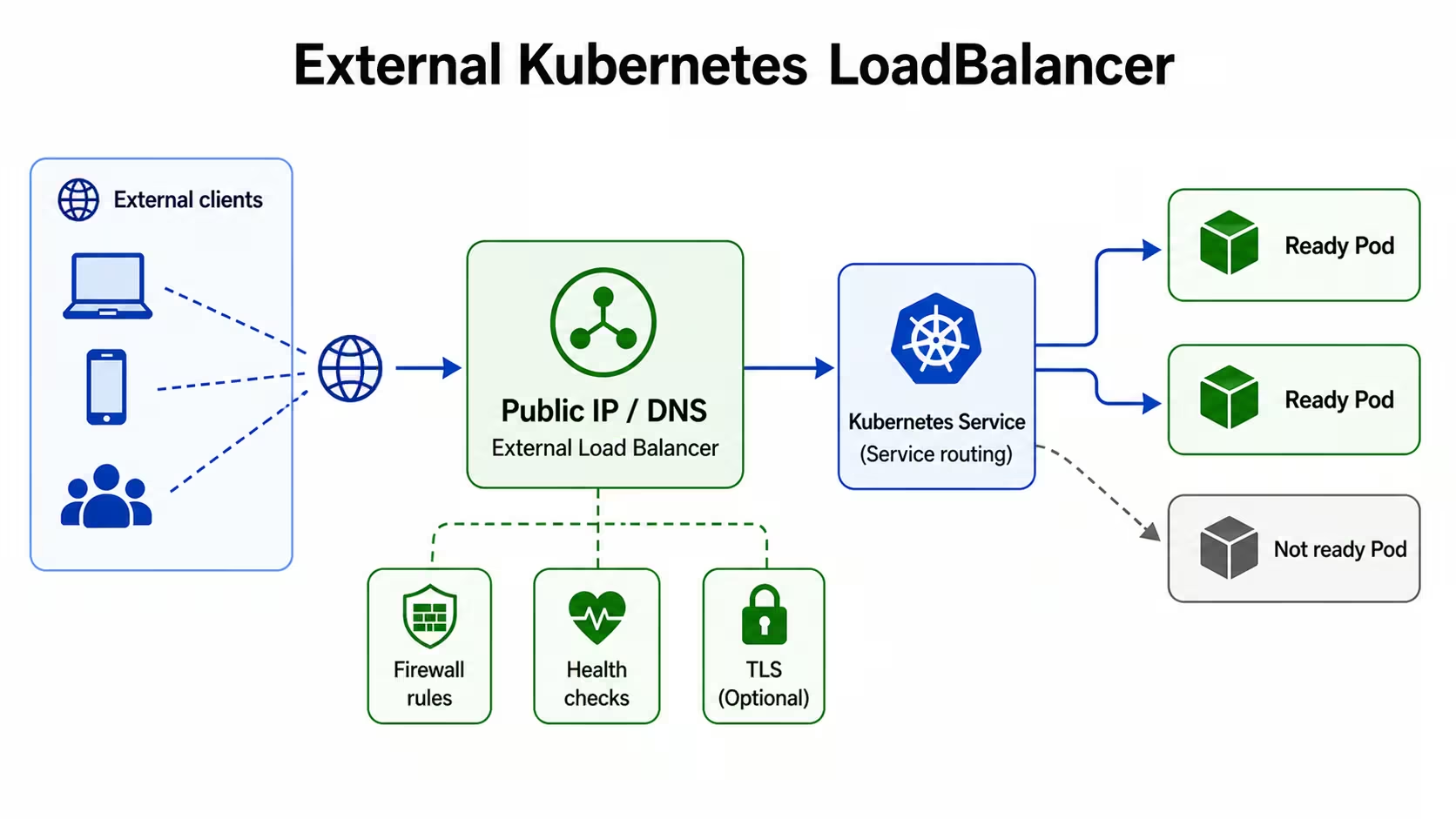
Because that address can receive traffic from outside the private network, the setup needs network controls. Firewall rules limit source addresses, health checks decide which backend targets receive traffic, and Transport Layer Security (TLS) settings control whether encrypted traffic ends at the load balancer or continues to the application.
Internal LoadBalancers
An internal LoadBalancer publishes a private IP address for the Service. Clients reach that address through an approved private network path, such as a Virtual Private Cloud (VPC), Virtual Network (VNet), peered network, Virtual Private Network (VPN), or connected cluster.
.jpg)
Because the address stays private, the Service is not directly exposed to public internet traffic. The private IP address must belong to the correct subnet, firewall rules must allow the intended clients, and health checks must reach the backend targets.
Cloud-Provider LoadBalancers
Cloud-provider LoadBalancers are the infrastructure resources that managed Kubernetes platforms create for `type: LoadBalancer` Services. Kubernetes defines the Service request, but the cloud provider creates the load balancer, assigns the address, configures health checks, and connects the load balancer to the Service backends.
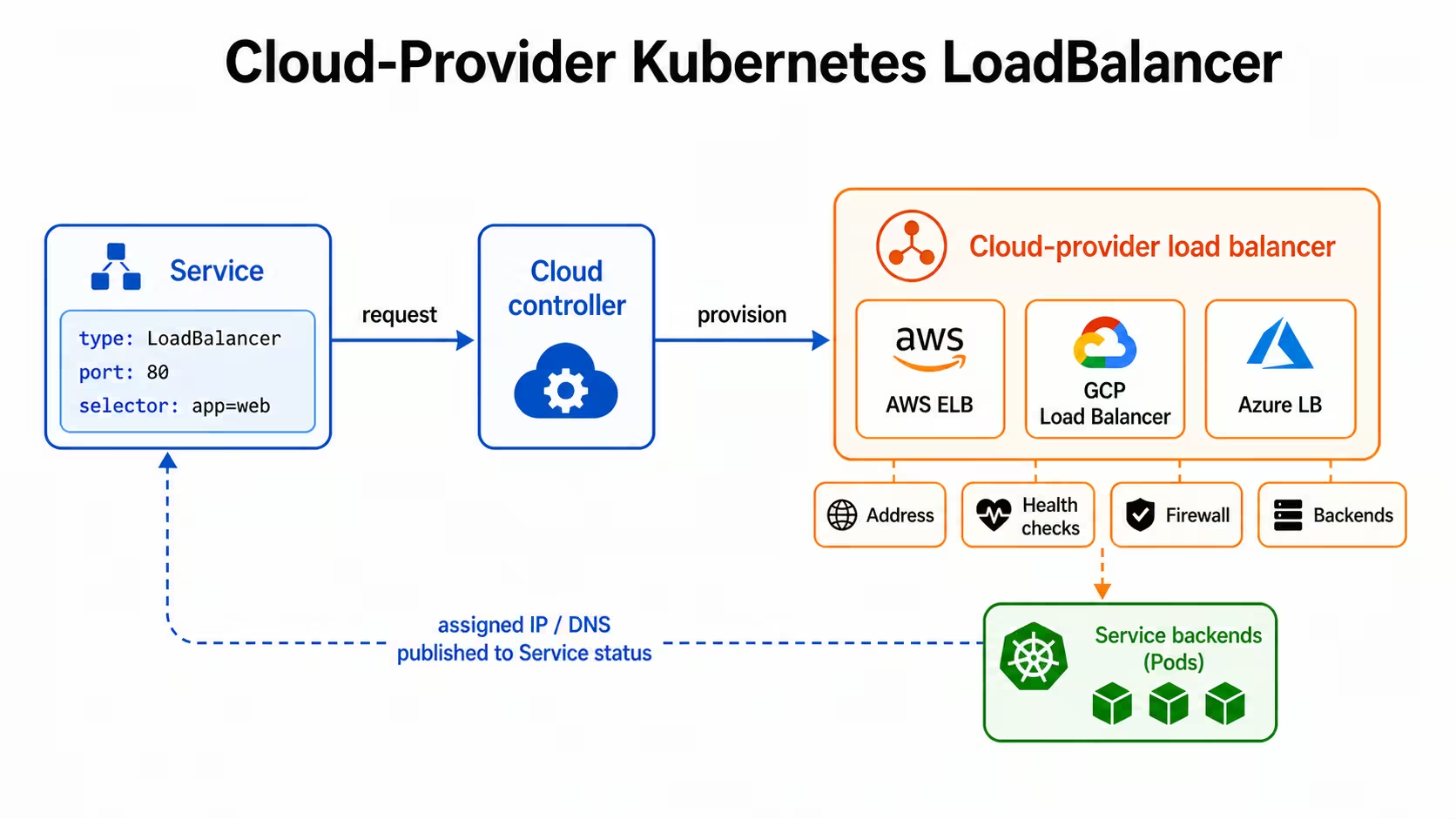
The underlying resource depends on the provider. Amazon Web Services (AWS) uses Elastic Load Balancing (ELB) resources, Google Cloud Platform (GCP) uses Google Cloud load balancing resources for Google Kubernetes Engine (GKE), and Microsoft Azure uses Azure Load Balancer (Azure LB) for Azure Kubernetes Service (AKS). These provider resources affect address allocation, health checks, firewall rules, source IP handling, annotations, and cost.
Common Use Cases for Kubernetes LoadBalancer
A Kubernetes LoadBalancer is beneficial when an application needs a dedicated endpoint for network traffic. These are the main use cases:
- Public APIs: APIs often need one stable address for users, mobile apps, or partner systems. A LoadBalancer Service gives the API its own endpoint while Kubernetes keeps requests tied to ready backend pods.
- Private services outside the cluster: Some applications run in Kubernetes but serve clients outside the cluster, such as virtual machines, internal tools, or workloads in another cluster. An internal load balancer gives those clients a private address without exposing the Service to public internet traffic.
- TCP and UDP applications: Ingress mainly handles HTTP and HTTPS traffic, so it is not designed for direct TCP or UDP access. A Kubernetes LoadBalancer exposes the Service at the network layer, which makes it useful for message brokers, game servers, and streaming services.
- Webhook receivers: External systems often need to send events to a fixed endpoint. A LoadBalancer Service can expose the webhook receiver directly while health checks keep traffic away from unavailable backends.
- Dedicated service endpoints: Some applications should not share an Ingress controller with multiple services. A customer-facing API, tenant-specific service, or admin endpoint may need separate firewall rules, health checks, source restrictions, or cloud provider settings. A dedicated load balancer service keeps those controls attached to one Service.
Troubleshooting Kubernetes LoadBalancer Not Working
A Kubernetes LoadBalancer can fail even when the Service exists, and the manifest looks correct. The problem usually comes from one of four places: the Service configuration, the cloud provider integration, the node and network path, or the application path. Check Kubernetes state first, then move outward to the provider and network layer.
Validate Service Configuration
Start with the Service because it defines the ports, selector, traffic policy, and annotations that the load balancer controller reads. A wrong selector, incorrect targetPort, missing required annotation, or unsupported Service annotation can create a load balancer with no usable backends.
Check that the Service type is `LoadBalancer`, the selector matches the intended pods, and the Service `port` and `targetPort` point to the port your application actually listens on.
If EndpointSlices show no ready endpoints, fix pod labels, readiness probes, or application startup before changing the load balancer configuration.
Check Cloud Provider Integrations
If the Service stays in Pending, Kubernetes has created the Service object, but the cloud provider has not assigned a load balancer address. This can happen when the cluster lacks the right controller, the controller lacks permissions, the requested subnet has no available addresses, or the Service contains invalid or unsupported Service annotations.
Review the cloud provider requirements for the cluster. On AWS, subnet tags, controller permissions, target type, and security group rules can affect provisioning. On GKE, annotations control internal access, static addresses, and load balancer behavior. On AKS, annotations can control internal load balancers, subnet selection, and health probes. Provider events and controller logs often show the reason when provisioning fails.
Inspect Node Health and Network Paths
A load balancer can have an address and still fail to route network traffic if the nodes or network path are unhealthy. Check whether the nodes are ready, whether pods run on the expected nodes, and whether firewall rules allow traffic from the load balancer to the backend targets.
`kubectl top nodes` requires metrics-server, so use it as a capacity check rather than a required LoadBalancer test. Node placement also matters when the load balancer sends traffic to specific nodes. If pods run in only one zone or on only a few nodes, some targets may pass health checks while others fail. Match pod scheduling, readiness probes, and load balancer health checks so the provider sends traffic only to nodes or pods that can reach the application.
Review Events, Logs, and Connection Failures
Use events and logs to connect the symptom to the failing layer. `kubectl describe svc` can show provisioning errors, invalid annotations, health check details, or repeated controller updates. Controller logs show provider API failures, permission errors, subnet problems, or rejected load balancer settings.
Adjust the namespace and label selector for your cloud controller manager or external load balancer controller. Then test the application path directly. A failed request from the load balancer address can point to provider routing, but a failed request to the pod or Service can point to the application, readiness probe, or Service selector. Use the evidence in order: Service state, EndpointSlices, provider events, node health, and application logs.
Best Practices for Kubernetes LoadBalancer Deployment
A production Kubernetes LoadBalancer deployment should make the Service configuration, provider settings, health checks, and backend placement explicit. The table below shows the main deployment decisions and why each one affects reliability.
These decisions reduce ambiguity in production. When the Service manifest, provider settings, health checks, and pod placement are defined together, load-balancing behavior is easier to predict during rollouts, scaling events, and infrastructure changes.
Observability for Kubernetes LoadBalancer Traffic
Observability for Kubernetes LoadBalancer traffic has to cover both the provider layer and the Kubernetes layer. Provider metrics show whether the load balancer receives network traffic and reaches its targets. Kubernetes telemetry shows whether the Service, EndpointSlices, nodes, and pods can process that traffic after it enters the cluster.
Track Load Balancer Health and Traffic
Start with the metrics your provider exposes, such as connection count, bytes in and out, target health, and health check failures. For HTTP-aware load balancers, also track request rate, response latency, and response codes.
These signals show whether clients can reach the load balancer and whether the provider can reach the backend targets. If traffic reaches the load balancer but target health drops, the next check should be Kubernetes state, not DNS or client access.
Attach Kubernetes Context to Metrics and Logs
Provider metrics become more useful when they include Kubernetes context. Keep Service metadata, such as namespace, Service name, labels, and annotations attached to telemetry where possible. Add workload context such as pod name, node name, and deployment version so each signal points to the affected backend.
That context helps connect traffic changes to cluster changes. A drop in healthy targets may follow a rollout, a node drain, a readiness probe failure, or a Service annotation change. Without that context, the load balancer shows the symptom but not the Kubernetes object involved.
Watch EndpointSlices and Pod Readiness
EndpointSlices show the backend IP addresses, ports, and readiness conditions available to a Service. Pod readiness shows whether each backend should receive traffic. Track both because a load balancer service can have an assigned address while the backend list is empty, stale, or smaller than expected.
This matters during deployments and scaling events. If new pods are not ready, the load balancer may have fewer valid targets. If a selector change removes pods from the Service, client requests can fail even though the load balancer address still exists.
Use Logs and Traces to Confirm the Application Path
Metrics show that traffic changed, but logs and traces show what happened after requests reached the application. Use application logs to check rejected requests, dependency errors, and readiness failures. Use traces to confirm whether requests reached the expected service and where latency increased.
This separates load balancer problems from backend problems. If traces show that requests reached the pod and failed during a database call, the load balancer is not the root cause. If failed requests produce no application logs or traces, traffic may be failing before it reaches the workload.
Alert on Behavior That Affects Users
Useful alerts should cover the full request path. Alert on unhealthy targets, failed health checks, high latency, missing ready endpoints, pod restart spikes, node readiness changes, and, for HTTP services, increased 5xx responses.
LoadBalancer observability should connect provider metrics with Kubernetes events, EndpointSlices, pod readiness, logs, and traces. That connection shows whether network traffic stops at the load balancer, the node path, the Service backend list, or the application itself.
Cost Optimization for Kubernetes LoadBalancers
A Kubernetes LoadBalancer can add cost even when the application behind it is small. Use these strategies to reduce cost without changing the access model the Service needs.
- Share HTTP traffic when possible: If multiple services expose HTTP or HTTPS traffic, route them through Ingress instead of creating a separate LoadBalancer Service for each application. One shared routing layer can reduce duplicate load balancers, health checks, firewall rules, and static addresses.
- Keep dedicated LoadBalancers for services that need them: Some workloads need their own load balancer service because they use TCP, UDP, separate access rules, or a separate failure boundary. In those cases, the extra cost supports a clear networking requirement.
- Watch cross-zone traffic: Poor pod placement can make requests cross zones before they reach ready backend pods. That can increase latency and may add data transfer cost, depending on the provider and load balancer configuration. Spread replicas across zones so traffic can stay closer to available backends.
- Delete unused LoadBalancer Services: Test environments, preview deployments, old Services, and unused static addresses can keep provider resources active after the application no longer needs them. Add owner, environment, and expiry labels so teams can find and remove stale LoadBalancer Services and related provider resources.
- Use static addresses only when the Service needs them: Static IP addresses help when partners, firewall rules, or DNS records depend on a fixed endpoint. If the application does not need a fixed address, use a provider-assigned address to reduce configuration work and avoid extra address management.
Do not replace production LoadBalancers with `NodePort` only to cut costs. It may reduce direct load balancer spend, but it adds work around node exposure, firewall rules, DNS, monitoring, and security. Choose the exposure method that meets the application’s requirements with the fewest duplicated resources.
Security Considerations for Kubernetes LoadBalancer
A LoadBalancer Service creates a network entry point, so the main security questions are: who can reach that address, and which traffic the backend should accept.
- Restrict allowed sources: Use spec.loadBalancerSourceRanges where supported, or provider-specific source range settings to limit which client IP ranges can reach the load balancer. This is especially important for external LoadBalancers because the endpoint may be reachable from outside the private network.
- Use internal LoadBalancers for private workloads: Admin APIs, internal platform services, and private application endpoints should not use public load balancer addresses unless public access is required. An internal LoadBalancer keeps access on private network paths such as a VPC, VNet, peered network, or VPN.
- Define where TLS terminates: Decide whether Transport Layer Security (TLS) ends at the load balancer or continues to the application. If TLS ends at the load balancer, configure certificates, listener ports, and backend protocol settings through provider settings.
- Preserve source IP only when needed: Some security controls depend on the original client IP, including allowlists, audit logs, and rate limits. Kubernetes can preserve the client source IP with externalTrafficPolicy: Local, but that setting changes how traffic is distributed because nodes without local ready pods cannot serve that traffic.
- Apply NetworkPolicies inside the cluster: Firewall rules control access to the load balancer, but they do not replace pod-level traffic controls. Use NetworkPolicies to define which pods or endpoints can communicate with the workload after traffic enters the cluster. NetworkPolicy enforcement depends on a network plugin that supports it.
- Keep security settings declarative: Store load balancer annotations, source ranges, TLS settings, and internal or external access settings in manifests, Helm values, or Kustomize patches. Manual changes in the cloud console can create drift between Kubernetes configuration and provider behavior.
The endpoint should accept traffic only from approved sources, terminate or pass TLS in the expected place, preserve source IP only when the application needs it, and restrict pod access after traffic reaches the cluster.
Alternatives to Kubernetes LoadBalancer
A LoadBalancer Service is useful when an application needs its own network endpoint, but other Kubernetes exposure methods may work better when traffic stays inside the cluster, uses shared HTTP routing, or depends on infrastructure outside Kubernetes.
Choose the alternative based on where clients run and how traffic should be routed.
How groundcover Improves Kubernetes LoadBalancer Reliability
Kubernetes LoadBalancer reliability depends on whether traffic reaches the right backend and whether the backend can handle the request. groundcover helps you verify that path from inside the cluster by tying service traffic, Kubernetes events, logs, traces, and resource signals to the workloads behind the LoadBalancer Service.
Uses eBPF to Verify Backend Traffic
groundcover uses its eBPF sensor, Flora, as a DaemonSet in your Kubernetes cluster to inspect packets that services send and receive. For a LoadBalancer Service, that helps you answer the first reliability question: did traffic reach the backend workload? If groundcover captures traces, latency, errors, or dependency calls for that workload, the issue is likely inside the application path. If no matching backend traffic appears, you can check the load balancer target, Service selector, EndpointSlices, health checks, node path, or firewall rules next.
Correlates Traffic Failures With Kubernetes Changes
LoadBalancer failures often follow Kubernetes changes such as rollouts, pod restarts, readiness failures, node drains, or Service annotation updates. In groundcover, you can inspect Kubernetes events, traces, logs, metadata, and workload relationships around the same issue window. That helps you connect a traffic failure to a deployment, pod lifecycle change, node problem, or Service configuration change instead of treating the load balancer as the only suspect.
Detects Problems Before Users Report Them
groundcover Monitors can alert on signals from metrics, logs, traces, and Kubernetes events. For Kubernetes LoadBalancer reliability, you can track error spikes, latency increases, pod restarts, readiness probe failures, and backend health changes before users report a broken endpoint. This gives you an early warning when the LoadBalancer still has an address but traffic is no longer reliably reaching healthy pods.
Maps Dependencies Behind the Exposed Service
A LoadBalancer exposes one Service, but that Service may call other workloads, databases, queues, or external APIs before returning a response. groundcover’s issue map helps you inspect workload interactions related to the active issue, so you can see whether the exposed Service is failing by itself or waiting on another dependency. That matters when users report slow LoadBalancer traffic, but the delay starts after the request reaches the backend pod.
Narrows the Fault Domain Faster
A LoadBalancer incident can involve the provider target, Service backend list, node path, application code, or downstream dependency. groundcover narrows that fault domain by keeping traffic evidence, Kubernetes events, logs, traces, resource metrics, and service relationships in one investigation path. Instead of checking each layer separately, you can move from the affected workload to the related signals and confirm where the request stopped, slowed down, or failed.
Conclusion
A Kubernetes LoadBalancer gives an application a stable endpoint, but production reliability depends on what happens after the endpoint receives traffic. Requests still need valid targets, passing health checks, reachable nodes, and ready backend pods before users can reach the application.
That is why LoadBalancer setup should account for routing behavior, provider settings, observability, cost, and security from the start. groundcover increases reliability by helping you see whether traffic reached the workload, what changed in Kubernetes, and where requests stopped, slowed down, or failed.














.svg)