Topology Aware Routing: Key Concepts, Challenges & Best Practices



Key Takeaways
- Topology aware routing keeps Kubernetes traffic within the same availability zone to reduce latency and cross-zone transfer costs.
- It only works reliably when pods are evenly distributed across zones; otherwise Kubernetes falls back to standard routing.
- The feature improves efficiency, but it does not replace failover or multi-zone resilience strategies.
- Continuous monitoring is essential because topology hints can disappear without obvious signs, eliminating the expected benefits.
Modern cloud-native applications rarely live in a single data center. As Kubernetes deployments spread across availability zones, the cost of routing every service call across zone boundaries adds up fast. According to AWS pricing data, cross-AZ data transfer is charged at $0.01 per GB in each direction, meaning a round-trip costs $0.02 per GB - small per request, but enormous at scale.
Topology aware routing keeps traffic local to the zone where it originates, cutting latency, lowering transfer costs, and reducing reliance on cross-zone links that can become bottlenecks. This guide covers how topology aware routing works, where it helps, and what best practices look like in production.
What Is Topology Aware Routing in Kubernetes
Topology aware routing is a Kubernetes feature that influences how traffic is distributed across service endpoints based on the physical or logical topology of your cluster, primarily availability zones. Instead of load-balancing requests blindly across all healthy pods, it routes a request to an endpoint in the same zone as the client making it.
The feature was introduced as alpha in Kubernetes 1.21 and has evolved through several iterations. In Kubernetes 1.27 and later, it is controlled through the service.kubernetes.io/topology-mode annotation, with Auto being the main supported value. Earlier versions used the topologyKeys field, which is now deprecated.
At its core, topology aware routing relies on EndpointSlice hints, metadata attached to each endpoint telling kube-proxy which zone that endpoint belongs to, and which zones it should serve.
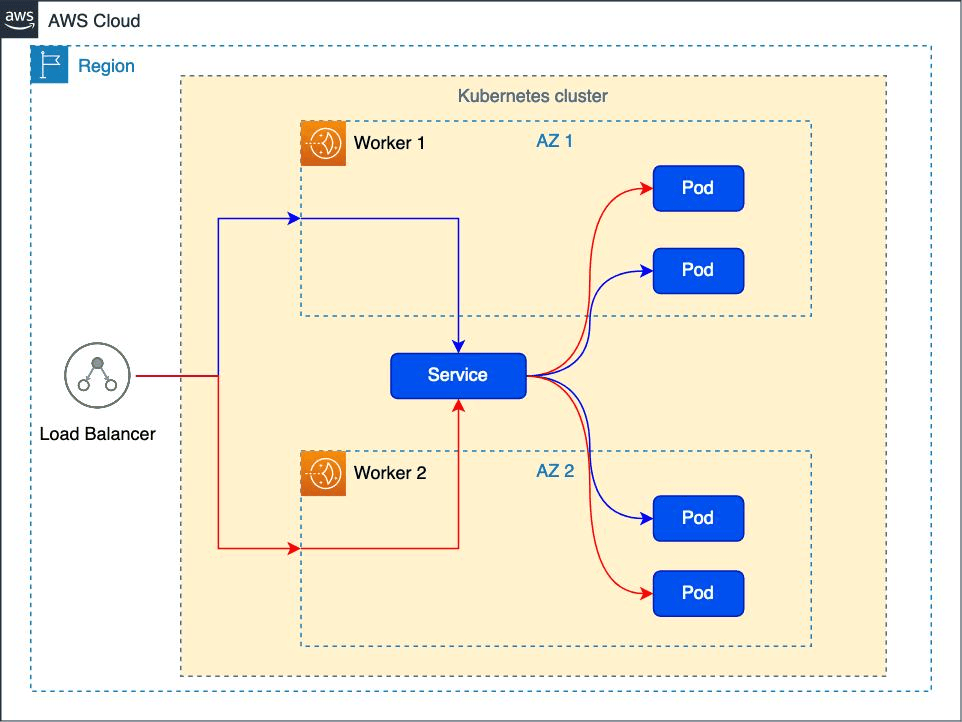
Why Topology Aware Routing Matters for Cost, Latency, and Reliability
The business case for topology aware routing comes down to three things:
| Concern | Without Topology Aware Routing | With Topology Aware Routing |
|---|---|---|
| Data Transfer Cost | Every cross-zone call incurs egress charges | Most traffic stays in-zone; charges drop significantly |
| Latency | Cross-zone round trips add 1–5ms per hop | In-zone calls are typically sub-millisecond |
| Blast Radius | A zone failure can cascade via cross-zone dependencies | Services degrade more gracefully per zone |
For a service handling millions of requests per day, even a modest reduction in cross-zone traffic can translate into thousands of dollars per month in saved egress costs. Lower latency also improves tail percentiles (p95, p99) in ways that show up directly in user experience metrics.
That said, topology aware routing is not a reliability guarantee. If a zone becomes unhealthy and routing is locked to local endpoints, you may stop serving traffic rather than failing over. This trade-off between cost and performance on one side, and availability on the other, is the central tension the feature asks you to manage.
How Topology Aware Routing Works in Kubernetes
When a Service has topology-mode: Auto set, the EndpointSlice controller calculates an allocation of endpoints across zones. It inspects node labels (specifically topology.kubernetes.io/zone) to understand which pods are running in which zones, then annotates each endpoint in the EndpointSlice with a hints field.
Here's a simplified example of what a hinted EndpointSlice looks like:
kube-proxy on each node reads these hints and filters the set of endpoints it will route traffic to. A node in us-east-1a will only route to endpoints hinted for us-east-1a. If no hints are present, because the controller decided the conditions weren't right, kube-proxy falls back to routing across all endpoints.
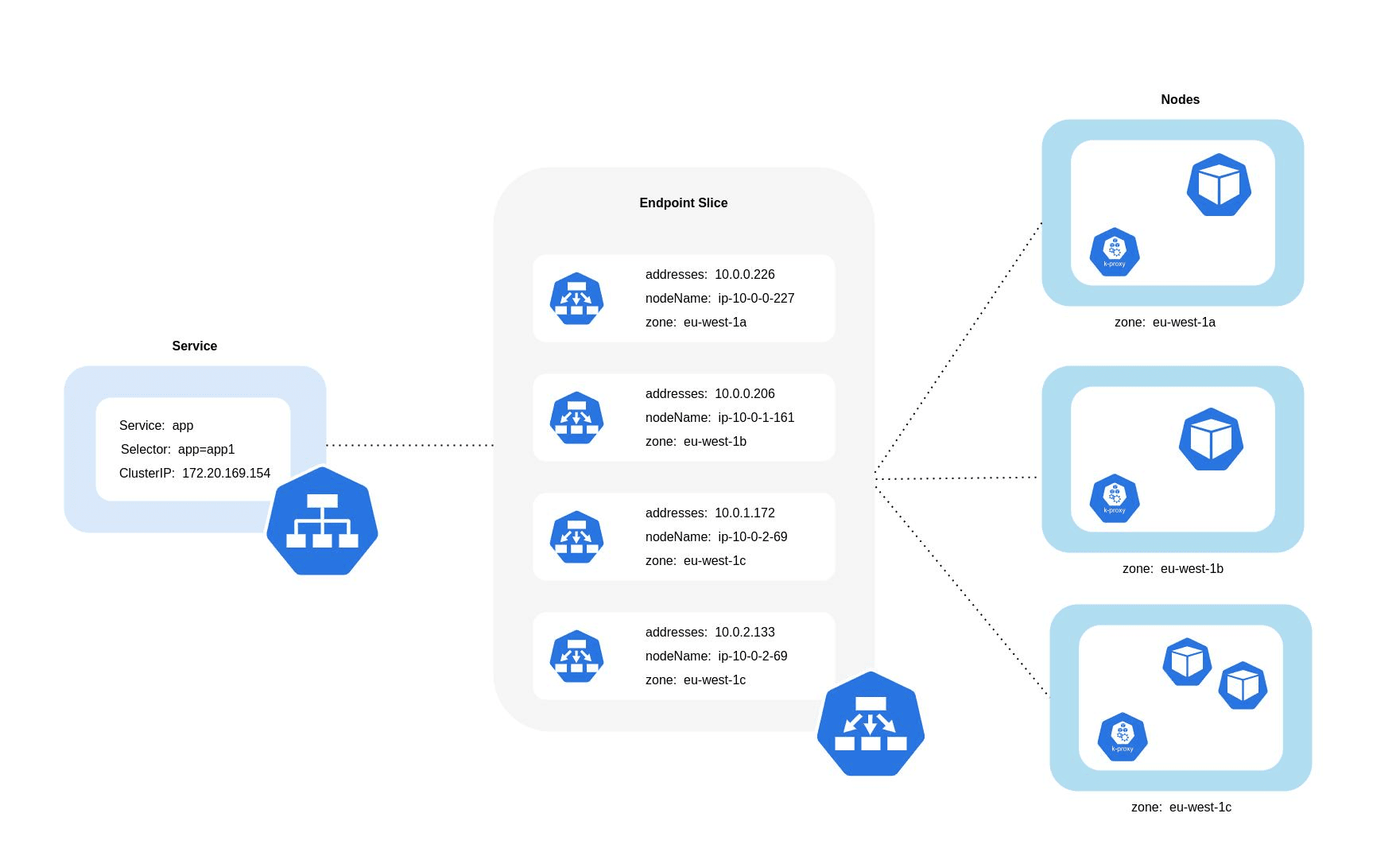
Key Components of Topology Aware Routing
EndpointSlice Controller and Topology Hints
The EndpointSlice controller is the part of the Kubernetes control plane that owns hint generation. It runs as part of kube-controller-manager and watches Service and EndpointSlice objects. When topology-mode: Auto is set, the controller:
- Counts the number of ready endpoints per zone
- Calculates the proportion of traffic each zone is expected to receive (based on node count per zone, proportionally weighted)
- Assigns forZones hints to endpoints to match those proportions as closely as possible
Critically, the controller will not assign hints if the endpoint distribution is too uneven. If the endpoint distribution across zones is too uneven relative to node-based traffic share expectations, the controller removes all hints, causing kube-proxy to fall back to cluster-wide load balancing. This is a safety mechanism, not a bug.
kube-proxy and Traffic Distribution
kube-proxy on each node reads EndpointSlices and programs iptables or IPVS rules accordingly. When hints are present, it narrows its backend pool to endpoints hinted for the local zone. When hints are absent, it uses all ready endpoints.
One practical implication: kube-proxy's behavior is node-local. There is no global coordination between nodes, and each node independently decides based on the EndpointSlice data it receives.
Service Traffic Policies and Zone Awareness
Kubernetes also supports externalTrafficPolicy: Local and internalTrafficPolicy: Local, which are related but distinct. These policies are explicit, and they hard-fail if no local endpoint exists rather than falling back gracefully. Topology aware routing via hints is softer: it prefers local but falls back to cluster-wide routing when local endpoints aren't available or proportional enough.
The two can be combined, but using internalTrafficPolicy: Local alongside topology hints can cause traffic to be dropped rather than spilled to other zones when local endpoints are unhealthy.
When Topology Aware Routing Works Best in Production
Topology aware routing works best when these conditions are true:
- Your Cluster Spans Multiple Availability Zones: If everything is in one zone, there's nothing to optimize.
- Pods Are Distributed Proportionally Across Zones: The feature depends on balanced endpoint distribution. Uneven distributions disable hints automatically.
- Traffic Volume Is High Enough: The cost savings only materialize when cross-zone data transfer is significant. Low-traffic services gain little.
- You're Running Kubernetes 1.27 or Later: Earlier versions used a different (now deprecated) API.
- Zone Labels Are Set On All Nodes: topology.kubernetes.io/zone must be present for the controller to function.
Conversely, topology aware routing tends to cause issues when pods are deployed without zone-spreading constraints, when services have a small total number of endpoints (e.g., fewer than 3), or when you need strict failover guarantees across zones.
How to Enable Topology Aware Routing in Kubernetes
Prerequisites for Topology Aware Routing
Before enabling this feature, verify the following:
- Kubernetes version 1.27 or later
- EndpointSlice API enabled (default since 1.21)
- Nodes labeled with topology.kubernetes.io/zone
- kube-proxy running (not replaced by a custom dataplane that ignores hints)
Verify zone labels on your nodes:
Configuring Services with Topology Hints
Add the annotation to any Service where you want topology awareness:
Distributing Pods Across Availability Zones
Hints are only generated when endpoints are proportionally distributed. Use topologySpreadConstraints to enforce this:
Setting maxSkew: 1 ensures no zone has more than one extra pod compared to others. DoNotSchedule prevents scheduling when the constraint can't be satisfied, keeping your distribution tight.
Validating and Monitoring Traffic Distribution
Once configured, check whether hints are actually being applied:
If the hints field is empty or absent, the controller has disabled them, usually because endpoint distribution is too skewed. Check the controller manager logs for hint-related events.
Common Challenges in Topology Aware Routing Implementations
Getting topology aware routing to actually work as expected is harder than the documentation implies. Here are the failure modes teams run into most often:
- Hints Silently Disappear: The EndpointSlice controller removes hints when endpoint distribution doesn't meet its internal threshold. This happens without any obvious alert, and kube-proxy silently falls back to cluster-wide routing. You may think you're saving cross-zone costs when you're not.
- Imbalanced Deployments: If you're using Deployment without zone-spreading constraints, Kubernetes may schedule most pods in one zone, especially in clusters where one zone has more nodes with available capacity. This immediately breaks the proportionality requirement for hints.
- Scale-Down Events: When HPA scales a service down during low-traffic periods, you may drop below the minimum endpoint threshold in one zone. Hints are dropped, traffic spreads cluster-wide, and your cost assumptions break.
- Node Labeling Gaps: If even one node is missing the topology.kubernetes.io/zone label, pods on that node have no zone affinity and can disrupt hint calculations.
- Interaction with Service Meshes: Some service mesh implementations intercept traffic before kube-proxy rules apply, meaning topology hints may be ignored entirely. Always verify behavior at the mesh level.
Key Metrics and Signals to Monitor Topology Aware Routing
Monitoring topology aware routing requires looking beyond standard service health. These are the signals that matter:
| Metric | What It Tells You |
|---|---|
| cross_zone_traffic_bytes (custom) | Whether traffic is actually staying in-zone |
| endpointslice_controller_endpoints_desired | How many endpoints the controller expects per zone |
| kube-proxy logs for hint fallback | Whether hints are being applied or ignored |
| Pod distribution per zone | Whether topologySpreadConstraints are working |
| p99 latency per zone | Whether in-zone routing is actually reducing tail latency |
Cloud provider network flow logs (VPC Flow Logs on AWS, Network Intelligence on GCP) can show you actual cross-zone bytes. Correlating this with deployment events lets you catch hint failures quickly.
Constraints and Limitations of Topology Aware Routing
It's worth being direct about what topology aware routing cannot do:
- It does not guarantee traffic stays in-zone. Hints are advisory, not mandatory. If proportionality thresholds aren't met, fallback occurs.
- It does not work with externalTrafficPolicy: Cluster when you need strict zone isolation.
- It does not replace a proper multi-zone resilience strategy. If a zone fails entirely, you need circuit breakers, retries, and failover logic at the application layer.
- It only applies to Services with selectors. Headless services and ExternalName services are not supported.
- While Kubernetes has no fixed minimum, maintaining around 3 pods per zone often helps keep topology hints stable during scaling events.
Best Practices for Topology Aware Routing in Kubernetes
Following these practices will keep you out of the most common failure modes:
- Always pair with topologySpreadConstraints. Don't enable topology aware routing without enforcing pod distribution. The two features are designed to work together.
- Set minAvailable in PodDisruptionBudgets per zone. This prevents node drain operations from collapsing endpoint counts in a single zone below the hint threshold.
- Monitor the hint status continuously. Don't assume hints are applied because you set the annotation; build a check into your observability pipeline.
- Test failover explicitly. Simulate a zone failure in staging and verify traffic re-routes rather than drops. Fallback behavior should be validated, not assumed.
- Avoid combining internalTrafficPolicy: Local with topology hints unless you've fully tested the failure modes.
- Scale with buffer. Ensure your HPA minimum replica count is high enough that a scale-down event in one zone doesn't drop below the hint threshold.
- Document your zone topology. Know which zones your cluster spans, your target pod distribution, and your actual cross-zone traffic baseline before and after enabling the feature.
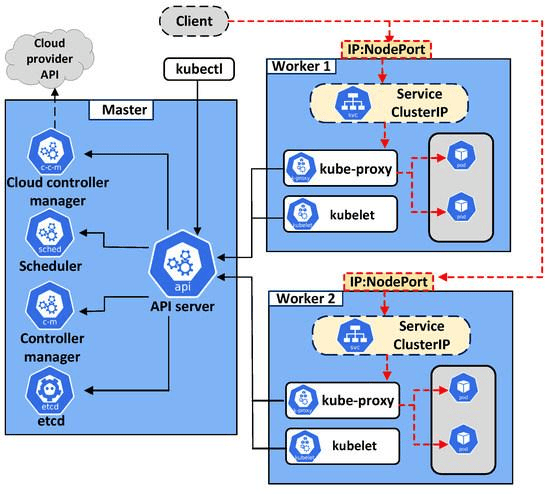
Real-Time Visibility into Topology Aware Routing with groundcover
Understanding whether topology aware routing is actually working requires visibility into your Kubernetes network layer - not just whether services are healthy - but whether traffic is flowing the way your routing strategy intends.
groundcover provides visibility into service communication, infrastructure behavior, and application performance through an eBPF-powered sensor that requires no code changes, no sidecars, and no manual instrumentation. By collecting telemetry directly from the kernel, groundcover helps platform teams understand how traffic moves across services, clusters, and Kubernetes resources in real time. With groundcover, you can:
- Visualize service-to-service communication through service maps and dependency views, making it easier to understand traffic flows and identify unexpected communication patterns across workloads.
- Correlate traffic behavior with Kubernetes events such as deployments, scaling activities, node changes, and EndpointSlice updates, helping teams investigate whether routing behavior changes after infrastructure modifications.
- Investigate latency and performance issues by combining application-level telemetry with infrastructure and network signals, making it easier to determine whether performance degradation is caused by routing behavior, workload placement, or application bottlenecks.
- Monitor resource utilization and cost-related trends across Kubernetes environments, helping platform teams evaluate the operational impact of initiatives designed to reduce unnecessary cross-zone traffic and improve efficiency.
groundcover's BYOC (Bring Your Own Cloud) deployment model allows organizations to run the platform within their own cloud environment (AWS, GCP, or Azure) while maintaining comprehensive visibility across Kubernetes workloads. Teams can get started quickly and gain actionable insights into network flows, service dependencies, and infrastructure behavior without introducing significant operational overhead.
For platform engineering teams managing multi-zone Kubernetes environments, this level of observability provides a practical way to validate that the routing policies, workload placement strategies, and traffic distribution mechanisms are behaving as expected in production. Combined with Kubernetes-native monitoring and troubleshooting capabilities, it helps ensure that topology-aware routing delivers the latency, reliability, and cost benefits it was designed to achieve.
Conclusion
Topology aware routing is a genuinely useful feature for multi-zone Kubernetes deployments, but it requires more than just adding an annotation. It needs balanced pod distribution, careful monitoring, an understanding of its fallback behavior, and integration with your broader resilience strategy.
When it works, it reduces latency and lowers cross-zone data transfer costs at scale. When it silently fails, hints dropped, traffic spreading cluster-wide, you're paying the costs without knowing it. The best approach is to treat topology aware routing as a system that needs continuous observation, not a configuration you set and forget.
FAQs
The only reliable way to validate savings is to measure actual cross-zone network traffic before and after enabling topology aware routing.
- Establish a baseline using VPC Flow Logs, cloud network telemetry, or equivalent provider-level network monitoring.
- Track cross-zone bytes transferred alongside deployment and scaling events.
- Compare traffic patterns during peak and off-peak periods, since HPA scale-downs can disable topology hints.
- Include cross-zone transfer costs in FinOps dashboards rather than assuming the feature is working continuously.
Explore our guide to Kubernetes Cost Optimization.
Topology hints are automatically removed when Kubernetes determines endpoint distribution across zones is too imbalanced to safely keep traffic local.
- Check EndpointSlices directly instead of relying on Service configuration alone.
- Use topologySpreadConstraints to maintain balanced pod placement across zones.
- Verify every node has the topology.kubernetes.io/zone label.
- Watch for HPA scale-down events that reduce endpoint counts in specific zones.
Treat topology aware routing as a performance optimization layer, not a replacement for application-level resilience mechanisms.
- Design retries, circuit breakers, and failover behavior independently of routing preferences.
- Run controlled zone-failure simulations to verify fallback behavior under stress.
- Measure service-level objectives by zone to detect partial degradation before it becomes an outage.
- Avoid assuming local routing guarantees availability during endpoint shortages or infrastructure failures.
Find out how the Circuit Breaker Pattern works.
Autoscaling can unintentionally destabilize topology hints by creating uneven endpoint distribution across zones.
- Set minimum replica counts high enough to maintain healthy zone representation.
- Monitor endpoint counts per zone as a first-class operational metric.
- Review scale-down policies, not just scale-up responsiveness.
- Test low-traffic periods explicitly because routing behavior often changes when clusters shrink.
Explore the best practices for Kubernetes Cluster Autoscaler.
You need workload, service, and infrastructure visibility together to confirm traffic is following intended zone-local paths rather than silently reverting to cluster-wide routing.
- Correlate EndpointSlice updates with changes in service-to-service communication patterns.
- Monitor deployment events, node changes, and scaling activities alongside network behavior.
- Investigate p95 and p99 latency by zone instead of relying only on aggregate service metrics.
- Use dependency mapping to identify unexpected cross-zone communication paths that increase cost and latency.