

PVC Stuck Terminating Explained: Troubleshooting & Prevention



A PVC (PersistentVolumeClaim) stuck in Terminating looks like a small cleanup issue until it blocks follow-on operations. You run a delete, it reports success, and the claim still shows up when you list PVCs because Kubernetes only removes it after cleanup finishes. That one claim can keep a namespace deletion from completing, and it can also block a Helm uninstall, a GitOps prune, or a continuous integration (CI) pipeline cleanup step that deletes temporary namespaces and expects the PVC to disappear.
In this guide, you’ll learn why PVCs get stuck in a terminating state, how Kubernetes handles PVC and PV deletion, how to troubleshoot and fix stuck PVCs without corrupting data, and how to design workloads, storage classes, and GitOps workflows to avoid PVCs getting stuck in the first place.
What “PVC Stuck Terminating” Means in Kubernetes
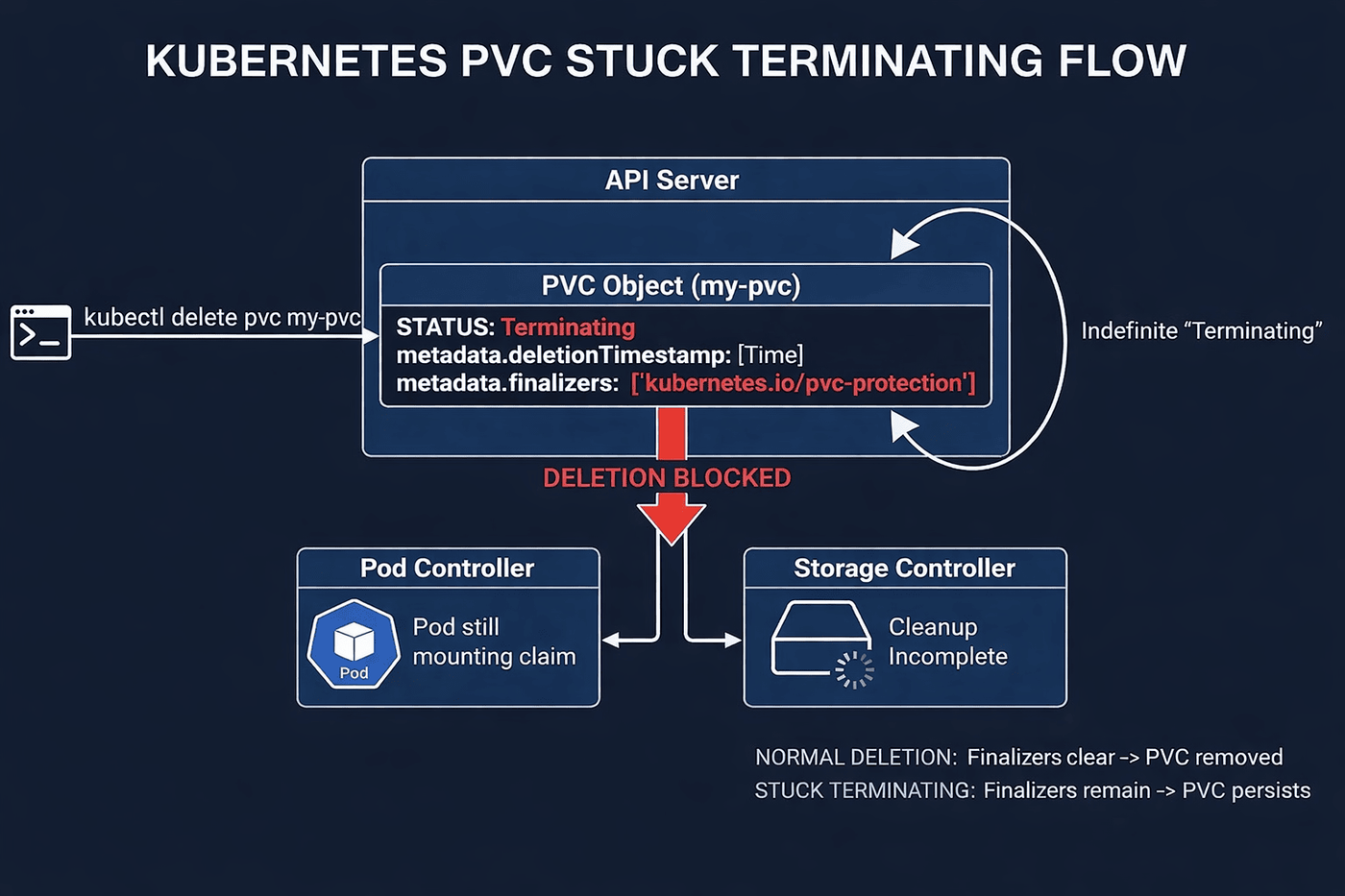
PVC stuck terminating in Kubernetes means the cluster has accepted a delete request for a PersistentVolum
eClaim, but is intentionally delaying removal because cleanup is not complete.
When you delete a PVC, Kubernetes:
- Sets metadata.deletionTimestamp
- Leaves the object in storage
- Waits until all finalizers are removed
As long as metadata.finalizers is non-empty, the PVC remains visible and shows Terminating in kubectl get pvc.
This is expected behavior.
A PVC becomes stuck when deletion never progresses because the condition blocking the finalizer is not resolving.
Typical causes include:
- A Pod still referencing the claim
- A PV cleanup operation still running
- A CSI driver waiting on backend storage deletion
- A stuck detach operation
The Role of Finalizers and Garbage Collection in PVC Deletion
Kubernetes does not delete a PVC in one step. Deletion is controller-driven and happens in stages.
It first marks the object for deletion and then waits for controllers to finish their cleanup. Finalizers control that wait on each PVC or PV, and garbage collection decides what happens to related objects such as Pods, StatefulSets, and namespaces.
How Kubernetes Uses Finalizers for PVC and PV Deletion
Finalizers are strings in `metadata.finalizers` that tell the API server to block deletion until specific work is done. When you delete a PVC, the API server sets `metadata.deletionTimestamp` but keeps the PVC in etcd and in `kubectl get pvc` output while that list is non-empty. Each controller that owns a finalizer watches for the timestamp, runs its pre-delete logic, and then removes its own entry.
For storage, the StorageObjectInUseProtection admission plugin adds `kubernetes.io/pvc-protection` and `kubernetes.io/pv-protection` when you create PVCs and PVs. The corresponding protection controllers remove those finalizers once Kubernetes no longer considers the objects in active use. A PVC is in active use as long as a Pod object still references it. CSI drivers can also add their own PV finalizers so the external provisioner can safely delete or release backend volumes according to the reclaim policy before the PV object disappears.
How Garbage Collection Handles PVC and PV Dependents
Garbage collection works on relationships, not on cleanup. It reads `ownerReferences` to decide what to do when an owner is deleted, using either background deletion (delete the owner, then asynchronously delete its dependents) or foreground deletion (hold the owner with a special finalizer until its dependents with `blockOwnerDeletion=true` are gone). Deleting a namespace, StatefulSet, or other owner can therefore trigger deletion of Pods and PVCs through garbage collection.
However, garbage collection never overrides finalizers on PVCs or PVs. If storage or CSI finalizers are still present, those objects remain in Terminating until the responsible controllers clear their finalizers. That is the condition behind most “PVC stuck terminating” cases.
Common Causes of PVC Stuck Terminating
Most PVC stuck terminating incidents trace back to common causes across the pod lifecycle, the PV lifecycle, and the storage controller path. Here are the key ones.
- A Pod still references the PVC (pvc-protection): If any Pod object still lists the claim under its volumes, Kubernetes treats the PVC as in use and keeps it from being deleted.
- A Pod delete is stuck, so the reference never clears: A common example is a node that is NotReady or unreachable, so the kubelet cannot report back to the API server, and the Pod object stays in `Terminating`. A kubelet that cannot unmount a volume on an otherwise healthy node can cause the same result.
- The PersistentVolume is still protected or still bound (pv-protection): The PVC is the claim, but the PV is the backing volume record. If the PV still carries its protection finalizer or still appears bound, the PV side of the lifecycle cannot complete, which can stall cleanup.
- The PV and PVC were deleted out of order: This can happen if someone deletes the PV directly, or during a cascade delete where deleting a higher-level resource triggers Kubernetes to delete related objects afterward. In out-of-order cases, Kubernetes may hold PV deletion to keep reclaim and backend cleanup consistent.
- CSI backend deletion has not completed (provisioner finalizer): With CSI, the cluster also has to delete the real backend volume. While the external-provisioner is still waiting for the driver to finish `DeleteVolume`, a PV finalizer can remain and keep the volume record from disappearing.
- Detach is blocked by a lingering VolumeAttachment: VolumeAttachment is the object Kubernetes uses to track that a volume is attached to a node. If it lingers after a node failure or an incomplete detach, storage cleanup can stall, leaving the PVC or PV in Terminating.
These causes all appear at different points along the same deletion path. Let’s see how Kubernetes handles PVC and PV deletion so you can pinpoint where each delay occurs.
How Kubernetes Handles PVC and PV Deletion
PVC and PV deletion is a controller-driven sequence, not a single API operation. Here are the steps Kubernetes follows to remove a claim and handle the backing volume safely.
Step 1. The API Server Marks the PVC for Deletion
When you delete a PVC, the API server sets `metadata.deletionTimestamp` and keeps the PVC stored as long as `metadata.finalizers` is non-empty. The PVC remains visible until the controllers responsible for those finalizers remove their entries.
Step 2. The Protection Controller Checks for Active Pod References
Kubernetes uses protection finalizers to prevent deletion while a volume is still considered in use. The StorageObjectInUseProtection admission plugin adds `kubernetes.io/pvc-protection` and `kubernetes.io/pv-protection` at creation time, and the corresponding protection controllers remove them when it is safe to do so. A PVC is “in active use” when a Pod object that uses it exists, and the PVC remains in Terminating until that condition is no longer true and the controller drops the finalizer.
Step 3. Kubernetes Evaluates the Reclaim Policy
After the PVC is removed, Kubernetes moves to the PV lifecycle and applies the PV reclaim policy. This is the point where behavior diverges.
Normal Path. PVC Deleted First
The PV transitions from Bound to Released once the claim is gone. With Retain, Kubernetes leaves the PV and backend storage for manual cleanup or recovery. With Delete, Kubernetes proceeds to delete the backend storage and then remove the PV object. For dynamically provisioned volumes, Delete is the default reclaim policy unless the StorageClass is set differently.
Out-Of-Order Path. PV Deleted While the PVC Still Exists
This only matters when the reclaim policy is Delete. With Retain, the backend storage is intentionally kept regardless of deletion order. Out-of-order deletion means a bound PV is deleted before its PVC. Kubernetes addresses the historical “PV object deleted, but backend volume leaked” problem by using `external-provisioner.volume.kubernetes.io/finalizer` to hold PV deletion until the backend volume is deleted, and this out-of-order leak prevention is GA in Kubernetes v1.33.
Step 4. Kubernetes Completes Detach And Node Unmount When the Volume Was Attached
If the volume was attached to a node, cleanup may wait on detach and unmount to complete. For CSI, the external-attacher watches `VolumeAttachment` objects and triggers `ControllerUnpublishVolume` to detach the volume from the node. Kubelet handles the node-side work, including unmount and CSI node operations, so node failure or an unmount that never finishes can leave attachment state lingering and delay later storage cleanup.
Step 5. The External-Provisioner Deletes the Backend Volume for CSI Volumes With Delete Reclaim Policy
For CSI volumes with a Delete reclaim policy, the external-provisioner triggers the driver’s `DeleteVolume` operation. The PV finalizer is cleared only after the backend deletion succeeds, preventing the PV object from disappearing while the storage asset still exists. If `DeleteVolume` cannot complete, the PV can remain pending deletion because the finalizer remains.
This sequence is why the same `Terminating` status can come from different parts of the system. It can be a Pod reference, attachment, or unmount work that did not finish, or a backend deletion that has not completed.
Troubleshooting PVC Stuck Terminating
When troubleshooting a PVC stuck terminating issue, you need to identify which stage of deletion is not completing. To do this, narrow the cause down across pod references, storage reclaim, and node-level attach/unmount state.
Application Or Pod Issues
Start with the PersistentVolumeClaim itself. Confirm it has a `deletionTimestamp`, then capture the finalizers and the bound PV name. This shows whether `kubernetes.io/pvc-protection` is in play and provides the PV to follow.
If the PVC has `kubernetes.io/pvc-protection`, confirm whether any Pod object still references the claim. Kubernetes considers a PVC “in active use” when a Pod object referencing it exists, even if the controller that created the Pod has already been deleted.
If a Pod is stuck in Terminating, correlate it with node health and volume unmount. A common pattern is a node that is NotReady or unreachable, which prevents the kubelet from reporting completion. Another pattern is a reachable node where the kubelet cannot complete the volume unmount. Use the `describe` output and recent events to see which one applies.
Storage Or CSI Problems
Once you have the PV name, shift to the PV lifecycle. Confirm the PV phase, reclaim policy, and PV finalizers. The reclaim policy indicates whether Kubernetes should delete backend storage (Delete) or keep it (Retain). The finalizers indicate whether PV protection or CSI cleanup is still holding deletion.
If the PV is CSI-backed, confirm the CSI driver name and the StorageClass provisioner. This narrows the scope to a specific controller deployment and logs. Many stuck deletion cases with `Delete` reclaim policy involve the external-provisioner waiting for `DeleteVolume` to succeed while a provisioner finalizer remains on the PV.
Then check the CSI controller logs. Use `csi-provisioner` logs for `DeleteVolume` failures and csi-attacher logs for detach and `VolumeAttachment` issues. Namespaces and labels vary by driver, so first find the controller pod.
Node Or Cluster-Level Issues
If pod references are gone and the PV lifecycle still is not progressing, confirm whether the attachment state is lingering. For CSI, Kubernetes tracks attach and detach intent using `VolumeAttachment` objects. The external-attacher watches these objects and triggers `ControllerUnpublishVolume` for detach, while the kubelet completes the node-side operations. If a node is NotReady or the unmount does not complete, the VolumeAttachment can remain and delay storage cleanup.
Then correlate the stuck attachment with the node state. Check for NotReady, unreachable, and storage-related warnings that line up with the time the PVC entered `Terminating`.
Once you know where the issue originates, the next step is to apply the fix that matches the cause.
Step-by-Step Fixes for PVC Stuck Terminating
A PVC stuck terminating issue clears once the condition holding the finalizer is removed. Here are the fixes you should apply based on what you found during troubleshooting is causing the issue.
Remove Remaining Pod References to the PVC
If the PVC is held by `kubernetes.io/pvc-protection` and a Pod still references the claim, remove the remaining Pod objects that use it.
Once those Pod references are gone, Kubernetes can clear the protection finalizer and remove the PVC.
Clear Pods Stuck in Terminating
If the Pod that references the claim never disappears, the PVC delete cannot finish. Confirm the Pod is stuck and identify the node it is on, then force delete it.
After the Pod object is removed, the claim reference drops, and PVC deletion can proceed.
Note:
If the Pod belongs to a StatefulSet, be careful with forced deletion. First, confirm the node is genuinely unreachable before force-deleting. If the pod is still running on the node, force deletion removes the API object, but the process continues, which can cause data corruption.
Resolve Out-of-Order PV And PVC Deletion
If the PV reclaim policy is `Delete` and the PV was deleted while the PVC still existed, delete the PVC so the reclaim path can complete cleanly. With `Retain`, the backend storage is kept regardless of deletion order, and no further action is needed.
Once the PVC is deleted, the external-provisioner can complete backend cleanup and clear the PV finalizer.
Unblock CSI Backend Deletion
If the PV is CSI-backed and stuck pending deletion with provisioner-managed finalizers, check the driver and the external-provisioner’s `DeleteVolume` path.
If detach is also stalled, remove the stale attachment record after confirming it is safe for your driver and backend.
Once the `VolumeAttachment` is removed, the external-attacher can complete the detach, which unblocks the external-provisioner to call DeleteVolume and clear the PV finalizer.
Remove Finalizers As A Last Resort
If a controller is not making progress and you have confirmed that the volume is not in use, remove the finalizers to force deletion and complete. This bypasses controller cleanup, so only do it when backend storage is already deleted, or you have a manual cleanup plan.
Empty output confirms the finalizers cleared and deletion will complete.
Best Practices to Prevent PVC Stuck Terminating
Most PVC-stuck terminating incidents are preventable when you follow the right practices:
- Delete in the right order and avoid manual PV deletes: Delete the workload first so Pods release the claim, then delete the PVC and let Kubernetes reclaim the PV. Avoid deleting a PV while it is still Bound, because that is where out-of-order behavior and stalled cleanup often start.
- Set the reclaim policy intentionally and review StorageClass defaults: The reclaim policy determines whether backend storage is deleted (`Delete`) or retained (`Retain`). Check your StorageClasses and make sure the default matches your retention expectations, especially for dynamically provisioned volumes.
- Scale StatefulSets down before deleting them: StatefulSets do not guarantee pod termination when the StatefulSet is deleted. Scale replicas to 0 first to give pods a cleaner shutdown path, which helps claims detach and reduces the chance that PVC-protection lingers during cleanup.
- Drain nodes before maintenance and avoid abrupt shutdowns: Use node drain so Pods terminate cleanly and volumes unmount. Drain is still better than a hard shutdown, but it does not always guarantee that the attachment state clears quickly for ReadWriteOnce CSI volumes. Verify related VolumeAttachment objects have cleared before decommissioning the node.
- Watch CSI controller health for delete and detach: For CSI volumes with `Delete` reclaim policy, external-provisioner drives backend deletion through `DeleteVolume`, and external-attacher drives controller-side detach through `ControllerUnpublishVolume` using VolumeAttachment objects. If either controller is erroring or down, PV finalizers may not clear, and PVC deletes can stall.
These practices reduce the cases where a routine delete turns into a stuck finalizer. They also make bulk operations such as rollouts, namespace cleanup, Helm uninstalls, and GitOps prunes far less likely to stall on storage.
Managing PVC Stuck Terminating in Declarative and GitOps Workflows
GitOps tools make PVC deletion easy to missequence. A prune or Application delete can remove workloads and storage in the same pass, before Pod shutdown finishes and the PVC-protection finalizer clears. Here is how to avoid it.
Control What Gets Pruned
In Argo CD, `Prune=false` prevents a PVC from being pruned when it disappears from Git. The Application will show OutOfSync because Argo expected the resource to be removed. `Delete=false` can retain a resource during Application deletion, but it has a known limitation for PVCs created by StatefulSet `volumeClaimTemplates`, where it may be ignored. For StatefulSets, prefer `.spec.persistentVolumeClaimRetentionPolicy`, which is Stable in Kubernetes 1.32+.
Make Deletion Order Explicit
Argo CD applies sync waves from low to high, but prunes and deletes in reverse order, high to low. Put workload objects in a higher wave than their PVCs so pods are removed before storage is pruned. If you need to delay pruning until the end of a sync, `PruneLast=true` defers pruning until other resources have been applied and are healthy.
Use Teardown Hooks With Version And RBAC In Mind
PreDelete hooks require Argo CD 3.3 or later. On older versions, a Job annotated as PreDelete is treated as a normal resource and does not block deletion. If you run a hook Job that scales a StatefulSet down and waits for pods to disappear, its ServiceAccount needs RBAC for `statefulsets/scale` and Pods `get`, `list`, and `watch`, or the hook will fail, and teardown will stall.
Handle Flux Prune With Finalizers In Mind
In Flux, garbage collection runs when a Kustomization is deleted, and Flux maintainers recommend disabling `spec.prune` before renaming a Kustomization to avoid unintended deletions. Objects with finalizers can hang prune when the controller that would clear them is gone, so keep CSI and storage controllers installed until PVC and PV deletion is finished.
Why Traditional Monitoring Fails to Diagnose Stuck PVCs
A PVC stuck terminating problem is usually easy to spot and hard to explain. Most monitoring stacks can tell you a claim exists and a workload is failing, but they struggle to show the exact condition that is holding deletion.
Dashboards Show PVC Phase Not Deletion State
Most dashboards track the PVC phase. That usually means values like Pending, Bound, or Lost. “Terminating” is not a PVC phase. It is a deletion state derived from a deletion timestamp plus finalizers, so it often does not show up as a clear metric signal.
This creates a common mismatch. A PVC can still look Bound in dashboards while it is also stuck in Terminating, because the binding state and deletion state are different signals. You end up seeing symptoms without the key detail you need, which is which finalizer is still present and what is preventing it from clearing.
Events Expire Before You Need Them
The first useful clue is often an event that explains what failed during detach, unmount, or backend deletion. In many clusters, those events are gone by the time someone starts digging, especially if the issue is noticed later during a cleanup or a rollback. When events expire, the simplest explanation disappears with them.
At that point, the remaining evidence is spread across logs and object state. That makes the issue feel “silent” even though something did fail earlier.
The Root Cause Is Split Across Controllers and Nodes
A stuck delete is rarely owned by one component. The PVC may be held by PVC-protection because a Pod object still references it. The PV may be held by reclaim logic or by CSI finalizers while backend deletion is pending. Detach may be blocked by a VolumeAttachment that is never cleared, and node-side unmount issues can keep the attach or detach path from completing.
Traditional monitoring usually captures these pieces in separate tools and views. Metrics live in one place, logs in another, and storage-controller signals are often in a different namespace and not correlated to the PVC you are looking at.
How groundcover Speeds Up PVC Stuck Terminating Root-Cause Analysis
PVC stuck terminating investigations often stall because the evidence is split across layers. The PVC and PV objects are easy to find, but the controller logs are in different namespaces, and the node signals behind detach or unmount delays are elsewhere. groundcover speeds root-cause analysis by keeping those signals in one workflow with Kubernetes context.
Connects Kubernetes Events to the Incident Trail
PVC deletes usually surface as Kubernetes events first, then as symptoms elsewhere. groundcover keeps Kubernetes events alongside logs, metrics, and traces, and its tracing view can include Kubernetes events relevant to a service around the same time window. That correlation is useful when a PVC is held by `pvc-protection`, a PV is held by a reclaim finalizer, or a CSI detach is stalled, and the first clue is an event that would otherwise be missed.
Adds Kubernetes Context to Clusterwide Logs
The root cause of stuck PVC deletion often lies in logs outside the application namespace, especially CSI controller logs. groundcover automatically collects logs across namespaces via its eBPF sensor, and its in-cluster OpenTelemetry Collector processes and enriches those logs before they land in storage. That cuts down the time spent jumping between namespaces and rebuilding context around which controller and which volume were involved.
Surfaces Node-Level Causes Behind Detach and Unmount Delays
Some stuck terminating cases are held up by node-level work, such as unmounts that never complete or attach state that does not clear after disruption. Because the sensor runs on every node, groundcover can capture node-level signals in the same pipeline as Kubernetes metadata. That makes it easier to connect a stuck PVC or PV to the specific node that is holding detach or cleanup.
Generates eBPF Traces and Enriches Existing Trace Data
groundcover supports eBPF traces that are generated automatically for supported services, and it can ingest third-party traces through OpenTelemetry. That combination helps when storage issues show up indirectly as request latency, retries, or failed startups, and you need to connect timing across traces, and the cluster signals that explain it.
Conclusion
PVC stuck terminating can delay rollouts, Helm uninstalls, GitOps prunes, and CI jobs that expect namespaces and storage to be removed cleanly. Resolving it safely means knowing where deletion is held up, whether that is a remaining pod reference, reclaim policy, CSI cleanup, or node detach work that never finished.
Traditional monitoring shows parts of this path but often hides the link between events, controller behavior, and node state. groundcover complements those tools by using eBPF and Kubernetes context to connect these signals so you can reach the root cause faster.
FAQs
Kubernetes postpones PVC deletion while the claim is still “in active use,” which is true whenever a Pod object still exists that uses the PVC, including Pods that are still present as Terminating. Kubernetes can also postpone PV removal while the PV is still bound to a PVC, so PVC cleanup can remain stuck even after you deleted the workload.
Only remove finalizers after you have confirmed no Pods still reference the PVC, and you understand what cleanup you are skipping for the PV and backend volume. Removing finalizers forces Kubernetes to finish deletion even if the controller cleanup did not run, so backend cleanup must already be complete or handled manually.
groundcover uses an eBPF-based sensor and Kubernetes context to correlate events, logs, traces, and node-level behavior in one place. That correlation helps pinpoint whether the deletion is held by a remaining pod reference, a controller-side storage operation, or node-side detach and unmount activity.



