

Volume Snapshots in Kubernetes: How They Work, Use Cases & Best Practices



Key Takeaways
- Volume snapshots give Kubernetes workloads a fast rollback point for persistent data, making them especially useful before risky changes like database migrations or upgrades.
- Snapshots are managed natively through Kubernetes APIs and CSI drivers, so teams can create, restore, and automate backups using standard YAML workflows instead of external tooling.
- Restoring from a snapshot creates a completely separate PVC, which makes snapshots useful not only for recovery but also for cloning production data into staging or test environments safely.
- Snapshot reliability depends heavily on operational discipline: teams need restore testing, retention policies, monitoring, and application-aware consistency checks to avoid false confidence in backups.
What Are Volume Snapshots in Kubernetes and Why They Matter
A volume snapshot is a point-in-time copy of a persistent volume claim (PVC) in your cluster. Think of it like a save point in a video game - if something breaks, you can roll back to exactly where things were stable without losing everything.
Kubernetes introduced volume snapshots as a beta API in version 1.17 and promoted them to stable (GA) in 1.20. Since then, they've become a standard part of stateful application management, especially for databases, message queues, and file-based services running inside clusters.
Why do they matter? A few reasons:
- They enable fast, consistent backups without stopping your application.
- They let you clone volumes for testing or staging environments.
- They give you a recovery path before risky operations like schema migrations.
- They are Kubernetes-native, managed via manifests, not external tooling.
How Volume Snapshots Work in Kubernetes Storage Architecture
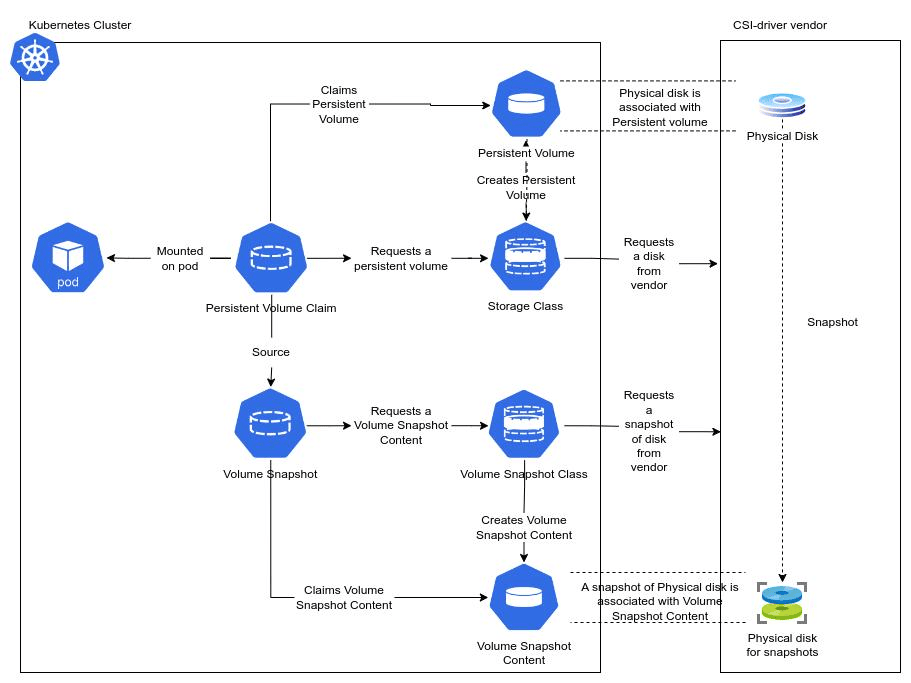
Volume snapshots in Kubernetes sit on top of the Container Storage Interface (CSI) - the standardized API through which Kubernetes talks to storage backends. When you request a snapshot, Kubernetes doesn't do the actual snapshotting itself; it delegates that work to the CSI driver, which talks to the underlying storage system (AWS EBS, GCP Persistent Disk, NetApp, etc.).
The flow looks roughly like this:
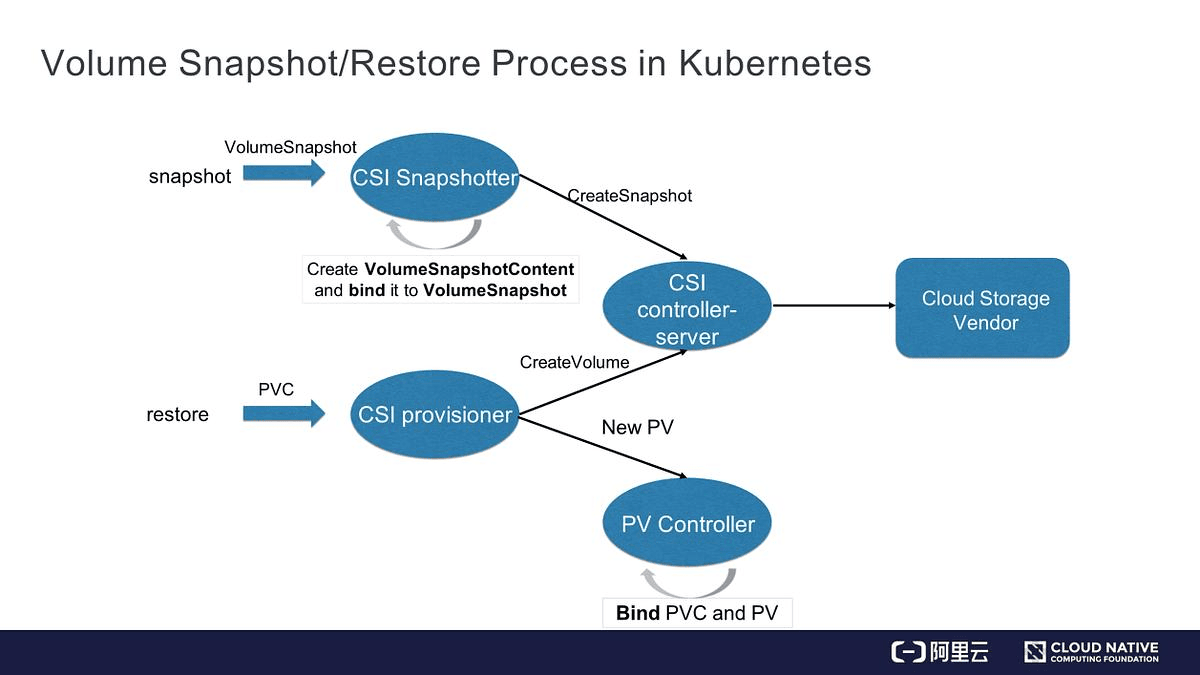
- You create a VolumeSnapshot object in the cluster.
- The external snapshot controller watches for this object.
- The controller calls the CSI driver via a CreateSnapshot RPC.
- The storage backend creates the snapshot and returns metadata.
- Kubernetes creates a VolumeSnapshotContent object to represent the result.
- The snapshot status is updated to readyToUse: true.
From the user's perspective, it's declarative. You write YAML, and Kubernetes handles the rest.
Volume Snapshot Components
There are three main objects you need to understand before you can work with volume snapshots effectively. They mirror the PVC/PV/StorageClass pattern in Kubernetes storage.
| Component | Kubernetes Kind | Purpose | Scope |
|---|---|---|---|
| VolumeSnapshot | VolumeSnapshot | User-facing request for a snapshot of a PVC | Namespaced |
| VolumeSnapshotContent | VolumeSnapshotContent | The actual snapshot resource, created by the controller or manually | Cluster-wide |
| VolumeSnapshotClass | VolumeSnapshotClass | Defines the CSI driver and parameters used to create snapshots | Cluster-wide |
| CSI Driver | N/A (external component) | The plugin that communicates with your storage backend | Node/cluster level |
1. VolumeSnapshot
This is the object you create. It references a PVC and a snapshot class, and that's essentially all you need to get started. Once created, the snapshot controller picks it up and drives the rest of the workflow.
2. VolumeSnapshotContent
Think of this like a PersistentVolume, it's the backing resource that represents the actual snapshot in the storage system. It can be created dynamically (by the controller) or pre-provisioned manually and then bound to a snapshot object.
3. CSI Drivers
Your CSI driver must support the CREATE_DELETE_SNAPSHOT capability for volume snapshots to work. Most major cloud providers ship CSI drivers that do this. The CSI driver list maintained by the Kubernetes CSI project is a good reference for checking compatibility.
Volume Snapshot Lifecycle in Kubernetes Environments
Every volume snapshot passes through a defined lifecycle, and understanding it is essential for debugging and automation.
Dynamic Provisioning Lifecycle
- User creates a VolumeSnapshot referencing a PVC and a VolumeSnapshotClass.
- The snapshot controller creates a VolumeSnapshotContent object.
- The CSI driver creates the snapshot on the storage backend.
- VolumeSnapshotContent is bound to the VolumeSnapshot.
- Snapshot status shows readyToUse: true.
Static (Pre-Provisioned) Lifecycle
- Admin creates a VolumeSnapshotContent manually with a reference to an existing snapshot.
- The user creates a VolumeSnapshot that references this content directly.
- The controller binds them together without calling the CSI driver.
You can monitor snapshot status by running:
A healthy snapshot will show READYTOUSE: true. If it's stuck in false, check the snapshot controller logs and the CSI driver logs for errors.
Types of Volume Snapshots
Not all snapshots are created equal. Depending on how they're triggered and what guarantees they offer, you'll encounter a few different types:
- Crash-Consistent Snapshots: Captures whatever is on disk at a point in time, including any in-flight writes. Safe for most use cases, but doesn't guarantee application-level consistency.
- Application-Consistent Snapshots: The application is quiesced (writes are flushed) before the snapshot is taken. More complex to set up, but required for databases like PostgreSQL or MySQL running inside the cluster.
- Pre-Provisioned Snapshots: Created outside Kubernetes (directly on the storage system) and then imported into the cluster as a VolumeSnapshotContent. Useful when migrating from non-Kubernetes environments.
How to Create Volume Snapshots in Kubernetes Clusters
Before you can create volume snapshots, you need three things: a CSI driver that supports snapshots, the snapshot CRDs installed, and an external snapshot controller running in the cluster. The CRDs and controller can be installed from the kubernetes-csi/external-snapshotter repository.
Step 1: Create a VolumeSnapshotClass
Step 2: Create a new VolumeSnapshot
Apply it with kubectl apply -f snapshot.yaml. Then verify the snapshot status:
Look for Status.ReadyToUse: true and a non-null Status.BoundVolumeSnapshotContentName.
Restoring Persistent Volumes from Volume Snapshots
Restoring from a snapshot means creating a new PVC that uses the snapshot as its data source. The CSI driver will populate the volume with the snapshot's data before it becomes available.
Once the PVC is bound, you can attach it to a pod just like any other PVC. Note that the restored volume is completely independent, and changes to it won't affect the original snapshot, and vice versa. This makes snapshots a solid foundation for spinning up test or staging environments from production data.
Managing Volume Snapshot Deletion and Retention Policies
Every VolumeSnapshotClass has a deletionPolicy that controls what happens to the underlying storage snapshot when the Kubernetes object is deleted:
- Delete: Deletes both the VolumeSnapshotContent and the actual snapshot in the storage backend.
- Retain: Deletes the VolumeSnapshotContent object but keeps the snapshot in the storage system, allowing manual recovery.
Choosing Retain is the safer default for production, especially when snapshots are part of a compliance or backup workflow. You can always clean up manually, but you can't recover a deleted snapshot.
Common Use Cases for Volume Snapshots in Production Workloads
Volume snapshots fit naturally into several real-world scenarios:
- Pre-Upgrade Backups: Snapshot your database PVC before running a schema migration. If the migration fails, restore, and you're back in business within minutes.
- Environment Cloning: Create a new volume snapshot from production and restore it into a staging namespace. Developers get real data without touching production.
- Disaster Recovery: Use scheduled snapshots as a lightweight recovery point objective (RPO) strategy, especially combined with cross-region replication at the storage level.
- CI/CD Pipelines: Some teams snapshot a clean database state before each test run and restore it after, ensuring tests always start from the same baseline.
- Compliance and Audit: Point-in-time copies provide evidence that data existed in a certain state at a specific time, which can satisfy audit requirements.
Challenges and Limitations of Volume Snapshots in Kubernetes
Volume snapshots are powerful, but they come with real constraints. Understanding them upfront prevents surprises in production.
| Challenge | Details | Mitigation |
|---|---|---|
| CSI Driver Dependency | Not all CSI drivers support snapshots. Older in-tree drivers don't. | Verify driver capability before planning snapshot workflows. |
| Application Consistency | Snapshots are crash-consistent by default; databases may have dirty buffers. | Use pre-snapshot hooks to quiesce the application. |
| Cross-Cluster Portability | Snapshots are tied to the storage backend and can't easily move between clusters or providers. | Use tools like Velero for cross-cluster backup and restore. |
| No Built-In Scheduling | Kubernetes has no native snapshot scheduling; you must build it yourself. | Use CronJobs, Velero, or a storage-native scheduler. |
| Snapshot Size and Cost | Snapshots consume storage and cost money, especially if you keep many of them. | Implement a retention policy and monitor snapshot storage usage. |
| Restore Speed | Large volumes can take time to restore, impacting RTO during incidents. | Test your restore time regularly, don't wait for a disaster. |
Best Practices for Using Volume Snapshots in Kubernetes at Scale
Running snapshots reliably at scale requires a bit more than just writing YAML. Here's what teams that do this well tend to follow:
- Always Test Restores. Creating a snapshot means nothing if you've never validated that restoring from it works. Test your restore process regularly, ideally in an automated way.
- Label Your Snapshots. Add labels like app, environment, and created-by to every VolumeSnapshot object. This makes filtering and cleanup significantly easier.
- Use the Retain Deletion Policy for Critical Data. The extra step of manually cleaning up is worth the safety net.
- Monitor Snapshot Status Actively. A snapshot stuck in readyToUse: false is a silent failure. Build alerting around it.
Volume Snapshots and Data Protection Strategies in Cloud-Native Environments
Volume snapshots are a building block, not a complete data protection strategy. In cloud-native environments, you typically want to layer them with other mechanisms.
A practical data protection stack might look like:
- Volume Snapshots for fast, in-cluster recovery (low RPO, low RTO for known failure modes)
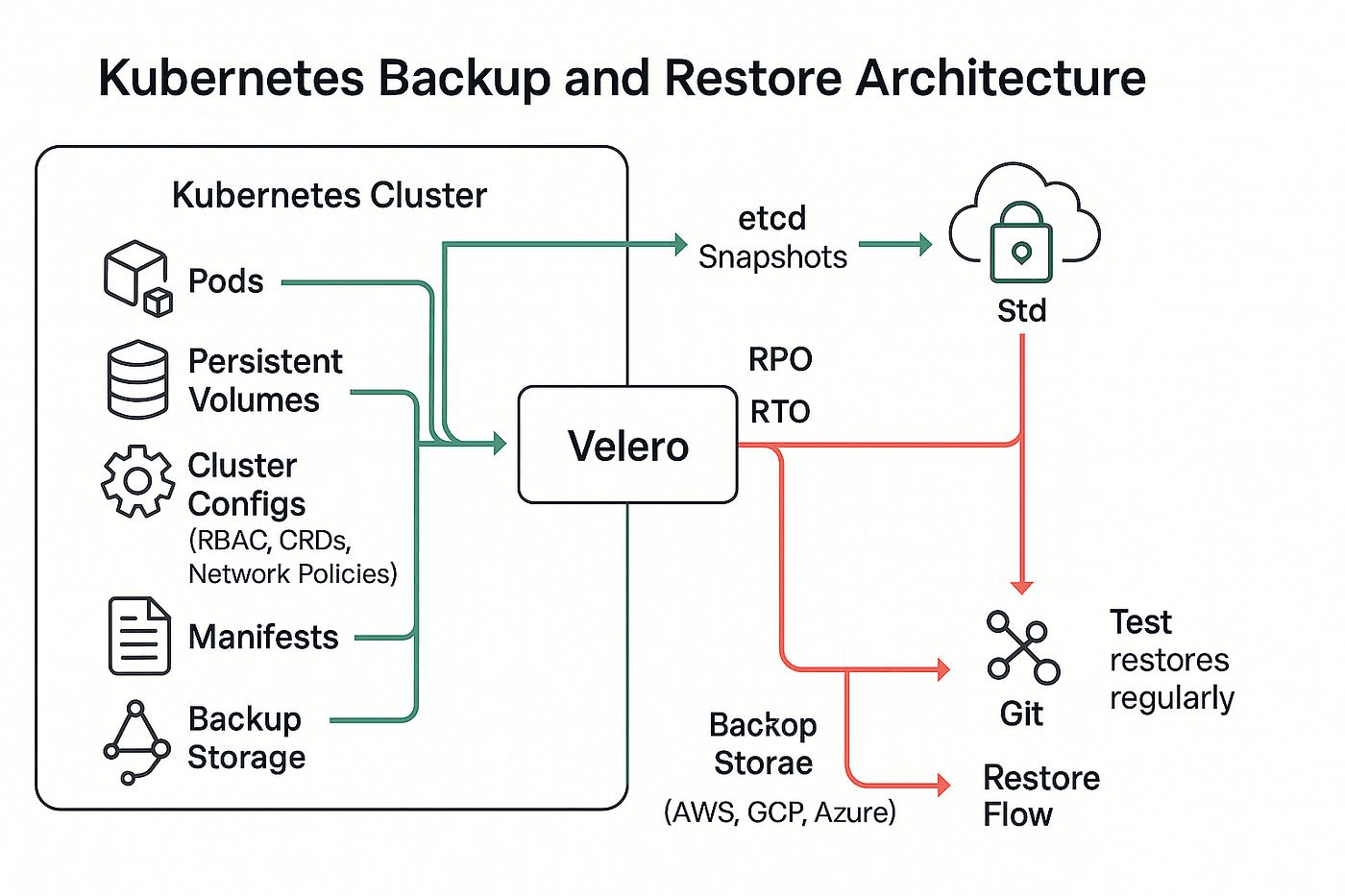
- Velero for cross-cluster backup, including snapshot scheduling and restore workflows
- Object Storage Exports (e.g., copying snapshot data to S3) for off-site durability
- Replication at the storage layer (where the CSI driver supports it) for active-active resilience
Real-Time Visibility Into Volume Snapshots and Storage Performance with groundcover
Creating volume snapshots is only half the equation. The other half is knowing when they fail, how long they take, and whether your storage is behaving correctly across your cluster. groundcover is a cloud-native observability platform powered by eBPF that deploys without code changes or sidecar injection, giving you deep visibility into storage operations and Kubernetes workloads without the overhead of traditional APM tools.
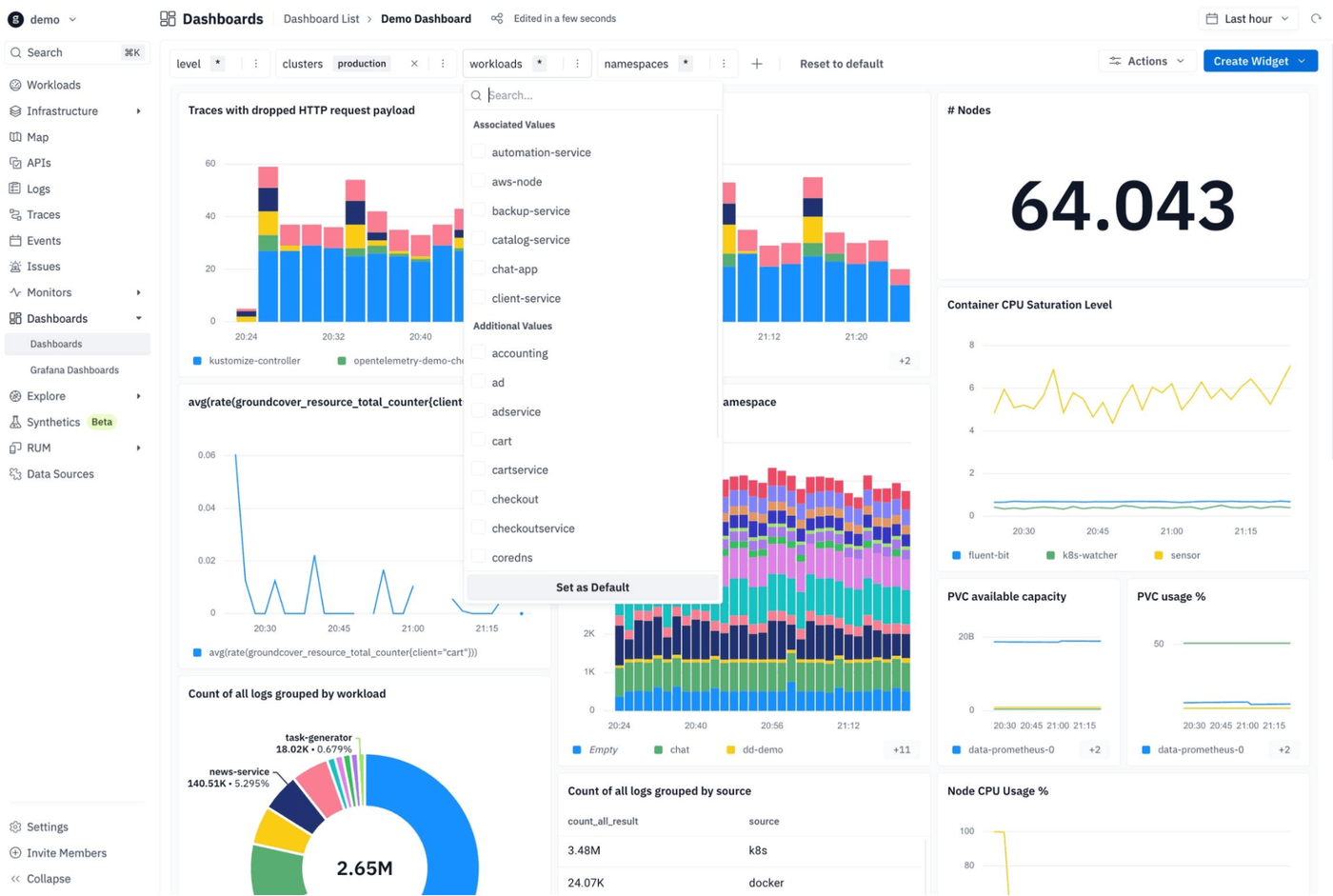
With groundcover, you can:
- Configure alerts on snapshot creation latency so you know when a snapshot takes longer than expected, a common early sign of storage backend pressure or CSI driver issues.
- Correlate snapshot failures with broader cluster events using groundcover's unified logs, metrics, and traces.
- Monitor PVC health and storage I/O across all namespaces in a single pane, so you're not flying blind on storage-related degradation.
- Build alerts around snapshot status conditions, such as a persistent readyToUse: false state, using groundcover's Kubernetes monitoring and alerting layer to catch silent failures before they become incidents.
If you're running stateful workloads at any meaningful scale, pairing volume snapshots with proper observability isn't optional - it's how you actually trust your recovery story. groundcover's Kubernetes monitoring is a practical place to start.
Conclusion
Volume snapshots in Kubernetes give you a native, declarative way to capture point-in-time copies of your persistent data, whether you're protecting a database before a migration, seeding a staging environment, or building a lightweight disaster recovery strategy. The API is mature, CSI driver support is broad, and the integration with standard Kubernetes workflows is clean.
That said, snapshots aren't magic. They work best when combined with proper retention policies, automated scheduling, regular restore testing, and observability tooling that tells you when something goes wrong. Build the full picture, and volume snapshots become a genuinely reliable part of your production infrastructure.
FAQs
Snapshot frequency should be based on your acceptable recovery point objective (RPO), not a fixed schedule.
- Critical transactional systems often require snapshots every 15–60 minutes, while lower-risk workloads may only need daily snapshots.
- Frequent snapshots increase storage backend API calls and retention costs, especially on high-churn volumes.
- Snapshot schedules should align with deployment windows, schema changes, and backup export jobs to avoid inconsistent restore states.
- Teams running stateful workloads should combine snapshots with WAL/binlog archiving for tighter recovery guarantees.
Learn more about Kubernetes storage architecture.
A snapshot captures block storage state quickly inside the storage layer, while a backup typically creates portable, long-term copies stored externally.
- Snapshots are optimized for fast rollback and rapid restore operations inside the same infrastructure environment.
- Traditional backups are better suited for disaster recovery, compliance retention, and cross-region portability.
- A snapshot alone does not protect against storage account deletion, cloud account compromise, or region-wide failures.
- Mature platforms use snapshots for operational recovery and backups for resilience and audit requirements.
Crash-consistent snapshots preserve disk state but do not guarantee that in-memory database transactions were safely flushed before capture.
- Databases may require WAL replay, journal recovery, or transaction rollback after restoration.
- Snapshotting during checkpoint-heavy periods can significantly extend restore times under load.
- Pre-snapshot hooks should pause writes or flush buffers for PostgreSQL, MySQL, Redis, and Kafka workloads.
- Restore testing must validate application startup behavior, not just PVC attachment success.
Discover our guide to Kubernetes troubleshooting workflows.
Large-scale snapshot programs can quietly increase cloud costs and storage latency if retention and I/O behavior are not monitored closely.
- Incremental snapshot chains grow over time and may slow restore operations depending on the storage backend.
- Snapshot-heavy workloads can increase API throttling pressure on CSI drivers and cloud storage services.
- Teams should track snapshot age, restore duration, storage delta growth, and orphaned snapshot resources.
- Retention policies should distinguish between operational rollback points and compliance-grade archives.
groundcover correlates Kubernetes events, storage telemetry, and workload behavior in real time so failed or degraded snapshots don't remain invisible.
- Alerting can detect prolonged readyToUse: false states, CSI timeout spikes, or abnormal snapshot creation latency.
- Unified metrics, logs, and traces help identify whether failures originate from storage saturation, node instability, or CSI controller issues.
- eBPF-based telemetry reduces instrumentation overhead while still exposing storage-related bottlenecks across clusters.
- Snapshot monitoring becomes part of broader workload health analysis instead of a disconnected backup workflow.
Learn more about eBPF-powered Kubernetes observability.
Keeping observability data inside your own cloud environment improves control over retention, compliance, and storage economics for high-volume infrastructure telemetry.
- Snapshot workflows generate operational metadata, events, logs, and storage metrics that can become expensive in SaaS-only observability platforms.
- BYOC architectures reduce data egress exposure and simplify compliance requirements for regulated environments.
- Infrastructure teams maintain direct ownership over retention policies and telemetry lifecycle management.
- High-cardinality Kubernetes storage signals can be retained longer without creating runaway ingestion costs.
Explore BYOC observability architectures.



