Weekly updates on new features, improvements, and fixes across groundcover.

Agent Model Selection, a New Databases Page, Flutter RUM, and kubectl Access Through groundcover
October 22, 2026
This changelog covers what shipped across groundcover over the last two weeks. Admins on Amazon Bedrock can now choose which models the Agent uses, and a new Databases page lists every database your services call. Flutter apps get RUM support, OpenTelemetry services show up as workloads, and kubectl can read your clusters through groundcover. Policies can also restrict data access by index tier, and profiling adds two new flame graph views.
Choose the models the Agent runs on
Workspace admins on Amazon Bedrock can now pick which models the groundcover Agent uses. In Settings > AI & Agents > Management, groundcover shows a predefined list of recommended models, including OpenAI models available through Bedrock and Claude models such as Sonnet, Opus, and Fable. Admins can also add any other LLM their Bedrock account has enabled by pasting its model ID. groundcover tests each model before it shows as available, and a model your account can’t use yet carries an Action required badge with the provider’s error and the steps to fix it. The admin then sets a default model, which applies to each user’s first chat and to Agent runs started from Slack and from MCP tools. Users can switch models from the picker in the chat box, even between replies in the same conversation, and adjust reasoning effort when the model supports it. Teams that already run AI workloads on Bedrock can now point the Agent at the models their AWS account approves. Model selection currently works only for workspaces on Amazon Bedrock, and support for Google Cloud Vertex AI and Microsoft Foundry is coming soon. Other workspaces keep Claude Sonnet 4.6 as the default for now.
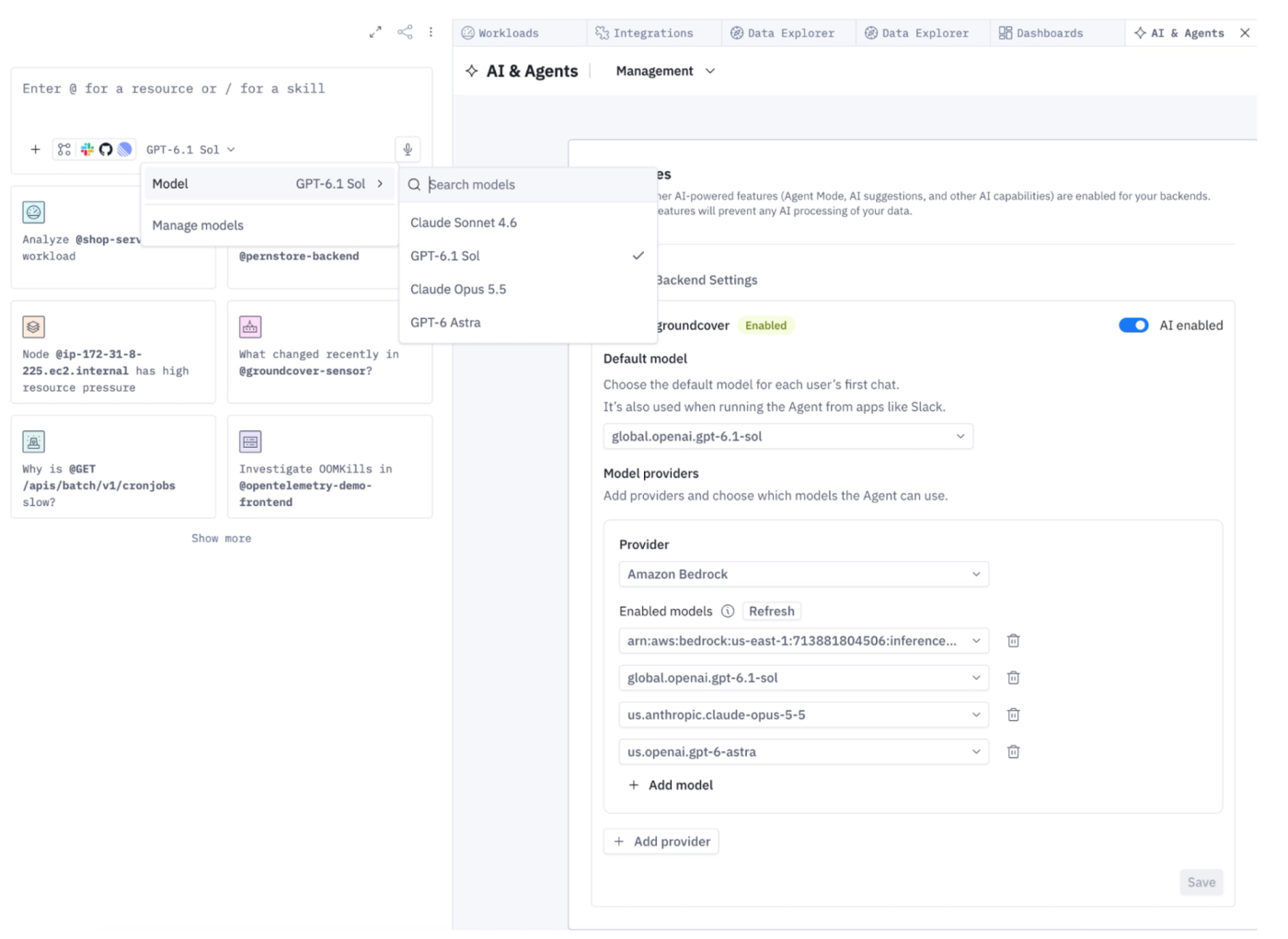
Support for DB Monitoring grows with a new Database page
The new Databases page is the first major milestone for database monitoring in groundcover.
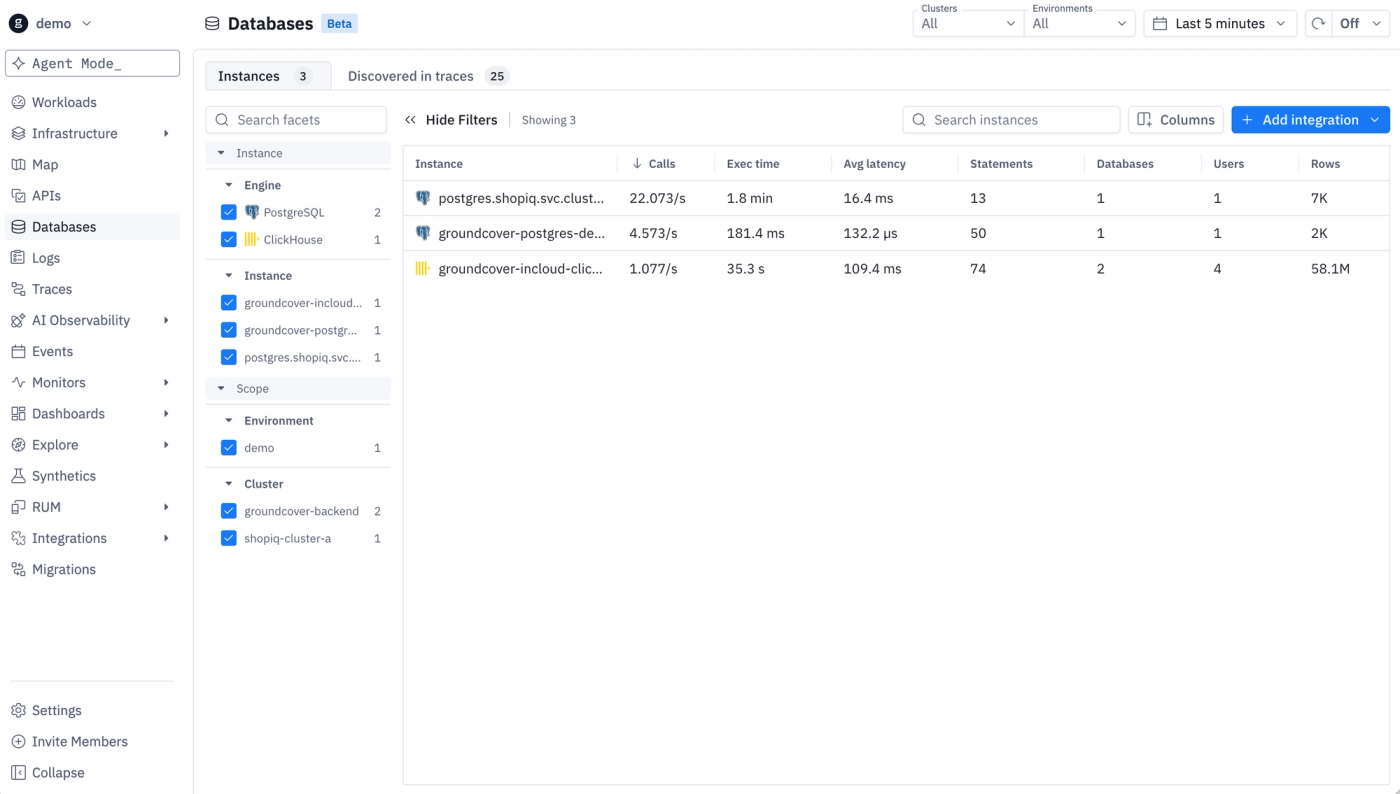
The Instances tab lists each PostgreSQL and ClickHouse instance an integration monitors, with calls per second, execution time, average and P95 latency, errors, statements, databases, users, and rows. The Discovered in traces tab lists every database host your services call, including MySQL, MongoDB, and Redis, and marks each host as Monitored, Not monitored, or Not supported.

For an unmonitored PostgreSQL or ClickHouse host, the Add integration button opens the setup wizard with the host, port, and cluster already filled in, so an admin only enters the credentials. The workload page now recognizes a monitored database as well. Its header shows the engine, the PostgreSQL role (Primary or Replica), and chips for port, databases, users, statements, and connections used against the maximum, plus an Edit integration button for admins. New tabs on the workload page put the database's query statistics and health metrics next to its traces, logs, and infrastructure data, so you can investigate a slow query without leaving the workload.
RUM for Flutter apps (alpha)
groundcover RUM now supports Flutter. Until this release, the React Native SDK was the only way to collect RUM data from iOS and Android apps, which left Flutter teams without real user monitoring. The new groundcover_rum package for Flutter reports native crashes, app hangs, app start time, time to interactive, and frame performance on both platforms. Dart errors appear in the RUM exceptions table with a Flutter icon, so you can tell them apart from native crashes.
OpenTelemetry services as workloads, making OTel a first class citizen in groundcover
The Workloads page used to show only workloads the groundcover sensor discovered. A service that sent data only through OpenTelemetry, such as a Lambda function or an ECS service, had traces and logs in groundcover but no workload page. groundcover now builds workloads from the traces, logs, and APM measurements those services report. An OTel-only, ECS, or Lambda service appears on the Workloads list within about two minutes of sending data, tagged with its kind, and never duplicates a workload the sensor already found. Its workload page shows the overview, traces, logs, and APIs collected from that service, and hides the Kubernetes-only tabs such as pods and infrastructure. A service that stops reporting turns gray after five minutes and leaves the list after an hour. With this change, OTel-instrumented services get the same workload view as sensor-based ones, which moves groundcover a large step closer to being fully OTel native.
Use kubectl against groundcover
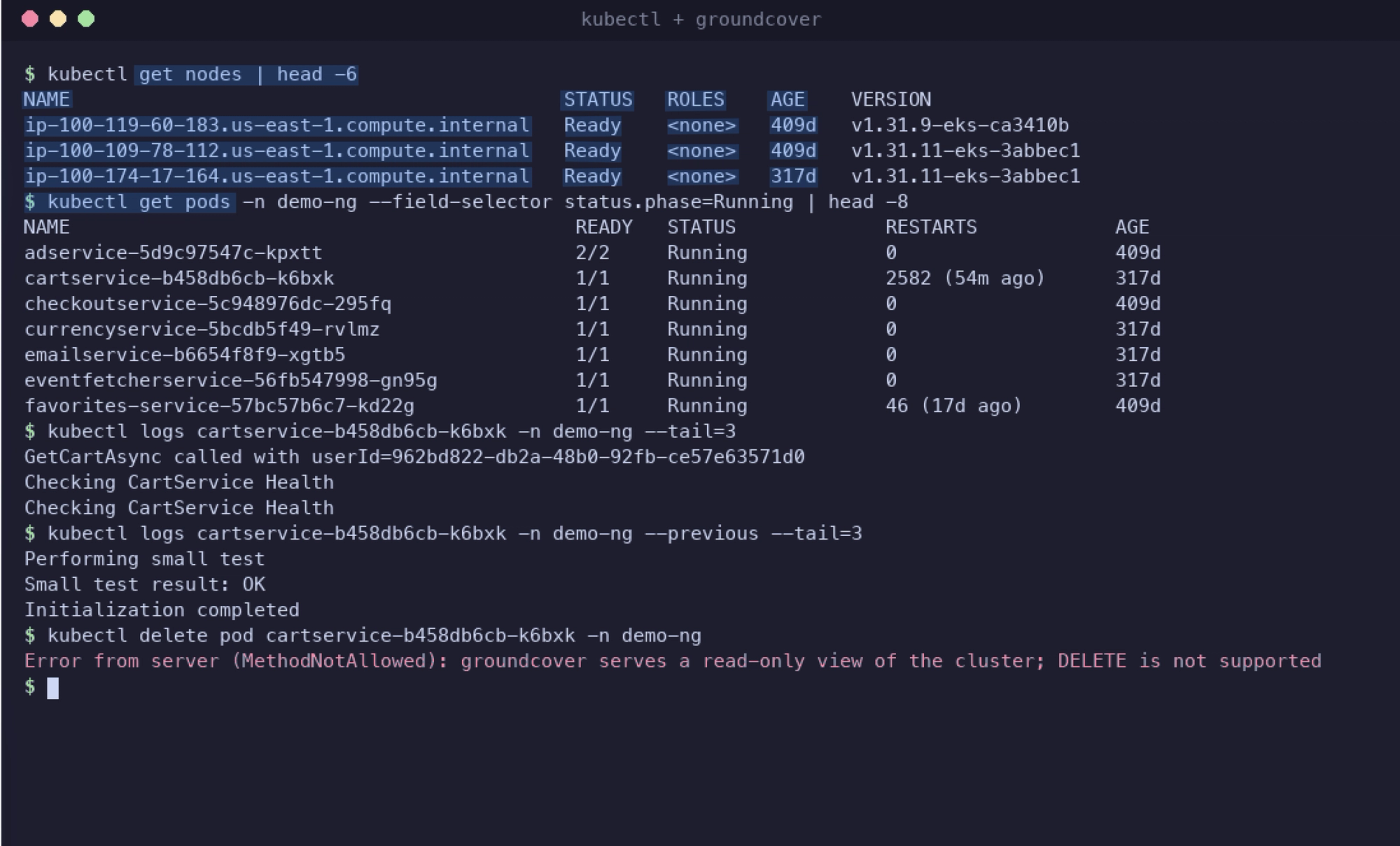
Giving engineers and AI agents kubectl access usually means opening network paths to each cluster’s API server, distributing kubeconfigs, and managing Kubernetes RBAC per user. The groundcover API now serves the Kubernetes API, so the standard kubectl, k9s, Lens, and Freelens can read your clusters from the data groundcover already stores. You point a kubeconfig context at groundcover and authenticate with a groundcover API key, with no VPN, bastion, or cluster credentials involved. Access follows groundcover policies: a key bound to a policy sees only the clusters and namespaces that policy allows. The API is read-only and refuses every create, update, and delete, which makes it safe to give to coding agents such as Claude Code or Cursor. kubectl logs reads from groundcover’s log storage, so you still get lines the node has already rotated away, and --previous keeps working after the old container is gone. Because those logs have already passed through your OTTL pipelines, kubectl logs returns the processed version: any masking, obfuscation, or parsing rules you’ve defined apply to the output, so a person or agent using kubectl can’t see raw values your rules hide. Queries run on groundcover’s backend and add no load to your control plane. Pods, nodes, deployments, statefulsets, daemonsets, replicasets, jobs, cronjobs, configmaps, persistent volumes and claims, and custom resources support get, describe, logs, top, label and field selectors, and YAML or JSONPath output.
Restrict data access by index tier
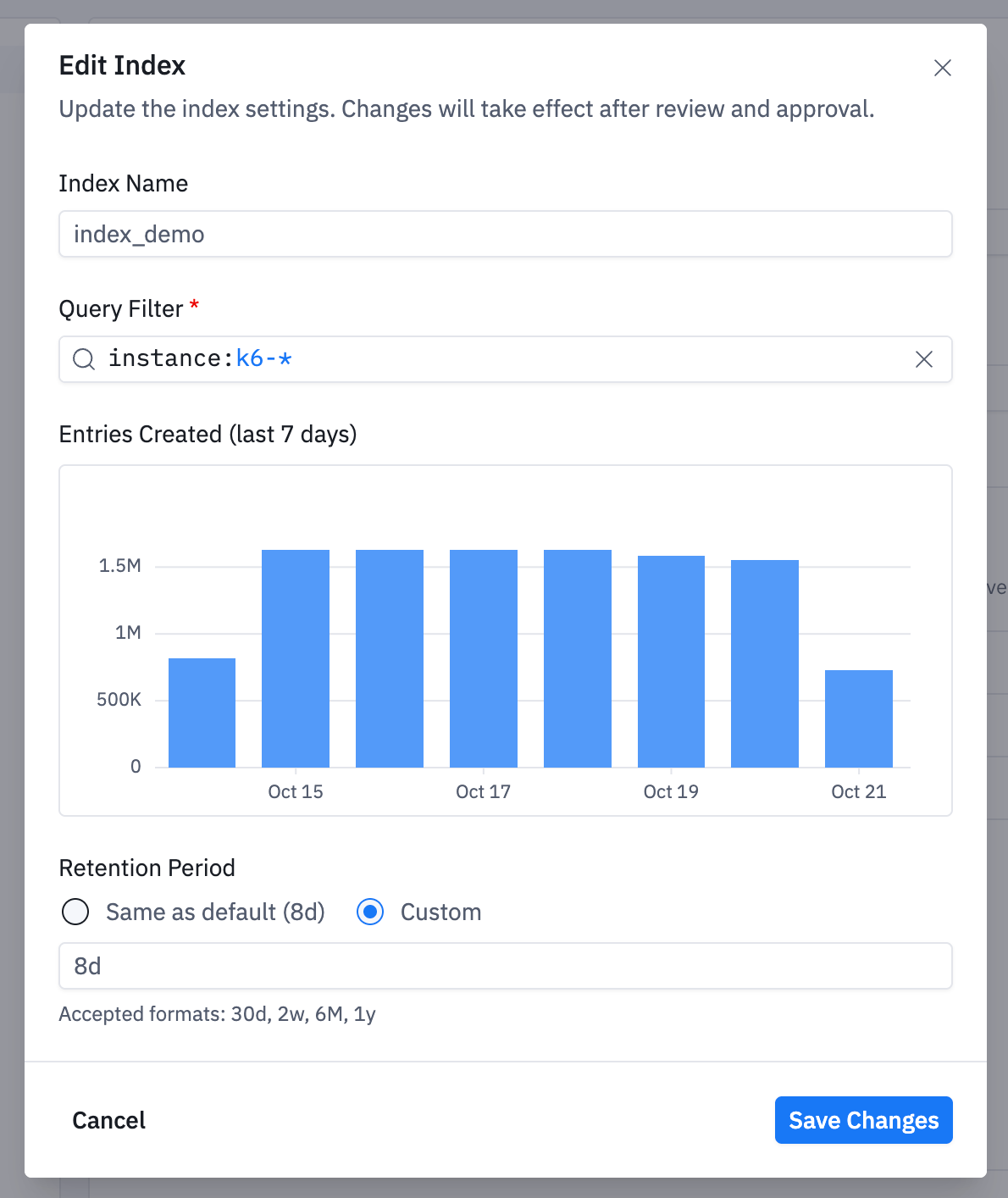
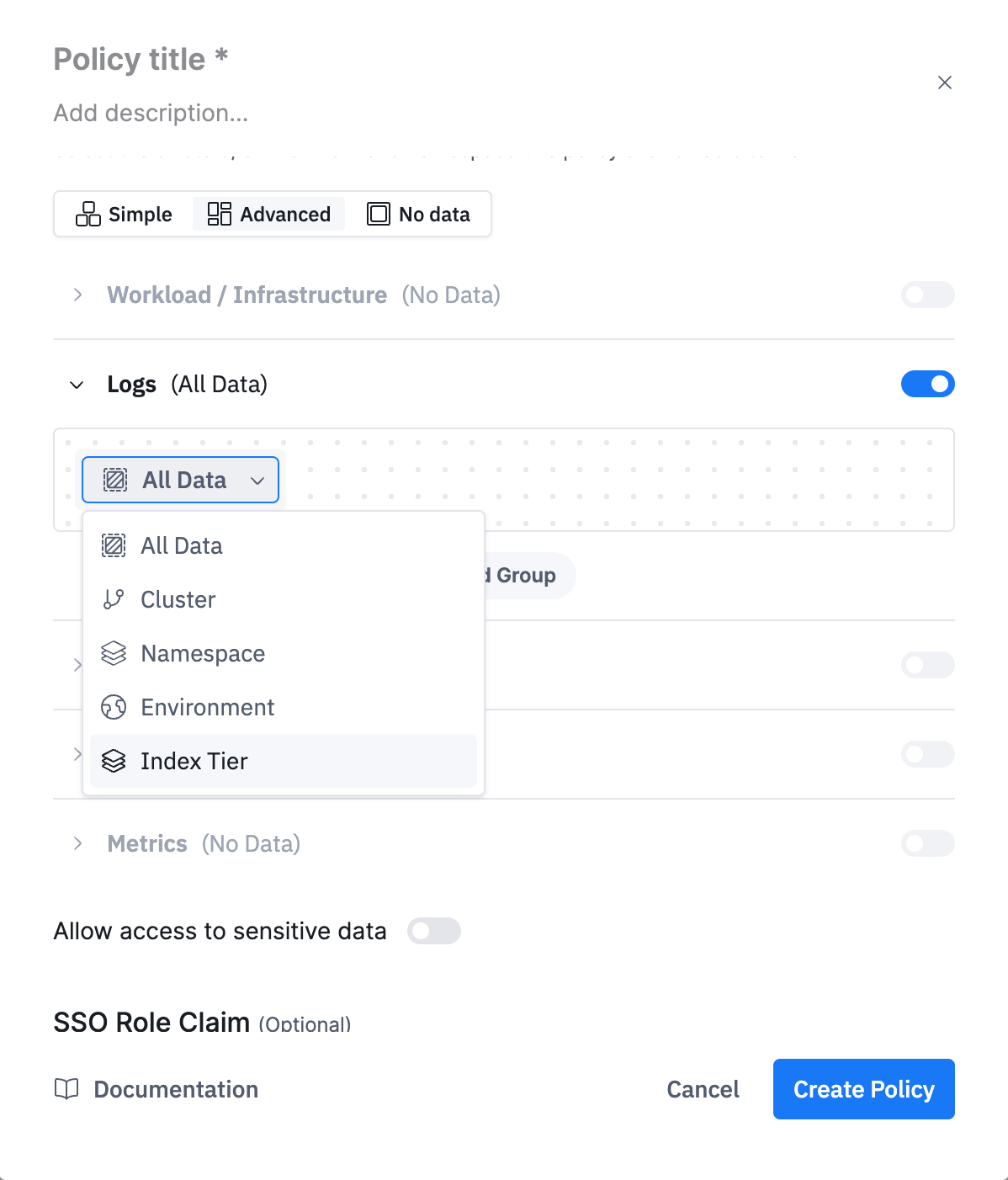
Data access policies could previously limit what a user sees by cluster, namespace, or environment. Admins can now add index tiers to a policy as well. In a policy's Advanced mode, an admin selects one or more index tiers for logs or traces with an In or Not in condition, and every user the policy covers can query only the data in those tiers. Teams that already group logs and traces into index tiers for retention can reuse those same tiers to control who sees the data. Tier-based access applies to data ingested after the tier was defined.
Version history for monitors
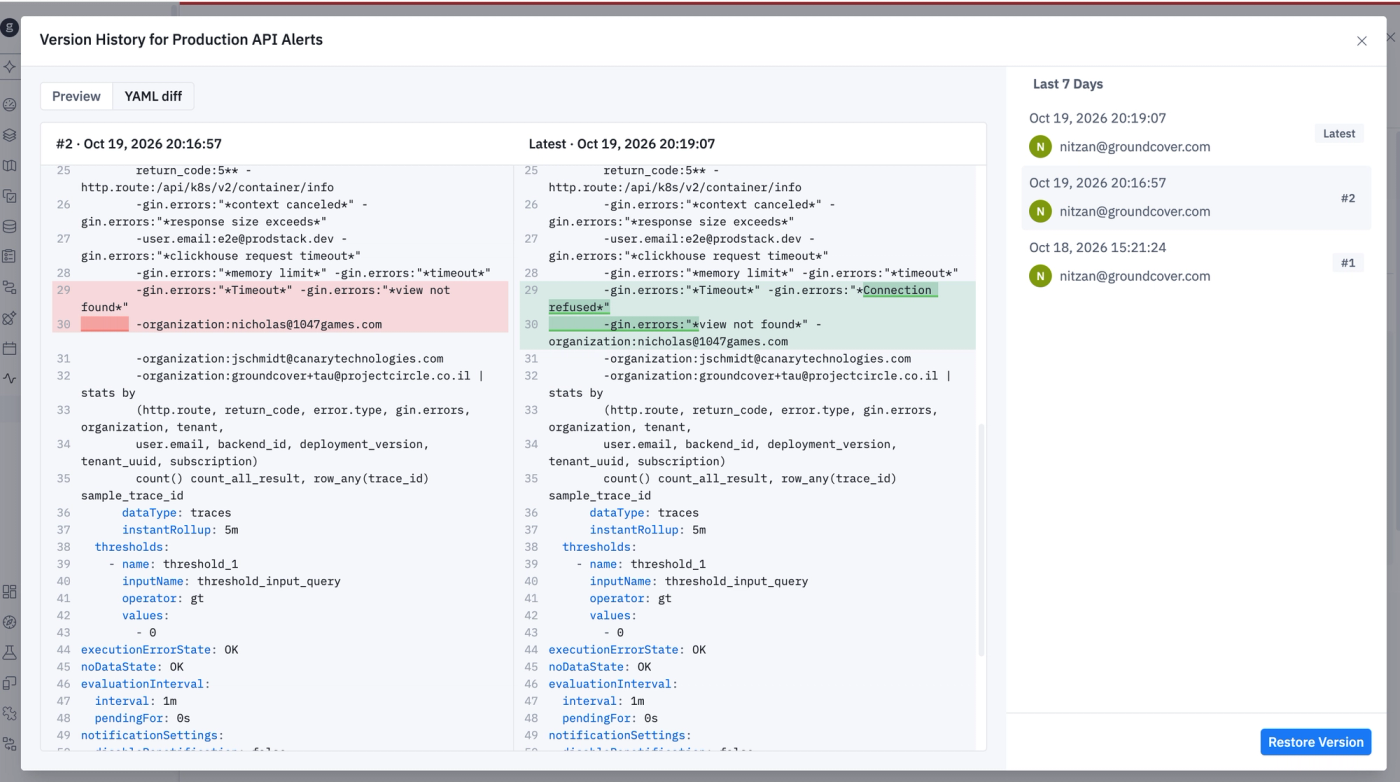
Monitors now keep a version history, the same way dashboards already do. groundcover saves a new version each time someone saves a monitor and records who made the change and when. To see the history, open a monitor and go to Version History. Versions are listed by date, and each one shows the editor’s email, so you can see who changed an alert and when. The Preview tab shows how a monitor looked in an earlier version. The YAML diff tab puts that version and the latest one side by side, with removed lines in red and added lines in green. That shows exactly what changed in the query, the thresholds, or the notification settings. If a change caused noisy or missing alerts, Restore Version puts the earlier version back. The history starts with the first save after this release, so monitors that haven’t been edited since then have no earlier versions yet.
Compare and invert flame graphs
Profiling adds two new flame graph views. The differential flame graph compares two profiles of the same workload (i.e. before and after a deploy, one version against another, or one pod against the rest). It colors frames red where the code used more resources and green where it used less, and the functions table lists the change in self and total time for each function. The Invert call stack switch flips the flame graph so the functions that consumed the samples appear first, with their callers underneath, which helps you find the most expensive functions when many code paths call them.
Other recent updates


Observability
for what comes next.
Start in minutes. No migrations. No data leaving your infrastructure. No surprises on the bill.