LangChain RAG: How to Build, Optimize, and Observe in Production



The quality of a LangChain RAG system depends on more than the language model you choose. How you load documents, split their content, and configure retrieval determines what information the model receives. A retriever might return a passage that matches the user's question but leaves out an important detail, causing the model to generate an incomplete or incorrect answer.
Getting consistent results takes more than testing a few questions and adjusting prompts. As your document collection grows, you need to understand how changes to the pipeline affect retrieval quality and whether the answers remain grounded in the source material. Once the system is running in production, you also need visibility into individual requests to investigate poor responses and performance issues.
In this guide, you'll learn how to build LangChain RAG systems, optimize and evaluate their results, and monitor and troubleshoot their performance in production.
What Is LangChain RAG
LangChain RAG refers to building retrieval-augmented generation (RAG) systems using the LangChain framework. It retrieves relevant information from external sources and supplies it to a language model as context for generating answers. LangChain provides components for document loading, text splitting, embeddings, retrieval, reranking, and model integration. You can use a vector store to retrieve document passages or connect directly to databases, search engines, and APIs.
LangChain supports several RAG architectures. In two-step RAG, retrieval happens before answer generation, while agentic RAG lets the model decide when to retrieve information. Hybrid RAG combines fixed retrieval steps with validation and optional retries. These approaches help ground responses in external information, but answer accuracy still depends on the quality of the retrieved evidence and how the model uses it.
How LangChain RAG Works: The Two Core Pipelines
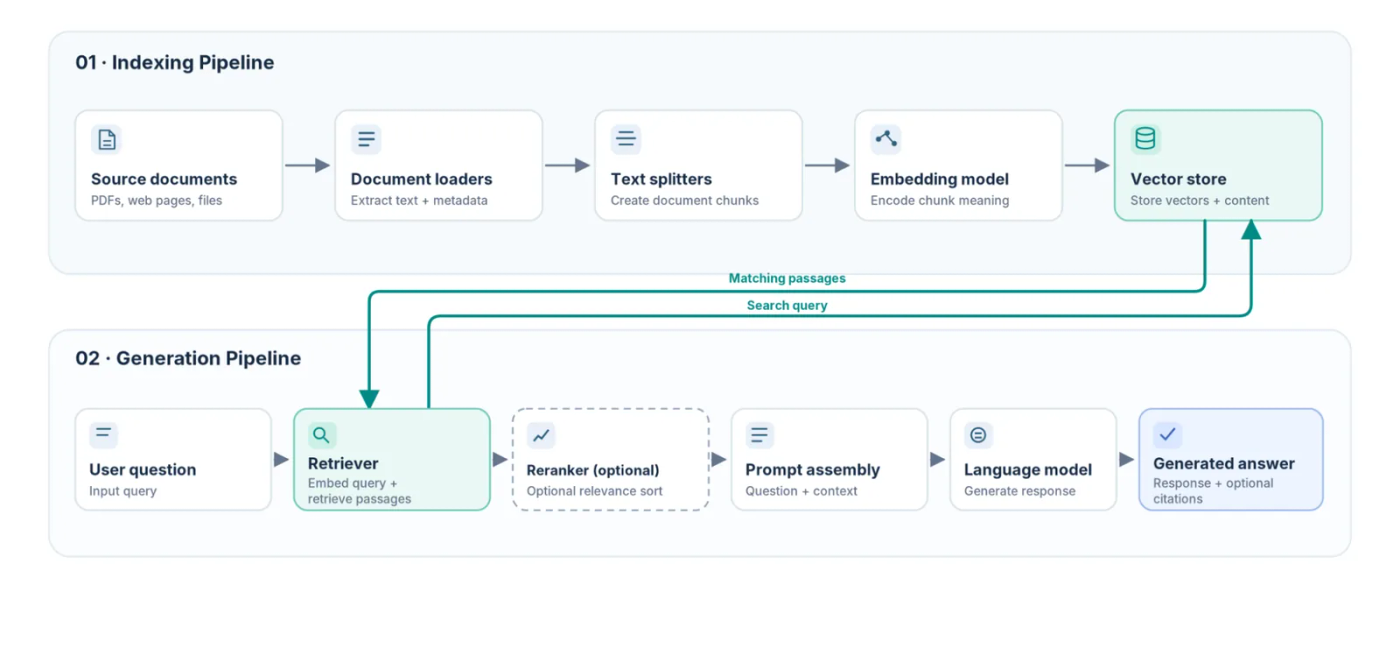
When you build a LangChain RAG system using a collection of documents, the documents must be prepared for retrieval before they can be used to answer questions. This happens in the indexing pipeline, which processes the documents and stores their content in a searchable index. When a user submits a question, the generation pipeline retrieves relevant information from that index and passes it to a language model to generate an answer.
The Indexing Pipeline: From Raw Documents to a Vector Store
The indexing pipeline begins with document loaders that extract text from sources such as PDFs, web pages, and Markdown files. LangChain converts the extracted content into Document objects containing text and metadata. Text splitters divide long documents into smaller chunks, preserving source information that can later be used to identify retrieved passages.
An embedding model converts each chunk into a numerical vector representing its semantic meaning. The system stores these vectors alongside their text and metadata in a vector store such as Chroma or Milvus. This allows the retriever to search for passages related to a user's question based on meaning rather than exact keyword matches.
When source documents change, the index must be updated to reflect those changes. Otherwise, outdated chunks can remain searchable and appear alongside newer information. Tracking document versions and removing obsolete entries helps prevent the retriever from returning stale content.
The Generation Pipeline: From User Query to Grounded Answer
The generation pipeline begins when a user submits a question. In a two-step RAG workflow, the retriever searches the indexed documents before the language model generates a response. For vector retrieval, an embedding model converts the question into a vector and searches for similar passages. When documents have access-control metadata, the application can apply filters based on the user's permissions to restrict which passages the retriever returns.
The retrieved passages can then be reranked to prioritize those most relevant to the question. The application selects the passages to include in the prompt, combines them with the user's question, and sends the resulting prompt to the language model. The model uses this context to generate an answer, while the application can use metadata from the retrieved documents to provide source citations.
The quality of the answer depends on the information returned by the retriever and how the model interprets it. If the retrieved passages are irrelevant or incomplete, the system may produce an incorrect answer even when the language model runs without errors.
How to Build a LangChain RAG System Step by Step
Building a LangChain RAG system requires choosing the right components for your data and configuring how they work together. The implementation also needs to account for changes to source documents, retain metadata for citations, and pass retrieved passages to the language model.
For this example, you'll use Groundcover's The Observability Imperative report as your data source, Chroma for vector storage, and OpenAI for embeddings and answer generation.
The full source code is in this GitHub Repository.
Before getting started, ensure you have Python installed and an OpenAI API key. You'll also need the following Python packages:
- langchain-core: Provides the
Documentclass, prompt templates, output parsers, and LangChain Expression Language (LCEL) components. - langchain-text-splitters: Provides text splitting utilities for dividing documents into smaller chunks.
- langchain-openai: Connects LangChain to OpenAI's language and embedding models.
- langchain-chroma: Integrates Chroma with LangChain for vector storage and retrieval.
- python-dotenv: Loads API credentials and model settings from environment variables.
- pypdf: Extracts text from PDF documents.
Install the packages using pip:
Next, create a .env file in your project directory and add your OpenAI API key and model configurations:
This example uses GPT-6 Luna to generate answers and text-embedding-3-small to create document embeddings. You can replace either model with another compatible OpenAI model by changing its name in the .env file. Changing the embedding model requires rebuilding the document index, which the example handles when it runs again.
Finally, download The Observability Imperative report in your project directory.
Step 1: Load and Split Documents
Start by extracting the report's text and converting it into LangChain Document objects. Each document will contain the extracted text and metadata identifying its source and page number, which you'll use later when citing retrieved information.
Open a Python file and add the required imports and configuration:
The configuration variables define the PDF location, the directory where Chroma will save its index, and the chunking and retrieval settings.
Next, define a function to load the PDF:
The function uses PdfReader to extract text from each page and removes unnecessary whitespace. It then creates a Document object containing the extracted text in page_content and the filename and page number in metadata.
Once the documents are loaded, split them into smaller chunks using RecursiveCharacterTextSplitter:
The splitter uses a maximum chunk size of 1,000 characters and an overlap of 160 characters where the split boundaries permit. The overlap helps retain context when text spans adjacent chunks.
Each chunk receives a SHA-256 identifier generated from its source, page number, position, and content. These identifiers allow the application to detect changes when comparing the current documents with those already indexed.
Step 2: Generate Embeddings and Index the Documents
The next step is to generate embeddings for the document chunks and store them in Chroma. Configure Chroma to save the embeddings locally and reuse them when the source documents and indexing settings haven't changed.
OpenAIEmbeddings initializes the embedding model configured in your .env file. Chroma uses that model to generate embeddings when documents are added and to embed questions during similarity searches.
The persist_directory parameter tells Chroma to save its data in .cache/chroma. This allows you to query previously indexed documents without recreating their embeddings every time the application starts. The function also checks whether the stored index matches the current document chunks and indexing configuration. If the PDF content, embedding model, or chunking settings have changed, it replaces the existing entries. Otherwise, it reuses the stored index.
Step 3: Build the Retrieval Chain Using LCEL
You can now create the retrieval chain using LangChain Expression Language (LCEL). The chain will retrieve document passages, format them for the language model, and retain the source documents alongside the generated answer.
First, add a function to format the retrieved passages:
The retriever returns Document objects containing text and metadata. This function converts them into a single string, placing the PDF filename and page number before each passage. The model can then reference those details when generating citations.
Next, define the LCEL chain:
ChatPromptTemplate defines the instructions sent to the model. The system message tells it to use the report excerpts as evidence, avoid unsupported claims, and cite the relevant pages. The human message contains the user's question.
The chain uses three LCEL operations:
RunnableParallelsends the question to the retriever while preserving the original question throughRunnablePassthrough().RunnablePassthrough.assign()formats the retrieved passages and adds them to the chain's data undercontext.prompt | model | StrOutputParser()sends the completed prompt to the model and converts its response into text.
The resulting chain retains the question, retrieved documents, formatted context, and generated answer. You can therefore inspect the source documents separately from the model's response.
Step 4: Connect the LLM and Run Queries Against Retrieved Context
You can now connect the retriever and language model and execute the complete RAG pipeline.
as_retriever() converts the Chroma collection into a LangChain retriever. The search_kwargs parameter sets k to five, so each query returns up to five relevant passages. The application then calls build_rag_chain() to connect retrieval and generation. The invoke() method executes the chain and returns the generated answer together with the retrieved documents.
Run the script without specifying a question to use the default query about AI adoption and trust in observability workflows. The following output was generated by GPT-6 Luna using passages retrieved from the report by the RAG system.
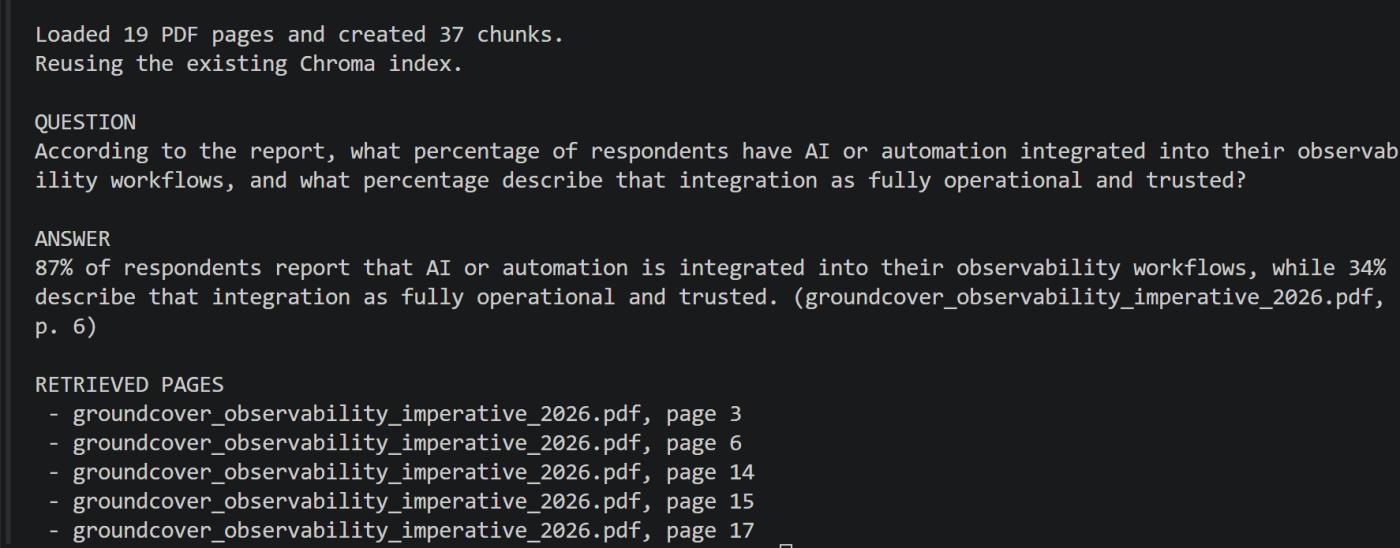
The model correctly identified that 87% of respondents have AI or automation integrated into their observability workflows, while 34% describe that integration as fully operational and trusted. It cited page 6 of the report as its source.
You can also specify your own question as a command-line argument:
Replace your_script.py with your Python script's filename.
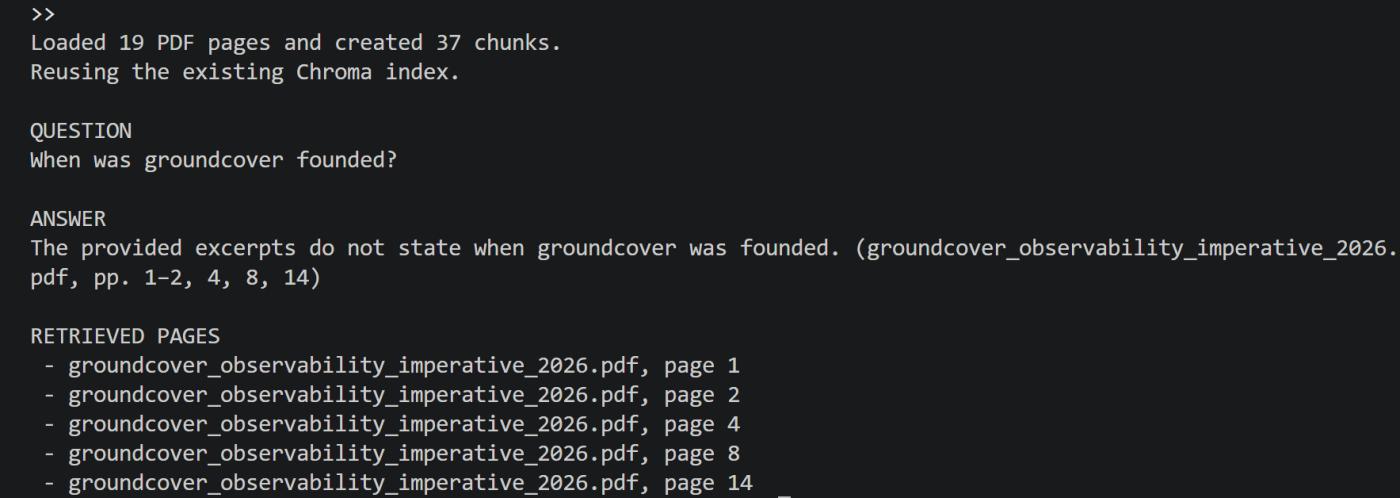
The model remained grounded in the retrieved passages, correctly identifying that they didn't contain groundcover's founding date rather than generating an unsupported answer.
LangChain RAG Vector Store and Embedding Options
The choice of vector store becomes more important as your document collection grows and retrieval requirements change. Chroma works for the PDF example above, but applications serving multiple users with different document permissions require access controls and data isolation. Some workloads also benefit from combining semantic search with keyword matching, especially when queries contain error codes, product identifiers, or technical terms.
LangChain supports several vector stores through its integration packages. Although they expose similar retrieval interfaces, their deployment models, indexing capabilities, and operational requirements differ.
LangChain supports additional integrations, including Astra DB, Neo4j, Azure Cosmos DB, and Google AlloyDB. You can find the complete list in the LangChain vector store integrations documentation.
Choosing an Embedding Model for Your RAG System
The embedding model affects which document passages the retriever identifies as relevant. A different vector store won't necessarily improve retrieval accuracy if the embeddings fail to represent the terminology or language used in your documents.
LangChain supports hosted embedding APIs, local models, and self-hosted inference through several integrations. The following table compares some of the main options.
For example, OpenAI's text-embedding-3-small produces 1,536-dimensional vectors by default, while text-embedding-3-large produces 3,072-dimensional vectors. Larger embeddings require more storage at their default dimensions but don't guarantee better retrieval results for every workload.
To compare embedding models, test them against representative questions from your document collection. Measure recall@k to determine how often the expected passages appear in retrieved results, alongside query latency, embedding costs, and storage requirements.
If you change embedding models, regenerate the document embeddings in a separate index and validate retrieval results before switching. This prevents incompatible embeddings from being mixed in the same index.
LangChain supports additional embedding integrations, including Mistral AI, NVIDIA, Databricks, IBM watsonx, and Together AI. You can explore the complete list in the LangChain embedding model integrations documentation.
Advanced LangChain RAG Techniques
A basic RAG pipeline follows a fixed retrieval process, which can limit how well it handles different types of questions. Some queries require different data sources, others need more context than the retrieved chunks provide, and some depend on exact terms that semantic search might miss.
Agentic RAG With LangGraph for Dynamic Query Routing
Agentic RAG allows a language model to decide which retrieval tools to use and whether additional searches are needed. With LangGraph, you can build a stateful workflow using nodes for retrieval, relevance checking, and answer generation, with conditional edges controlling the path between them.
For example, a Kubernetes RAG agent can route architecture questions to a vector store, error-code lookups to keyword search, and live cluster queries to an authorized API. After retrieving documents, it can evaluate their relevance and rewrite the question if the results are insufficient.
This approach is useful when questions require different retrieval paths or multiple searches. However, additional model calls increase latency and cost, so you should limit retries and enforce access controls on every retrieval tool.
Parent Document Retriever for Precision and Context Balance
Small document chunks help identify relevant passages but can exclude important surrounding details. LangChain's ParentDocumentRetriever addresses this by searching smaller child chunks and returning their larger parent documents.
During indexing, you split documents into parent sections and smaller child chunks. Child embeddings are stored in a vector store with references to their parents, while the larger sections are stored separately. When a query matches a child chunk, the retriever fetches its parent to provide additional context.
For example, a query about a Kubernetes deployment failure might match a short passage describing the error, while its parent section contains the cause and troubleshooting steps. However, larger parents consume more context tokens and can introduce irrelevant information. You also need to keep the child index and parent documents synchronized when updating your sources.
Hybrid Search With BM25 and Vector Similarity
Vector similarity search retrieves passages based on meaning, while BM25 ranks documents using keyword matches, term frequency, and document length. Combining the two helps retrieve both semantically related passages and documents containing exact identifiers, such as error codes or software versions.
For example, BM25 can prioritize documents containing CrashLoopBackOff, while vector search can retrieve related explanations when someone asks why a Kubernetes container keeps restarting.
In LangChain, you can combine BM25Retriever and a vector store retriever using EnsembleRetriever, which merges their rankings using weighted reciprocal rank fusion. Alternatively, databases such as Weaviate, Qdrant, and Milvus support hybrid retrieval within the database. Hybrid search adds indexing and ranking complexity, so compare BM25-only, vector-only, and combined results against representative queries before adopting it. Tune the retrieval weights based on measured relevance rather than assuming the combined approach always performs better.
Common LangChain RAG Failures in Production
A LangChain RAG system can return incorrect answers even when every component runs without errors. Problems originate from document ingestion, retrieval, context preparation, or answer generation. The following are common production failures and how to address them:
- Incomplete document extraction: Parsing PDF tables, scanned pages, or complex layouts loses important information. Inspect the extracted text and verify that the required content reaches the index.
- Poor chunking: Small chunks separate related information, while oversized chunks dilute relevant details. Adjust chunk sizes and overlap based on document structure and retrieval results.
- Irrelevant retrieval results: Unsuitable embeddings, incorrect filters, or weak ranking cause the retriever to miss relevant passages. Inspect the returned documents and test alternative retrieval settings.
- Missing context: Reranking, formatting errors, or prompt truncation remove relevant passages before generation. Compare retrieved documents with the context sent to the language model.
- Stale document indexes: Outdated or deleted documents remain searchable when index updates fail. Synchronize document changes with the vector store and invalidate stale cached results.
- Hallucinated answers and citations: The model generates unsupported claims or cites passages that don't support its answer. Validate responses against retrieved evidence and instruct the model to acknowledge insufficient context.
- Unauthorized document retrieval: Missing or incorrect access filters expose documents belonging to other users. Enforce permissions during retrieval and test access restrictions.
- Prompt injection: Malicious instructions embedded in retrieved documents attempt to override application behavior. Treat source content as untrusted and restrict the model's tool permissions.
Slow vector searches, oversized prompts, repeated model calls, and agent retry loops increase response times and expenses. So monitor each pipeline stage and limit retrieval, context size, and retries.
Evaluating LangChain RAG Quality: Faithfulness, Relevance, and Retrieval Precision
A RAG system producing fluent answers doesn't mean its responses are accurate or supported by retrieved documents. You need to evaluate both retrieval and generation to determine whether the system finds the right evidence, answers the user's question, and avoids unsupported claims.
Faithfulness: Are Answers Grounded in Retrieved Evidence?
Faithfulness measures whether the claims in a generated answer are supported by the context supplied to the language model. An answer fails this evaluation when it introduces facts, numbers, or conclusions that aren't established by the retrieved passages. You can evaluate faithfulness by checking individual claims against their supporting evidence, including whether cited passages actually support those claims.
Tools such as Ragas automate faithfulness evaluation using language models. However, faithfulness doesn't guarantee factual correctness. An answer can accurately reflect an outdated or incorrect source, so verifying factual accuracy requires comparison against trusted information.
Answer Relevance: Does the Response Address the Question?
Answer relevance measures how directly the generated response addresses the user's question. A response can be grounded in retrieved documents but still omit the requested information. For example, if a user asks what percentage of respondents trust AI in observability, an answer discussing adoption trends without providing the percentage has poor relevance.
You can measure answer relevance by comparing questions with generated responses using human reviewers or LLM-based evaluators. When verified reference answers are available, evaluate correctness and completeness separately to identify inaccurate or missing information. Include unanswerable questions to check whether the model acknowledges insufficient evidence rather than inventing an answer.
Retrieval Precision and Recall: Are the Right Passages Retrieved?
Retrieval quality determines whether the language model receives the evidence needed to answer a question. Precision@k measures the proportion of the top k retrieved passages that are relevant, while recall@k measures the proportion of all known relevant passages found within those results. For example, if three of five retrieved passages are relevant and four relevant passages exist in the test collection, precision@5 is 60% and recall@5 is 75%.
Precision identifies irrelevant passages consuming the model's context window, while recall reveals missing evidence. Ranking metrics such as mean reciprocal rank (MRR) and normalized discounted cumulative gain (nDCG@k) also measure how highly relevant passages appear in retrieval results. These metrics require labeled test data with known relevant passages and help compare chunking, embeddings, retrieval methods, and reranking configurations.
Running RAG Quality Evaluations
Start by creating a dataset of representative questions, expected source passages, and verified reference answers. Include questions requiring multiple documents, exact identifiers, paraphrased queries, and information absent from the source collection. Use evaluation frameworks such as Ragas to measure retrieval and generation quality separately, comparing results across pipeline configurations.
Run offline evaluations against this dataset after changing embedding models, retrieval settings, prompts, or language models. Complement these tests with online evaluation of sampled production interactions to identify failures your dataset misses. Keep a human-reviewed sample to validate automated judgments, and add failed production queries to your regression tests to detect recurring problems.
LangChain RAG Best Practices for Production Deployments
Moving a LangChain RAG application into production requires more than deploying the retrieval chain behind an API. You need reliable document updates, consistent retrieval behavior, secure data access, and safeguards against slow or failed dependencies.
The following table shows the practices to follow and the checks to perform to verify that your system is ready for production.
Prioritize access controls, index consistency, and request limits before exposing the application to users. Once those safeguards are in place, use production traces and quality evaluations to identify regressions and guide further optimization.
Tracing LangChain RAG Pipelines End to End With groundcover
A successful RAG API request doesn't guarantee a correct answer. To investigate performance and answer quality, you need visibility into retrieval, context assembly, model generation, and the underlying infrastructure. groundcover combines eBPF-based monitoring with OpenTelemetry to connect these stages and identify where problems originate.
Automatic LLM Call Monitoring
groundcover's eBPF sensor automatically captures supported OpenAI, Anthropic, and AWS Bedrock API calls without application code changes. Its AI Observability view provides model latency, errors, token consumption, estimated costs, and prompt and response content. Calls can be filtered by model, provider, or service, while OpenTelemetry instrumentation extends GenAI visibility to unsupported providers and API gateways.
End-to-End RAG Tracing
groundcover ingests OpenTelemetry spans from LangChain applications, connecting retrieval, vector searches, reranking, context assembly, and model generation within a request trace. Compatible SDKs such as Traceloop capture supported framework operations, while custom spans provide visibility into steps not covered automatically.
In Kubernetes, groundcover's sensor receives OTLP telemetry and enriches spans with pod, namespace, and cluster metadata. Attributes such as retrieved document IDs, index versions, candidate counts, and context size help reconstruct the evidence supplied to the model.
Retrieval and Generation Troubleshooting
groundcover's Models, Agent, and Trace views provide visibility into model calls, agent execution, and individual request spans. Missing or irrelevant retrieved documents indicate retrieval problems, while passages omitted from the final context point to reranking or context assembly. When the correct evidence reaches the model but the answer remains unsupported, the problem lies downstream in generation or response processing. Faithfulness evaluations complement these traces by assessing whether the answer is supported by the retrieved evidence.
Latency and Cost Analysis
groundcover tracks model latency, errors, token usage, and estimated costs through AI Observability and gcQL. Correlating model calls with retrieval spans and Kubernetes metrics reveals whether delays originate from vector searches, model inference, or infrastructure constraints. The same telemetry supports p95 and p99 latency analysis, cost breakdowns by model or service, and monitors for recurring performance issues.
Because supported provider calls include prompt and response content by default, groundcover also provides privacy controls for restricting sensitive data collection and storage.
AI-Assisted Investigations With Agent Mode
groundcover Agent Mode investigates RAG application issues using natural-language queries across traces, logs, metrics, and Kubernetes events. For example, an investigation into increased RAG API latency after a deployment can examine model response times, retrieval spans, resource consumption, and service dependencies to identify contributing factors.
Agent Mode executes inspectable gcQL queries and turns investigation findings into dashboards or monitors. Combined with detailed RAG traces, this helps teams investigate retrieval failures, generation bottlenecks, and infrastructure issues without manually correlating data across separate tools.
Conclusion
The challenge with LangChain RAG in production isn't simply generating answers, but understanding why those answers succeed or fail. A missing document, incomplete context, or unsupported response can produce similar symptoms, even when the application runs without errors. Distinguishing these problems requires visibility into what happens throughout each request, not just its final output.
groundcover uses eBPF to automatically capture supported LLM API calls and combines that telemetry with OpenTelemetry traces. This connects retrieval and generation behavior with the underlying services and infrastructure, helping you pinpoint failures and understand their impact on latency and costs. Agent Mode extends this visibility by investigating related signals across logs, metrics, and traces, making it easier to resolve underlying issues and maintain reliable RAG performance as workloads change.
FAQs
You should choose a chunk size that preserves related information without including excessive irrelevant text. Use enough overlap to retain context across chunk boundaries. Chunks that are too small separate important details, leading to incomplete answers, while oversized chunks reduce retrieval precision and increase token usage. Too little overlap loses context, while too much creates duplicate results and increases costs. Test different configurations using retrieval precision, recall, and answer quality.
Semantic similarity search uses embeddings to retrieve passages based on meaning. Hybrid search adds keyword matching, typically BM25, to capture exact terms such as error codes and identifiers. You should consider hybrid search when your queries require both semantic understanding and exact matches, although it introduces additional indexing and ranking complexity.
groundcover uses eBPF to automatically monitor supported LLM API calls and ingests OpenTelemetry spans for retrieval, reranking, and context assembly. It displays these instrumented operations within a single request trace, showing their execution times and recorded outputs alongside model generation. This visibility helps you isolate whether an answer-quality issue originated during retrieval, context preparation, or generation.