

AWS Bedrock Monitoring: Key Metrics, Challenges & Best Practices



Generative AI applications on Amazon Bedrock can fail in ways that standard application monitoring misses. Your API metrics may show slow requests or failed responses, but they do not explain the model invocation itself. AWS Bedrock monitoring adds that view through signals such as first-token latency, throttling, token usage, invocation errors, guardrail activity, knowledge base ingestion issues, and retrieval workflow signals.
In this guide, you’ll learn what AWS Bedrock monitoring is, how it works, the key signals to track, and the best practices for monitoring Bedrock workloads in production.
What Is AWS Bedrock and Why Monitoring Matters
Amazon Bedrock is AWS’s managed service for building generative AI applications with foundation models. It lets your application call a model through AWS instead of hosting and operating the model yourself.
That convenience does not remove production risk. A Bedrock feature can still feel slow to users, consume more tokens after a prompt change, run into throttling, or produce responses that require guardrail review. These problems affect user experience and cloud spend, but they rarely show up clearly in a standard application dashboard.
AWS Bedrock monitoring gives you model-level visibility into how requests behave in production. It helps you understand whether your Bedrock workloads are fast, reliable, cost-aware, and safe enough for real users before small issues become production failures.
How AWS Bedrock Works in Production Architectures
In production, Amazon Bedrock sits inside the application request path. A user action reaches your backend, the backend prepares the model input, and Bedrock sends that input to the selected foundation model. The response returns to your application, which handles formatting, storage, streaming, or display depending on the feature.
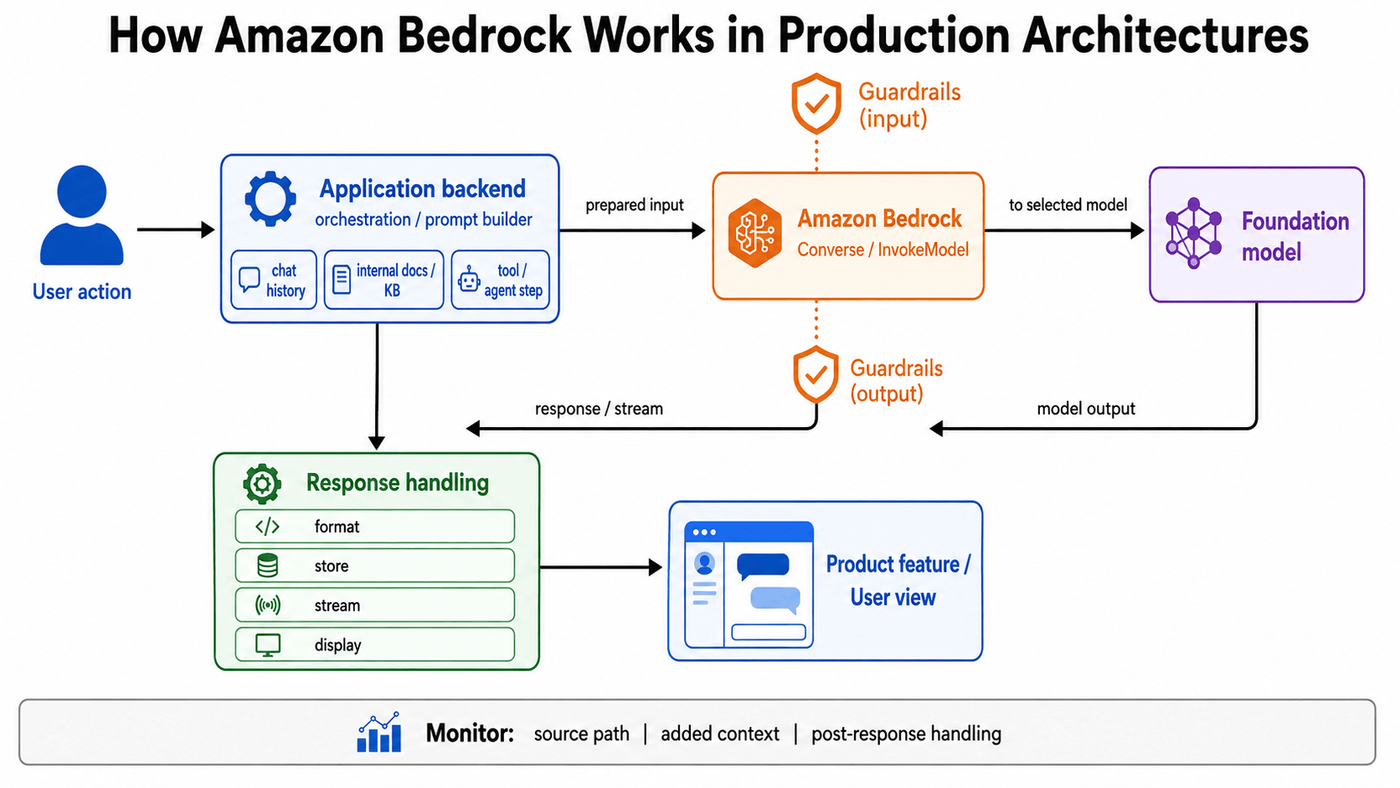
A simple workflow may send a single request to Bedrock and return a single response. For example, a log analysis tool can send an error trace to a model and return a plain-language explanation to the on-call engineer. In that setup, Bedrock acts as the model layer behind a normal product feature.
More complex workflows add context, decisions, or external steps around that same model call. A chat feature adds conversation history so the model can answer in context, while a retrieval-based assistant fetches internal documents before building the prompt. An agent workflow goes further by deciding whether to call a tool, query a knowledge base, or ask the user for more details before it returns an answer.
In each case, the model call is only one part of the full request path. Before you can monitor Bedrock well, you need to know which application path sends the request, what context it adds, and what happens after the response returns.
Key Metrics for AWS Bedrock Monitoring
CloudWatch metrics show where a Bedrock model call changed. The main AWS Bedrock monitoring metrics fall into three groups: latency, errors and throttling, and token and quota pressure.
Latency Metrics
Latency metrics show whether users or background jobs are waiting longer for Bedrock responses.
- InvocationLatency: Measures how long Bedrock takes to return the final token for a model request. This is the main latency signal for workflows that wait for the full response before moving on, such as summarization jobs, classification tasks, or backend processing flows. If this metric rises after a release, check whether the request now sends more context, uses a different model, or asks for longer responses.
- TimeToFirstToken: Measures how long a streaming request takes to return the first token. This metric is more useful for chat and assistant features than total response time alone, because users notice the pause before the first word appears. A response can finish within an acceptable total time and still feel slow if the first token takes too long.
Error and Throttling Metrics
These metrics tell you whether a failure started in your application code, in the Bedrock service, or at a quota boundary.
- Invocations: Tracks successful model requests. Use it as the baseline for traffic patterns. A steady increase may reflect normal adoption, but a sharp jump can point to duplicate calls, retry loops, or a workflow that now sends more Bedrock requests for the same user action.
- InvocationClientErrors: Points to requests Bedrock rejects because of a caller-side problem. This can happen after a release if the application sends a malformed payload, uses the wrong model ID, passes invalid parameters, or loses the required permissions. A spike here often means the application changed, not the model.
- InvocationServerErrors: Tracks AWS server-side errors. This metric helps separate service-side failures from bad request payloads or application bugs. Watch it together with application errors so you can tell whether failures are coming from your code path or from the Bedrock service response.
- InvocationThrottles: Shows that Bedrock rejected requests because the workload crossed a quota boundary. This is one of the first metrics to check when a feature works in testing but fails under production traffic. Throttling can come from higher request volume, retry storms, larger prompts, or output settings that reserve more token capacity than the request actually uses.
Token and Quota Metrics
Token and quota metrics show whether prompt size, output length, or token limits are driving latency, cost, or throttling.
- InputTokenCount: Shows how many tokens your application sends to the model. This metric often changes when a prompt template grows, a chat feature adds more conversation history, or a retrieval workflow sends too many document chunks into the prompt. A higher input token count increases latency, cost, and quota pressure even when request volume stays flat.
- OutputTokenCount: Shows how many tokens the model generates. Track it when responses become longer than expected or when a prompt change makes the model produce more detail than the feature needs. Longer outputs can slow down completion time and raise spend across high-volume workloads.
- EstimatedTPMQuotaUsage: Estimates tokens-per-minute quota consumption. Use it for capacity planning and throttling prevention rather than as a standalone health metric. If this metric keeps rising during traffic peaks, the workload may need shorter prompts, tighter output limits, better retry behavior, or a quota increase.
These metrics give you the baseline for AWS Bedrock monitoring. They help you see whether a production issue starts with response time, failed requests, throttling, token growth, or quota pressure.
AWS Bedrock Monitoring Across Kubernetes and Cloud-Native Environments
Cloud-native Bedrock workloads often run across several services. A request enters through an API gateway, moves through a Kubernetes service, calls a retrieval layer, and then reaches Bedrock from a pod. Bedrock metrics show the model layer, but you still need workload context around the call.
Connect Bedrock Calls to Workload Identity
Several Kubernetes services call the same Bedrock model, so the model name alone does not show which workload changed when throttling or token usage rises. Track the service, namespace, deployment, pod, route, release version, and service account for each Bedrock request. This helps you see whether the change came from real traffic, retries, larger prompts, or a new release.
Watch the Cluster Around the Model Call
A slow Bedrock-backed feature does not always mean the model is slow. The calling pod may be restarting, the CPU may be saturated, or the memory limits may be too low. Track compute health around the calling pods, including restarts, failed pods, CPU pressure, and memory limits. Also, monitor network latency between the pod and the Bedrock endpoint, since a slow network can appear as a slow model from the application’s perspective.
Add Application Context to Bedrock Metrics
Kubernetes metadata tells you where a Bedrock request came from, while application context tells you why it happened. Add fields such as feature name, request path, prompt version, tenant, retry count, model ID, and Bedrock operation to your telemetry. This makes a metric like `InputTokenCount` easier to debug because you can connect the token change to a prompt version, route, and deployment.
Here is an example that shows what that context looks like on a single request.
Keep the Cloud and Cluster View Connected
CloudWatch metrics show that latency, throttling, or token usage changed. Kubernetes and application telemetry show which workload caused the change. That connection becomes more important as Bedrock usage runs across services, workers, queues, and agent workflows. You need to know which workload changed, which release introduced it, and which user-facing path it affected.
Advanced AWS Bedrock Monitoring Techniques
CloudWatch metrics show that a Bedrock workload has changed. Advanced monitoring explains the request and application behavior behind that change. This layer adds bedrock logs, log queries, dashboards, alarms, and custom metrics around the model call.
Enable Model Invocation Logging
Model invocation logging records Bedrock request metadata, inputs, and outputs for supported runtime calls in an AWS account and Region. Send these logs to a CloudWatch Logs log group for fast debugging, or to Amazon S3 for longer retention and larger payload storage. AWS disables model invocation logging by default, so Bedrock does not publish invocation logs until you enable it.
Before enabling logging, create the log group in CloudWatch. When enabling logging, select which modalities to capture, such as text, image, embedding, or video, based on what your workloads use. Treat prompt and response logging carefully because some workloads send customer data, internal documents, or sensitive prompts to the model.
Query Bedrock Logs With CloudWatch Logs Insights
CloudWatch Logs Insights helps you turn Bedrock logs into incident answers. If token usage rises, query the log group to find which caller or workflow consumed the most tokens.
`InputTokenCount` shows that the prompt size increased. The log query shows which identity, service, or request path caused the increase.
Build Dashboards Around Workflows
A useful Bedrock dashboard connects CloudWatch metrics to the application path that uses the model. Start with invocations, latency, throttles, client errors, server errors, input tokens, output tokens, and first-token latency.
Then add panels that match the workflow. A retrieval-based assistant needs retrieval latency and empty retrieval counts. A serverless workflow needs Lambda errors, duration, and throttles. A Kubernetes service needs pod health, deployment version, and route-level latency near the Bedrock call.
Add Alarms for Failure Patterns
Alarms should track failure patterns, not every metric change. Start with `InvocationThrottles`, `InvocationServerErrors`, `high InvocationLatency`, and high `TimeToFirstToken` for streaming features. Add EstimatedTPMQuotaUsage when traffic peaks create throttling risk.
Each alarm should point to an action. A throttling alarm leads the team to check traffic, retries, token usage, and quota. A first-token latency alarm leads the team to check streaming behavior, prompt size, model choice, and the calling service.
Add Custom Metrics From the Application
Bedrock metrics show the model side of the request. Custom metrics show the application behavior around it, such as retry count, timeout count, fallback model usage, prompt version, retrieved chunk count, empty retrieval count, and user-visible failure count.
CloudWatch Embedded Metric Format lets you publish custom metrics through structured logs and query the same events in CloudWatch Logs Insights. This works well for containers and short-lived compute because one structured event carries both metric values and debugging context. Avoid high-cardinality dimensions such as request ID because they create many unique custom metrics and raise cost.
These layers connect what CloudWatch metrics show to the specific request, caller, and application behavior behind it.
Observability Challenges With AWS Bedrock Monitoring
AWS Bedrock monitoring comes with observability challenges that standard infrastructure dashboards do not fully address. Here are the main challenges you need to account for when monitoring Amazon Bedrock in production.
| Challenge | Production Signal | Solution |
|---|---|---|
| Limited metric context | Latency or token usage changes, but the metric does not show the caller, prompt, route, or workflow | Add trace context to each Bedrock call. Connect inference, retrieval, and tool execution spans to the same request path |
| Sensitive invocation logs | Bedrock logs help debug requests, but prompts and responses may contain customer data or internal documents | Create the log destination first. Capture only needed modalities, restrict access, set retention, and redact sensitive fields |
| Silent token growth | Token usage rises without a matching traffic spike | Set token budgets by workflow. Version prompts, cap chat history, limit retrieved chunks, and tune output limits before release |
| Quota and throttling ambiguity | \InvocationThrottles\ rises even when traffic looks stable | Tune \max_tokens\, add retry backoff, apply per-service rate limits, and request quota increases before peak traffic |
| RAG and agent blind spots | The model call succeeds, but retrieval, ingestion, tool execution, or agent planning causes slow or weak answers | Enable knowledge base logs. Trace retrieval and tools separately. Use agent metrics to isolate agent, model, token, or service-side failures |
| Output quality gaps | The request succeeds, but the answer is vague, ungrounded, blocked, or not useful | Track guardrail interventions, findings, user feedback, grounding checks, and custom evaluations across prompt and retrieval changes |
Each signal should point to the workload, prompt, quota condition, workflow step, or quality issue that needs attention.
Performance and Cost Considerations for AWS Bedrock Monitoring
Bedrock performance and cost often change together. A larger prompt, longer output, or a different inference tier can affect latency, spend, and quota pressure simultaneously.
- Track token usage as the first cost signal: `InputTokenCount` shows how much prompt, chat history, or retrieved context your application sends to the model. `OutputTokenCount` shows how much text the model generates. If either metric rises after a release, cost can rise even when traffic stays flat.
- Separate billing from quota pressure: AWS bills for actual token usage, but quota pressure can also depend on `max_tokens`, cache tokens, and output token burndown. Keep `max_tokens` close to the expected response size, then use `OutputTokenCount` to tune it over time.
- Attribute spend by workload: Several features may call the same model, so model-level cost alone is not enough. Use application inference profiles and cost allocation tags to separate Bedrock spend by application, team, or workflow.
- Match the inference tier to the workload: User-facing chat and incident-response tools need lower latency than batch summaries or offline analysis jobs. Use on-demand, batch, provisioned throughput, or latency-optimized inference based on the workflow’s response-time needs.
- Measure latency before and after changes: Track `TimeToFirstToken` for streaming features and `InvocationLatency` for full-response workflows. Compare these metrics before and after prompt changes, model changes, output-limit changes, or latency-optimized inference.
Performance and cost monitoring should show which workload is driving latency, spend, or quota pressure.
AWS Bedrock Monitoring for Reliability, Latency, and User Experience
A reliable Bedrock feature is not only a request that completes successfully. The user experience depends on when the first response appears, whether the full response finishes, and how the application handles throttles, timeouts, and service-side errors.
Define User-Facing Latency Targets
Track `TimeToFirstToken` for streaming features and `InvocationLatency` for full-response workflows. `TimeToFirstToken` measures how long streaming APIs take to return the first token, while invocation latency measures the time from request to final token. A chat assistant needs a short first-token delay because users notice the pause before text appears. A batch summary job does not need the same first-token target, but it still needs a full-response limit to prevent queues from backing up.
Monitor Reliability by Failure Type
Separate reliability signals by failure source. `InvocationClientErrors` points to caller-side problems, `InvocationServerErrors` tracks AWS server-side errors, and `InvocationThrottles` shows quota or rate pressure. This separation keeps incident response focused. A client error spike after a release points to payloads, permissions, or model IDs, while a throttle spike points to request rate, token rate, retries, and quota.
Treat Streaming as Its Own Experience
Streaming improves perceived speed only when the first token arrives quickly and the stream completes cleanly. Track first-token latency, stream completion, stream errors, and user-visible cancellations separately from normal request latency. For example, a support chatbot may display text quickly but fail halfway through the response, so streaming-specific telemetry helps you see whether the issue occurred before the first token, during generation, or after the response began reaching the user.
Reduce Latency for Repeated Context
Repeated context slows Bedrock features when the same large prompt prefix is processed on every request. Prompt caching helps supported models reuse static prompt sections, reducing inference latency for workloads with long, repeated context. Use this for stable prompt sections such as system instructions, policy documents, long reference material, and repeated session context, not for prompts that change on every request.
Protect User Experience During Traffic Spikes
Traffic spikes affect reliability when requests run into quota or regional capacity pressure. Cross-Region inference profiles let Bedrock route requests across supported AWS Regions to increase throughput and handle unplanned bursts. Use cross-Region inference for workloads where higher throughput is more important than single-Region routing. For stricter data residency requirements, choose a geographic profile instead of a global one.
Tie Alerts to User Impact
Reliability alerts should reflect what users feel. Alert on sustained first-token latency for chat, high full-response latency for blocking workflows, repeated throttles, server-side errors, and timeout rates. Each alert should point to the next check. A first-token alert should lead to prompt size, model choice, streaming behavior, and caller-service health, while a throttle alert should lead to retry volume, token usage, `max_tokens`, and quota settings.
Security and Compliance Signals to Track With AWS Bedrock Monitoring
Security and compliance monitoring for Bedrock covers four areas: caller identity, invocation log access, safety control activity, and network and encryption behavior. Here are the main signals to track in production.
- CloudTrail activity: Monitor Bedrock CloudTrail events for model invocation, agent runtime, knowledge base, and flow activity. Watch the caller identity, source IP address, Region, API action, resource ARN, and request parameters for unexpected access patterns.
- Identity and Access Management (IAM) changes: Watch CloudTrail for `PutRolePolicy`, `AttachRolePolicy`, `UpdateAssumeRolePolicy`, and unexpected `AssumeRole` activity on roles that can call Bedrock. Also monitor IAM Access Analyzer findings for Bedrock-scoped policies that expose access outside the intended account or organization.
- Model invocation log access: Monitor reads, exports, and deletions on the CloudWatch Logs log group or S3 bucket that stores Bedrock invocation logs. Useful events include `GetLogEvents`, `StartQuery`, `CreateExportTask`, `DeleteLogGroup`, and S3 data events such as `GetObject` or `DeleteObject` from unexpected identities.
- Guardrail metrics: Track `InvocationsIntervened`, `FindingCounts`, `TextUnitCount`, guardrail policy type, content source, guardrail ARN, and guardrail version. These metrics show when safety controls intervene in model inputs or outputs.
- Encryption and key usage: Monitor AWS Key Management Service (KMS) CloudTrail events for Bedrock-associated keys. Focus on `Decrypt`, failed decrypt attempts, `CreateGrant`, `DisableKey`, key policy changes, and access from unexpected identities or services.
- Private connectivity: Monitor VPC endpoint use, endpoint policy changes, rejected VPC Flow Logs, and traffic that bypasses the expected Bedrock interface endpoint. Bedrock supports AWS PrivateLink endpoints for services such as `bedrock`, `bedrock-runtime`, `bedrock-agent`, and `bedrock-agent-runtime`, while VPC Flow Logs capture traffic records for monitored network interfaces.
Security and compliance monitoring should leave an audit trail you can defend. Each signal should show who accessed Bedrock, who changed access, who touched sensitive logs, which controls intervened, and whether the request followed the expected encryption and network path.
Best Practices for AWS Bedrock Monitoring at Scale
AWS Bedrock monitoring at scale needs clear ownership, a stable context, and alerts that point to the next action. Follow these practices to keep model signals useful as Bedrock usage grows across services, workflows, and Kubernetes workloads.
| Best Practice | Implementation | Why It Matters |
|---|---|---|
| Add workload context | Attach service, route, namespace, deployment, model ID, prompt version, tenant, and trace ID to each Bedrock call | Keeps latency, token growth, throttling, and errors tied to the workload that caused them |
| Trace multi-step AI workflows | Trace Bedrock calls together with retrieval, tool execution, queue processing, and downstream writes | Keeps RAG and agent workflows connected across the full request path |
| Build workflow-level dashboards | Create dashboards around the user path or job type, not only the model | Helps you compare Bedrock metrics with application metrics, cluster health, and workflow-specific signals |
| Set action-based alarms | Alert on sustained throttling, server-side errors, first-token latency, full-response latency, token spikes, and quota pressure | Makes each alert point to a clear next action rather than a metric dashboard |
| Control logs and sensitive data | Enable invocation logging only where request and response detail is needed. Set retention, limit access, and choose CloudWatch Logs or S3 intentionally | Prevents Bedrock logs from becoming noisy, expensive, or risky to retain |
| Attribute cost by workflow | Use application inference profiles and cost allocation tags for applications, teams, or workflows | Prevents spend from disappearing into one shared model line item |
| Set and monitor token budgets | Set expected input and output ranges, then monitor prompt versions, retrieved chunks, chat history, token counts, and quota usage after releases | Reduces surprise cost, latency, and throttling from prompt or retrieval changes |
| Monitor streaming separately | Use \TimeToFirstToken\ for streaming features and \InvocationLatency\ for full-response workflows | Captures the delay users feel before the first response appears |
| Track RAG, agents, and guardrails separately | Add knowledge base logs, agent metrics, guardrail metrics, and application-level quality signals | Helps explain weak retrieval, tool errors, agent delays, and safety interventions |
| Review monitoring after production changes | Compare latency, token usage, throttles, errors, cost, and output quality after prompt, model, routing, or guardrail changes | Turns each release into a measurable change instead of a guessing exercise |
At scale, the useful signal is not only that a Bedrock metric changed. It is which workload changed, what triggered it, and what action should follow.
Unified AWS Bedrock Monitoring Across Kubernetes Workloads With groundcover
When Bedrock runs behind Kubernetes services, model metrics only tell part of the story. A slow response, token spike, or error may start in the model call, but the pod, service, namespace, deployment, prompt path, or infrastructure around it may cause it.
groundcover connects each Bedrock call to the Kubernetes and application context around it. It allows you to follow the signal from the model layer back to the workload that caused it.
Capture Bedrock Calls Across Kubernetes Services
groundcover uses eBPF to automatically detect and trace LLM API calls without code changes. Because it supports AWS Bedrock APIs, it can capture model traffic across services that use different Bedrock clients, routes, or frameworks. The sensor then converts that traffic into structured spans and metrics, including model metadata, latency, token usage, completion time, errors, and finish reasons.
Connect Model Signals to Workload Context
groundcover enriches LLM metrics with Kubernetes context, such as cluster, namespace, and workload. This lets you trace a latency spike, token increase, or Bedrock error back to the service that caused it instead of stopping at the model name. For example, you can separate token growth from a chatbot service, an incident-summary API, or a RAG worker, even when they use the same Bedrock model.
Break Down Token Usage by Service and Namespace
groundcover exposes input token, output token, and total token metrics at workload and cluster scope. You can filter those metrics by workload, namespace, cluster, model, provider, client, server, and status code. That makes token growth easier to explain when a single prompt change, a retrieval path, or a background worker increases spend without changing overall traffic.
Use Agent Mode to Investigate Bedrock Traces, Logs, and Pod Health
groundcover brings LLM traces together with logs, metrics, Kubernetes events, custom metrics, OpenTelemetry data, Prometheus metrics, and cloud integrations. Every signal is enriched with a cross-signal identifier at ingest, so groundcover's Agent Mode can connect them automatically without you manually aligning timestamps across dashboards. When latency rises, you can @mention Agent Mode from your current view and ask it to find the cause. It pulls the relevant Bedrock trace, pod metrics, logs, and request path into context and tells you whether the issue came from Bedrock, a busy pod, a slow dependency, or the request path around the model call.
Add GenAI Context for RAG and Agent Workflows
groundcover supports OpenTelemetry ingestion alongside its eBPF-based tracing. If your Bedrock workflow includes retrieval, reranking, tool execution, prompt templates, or response formatting, you can send those spans to groundcover and view them beside the LLM telemetry it captures automatically. This keeps RAG and agent workflows connected instead of splitting the model call from the steps around it.
Keep Bedrock Observability Data Under Your Control
groundcover runs natively on Kubernetes distributions, including Amazon EKS, and installs as a DaemonSet in Kubernetes clusters. Its architecture supports Bring Your Own Cloud, on-prem, and air-gapped deployments. Bedrock prompts, responses, traces, and token metadata may contain sensitive application context, so observability data should remain within the controls your environment requires.
FAQs
Start with metrics that show user delay, request failures, and token growth. For latency, use InvocationLatency for full-response delay and TimeToFirstToken for streaming features. For failures, track client errors, server errors, and throttles so you can separate application issues, AWS service errors, and quota pressure. For cost and capacity, add input tokens, output tokens, and estimated tokens-per-minute quota usage.
Traditional monitoring shows the service around the model call, such as API latency, pod health, memory usage, and endpoint errors. AWS Bedrock monitoring shows what happened inside the model call, including latency, token usage, throttling, invocation errors, guardrail activity, knowledge base behavior, and agent execution. You need both because a feature can look healthy at the API layer while the model response is slow, costly, blocked, or incomplete.
groundcover uses eBPF to capture LLM traffic directly from Kubernetes, so you don’t need SDK changes, wrappers, or code instrumentation across services. It connects each Bedrock call to the pod, service, namespace, and cluster that produced it, then places the trace beside related logs, metrics, pod health, and infrastructure signals. This helps you move from "the model call is slow" to "this workload, route, or dependency is causing it."



