Elasticsearch Disk Watermark: Causes, Fixes & Best Practices



Running completely out of disk space in Elasticsearch is a major problem – in fact, it’s so severe that Elasticsearch has a built-in feature, called disk watermark, designed to prevent this scenario. Disk watermark limits Elasticsearch’s ability to write data to nodes once their available disk space falls below 15 percent. This helps to prevent node crashes and data loss issues.
That said, in a healthy Elastic cluster, disk watermarks never come into play in the first place because nodes don’t face severe shortages of space. The job of Elasticsearch admins is to help avoid ever having to enforce disk watermarks.
Read on for guidance on how to get ahead of Elasticsearch disk watermark issues as we explain how disk watermarks work, what causes Elasticsearch nodes to run short of space, and best practices for getting ahead of disk watermark risks.
What is Elasticsearch disk watermark?
Disk watermark is an Elasticsearch feature that incrementally reduces Elasticsearch’s ability to write data on a node once the node’s unused disk capacity falls below 15 percent.
The purpose of the disk watermark capability is to prevent Elasticsearch nodes from running completely out of space. If that happens, they are at risk of losing data or falling out of sync because they’ll be unable to accommodate even minor changes to shards due to the exhaustion of disk capacity. They may also crash in the event that the operating system’s ability to run normally is impeded by a lack of space.
Types of Elasticsearch disk watermarks and their thresholds
There are four main watermarks in Elasticsearch. Each is triggered by a different level of disk usage, and each comes with progressively tighter restrictions on Elasticsearch storage operations.
The disk watermarks are:
- Low watermark (default: 85% disk usage): Prevents Elasticsearch from allocating new shards to nodes whose disk usage exceeds the low watermark. Existing shards remain on the node, but the cluster begins shifting future shard allocations elsewhere to avoid further disk pressure.
- High watermark (default: 90% disk usage): Triggers Elasticsearch to relocate shards away from nodes that exceed the threshold in order to free disk space and restore cluster balance. If sufficient capacity is unavailable on other nodes, relocation may be limited.
- Flood-stage watermark (default: 95% disk usage): Protects the cluster from running out of disk space by automatically placing a read-only block on indexes with shards stored on the affected node. Write operations are blocked until disk usage falls below the configured threshold and the block is removed.
- Flood-stage frozen watermark (default: 95% disk usage for frozen-tier nodes): Applies specifically to nodes in the frozen data tier. It helps protect frozen indexes from exhausting available storage while allowing Elasticsearch to manage disk usage separately from hot, warm, and cold data tiers.
The watermarks that kick in initially are known as low disk watermarks; those at the other end of the spectrum are sometimes called high disk watermarks.`
Common causes of Elasticsearch disk watermark errors
Again, while disk watermarks serve as a backstop against critical errors that may occur due to lack of disk space, the goal of Elasticsearch admins should be avoiding situations where nodes run dangerously low on storage in the first place.
Doing so starts with understanding common scenarios that can trigger disk watermarks. They include:
- Rapid data growth: Large volumes of new documents, logs, metrics, or traces can consume available storage faster than expected, causing one or more nodes to exceed configured disk watermark thresholds.
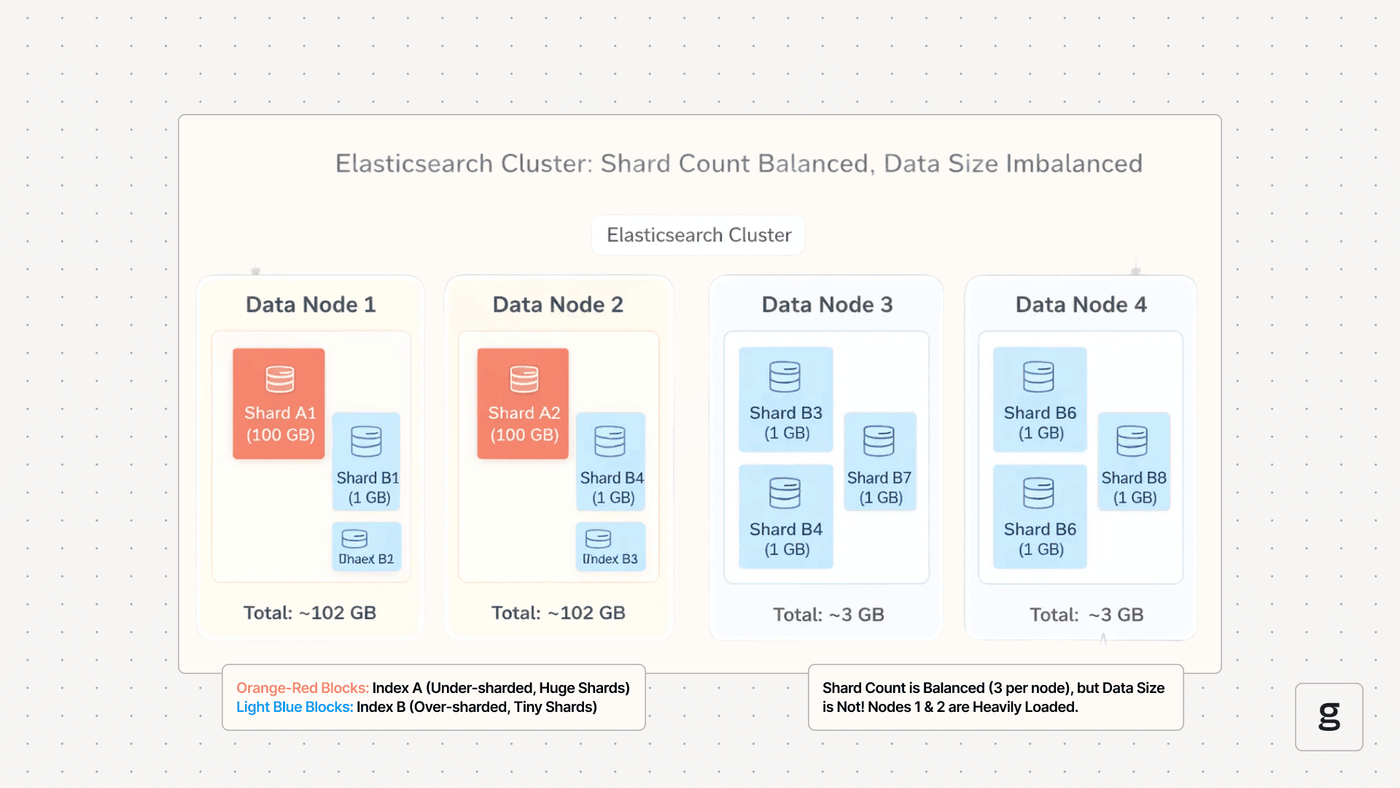
- Oversharding: Creating too many small shards increases storage overhead because each shard consumes disk space for metadata and index structures, even when it contains little data.
- Unbalanced shard allocation: If shards are unevenly distributed across the cluster, some nodes may reach disk capacity much sooner than others, triggering watermark errors despite sufficient free space elsewhere.
- Delayed index lifecycle management: Retaining old indexes longer than necessary or failing to delete obsolete data allows disk usage to grow continuously until watermarks are exceeded.
- Large merge operations: Elasticsearch periodically merges index segments to improve search performance. During these operations, temporary disk space is required, which can briefly push nodes above configured watermarks.
In short, inefficient management of Elasticsearch shards and indices are among the top causes of watermark errors.
How Elasticsearch disk watermark affects shard allocation and cluster health
Having watermarks kick in is bad not just in the generic sense that it means your node is short on space, but also because it can impede the overall efficiency and health of shards and the cluster.
That’s because relocating shards (which happens when watermarks are reached) requires network bandwidth, CPU, and disk I/O, which can temporarily slow indexing and search operations.
Worse, if the cluster lacks sufficient free capacity on other nodes, Elasticsearch may be unable to relocate shards or allocate replicas at all, leading to unassigned shards and reducing fault tolerance. While these actions can prevent serious issues such as node failures, prolonged recovery times, and potential data loss caused by exhausted storage, they can also significantly impede overall cluster performance.
How to diagnose Elasticsearch disk watermark issues in production
To diagnose issues with disk watermarks in Elasticsearch, first review cluster health and shard allocation by using the _cluster/health, _cat/allocation, _cat/nodes, and _cat/shards APIs to identify nodes with high disk utilization, unassigned shards, or ongoing relocation activity.
From there, inspect cluster settings to verify the configured low, high, and flood-stage watermarks, and review Elasticsearch logs for messages indicating allocation decisions, read-only index blocks, or failed shard relocations.
Finally, after identifying the affected nodes, determine the root cause of why disk usage has increased. You can do this by:
- Analyzing index sizes, shard distribution, and replica counts to identify oversized indexes, oversharding, or uneven shard allocation.
- Reviewing index lifecycle management (ILM) policies to confirm that old indexes are being deleted or transitioned to lower-cost storage as expected, and check for recent spikes in data ingestion or large merge operations that may have temporarily increased disk usage.
- Combining these findings with node-level monitoring of disk capacity, CPU, memory, and I/O helps distinguish between temporary storage pressure and a capacity issue that requires scaling the cluster or reclaiming disk space.
How to fix Elasticsearch disk watermark errors, step-by-step
After diagnosing a watermark problem, you can typically resolve it by working through the following steps.
1. Check disk usage across nodes
The first step in resolving disk watermark issues is determining which nodes have exceeded the configured thresholds and whether disk usage is evenly distributed across the cluster. Use APIs such as _cat/allocation and _cat/nodes to identify nodes with high disk utilization and compare available storage across the cluster.
If only a few nodes are affected while others have ample free space, the problem may be caused by uneven shard allocation rather than an overall storage shortage. Regularly monitoring node-level disk usage also helps identify growth trends before watermarks are reached.
2. Identify unassigned or relocating shards
Disk watermarks often prevent Elasticsearch from allocating or relocating shards, making it important to identify affected shards early. Use _cat/shards, the Cluster Health API, and the Cluster Allocation Explain API to determine which shards are unassigned or repeatedly attempting to relocate.
Reviewing the allocation explanations can reveal whether disk watermarks, allocation filters, or other routing constraints are preventing successful shard placement. Resolving these issues restores redundancy and improves cluster health.
3. Adjust cluster routing and allocation settings
Review cluster routing and allocation settings to ensure Elasticsearch can move shards away from nodes with limited disk space. Allocation filters, awareness rules, and other routing constraints may unintentionally prevent shard relocation, even when healthy nodes have sufficient capacity. Removing unnecessary restrictions or correcting allocation policies allows Elasticsearch to rebalance data more effectively while maintaining high availability and performance.
4. Free up disk space or expand storage
The most effective long-term solution is reducing disk usage or increasing available storage. Delete obsolete indexes, apply ILM policies, reduce unnecessary replica counts, and shrink or consolidate indexes where appropriate. If storage demand continues to grow, add larger disks or scale the cluster by adding new data nodes, allowing Elasticsearch to redistribute shards and restore healthy disk utilization.
5. Temporarily modify watermark thresholds
Temporarily increasing disk watermark thresholds can provide time to restore normal operations when immediate storage expansion or cleanup is not possible. This is because it allows Elasticsearch to resume shard allocation or indexing while administrators address the underlying capacity issue.
That said, because higher thresholds reduce the safety margin that protects nodes from running out of disk space, they should only be used as a short-term measure and returned to appropriate values once disk usage has been reduced.
You can modify watermark thresholds by sending a PUT request to the /_cluster_settings endpoint. For example, the following request changes the threshold for the flood stage to 98 percent:
Preventing Elasticsearch disk watermark issues before they impact performance
To get ahead of watermark problems and prevent them from impacting clusters in the first place, consider these strategies:
- Implement Index Lifecycle Management (ILM): Automatically delete, roll over, or move older indexes to lower-cost storage tiers before they consume excessive disk space. This prevents storage growth from reaching watermark thresholds during normal operations.
- Monitor disk utilization and configure proactive alerts: Track disk usage, shard allocation, and storage growth across all data nodes, and generate alerts well before the low watermark is reached. Early detection gives administrators time to reclaim space or add capacity before cluster performance is affected.
- Optimize shard sizing and index design: Avoid oversharding by creating appropriately sized shards and periodically reviewing shard distribution. Efficient shard management reduces storage overhead and helps keep disk usage balanced across the cluster.
- Plan capacity and scale proactively: Regularly evaluate storage trends and forecast future capacity requirements based on indexing rates and data retention policies. Expanding storage or adding data nodes before existing resources become constrained helps prevent shard allocation issues, unnecessary relocations, and write blocks.
Monitoring and alerting for Elasticsearch disk watermark thresholds
In addition to taking steps to prevent watermark issues, it’s a best practice to enable automated monitoring and alerting so that you’ll be aware of the problem when it arises.
Effective monitoring for this issue begins with tracking disk utilization on every Elasticsearch data node and comparing it against the configured low, high, and flood-stage watermark thresholds. Specifically, collect metrics such as disk usage percentage, available disk space, shard allocation status, and cluster health using Elasticsearch monitoring APIs and your observability platform. This provides early visibility into storage growth before watermarks begin affecting cluster operations.
Configure alerts that trigger before critical thresholds are reached rather than waiting for watermark errors to occur. For example, generate warning alerts as nodes approach the low watermark and higher-severity alerts as they near the high or flood-stage thresholds. Pair these alerts with notifications for unassigned shards, failed shard relocations, and indexes that have been placed into read-only mode to quickly identify the operational impact of disk pressure.
Monitoring should also focus on long-term trends instead of only current disk usage. Analyze storage growth, indexing rates, shard counts, and data retention patterns to forecast future capacity needs and identify abnormal increases in disk consumption. Regular capacity planning, combined with proactive alerting, enables teams to expand storage or optimize data management before disk watermarks affect cluster performance or availability.
Common mistakes when handling Elasticsearch disk watermark alerts
Of course, watermark alerts are only as effective as your teams’ response to them. Mistakes like the following can undercut the impact of alerts:
- Ignoring early watermark warnings: Waiting until the high or flood-stage watermark is reached can lead to shard relocation, read-only indexes, and degraded cluster performance. Investigate low watermark alerts promptly to prevent more disruptive issues.
- Relying only on higher watermark thresholds: Temporarily increasing watermark thresholds without addressing the underlying storage problem only delays the issue and increases the risk of exhausting disk space. Threshold changes should be used only as a short-term measure while permanent fixes are implemented.
- Failing to optimize data retention and shard management: Allowing obsolete indexes to accumulate or creating too many small shards wastes disk space and accelerates storage growth. Regularly review ILM policies, shard sizing, and replica counts to keep storage usage under control.
- Expanding storage without investigating the root cause: Adding larger disks or more nodes resolves capacity shortages but does not fix inefficient index designs, uneven shard allocation or unexpected data growth. Always identify the underlying cause to prevent recurring watermark alerts.
Best practices for managing Elasticsearch disk watermarks at scale
Beyond the shard allocation, storage management and alerting, and monitoring guidance we’ve covered above, the following core best practices can help streamline the management of Elasticsearch watermarks across large-scale clusters:
- Define appropriate data retention policies: Establish clear rules for how long different types of data should be stored and remove unnecessary historical data before it consumes excessive disk capacity. Aligning retention periods with business and compliance requirements helps prevent uncontrolled storage growth.
- Optimize indexing and data storage strategies: Reduce unnecessary data ingestion by filtering out irrelevant records, avoiding duplicate data, and storing only fields required for search and analytics workloads. Efficient data storage practices help limit disk consumption and improve overall cluster efficiency.
- Automate data lifecycle operations: Use automated processes to archive, delete, or transition older data based on predefined policies. Automation reduces the risk of manual cleanup delays and ensures storage usage remains predictable as data volumes increase.
- Plan storage capacity based on growth patterns: Allocate sufficient disk capacity for current workloads while accounting for future data growth in your cluster. Be sure to consider not just core storage needs but also indexing overhead and temporary space requirements during operations such as segment merges. Proper capacity planning reduces the likelihood of Elasticsearch reaching watermark thresholds unexpectedly.
Real-time observability for Elasticsearch disk watermark issues with groundcover
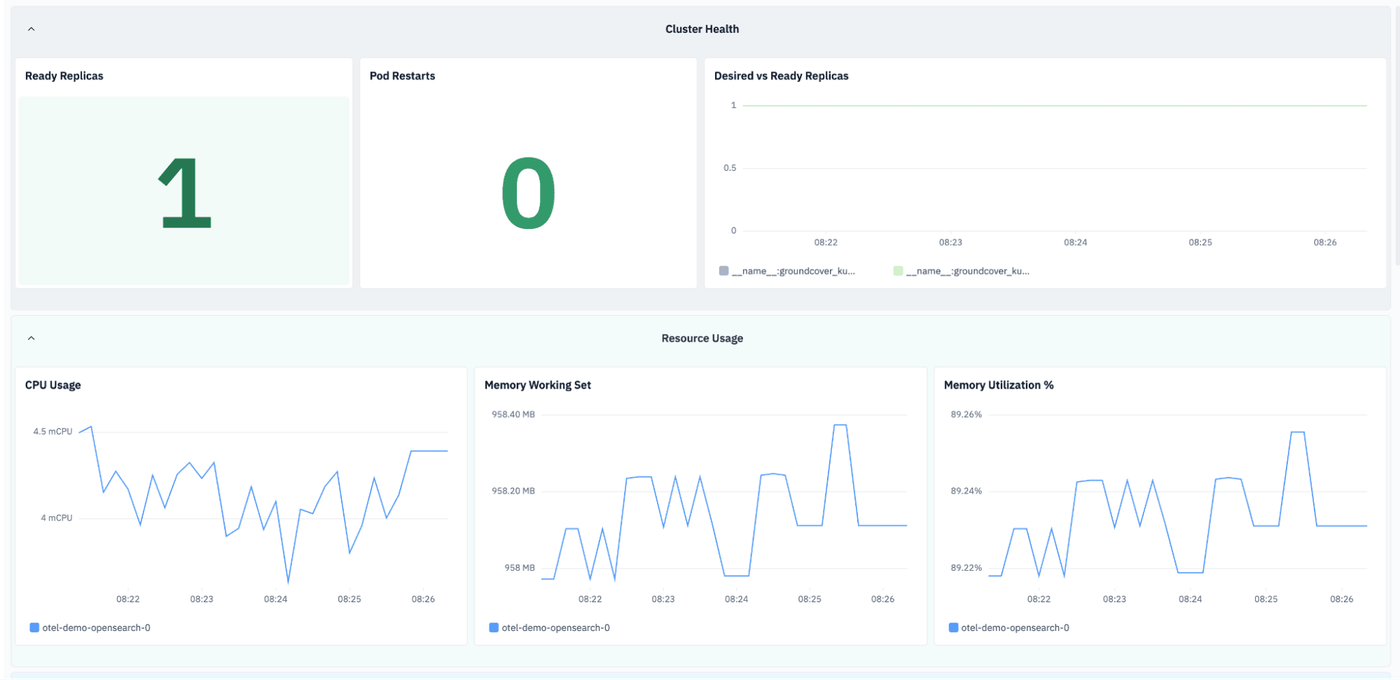
With a comprehensive observability solution like groundcover, you don’t have to guess if or when watermark issues are becoming a problem in your Elasticsearch cluster. By continuously monitoring the health of Elasticsearch nodes – including their storage capacity, CPU and memory utilization, and other core metrics – groundcover provides early warning about low disk availability or trends in that direction.
In turn, admins can take action to ensure adequate disk space before watermark issues set in. What’s more, by using the long-term insights that groundcover provides, teams are able to make informed decisions about scaling Elasticsearch disk capacity over time.
A calm-water approach to Elasticsearch disk watermarks
Disk watermarks are a crucial safeguard against failure scenarios in Elasticsearch. But in a perfect world, no Elasticsearch cluster would have to default to relying on watermarks to prevent serious operational problems. Instead, it would benefit from healthy storage, shard and index management practices, as well as the deep visibility provided by platforms like groundcover, to enable admins to manage disk capacity efficiently, in ways that proactively prevent disk watermark problems.
FAQs
The default Elasticsearch disk watermarks are 85% usage for the low watermark, which prevents new shard allocation, 90% usage for the high watermark, which triggers shard relocation, and 95% usage for the flood-stage watermark, which blocks writes to affected indexes to protect against disk exhaustion.
When a node exceeds the high disk watermark, Elasticsearch attempts to relocate shards away from that node to reduce disk usage. If relocation is not possible, the cluster may experience unassigned shards and reduced availability.
groundcover helps identify disk pressure by providing real-time visibility into Kubernetes and Elasticsearch performance signals, making it easier to correlate storage usage, cluster health issues, and operational events.
This allows teams to detect rising disk utilization, investigate root causes, and take corrective action before watermarks impact production workloads.