

Elasticsearch Shards: Types, Challenges & Best Practices



One of Elasticsearch’s chief selling points is its ability to enable fast queries across very large sets of data - more data than a single server can index in many cases. The secret to making this possible is Elasticsearch shards. By breaking indices into smaller units, shards play a key role in scaling Elasticsearch clusters and boosting performance.
That said, poorly managed shards can create more problems in Elasticsearch than they solve. That’s why it’s critical to monitor shards and take steps to optimize the role that they play within an Elasticsearch cluster. Read on for details as we break down everything Elasticsearch admins need to know about shards.
What are Elasticsearch shards, and how do they work?
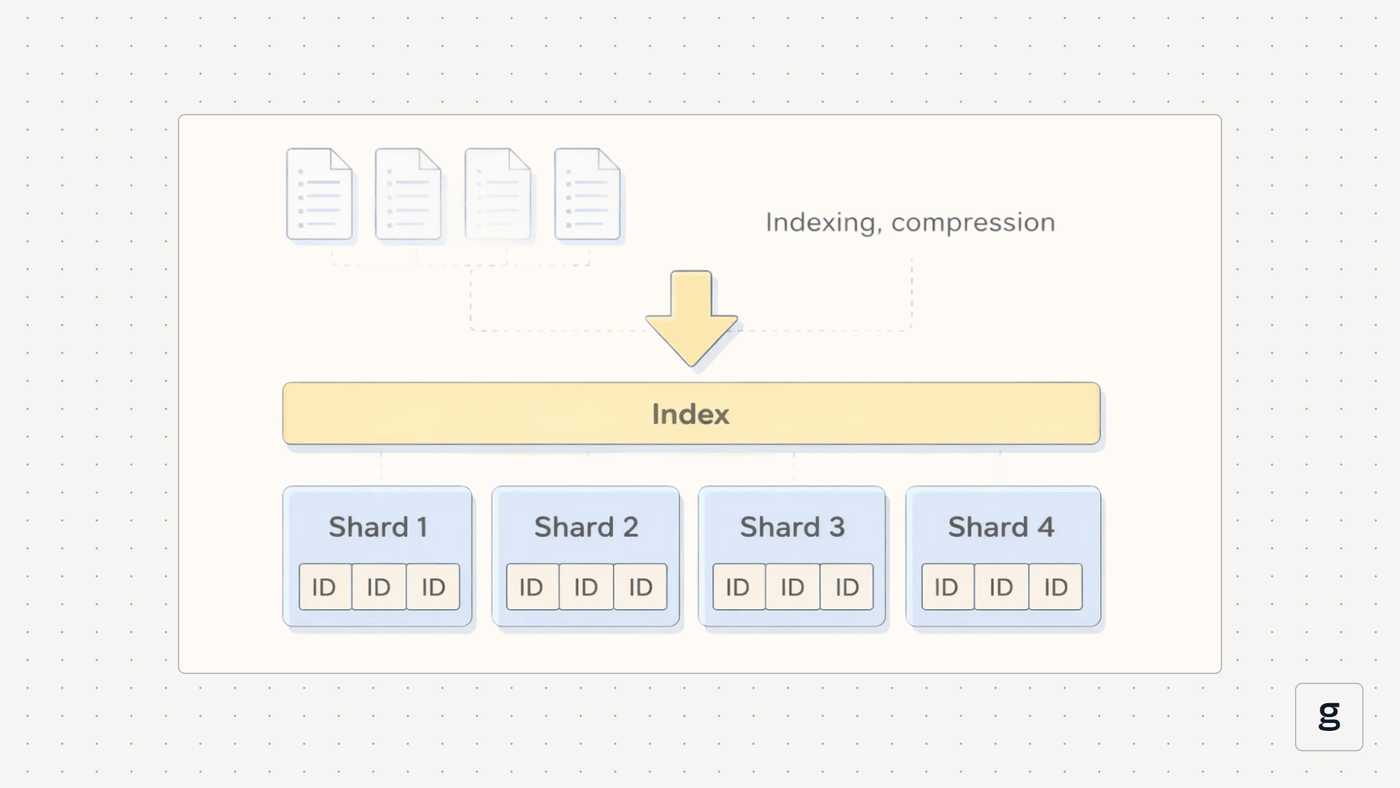
In Elasticsearch, a shard is a self-contained part of an index.
To fully explain what that means, let’s talk about Elasticsearch indices. An index in Elasticsearch is a set of documents. The purpose of indices is to organize documents in a coherent way so that they are easy to search. An Elasticsearch cluster can have one or multiple indices.
A common challenge when working with Elasticsearch indices is that often, an index is larger than any single Elasticsearch node (meaning a server within the Elasticsearch cluster) can handle on its own. An index might contain more data than a single node is able to support using its local storage, and a single node might also not have enough CPU and memory to parse the index effectively on its own.
Shards address this challenge by making it possible to break indices into smaller units. Elasticsearch can then spread the shards across multiple nodes, which share in the work of hosting, and process the index to which the shards belong.
Types of Elasticsearch shards
There are two types of Elasticsearch shards:
- Primary: Primary shards are the “main” instance of data. Changes to index data take place within primary shards, and Elasticsearch treats primary shards as the shards of record.
- Replica: Replica shards are copies of primary shards. They serve as backups that keep index data available if a primary shard fails, and they can also help to improve performance by distributing operations across multiple copies of the same data.
All Elasticsearch clusters contain primary shards. Replica shards are optional, but they’re a common component of any cluster designed for high availability and performance.
Shard allocation, rebalancing, and cluster health
An important aspect of shard behavior is Elasticsearch’s ability to allocate and rebalance shards automatically.
Unless you manually configure a shard to be bound to a specific node, Elasticsearch will automatically distribute them across available nodes. It does so in a way aimed at balancing the use of cluster resources, and avoiding situations where some nodes are overwhelmed (because they have too many shards, or shards that are too large) while others sit under-utilized. If Elasticsearch detects a node that is being over- or under-utilized, it will relocate shards to a different node in an attempt to maintain a balance.
These capabilities work toward a core goal of Elasticsearch, which is to utilize cluster resources efficiently and in a way that maximizes performance.
Distributed search and indexing with Elasticsearch shards
Elasticsearch’s ability to allocate and rebalance shards is also part and parcel of what makes Elasticsearch work as a distributed searching and indexing solution. The main purpose of Elasticsearch is to enable fast searches of a large body of data. This becomes possible when the data can be distributed as shards across a cluster of servers, with each node’s resources used efficiently through the effective balancing of shards.
How Elasticsearch shards enable scalability and performance
Now that we’ve covered the basics of how Elasticsearch shards work, let’s talk about what makes them so important: Their ability to help optimize scalability and performance.
Shards help with scalability by ensuring that an index size is not limited by the resources of any one node within a cluster. Without shards, it would be impossible to create an index that required more disk space or processing power than any single node could support. But with shards, you can distribute data within indices across nodes, with the result that there’s no real limit on how large an index can be.
Shards boost performance for a similar reason: They allow multiple nodes to share in the work of analyzing a single index. Generally speaking, it will take less time for multiple nodes to search different parts of an index than it would for a single node to search through the entire index (even if the index resided entirely on that node). This is because having multiple nodes working together enables parallelism.
Note, by the way, that this ability to process data in parallel is important not just for the performance of individual queries, but also for the performance of an Elasticsearch cluster as a whole. Sharding allows Elasticsearch to handle each query faster by distributing the load across servers. In turn, this means that the cluster can handle more queries in total without the risk that a complex query will become a bottleneck that delays the processing of other queries.
How many shards should an Elasticsearch index have?
The ability of shards to enable scalability and performance depends, in part, on how many total shards an index has. If there are too many shards, performance can degrade due to the high CPU and memory cost of managing so many shards. With too few shards, a cluster’s ability to process data in parallel is limited, which also reduces performance.
So, what is the optimal number of shards for an Elasticsearch index to have? To answer the question, consider:
- Total index size: Each shard should be between about 10 and 50 gigabytes in size - so to determine how many shards to create, divide the total size of your index by a number in this range.
- Total node count: Elasticsearch can’t support more than 1000 shards per node by default. This may limit how many shards you are able to create.
- Memory per node: A rule of thumb is that you need about 1 gigabyte of memory for every 25 shards, so consider how much memory your nodes have and plan your shard count accordingly.
Remember, too, that shard count includes both primary and replica shards. You’ll want to make sure that the total number of shards you create allows you to meet your replication goals while also remaining within the parameters of what your cluster can support.
Monitoring Elasticsearch shards: Metrics that matter
No matter how carefully you plan shard count, you may find your Elasticsearch cluster underperforming, which is why it’s important to monitor for problems that could be a sign of poor shard planning.
Specifically, it’s a best practice to track shard-related metrics, including:
- Active shard count: This metric tracks how many shards are up and available to support queries. Decreases in active shard count are often a sign of cluster performance problems.
- Shard size: Shard size can vary widely, and there is no “perfect” metric to aim for in this regard. But generally speaking, you’ll want to detect shards whose size falls outside the range of 10 to 50 gigabytes. This could be a sign of having too many or too few shards.
- Relocating shards: A relocating shard is one that is in the process of moving to a different node. While this type of migration is often normal, spikes could be an indication that your cluster is struggling to support your current number of shards.
- Unassigned shards: A significant incidence of shards that are waiting to be assigned to a node is also usually a sign of an overwhelmed cluster. It may also mean that you have more total shards than is ideal.
Thread pool rejections: These represent rejected read or write requests. If this metric becomes high, it could be a sign that nodes are overwhelmed.
| Metric | What it tracks | Signs of a problem |
|---|---|---|
| Active shard count | Total number of available, functioning shards | A rapid decrease in active shards could indicate exhaustion of hardware resources or node failures |
| Shard size | Total size of each shard | Shards that are too large (about 50 gigabytes) can lead to performance degradation |
| Relocating shards | Number of shards that are in the process of migrating between nodes | Frequent migrations could indicate that shards are too large for nodes to handle effectively. It could also be a sign of limited resource availability |
| Unassigned shards | How many shards are waiting to be assigned because no nodes are available to handle them | Unassigned shards indicate that there aren’t enough nodes in the cluster, or that shard size is too large for nodes to support |
| Thread pool rejections | How many read or write requests have been rejected | Frequent rejections mean nodes are overwhelmed, often either due to resource exhaustion or becomes shards are too large (and therefore don’t enable enough parallel processing) |
Common Elasticsearch shard problems and failure scenarios
If you detect an anomaly in the Elasticsearch shard metrics we just described, the root cause often boils down to one of the following shard problems or failure scenarios:
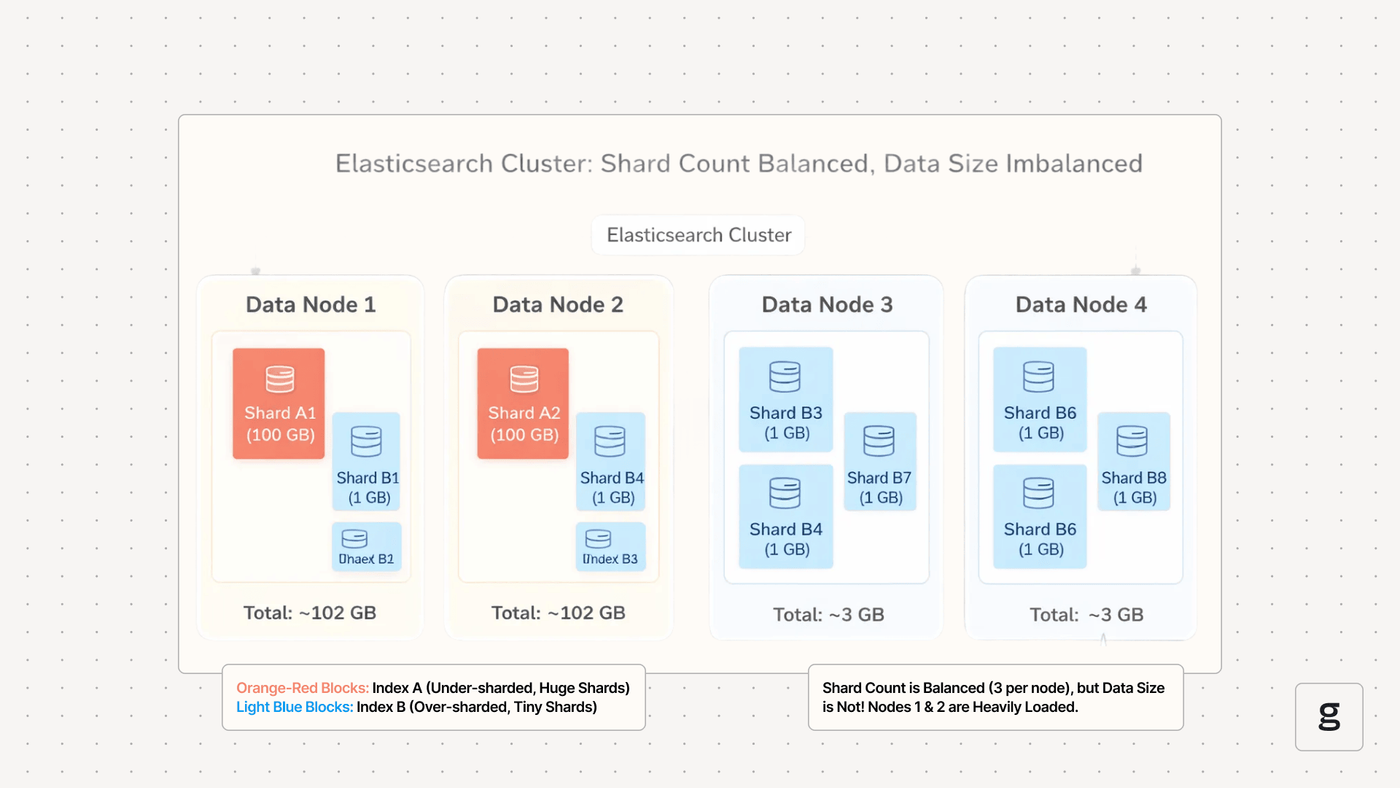
- Excessively large shards: Once shards become larger than about 50 gigabytes, it becomes more difficult for Elasticsearch to assign them to appropriate nodes and rebalance them quickly. This may lead to issues like shards that remain unassigned or are frequently in the process of relocating.
- Exhausted cluster resources: A cluster that lacks enough total disk space, CPU, and memory resources to support all of its shards will end up with shards that remain unassigned, as well as threat pool rejections.
- Node failures: Problems on individual nodes, such as hardware failures or operating system bugs, may result in shards becoming unavailable or having to be reassigned.
- Failure of all shards: This error condition occurs when all of the shards involved in processing a query fail to handle it successfully. This usually stems from either a problem with the query configuration or a lack of available hardware resources on the shards’ host nodes.
- Inefficient shard distribution: If you don’t have enough nodes to be able to spread shards across them, or if you manually bind multiple shards to a specific node, you may end up with a scenario where too many shards reside on a single node. This can undercut query performance and make shards unavailable due to exhaustion of the node’s resources.
Troubleshooting Elasticsearch shard performance issues
If your Elasticsearch cluster is experiencing performance issues and you suspect that shard configuration is the reason why, work through these troubleshooting steps to detect and mitigate the root cause of the problem.
- Monitor resource utilization: Check the total storage, CPU, and memory usage of your cluster, as well as individual nodes. Make sure that there are enough total resources, and that there are no nodes that are being maxed out on resource consumption. If resource availability is a problem, you’ll need to add nodes or delete some data from your cluster.
- Check shard size: Determine whether any shards are excessively large. If so, you’ll need to make them smaller by either creating a new Elasticsearch index with smaller primary shard sizes or reindexing your existing data.
- Assess queries: To rule out query configuration problems as a cause of poor performance, assess whether issues occur with queries of all types. In some cases, you’ll find that just a particular query structure triggers poor performance, which is a sign that the root cause of the problem lies with your queries rather than shard configuration.
- Increase replicas: Increasing the number of shard replicas may improve performance, especially in larger clusters (since having more replicas and more nodes creates more opportunities for spreading shards across nodes).
- Manually manage shard allocation: Binding shards to specific nodes (which you can do via shard allocation filtering or awareness settings) may help to resolve shard problems that result from unreliable nodes. Manual shard allocation also makes it possible to do things like host related shards in the same location or availability zone, another way to boost performance.
Shard sizing best practices for Elasticsearch clusters
To mitigate the risk of shard-related scalability and performance issues in Elasticsearch, consider the following best practices:
- Keep shard size in a healthy range: As we’ve said, 10 to 50 gigabytes is usually the “Goldilocks” range for total shard size. If shard size falls outside this range, you’ll want to add or remove shards as a way of changing average shard size.
- Consider total node count: The total number of nodes in your cluster plays a key role in how many shards it can support and how large each one can be.
- Leave room for growth: When planning how many shards to create, think about how rapidly you expect data volumes to grow over time. Avoid situations where you create too few shards to be able to support data growth without having the shards exceed the recommended 50-gigabyte size limit.
- Consider physical shard and node location: In large-scale clusters, the proximity of shards to one another - meaning the physical distance on the network between the nodes that host the shards - can impact performance because larger distances lead to higher latency. As noted above, you can use manual allocation controls to consolidate shards within the same part of your cluster.
- Leverage Index Lifecycle Management: ILM is a feature in Elasticsearch that can automatically keep shards below a certain size (such as 50 gigabytes). It does this by automatically rolling shards over to a new index when their total size approaches a predefined threshold.
| Best practice | How it helps |
|---|---|
| Keep shard size between 10 and 50 gigabytes | Shards that are smaller than 10 gigabytes increase the resources tied up by shard management, which can undercut overall cluster performance Shards that are larger than 50 gigabytes are often hard for a single node to handle efficiently, leading to slower performance |
| Consider total node count when sizing shards | The total number of nodes may limit how many shards you can have and how large they can be, since you can’t run more than 1000 shards per node by default |
| Leave room for shard data growth | As data volumes increase over time, shards need to be able to accommodate them without becoming excessively large |
| Consider physical shard location | In addition to shard size, shard proximity within clusters can affect performance |
| Use Index Lifecycle Management | The ILM feature can automatically resize shards to boost performance |
| Best practice | How it helps |
|---|---|
| Keep shard size between 10 and 50 gigabytes | Shards that are smaller than 10 gigabytes increase the resources tied up by shard management, which can undercut overall cluster performance Shards that are larger than 50 gigabytes are often hard for a single node to handle efficiently, leading to slower performance |
| Consider total node count when sizing shards | The total number of nodes may limit how many shards you can have and how large they can be, since you can’t run more than 1000 shards per node by default |
| Leave room for shard data growth | As data volumes increase over time, shards need to be able to accommodate them without becoming excessively large |
| Consider physical shard location | In addition to shard size, shard proximity within clusters can affect performance |
| Use Index Lifecycle Management | The ILM feature can automatically resize shards to boost performance |
Unified visibility into Elasticsearch shard behavior with groundcover
With groundcover, you never have to guess about the health of your Elasticsearch shards or why they’re not performing as expected.
Using the comprehensive and granular Elasticsearch observability data that groundcover collects in real time, you can monitor the status of every shard and node, identify anomalous events like a spike in unavailable shards, and detect the root cause of poor shard performance.
And you can do all this using hyper-efficient, eBPF-based data collection, which means you don’t have to worry that your observability tool will suck up the resources that your actual workloads need to perform at their best.
Getting the most from Elasticsearch shards
As the building blocks of Elasticsearch data resources, shards play a vital role in shaping overall performance. Hence the critical importance of planning an optimal shard count and configuration when setting up indices, as well as of monitoring Elasticsearch shards continuously to detect performance or scalability issues that could hinder access to your data.
FAQs
When properly configured (in terms of total shard count and size), shards reduce latency and improve throughput by making it possible for multiple nodes to share in the task of analyzing the data within a single index. This avoids the bottlenecks that would occur if a single node had to analyze the data on its own.
Shards that are too large (about 50 gigabytes or bigger) usually degrade query performance because there is too much data to analyze within each shard. As a result, the cluster can’t efficiently balance shards between nodes or take full advantage of parallelism to boost performance.
groundcover helps to detect and troubleshoot shard-related performance issues in Elasticsearch by providing comprehensive and granular visibility into shard status, as well as correlative data like node and cluster resource utilization. Using these insights, admins can quickly trace the root causes of shard issues and determine how to remediate them.



