
Kubernetes Log Rotation: How It Works, Limits & Best Practices



Kubernetes logs are a good thing – they provide critical visibility into the status and performance of Kubernetes resources. But it’s possible to have too much of a good thing, which is why it’s important to know how to perform Kubernetes log rotation. Rotating logs clears out outdated or unnecessary log data, which frees up space and helps prevent nodes from running out of storage.
This article explains everything you need to know about log rotation in Kubernetes, including how it works, why it’s important and how to rotate logs reliably and effectively.
What is log rotation in Kubernetes?
Log rotation in Kubernetes is the process of deleting or archiving old or unwanted log files. Log rotation can apply to any type of log file that can exist in Kubernetes, but it mainly focuses on container logs. The main purpose of log rotation is to free up space so that nodes (which is where log files are stored) don’t run out of storage capacity.
Why log rotation matters in Kubernetes clusters
If log rotation doesn’t occur in Kubernetes, nodes will eventually run out of storage space. The time it takes for this to occur depends on how large the log files are and how many storage resources each node possesses. Sooner or later, however, logs that are never rotated will take up more space than is available (assuming that new log data is continuously added while older logs remain in place).
When nodes run low on storage space, disk pressure issues set in. This means not only that the nodes won’t be able to accept new log data, but also that a variety of other problems may occur. In a bid to free up storage, nodes may start evicting Pods or refuse to accept new ones. Eventually, if free node storage resources are low enough for long enough, the nodes can crash entirely.
How Kubernetes handles log rotation natively
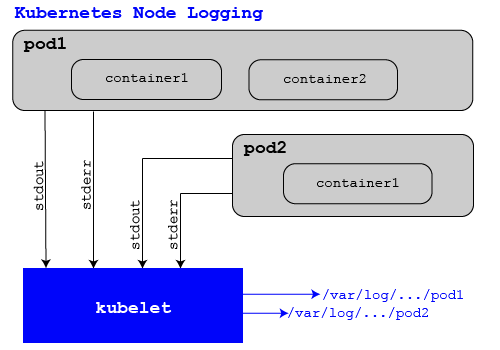
In most cases, it’s not necessary to rotate logs natively in Kubernetes. Instead, Kubernetes rotates logs automatically using native capabilities.
Specifically, the kubelet instance running on each node will rotate the logs files for containers hosted on the nodes when the files exceed a certain size. By default, the size threshold is 10 megabytes in most Kubernetes distributions, but admins can customize it using the containerLogMaxSize configuration variable. When kubelet rotates a container’s log file, it doesn’t delete older log data immediately. Instead, it archives the file, then creates a new, empty log file in its place.
Kubelet will, however, begin deleting log files when the total number of archived files passes a predefined limit – usually 5 by default. This threshold is configurable via the containerLogMaxFile variable.
Importantly, the log rotation process above applies only to container logs. Logs generated by Kubernetes components themselves (like kubelet) are typically not rotated automatically.
Key log rotation configuration parameters in Kubernetes
Admins can configure several variables in the Kubelet configuration file (some of which we’ve already touched on) to control Kubernetes log rotation behavior:
- containerLogMaxSize: Defines the maximum size a container log file can reach before Kubernetes initiates a rotation. The default is usually 10 megabytes
- containerLogMaxFile: Defines the maximum number of rotated log files that Kubernetes will retain for each container. The default is usually 5.
- containerLogMonitorInterval: Defines how often Kubernetes scans log files to check their sizes. The default is usually 10 seconds.
- containerLogMaxWorkers: Defines how many log rotation events can occur on a single node at a time (to help avoid placing too much load on the node by trying to rotate many files concurrently). The default is usually 1.
These variables apply to the node on which each Kubelet instance runs.
Where Kubernetes stores logs and how rotation applies
The way log rotation works is affected by where logs are stored – which itself varies depending on the type of log:
- Container logs are typically stored on nodes in the /var/log/pods directory, with symlinks in /var/log/containers pointing to them. Kubelet automatically rotates the log files in this location.
- System component logs are usually stored in /var/log. Kubernetes doesn’t automatically rotate these files in most cases – although other tools might, depending on which logging mechanisms (such as logrotate, a common log rotation utility) the node’s operating system has in place.
Critical limitations of native Kubernetes log rotation
While Kubernetes does a fairly good job of automating log rotation in most cases, the process is subject to some important limitations:
- Only applies to container logs: As we noted, Kubernetes only rotates container logs. Logs generated by Kubernetes itself (as opposed to containers hosted in a Kubernetes cluster) are not rotated by Kubernetes, although other tools might rotate them depending on how each node’s host operating system is configured.
- No long-term log persistence: Kubernetes retains log files only for running containers. Shortly after a container shuts down, all logs will be removed, and their data will be lost unless it was copied somewhere else beforehand.
- No log aggregation: Kubernetes can rotate container logs by removing outdated log files from individual nodes, but it can’t automatically aggregate them by moving them between nodes. It also has no way of migrating logs to a new node in the event that one node is running low on space.
- Size-based rotation: As we’ve noted, Kubernetes decides when to rotate logs based on their size. This usually works well, but it can be problematic for containers whose log files are particularly large – and because the containerLogMaxSize variable applies node-wide, there’s no simple way of setting different size thresholds for different applications.
Log rotation in Kubernetes at scale: multi-node and multi-tenant challenges
Log rotation becomes particularly complicated when dealing with large-scale clusters that include multiple nodes and/or multiple tenants. This type of setup increases the chances that node storage capacity and application log size will both vary, making it more challenging to apply generic log rotation configuration variables across the entire cluster.
The best way to handle this challenge is to leverage external tools that provide more granular control over the log rotation process.
Log rotation methods in Kubernetes
To that end, here’s a look at various ways to rotate logs in Kubernetes.
Using kubelet native log rotation
The first method – as we’ve discussed – is to use Kubernetes’s native, kubelet-based log rotation capability. This built-in Kubernetes logging architecture works well in smaller-scale clusters, but the lack of granular controls makes it challenging to use in more complex or diverse environments.
Sidecar containers for log management
Another approach is to rely on sidecar containers (meaning containers that run alongside the “main” application containers within each Pod) to handle log rotation. Under this method, the sidecar containers are responsible for monitoring the application container logs and rotating them as necessary.
The advantage of this technique is that you can configure different rotation behavior for each application’s logs. The downside is that it’s complicated to set up; in addition, the sidecar containers increase the resource overhead of the cluster due to the CPU and memory they consume.
Centralized logging solutions
A third method is to aggregate log data centrally – typically by configuring container runtimes to write logs to a central location instead of storing it locally on each node. This is also complex to implement, but it’s a streamlined approach once it’s set up.

How to configure log rotation in Kubernetes
The basic process for configuring log rotation in Kubernetes using native tooling involves the following steps.
1. Locate or create the kubelet configuration file
First, find the kubelet configuration file on each Kubernetes node, typically stored in locations such as /var/lib/kubelet/config.yaml, depending on the cluster setup. If the file does not exist, create one or update the existing kubelet configuration to include the required log rotation settings.
2. Set containerLogMaxSize and containerLogMaxFiles
The second step is to configure the containerLogMaxSize parameter to define the maximum size a container log file can reach before rotation occurs. Set containerLogMaxFiles to control how many rotated log files Kubernetes retains before older files are removed.
3. Apply the configuration across nodes
Assuming you want to use the same log rotation behavior across nodes, update the kubelet configuration on every node in the cluster to ensure consistent log rotation behavior across workloads. Note that you’ll need to restart the kubelet service on each node using a command such as systemctl restart kubelet to apply the new settings.
4. Validate rotation behavior and monitor disk usage
Finally, generate application logs or inspect existing log files to confirm that Kubernetes is rotating logs according to the configured limits. Monitor node disk usage with tools such as kubectl describe node or system monitoring platforms to ensure logs do not contribute to disk pressure.
Centralized logging as the foundation for log rotation at scale
The native Kubernetes log rotation process is convenient in that it’s available by default and simple to configure. However, in large clusters, it’s difficult to rely on native log rotation due to the lack of granular control.
A better approach for rotating logs at scale is to rely on lightweight agents to collect logs and store them in a central rotation using a centralized logging system. Then, a centralized log rotation process can rotate all logs as necessary. It’s also possible to apply different rules to different log files based on factors like the type of application that generated them or how frequently the log data in each file changes.
In addition to providing more flexibility, an advantage of a centralized logging solution is that it stores log data separately from nodes, reducing the risk of losing it in the event of a node failure. It also eliminates concerns about causing disk pressure on nodes; as long as the logs are stored in an external location from the start, they’ll never take up local storage on nodes. And it makes it possible to query logs and analyze logs from a central location, rather than having to move between nodes to inspect log data.
Common log rotation mistakes in Kubernetes and how to avoid them
Even for experienced admins, managing Kubernetes log rotation can be challenging. Here’s a look at common mistakes, along with tips on avoiding them:
- Incorrectly assuming Kubernetes handles all log cleanup: Kubernetes provides basic container log rotation through kubelet settings but does not manage long-term log retention or centralized storage. Avoid this by configuring proper log rotation limits and using centralized logging solutions when retaining logs for analysis or compliance.
- Setting log rotation values too high: Allowing large log files or keeping too many rotated files can consume node storage and contribute to disk pressure issues. Avoid this by tuning containerLogMaxSize and containerLogMaxFiles based on workload behavior and available disk capacity.
- Failing to apply configuration changes across all nodes: Updating log rotation settings on only some nodes can create inconsistent behavior where workloads rotate logs differently depending on placement. Avoid this by managing kubelet configurations consistently through automation tools or cluster management processes.
- Ignoring monitoring and validation after enabling rotation: Log rotation can fail silently if configurations are incorrect or nodes do not reload kubelet settings properly. Avoid this by regularly checking rotated log files, monitoring node disk usage, and setting alerts for storage pressure.
Best practices for log rotation in Kubernetes
The following best practices can help streamline the process of log rotation in Kubernetes:
- Configure appropriate log retention limits: Set kubelet parameters such as containerLogMaxSize and containerLogMaxFiles based on application logging patterns and available node storage to prevent excessive disk usage.
- Centralize logs for long-term storage and analysis: Use centralized logging platforms to collect logs from multiple Kubernetes nodes instead of relying only on local container log files that can be lost when pods are removed or nodes fail.
- Automate log rotation configuration management: Apply consistent kubelet log rotation settings across all cluster nodes using infrastructure automation tools to prevent configuration drift and inconsistent behavior.
- Monitor disk usage and rotation performance: Track node storage consumption, log growth rates and disk pressure events to identify rotation issues before they impact application availability.
Real-time log visibility and disk pressure alerting in Kubernetes with groundcover
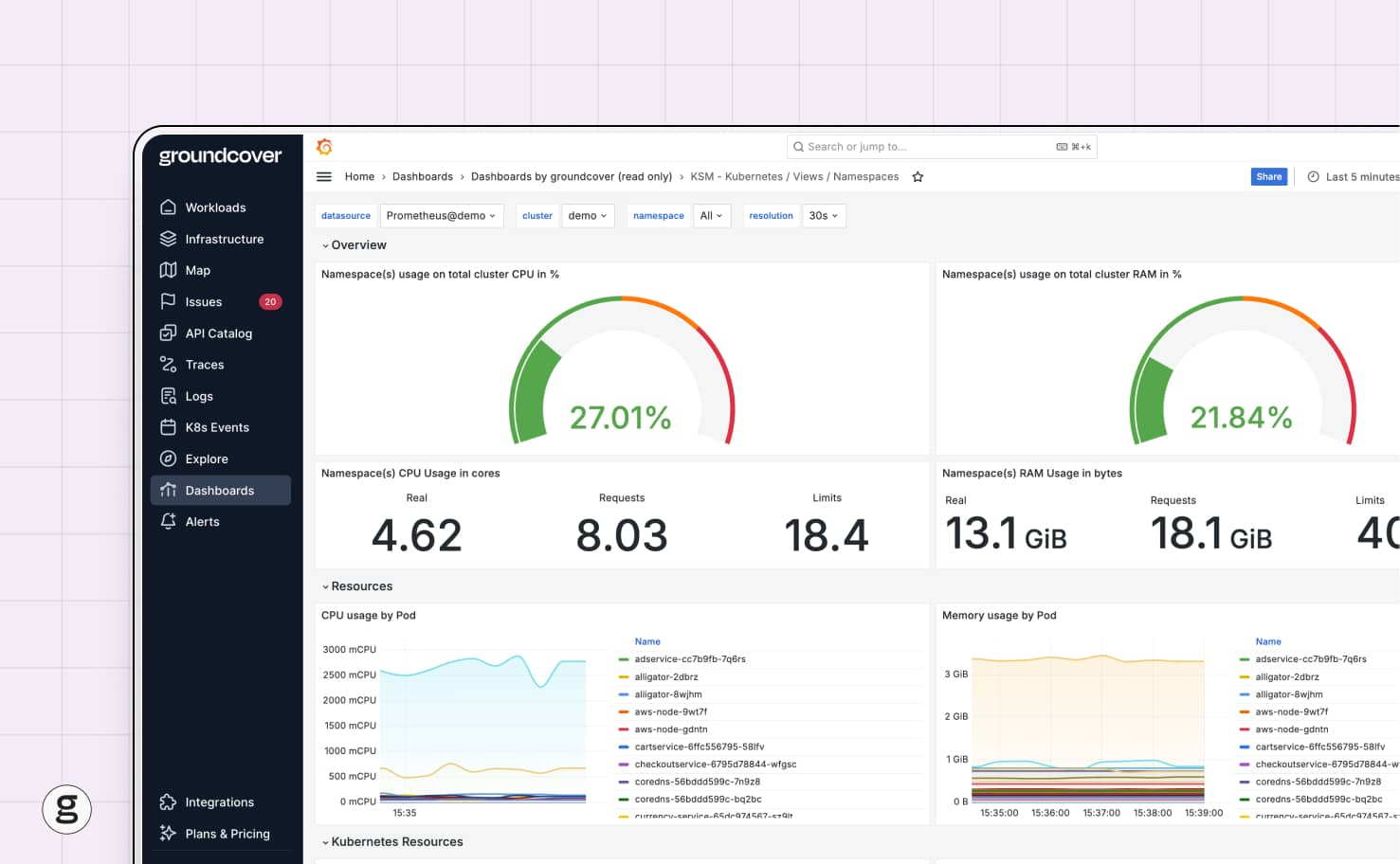
groundcover delivers the visibility admins need to be confident that log rotation – or the failure thereof – is not causing data loss or disk pressure issues in Kubernetes. By continuously monitoring the status of nodes and containers, groundcover can detect problems like nodes that are running low on storage space, which could be a sign of broken log rotation.
What’s more, for teams that rely on more advanced log rotation techniques, like using agents to centralize logs, groundcover can track the status of log management tools, ensuring that they, too, are operating as expected.
Robust, reliable Kubernetes log rotation
Log rotation may not be the most exciting aspect of Kubernetes; indeed, it’s one of those things that most admins don’t even think about until something goes wrong. But ideally, they will think ahead of time about how their logs are rotated and whether they’re properly monitoring the process to get ahead of potential failures.














.svg)