PVC Lifecycle in Kubernetes: Key Stages, Risks & Best Practices




Key takeaways
- A PVC moves through provisioning, binding, use, release, and reclamation, and understanding each stage helps prevent storage issues from becoming application outages.
- StorageClasses, access modes, binding modes, and reclaim policies determine how volumes are provisioned and what happens to their data throughout the PVC lifecycle.
- Reclaim policies are especially important for stateful workloads: Delete removes the underlying storage with the claim, while Retain preserves data for manual recovery or cleanup.
- PVC states and Kubernetes events provide useful troubleshooting signals, with Pending, Terminating, mount failures, and multi-attach errors often pointing directly to configuration or storage problems.
If you have ever watched a database Pod stuck in Pending because its claim would not bind, you already know storage is where Kubernetes stops feeling automatic. According to the CNCF's 2025 Cloud Native Annual Survey, 82% of container users now run Kubernetes in production, and a growing share of those workloads are stateful databases, queues, and AI pipelines that depend on durable storage. Understanding the PVC lifecycle is no longer optional; it is the difference between a clean failover and a 2 a.m. page about a stuck pod.
This article breaks down every stage of the PVC lifecycle, the configuration choices that shape it, the failure modes that trip up experienced teams, and the practices that keep persistent storage predictable at scale.
What Is PVC Lifecycle in Kubernetes?
The PVC lifecycle describes the sequence of states a PersistentVolumeClaim moves through, from the moment a user requests storage to the moment that storage is released and reclaimed. It governs how a storage resource is provisioned, matched, consumed by a pod, and eventually cleaned up. Getting this right matters because storage, unlike compute, carries state. A mistake in a Deployment gets rolled back in seconds. A mistake in the PVC lifecycle can mean lost data.
The lifecycle also determines how Kubernetes handles storage as workloads are created, rescheduled, expanded, or deleted. Understanding these transitions helps teams choose the right StorageClass, access mode, and reclaim policy for each workload. It also makes troubleshooting easier because states such as Pending, Bound, and Released provide useful signals about where a storage operation is getting stuck.
Persistent Volumes vs PersistentVolumeClaims vs StorageClasses
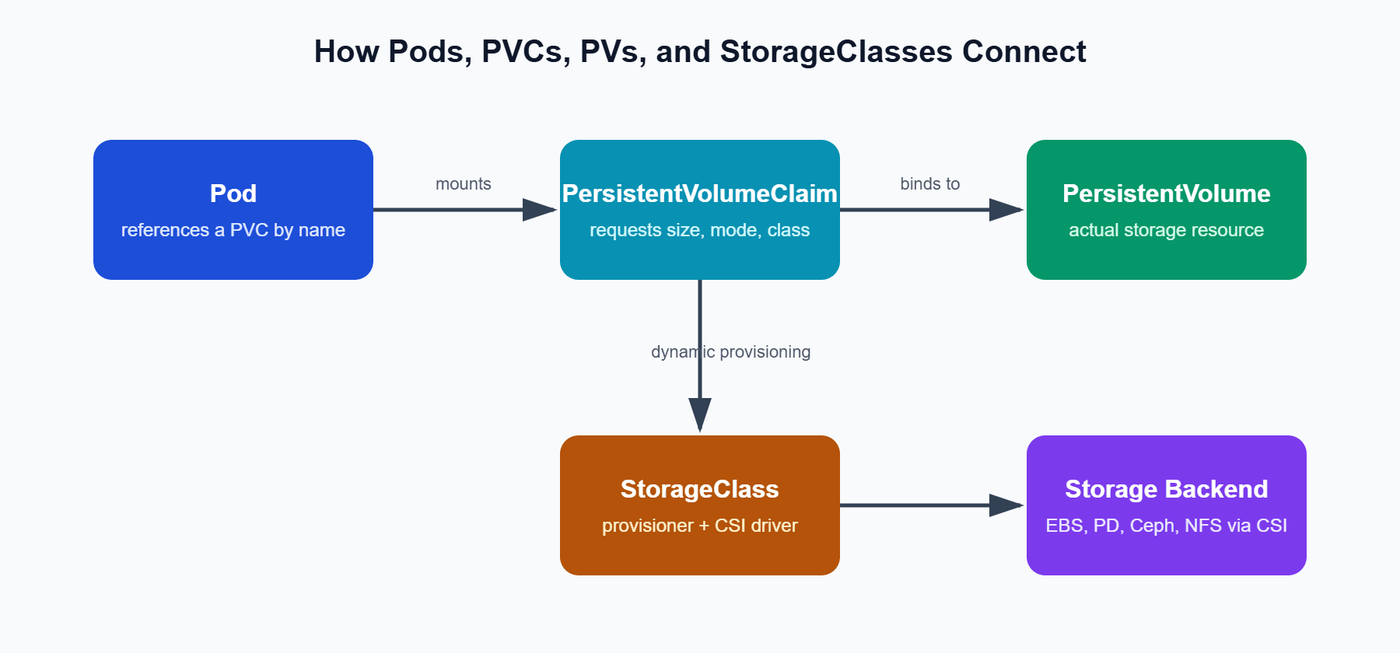
A Kubernetes storage request involves three closely related objects, each with a distinct responsibility. The PVC defines what an application needs, the PV represents the storage that satisfies that request, and the StorageClass determines how that storage is provisioned. Together, they form the foundation of the PVC lifecycle from storage request to application consumption.
In short: cluster users write PVCs, the CSI driver supplies PVs, and StorageClasses decide how the two match automatically.
How the PVC Lifecycle Works End to End
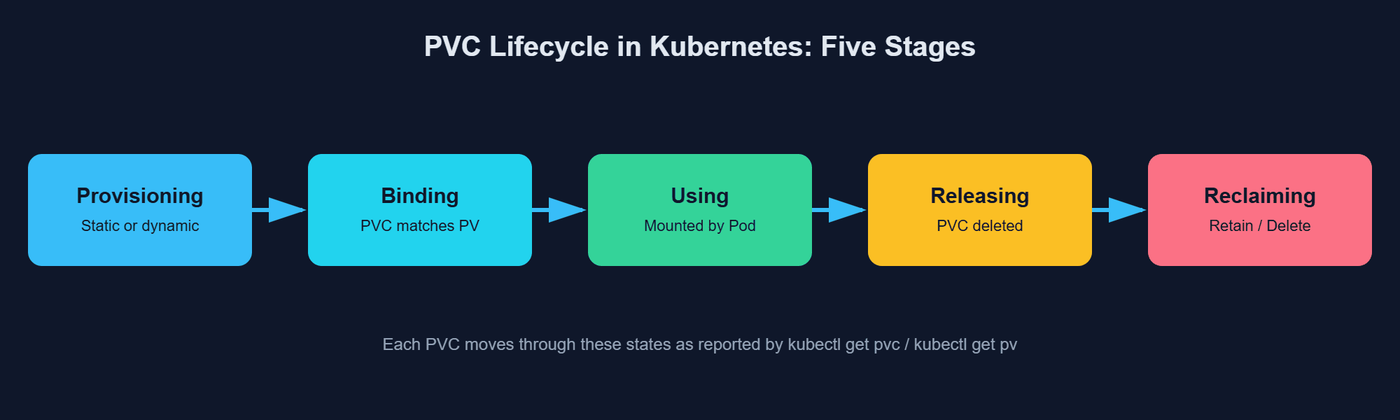
The official Kubernetes documentation breaks the PVC lifecycle into four core phases, and production teams typically watch a fifth: reclamation, which determines what actually happens to your data once a claim is gone.
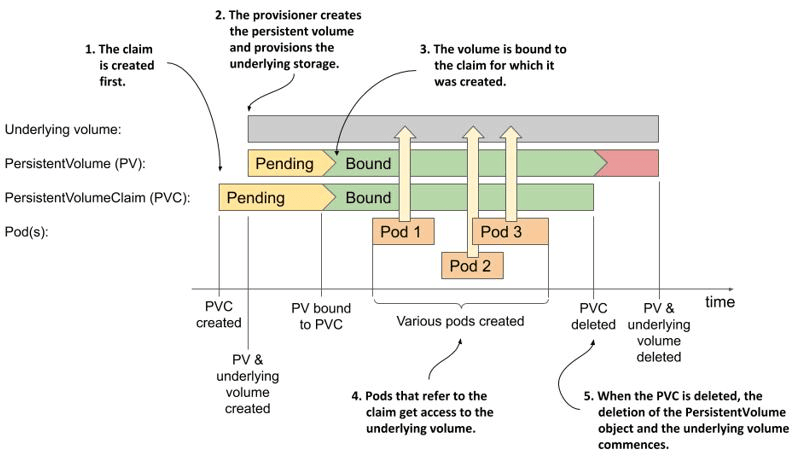
The PVC lifecycle follows a predictable sequence, from creating a storage request to binding it to a volume, using it with a pod, and eventually releasing the underlying storage. Understanding each stage makes it easier to manage storage safely and troubleshoot problems when a transition does not happen as expected.
Provisioning
Provisioning is where the storage resource is created. Static provisioning means an administrator manually defines a PV ahead of time:
Dynamic provisioning skips that step entirely. A user submits a PVC that references a StorageClass, and the CSI driver behind that class creates a matching PV automatically:
Most production clusters lean almost entirely on dynamic provisioning today, since it removes manual coordination and scales far better across teams and namespaces.
Binding and Pod Consumption
Once a PVC exists, a control loop watches for it and looks for a PV that satisfies its capacity, access mode, and StorageClass. When a match is found, the PVC and PV enter a one-to-one bound volume relationship recorded through a claimRef. If volumeBindingMode: WaitForFirstConsumer is set, binding is deliberately delayed until a pod using the PVC is scheduled, avoiding storage provisioned in the wrong zone.
A pod references the claim, not the volume directly:
Kubernetes then mounts the bound volume into the container's filesystem, and the storage becomes part of the running application.
In-Use Protection and Lifecycle Safety
Since Kubernetes 1.10, PVCs actively mounted by a pod carry a kubernetes.io/pvc-protection finalizer. This blocks accidental deletion while the claim is in use; the object shows Terminating but is not removed until every referencing pod is gone. It is a small safeguard that has saved plenty of engineers from deleting the wrong claim mid-cleanup.
Reclaim Policies
When a PVC is deleted, its bound PV moves to Released. What happens next depends entirely on the reclaim policy attached to the volume.
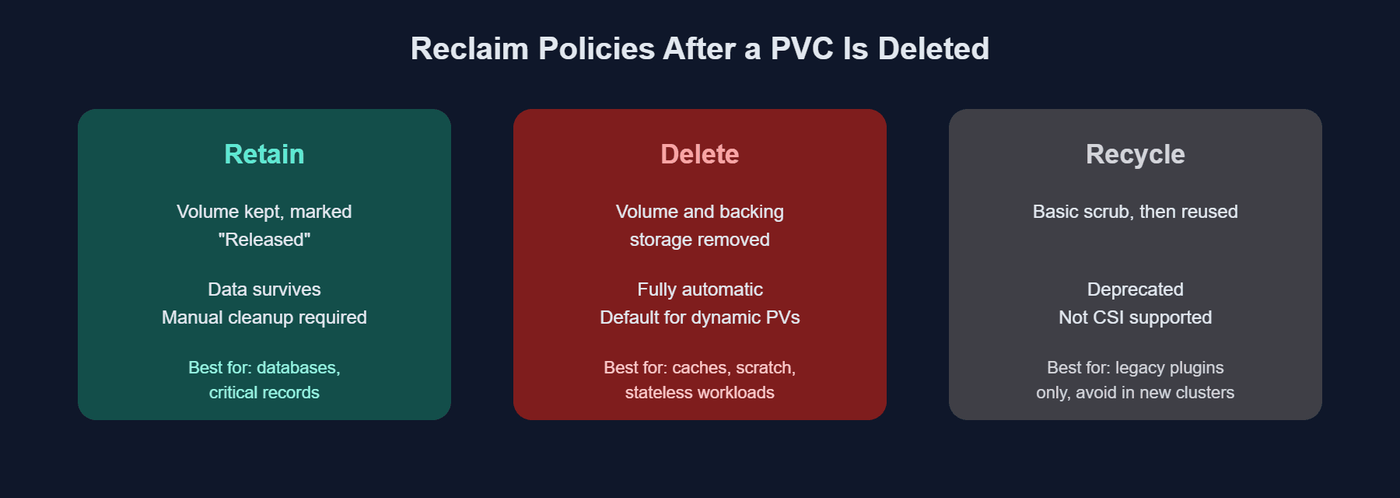
- Retain: the underlying storage resource and its data are preserved indefinitely. The PV cannot be reused until an administrator manually deletes it and, in most CSI drivers, cleans up the backing volume out of band.
- Delete: the default for most dynamically provisioned volumes. The PV and its backing storage are removed automatically the moment the claim is deleted.
- Recycle: a deprecated policy that performed a basic scrub before making the volume available again. It predates the Container Storage Interface and is not supported by modern CSI drivers.
Choosing the wrong reclaim policy is one of the costliest mistakes in the PVC lifecycle, since it decides whether a bad kubectl delete costs you a redeploy or your entire dataset.
Core Configuration Choices That Shape the PVC Lifecycle in Kubernetes
A handful of fields in a PVC spec determine how flexible and safe your persistent storage will be.
Most storage backends support multiple access modes, but not all of them, which is a frequent source of confusion. Block storage like AWS EBS or GCE Persistent Disk generally supports only ReadWriteOnce, while network filesystems like NFS or EFS support ReadWriteMany. Check what your storage system and CSI driver actually support before assuming an access mode will work; the API will accept a spec that then fails to bind.
Advanced PVC Lifecycle Operations in Production
Beyond the basic create-bind-use-delete flow, production clusters routinely run more advanced PVC lifecycle operations.
Expanding PersistentVolumeClaims
If a StorageClass has allowVolumeExpansion: true, you can grow a PVC without recreating it:
Most CSI drivers support online expansion, meaning the pod does not need to be restarted, though the underlying filesystem may need a resize step depending on the driver. Volumes can only be expanded, never shrunk, so plan capacity requests with some headroom.
Snapshots, Restores, and Cloning Workflows
The VolumeSnapshot API lets you capture a point-in-time copy of a PVC for backup or migration purposes:
You can then restore that snapshot into a new PVC, or clone an existing PVC directly, which is useful for spinning up staging environments seeded with production-like data without touching the original volume.
Volume Data Sources and Populators
Beyond snapshots, the dataSource and dataSourceRef fields let a new PVC be pre-populated from another PVC, a snapshot, or a custom populator. This is the mechanism behind volume cloning and increasingly behind AI/ML pipelines that need to seed training volumes with datasets stored elsewhere in the cluster.
Common PVC Lifecycle Failures and Troubleshooting Signals
Most PVC lifecycle problems appear as recognizable states or events, such as a claim stuck in Pending or a volume failing to attach or mount. Understanding these signals helps teams quickly identify where the storage workflow is failing.
| Symptom | Likely Cause | First Command to Run |
|---|---|---|
| PVC stuck in Pending | No matching PV, wrong StorageClass, or capacity mismatch | kubectl describe pvc |
| Pod stuck in ContainerCreating | Volume attach/mount failure, wrong access mode, zone mismatch | kubectl describe pod |
| PVC stuck in Terminating | PVC-protection finalizer blocked by a running pod | kubectl get pods -o wide / grep |
| Data missing after redeploy | Reclaim policy set to Delete on a volume that should have been retained | kubectl get pv -o yaml |
| multi-attach error | ReadWriteOnce volume mounted by pods on two nodes at once | kubectl get pods -o wide |
kubectl describe pvc and kubectl describe pv are the first stop for almost every storage incident; the Events section nearly always names the underlying provisioner error. For deeper issues, checking CSI driver pod logs on the affected node is the next step, since the scheduler rarely has full visibility into what the storage backend is reporting.
Best Practices for Managing the PVC Lifecycle at Scale in Kubernetes
Managing PVCs at scale requires more than simply provisioning storage when an application needs it. Consistent policies, automated backups, and proactive monitoring help keep storage reliable while preventing capacity, availability, and data-loss issues.
Faster PVC Lifecycle Debugging with eBPF-Powered Observability in groundcover
Storage failures rarely announce themselves cleanly. A claim stuck in Pending, a pod wedged in ContainerCreating, or a spike in I/O latency usually needs correlation across the pod, the node, the CSI driver, and the disk before the real cause is obvious, and piecing that together from kubectl describe output and scattered logs eats time you do not have mid-incident.
groundcover approaches this differently. Its eBPF sensor captures infrastructure and storage telemetry directly from cluster traffic, with no sidecars or manual instrumentation, so mount failures, throughput drops, and node-level disk pressure show up alongside pod and application signals in one place. That matters for the PVC lifecycle specifically because storage problems rarely stay isolated; they ripple into latency, restart loops, and scheduling decisions, and groundcover's Kubernetes monitoring correlates all of that automatically. The platform's Kubernetes troubleshooting workflows are built around exactly this kind of root-cause tracing, from a pending claim down to the node reporting disk pressure.
groundcover now ships as a self-serve, Bring Your Own Cloud deployment: it runs inside your own AWS, GCP, or Azure environment so telemetry never leaves your infrastructure, and every plan starts with a 14-day trial of full platform capabilities before stepping down to the free tier. If storage debugging still starts with grepping logs across three different tools, it is worth seeing what a unified view looks like; you can start free and have the sensor deployed in minutes.
Conclusion
The PVC lifecycle is deceptively simple on paper: provision, bind, use, release, reclaim. In practice, each transition carries real consequences for data durability and uptime. Getting the fundamentals right - access modes, reclaim policies, binding modes, and expansion support - prevents most storage incidents before they happen. For everything else, clear visibility into how your persistent volumes, claims, and pods interact is what turns a multi-hour storage outage into a five-minute fix.
FAQs
No; Retain is appropriate when accidental deletion would be unacceptable, but using it universally can leave orphaned cloud volumes consuming capacity and budget long after workloads disappear.
- Classify workloads by recovery requirements: production databases may justify Retain, while reproducible caches or temporary pipelines often do not.
- Pair Retain with an explicit cleanup process that identifies PVs in Released and validates ownership before deletion.
- Treat snapshots and backups separately from reclaim policy, a retained disk is not a substitute for a tested recovery strategy.
- Track orphaned volumes against application and namespace ownership so storage costs do not become invisible infrastructure debt.
Platform teams should expose a small set of workload-oriented StorageClasses that encode topology, performance, expansion, and lifecycle defaults rather than forcing application teams to understand provider-specific storage details.
- Prefer WaitForFirstConsumer where zonal volumes must follow Pod placement instead of being provisioned before the scheduler has topology context.
- Separate classes by meaningful operational guarantees, such as durable database storage versus disposable scratch storage, not every available cloud disk SKU.
- Define allowVolumeExpansion, reclaim policy, encryption, and CSI parameters centrally and manage StorageClasses through GitOps.
- Test node drains, zone failures, StatefulSet rescheduling, and volume reattachment before declaring a storage class production-ready.
Learn more about Kubernetes StorageClasses.
eBPF complements Kubernetes control-plane events by exposing runtime behavior around the affected workload, helping engineers connect a storage lifecycle failure to its application, network, and node-level consequences without instrumenting each service.
- Start with the affected Pod and correlate Kubernetes events with node and workload telemetry instead of investigating the PVC as an isolated object.
- Use runtime signals to determine whether an apparent storage incident coincides with application latency, resource pressure, or communication failures.
- Keep CSI and Kubernetes events in the investigation because eBPF does not replace the control plane's explanation of provisioning and binding decisions.
- Use this correlation to narrow the incident boundary before escalating to the storage backend or cloud provider.
groundcover's BYOC model keeps the observability data plane within the organization's cloud environment, reducing the need to export high-volume operational telemetry to a third-party SaaS backend while preserving cross-signal investigation workflows.
- Evaluate observability architecture alongside storage architecture when database logs, workload metadata, or traces carry sensitive information.
- Keep telemetry close to stateful workloads when data-residency, security, or governance requirements constrain external data movement.
- Model observability economics using ingestion and retention growth from databases and other high-volume workloads rather than only today's cluster size.
- Separate data-plane ownership from product access requirements when defining security reviews and operational responsibilities.
Explore groundcover’s BYOC observability.