
PVC Stuck Pending in Kubernetes: Causes, Fixes & Debugging Guide



Key Takeaways
- A PVC stuck in Pending is a symptom, not a root cause; it can mean anything from a missing storage configuration to a failed CSI driver, so you need to check events to understand why it’s happening.
- Most issues come down to a few common problems like misconfigured StorageClasses, no matching PersistentVolumes, or broken provisioning components, which makes troubleshooting more predictable.
- The fastest way to debug is to follow a simple path: inspect PVC events, verify StorageClass and PV matching, then check CSI driver health and quotas.
- Some cases (like WaitForFirstConsumer or zone constraints) are often misunderstood and tied to pod scheduling, not storage itself, which can mislead debugging.
- Proactive monitoring, especially alerts on PVCs staying in Pending, helps catch storage issues early before they block stateful workloads in production.
If you've spent any amount of time running stateful workloads on Kubernetes, you've almost certainly run into a PersistentVolumeClaim that refuses to move out of the Pending state. It just sits there. No error message in the pod logs, no obvious indication of what went wrong.
Stateful workloads on Kubernetes have grown significantly - 74% of organizations now use containers to manage stateful applications, up 10% from 2023, according to the 2024 CNCF Annual Survey. With that growth comes more exposure to storage-layer failures, and PVC binding issues are among the most disruptive.
This guide walks through why PVC stuck pending happens, how to systematically debug it, and what you can do to stop it from recurring.
What PVC Stuck Pending Means in Kubernetes
A PersistentVolumeClaim is Kubernetes' way of letting workloads request storage without needing to know the underlying infrastructure details. When you create a PVC, it goes through a binding process that ultimately links it to a PersistentVolume (PV). Until that binding succeeds, the PVC stays in Pending.
The problem is that Pending is a catch-all state. It covers everything from "waiting for dynamic provisioning" to "no matching volume exists" to "the CSI driver crashed." Without digging into events and logs, you won't know which situation you're in.
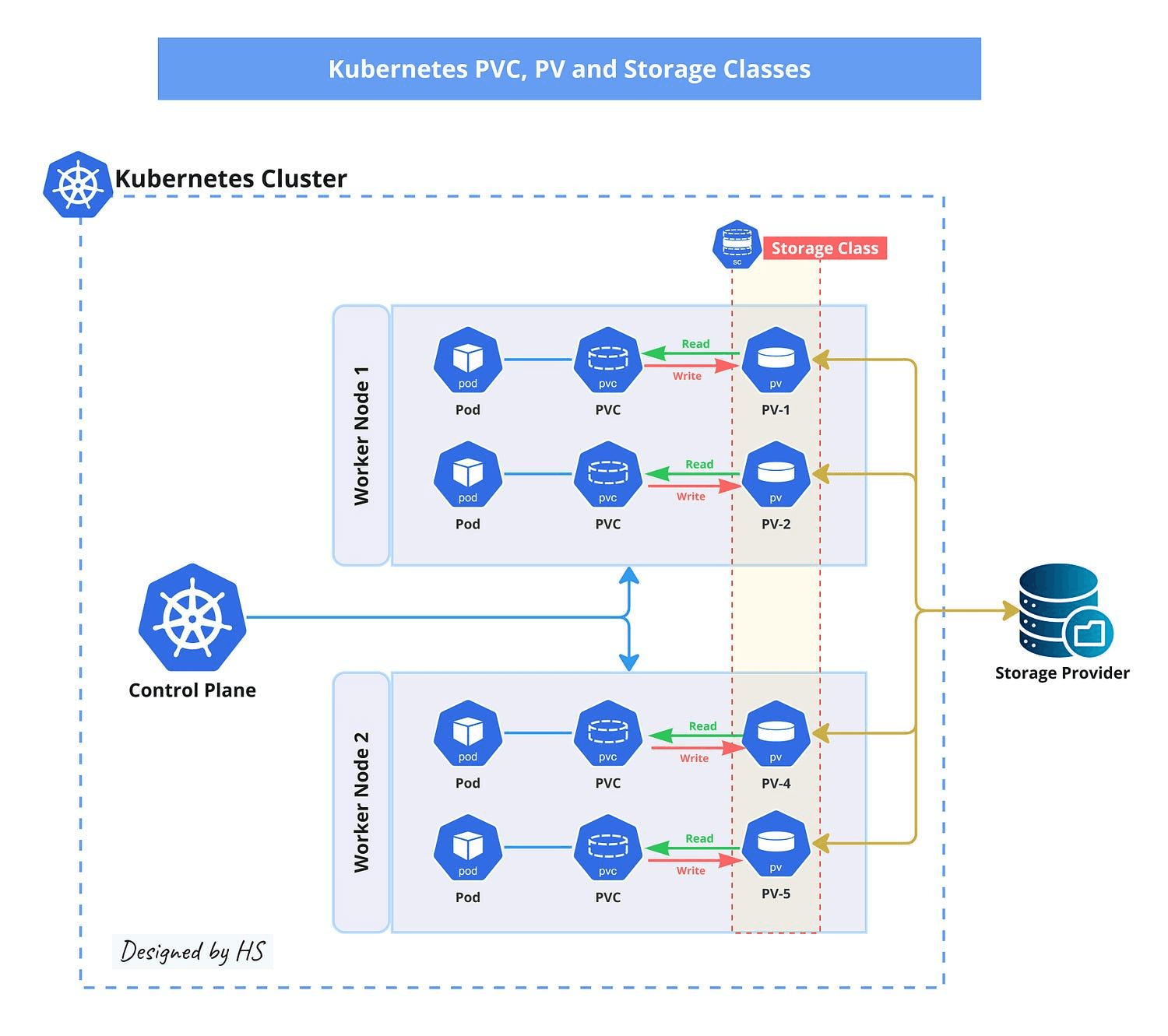
How PVC Binding Works
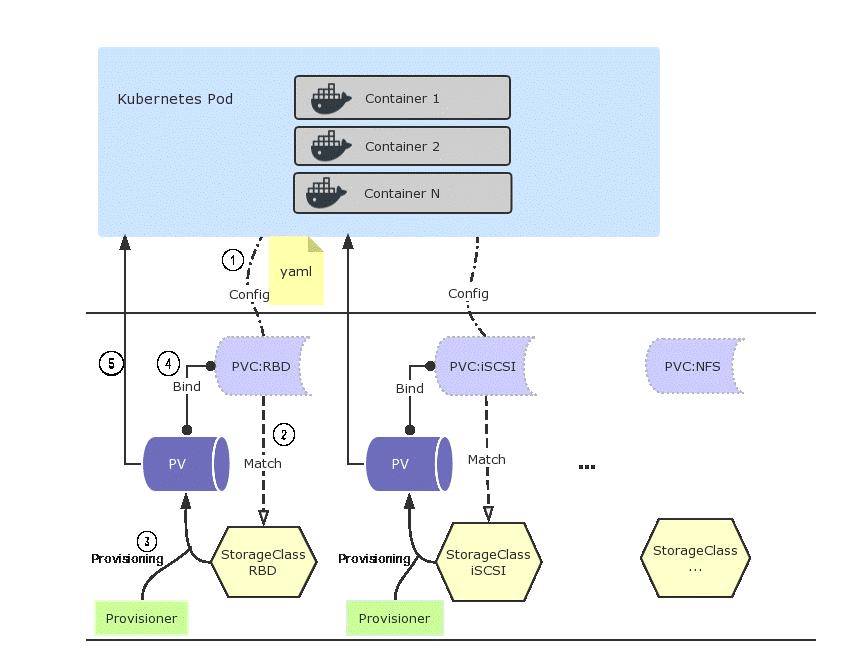
When a PVC is created, the Kubernetes control plane (specifically, the kube-controller-manager) tries to satisfy the claim in one of two ways:
- Static Binding: The controller looks for an existing PersistentVolume that matches the PVC's requested capacity, access modes, and StorageClass. If a match is found, the PV is bound to the PVC.
- Dynamic Provisioning: If no matching PV exists but the PVC references a StorageClass with a provisioner, the provisioner (often a CSI driver) creates a new volume on demand and binds it automatically.
If neither path succeeds, the PVC stays stuck in pending. The binding loop keeps retrying, but without intervention, it won't resolve on its own.

Common Causes of PVC Stuck Pending in Kubernetes Clusters
Most cases of a PVC stuck pending fall into a predictable set of root causes. The table below outlines the most common ones:
Step-by-Step Troubleshooting for PVC Stuck Pending
1. Check PVC Events and Error Messages
This is always your first move. Kubernetes stores events that describe exactly what the binding process tried to do and where it failed.
Look for the Events section at the bottom of the output. You'll see messages like:
or
These messages tell you immediately which category of problem you're dealing with. Don't skip this step - it's often all you need.
2. Verify StorageClass and Provisioner Configuration
A PVC stuck pending almost always traces back to a StorageClass issue. Check that the StorageClass the PVC references actually exists:
Then inspect its details:
Key things to verify:
- The Provisioner field matches an active CSI driver or internal provisioner
- The VolumeBindingMode is what you expect (Immediate vs. WaitForFirstConsumer)
- The ReclaimPolicy is set correctly (Delete or Retain)
If the StorageClass doesn't exist and no default is set, any PVC without an explicit storageClassName will stay stuck in pending indefinitely. Check which StorageClass is marked as default:
3. Validate PersistentVolume Availability and Matching Criteria
For clusters using static provisioning, a persistent volume must exist and be available for the PVC to bind. Run:
Check that at least one PV is in Available status. If a PV shows Released, it was previously bound to another PVC. By default, released PVs are not automatically reused. You'll need to either delete and recreate the PV or manually clear its claimRef:
Beyond status, the PVC and PV must agree on:
- Access Modes: A PVC requesting ReadWriteMany won't bind to a PV offering only ReadWriteOnce
- Storage Capacity: The PV must offer at least as much storage as the PVC requests
- StorageClass: Both must reference the same class (or both must have no class specified)
4. Inspect CSI Driver Health and Logs
If dynamic provisioning is configured but volume creation isn't happening, the CSI driver is the next place to look. CSI components typically run as pods in the kube-system namespace.
Look for any pods in CrashLoopBackOff, Error, or Pending state. Then check the logs of the external-provisioner sidecar:
Common problems here include:
- The provisioner lacks the IAM role or service account permissions to create volumes
- The provisioner is running, but can't reach the cloud provider API (network policy or proxy issue)
- The CSI driver version is incompatible with the Kubernetes version
5. Check Resource Quotas and Cloud Storage Limits
Namespace-level ResourceQuota objects can block PVC creation silently. Check what's in place:
Look at requests.storage if the namespace is at its limit, new PVCs won't provision even if the underlying storage infrastructure is fine.
On cloud providers, you can also hit account-level limits. AWS has per-region EBS volume limits; GCP has per-project disk quotas. If you're provisioning at scale, it's worth checking your cloud console for quota errors that won't surface directly in Kubernetes events.
6. Identify Zone and Node Affinity Constraints
When WaitForFirstConsumer binding mode is in use, the PVC binds to a zone based on where the consuming pod is scheduled. If the pod can't be scheduled due to node selector constraints, taints, or resource pressure, the PVC will also stay stuck in pending.
Check the pod associated with the PVC:
Look for FailedScheduling events. These will tell you whether the pod is stuck because of node affinity rules, resource limits, or zone availability, which in turn explains why the PVC hasn't bound.
PVC Stuck Pending in StatefulSets and Scheduling Workloads
StatefulSets are a particularly common place to hit PVC stuck pending issues. Each StatefulSet replica gets its own PVC via a volumeClaimTemplate. If one replica's PVC fails to provision, that specific pod won't start, but the StatefulSet controller won't automatically clean up or retry the PVC.
This means a partially-deployed StatefulSet can sit indefinitely with some pods running and others stuck. The fix depends on the root cause, but in many cases you'll need to delete the stuck PVC manually and let the StatefulSet controller recreate it:
Be careful with Retain reclaim policies; deleting the PVC doesn't delete the underlying volume asset, so you won't lose data. With Delete policies, confirm whether you actually want the storage asset removed before proceeding.
Advanced Debugging Techniques for PVC Stuck Pending Issues
When the standard approach hasn't turned anything up, these techniques can surface more obscure issues:
Watch Provisioner Controller Logs in Real Time:
Check for Webhook-Related Rejections: Admission webhooks can sometimes intercept and reject PVC creation requests. Look for relevant webhook configurations:
Audit API Server Events for the PVC:
Force a Dry-Run Provisioning Attempt: Temporarily increase log verbosity on the provisioner pod. Some provisioners support --v=5 or --leader-election=false flags for debugging.
Best Practices to Prevent PVC Stuck Pending in Production
Preventing PVC issues is significantly cheaper than debugging them at 2 am. The table below outlines the most effective practices:
Monitoring PVC Stuck Pending Events and Storage Health in Kubernetes
Reactive debugging is fine for one-offs, but in production, you want to catch PVC issues before they impact workloads. A few Prometheus metrics are particularly useful:
- kube_persistentvolumeclaim_status_phase - Alerts when PVCs are in Pending for longer than a defined threshold
- kube_persistentvolume_status_phase - Tracks PV availability and catches Released volumes that aren't being reused
- kubelet_volume_stats_available_bytes - Monitors disk usage on mounted volumes
A simple alert rule to catch PVCs stuck in pending:
Pair this with Kubernetes storage documentation and CSI driver specifications to stay current as provisioner behavior evolves across versions.
Real-Time Debugging and Storage Visibility for PVC Stuck Pending with groundcover
Even with solid alerting in place, the gap between "an alert fired" and "I understand what's happening" can be significant. That's especially true for storage issues, where the relevant signals are spread across events, logs, and metrics from multiple components.
groundcover is a Kubernetes-native observability platform built on eBPF, designed to give you full visibility into your cluster, including storage behavior, without requiring code changes or heavy instrumentation. It runs as a BYOC (Bring Your Own Cloud) deployment directly in your own cloud environment - whether AWS, Google Cloud, Azure, or on-premises - which means your data never leaves your infrastructure.

For PVC stuck pending situations specifically, groundcover helps in a few concrete ways:
- Correlated Event Timelines: groundcover's infrastructure monitoring correlates PVC events with pod scheduling failures, node pressure events, and CSI driver logs in a single view, so you don't need to manually piece together what happened across multiple kubectl describe outputs.
- CSI Driver Log Aggregation: Through groundcover's log management, CSI controller and node plugin logs are automatically collected and searchable, which makes it straightforward to trace provisioner failures back to their root cause.
- Storage Metrics and Alerting: groundcover surfaces Kubernetes infrastructure metrics, including PVC phase status, through its dashboards, with configurable PromQL-based alerts that can fire before a stuck PVC starts affecting production workloads.
Conclusion
A PVC stuck pending isn't a single problem - it's a category of problems that share the same symptom. The good news is that the debugging process is fairly systematic: start with kubectl describe pvc, check your StorageClass and provisioner health, verify PV availability and matching criteria, and work outward from there.
The trickier cases - zone mismatches, resource quota exhaustion, CSI driver crashes - are the ones that benefit most from proactive monitoring. If you're running stateful workloads at any scale, setting up alerts on PVC phase transitions is worth the 15 minutes it takes to configure.
For teams that want deeper visibility without the overhead of building and maintaining their own observability stack, groundcover provides Kubernetes-native storage monitoring that integrates directly with the signals you already have.














.svg)