
Kubernetes Certificate Management: How It Works & Best Practices




Key Takeaways
- Certificates Keep Kubernetes Secure: They protect communication across the cluster, and expired certificates can quickly cause outages.
- Automate Certificate Management: Tools like cert-manager automatically issue, renew, and manage certificates at scale.
- Use the Right Certificate Authority: Public CAs are best for external apps, while private or cloud-managed CAs suit internal services.
- Monitor Certificate Health: Track expirations and renewal failures to catch problems before they impact users.
If you run production workloads on Kubernetes long enough, you'll eventually get paged for a certificate that quietly expired somewhere in the stack. It happens to well-run teams, not just careless ones. According to CyberArk's 2025 "State of Machine Identity Security" report, 72% of organizations experienced at least one certificate-related outage in the previous year. On the public web, that means a browser warning; inside a cluster, it can lock operators out of the control plane entirely.
Certificate management in Kubernetes is really several overlapping problems: the internal PKI holding the API server, kubelets, and etcd together; TLS for Ingress traffic; and increasingly, mutual TLS between services in the mesh. This article covers how it works, why it matters, and what a mature setup looks like, with working examples you can adapt.
What Is Certificate Management in Kubernetes?
Certificate management in Kubernetes refers to the processes and tooling used to issue, distribute, renew, and revoke the X.509 certificates that secure communication inside and around a cluster, certificates that authenticate cluster components to each other, terminate TLS at an Ingress controller, and encrypt traffic between microservices.
Unlike a traditional data center where certificates live on a handful of long-running servers, a Kubernetes cluster can have thousands of ephemeral workloads, each needing its own identity, so certificate management here has to be automated by design.

Why Certificate Management Is Important in Kubernetes
Certificates are the backbone of trust in a Kubernetes cluster. Every secure connection, from kubectl talking to the API server to one microservice calling another, depends on a valid certificate chain, and when it breaks, the failure mode is rarely graceful.
A few reasons it deserves dedicated attention:
- Control Plane Availability: The API server, scheduler, controller-manager, and etcd - all rely on TLS. Lapsed certificates can make the cluster unmanageable, locking administrators out of the tools they'd use to fix it.
- Compliance: Standards like PCI DSS and SOC 2 require encryption in transit, and expired certificates are routinely flagged in audits.
- Zero-Trust Architectures: Service mesh designs assume every pod-to-pod connection is authenticated and encrypted, multiplying the number of certificates to track.
- Blast Radius: In an interdependent Kubernetes environment, a single certificate failure can cascade into a broader outage.
Certificate Authorities Supported for Kubernetes Certificate Management
Kubernetes doesn't lock you into a single certificate authority (CA). Depending on the workload, you'll typically choose from a mix of the following.
Each option trades off differently on cost, trust distribution, and operational overhead. Public CAs like Let's Encrypt are free and widely trusted, making them the default for external-facing endpoints, while private CAs give tighter control over certificate lifetimes and revocation for internal traffic.
How Kubernetes Uses Certificates Internally
Before workloads even enter the picture, Kubernetes depends heavily on certificates to establish trust between its own components. The API server presents a serving certificate to every client that connects. Kubelets authenticate to the API server with client certificates, and serve their own TLS endpoints in return. etcd uses a separate set of peer and client certificates to keep node-to-node traffic encrypted.
This is why a kubeadm-bootstrapped cluster typically ends up with a dozen or more distinct certificates, and why losing track of even one can bring the whole control plane down.
Internal Cluster Certificates and the Kubernetes PKI
Kubernetes maintains its own internal PKI, centered on a cluster root CA generated at bootstrap, which signs the individual certificates each component uses. You can inspect PKI health directly on a kubeadm-managed cluster:
This returns every control plane certificate, its expiration, and days remaining - a good first stop when troubleshooting auth failures. Most are valid for one year by default, balancing limited exposure against active renewal discipline, handled with kubeadm certs renew all. Managed offerings (EKS, GKE, AKS) generally handle this rotation for you, though it's worth confirming what your provider actually automates.
The Kubernetes Certificates API and Certificate Signing Requests
Beyond the bootstrap PKI, Kubernetes exposes a native certificates.k8s.io API that lets any client request a signed certificate: submit a request, have it approved, get a certificate back. It's the same mechanism kubelets use, and it's available to custom controllers too. A CertificateSigningRequest (CSR) holds a PEM-encoded request and a signer name. A minimal CSR looks like this:
Once approved, the API server populates status.certificate with the signed certificate, which the requesting client or controller can then retrieve.
Workload Certificate Management With cert-manager
The native Certificates API is powerful but low-level, as it doesn't know how to talk to Let's Encrypt, renew ahead of expiry, or store the result as a ready-to-use Secret. That's the gap cert-manager fills, and why it's the de facto standard for workload-level certificate management. The project became a CNCF incubating project in 2022, and by its later graduation was seeing over 500 million downloads a month, with roughly 86% of new production clusters adopting it.
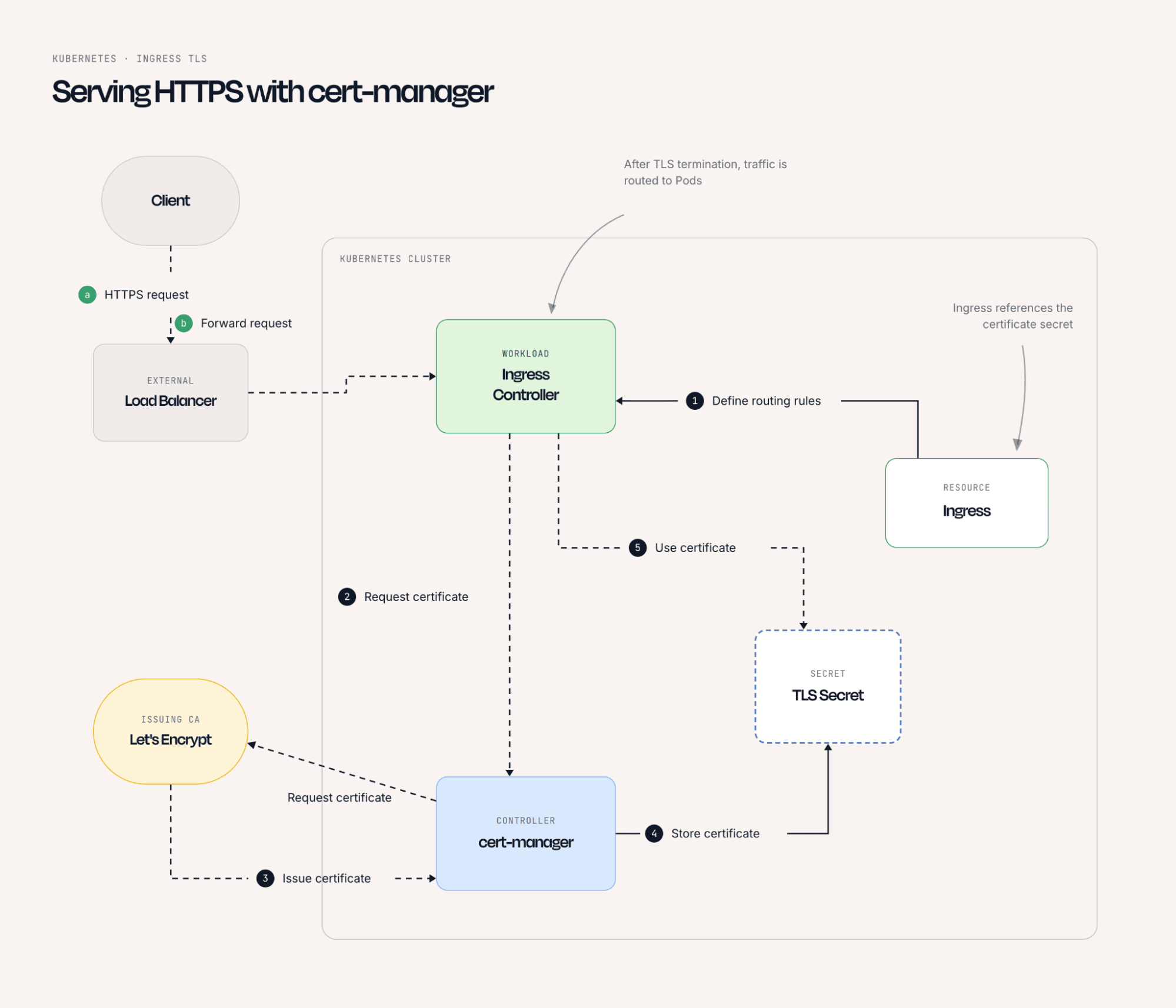
cert-manager watches for Certificate custom resources, generates a private key and CertificateRequest, submits it to a configured issuer, and stores the result as a Secret, then tracks expiration and renews automatically, turning renewal from a calendar reminder into a background process.
Issuers and ClusterIssuers in cert-manager: Key Differences
Before cert-manager can issue anything, it needs to know which CA to talk to, configured through an Issuer or ClusterIssuer - two similar objects with one key scoping difference:
Most clusters use a ClusterIssuer for a shared public CA like Let's Encrypt, since any Ingress can reference it regardless of namespace. Namespaced Issuer resources show up when different teams need certificates from isolated CAs.
How to Set Up Certificate Management in Kubernetes
Setting up automated certificate management generally follows the same five-step pattern, regardless of which CA you're issuing from.
1. Install cert-manager in the Cluster
The most common path is Helm, which installs the controller, webhook, and CRDs in one pass:
Confirm the controller pods are running before moving on:
2. Configure an Issuer or ClusterIssuer
Next, tell the cert-manager which CA to use. Here's a ClusterIssuer for Let's Encrypt's production endpoint, using HTTP-01 validation through NGINX:
3. Create a Certificate Resource for Your Workload
With an issuer in place, define a Certificate resource for the domain(s) to cover:
4. Verify the Certificate Has Been Issued and Stored in a Secret
Check the status to confirm it reached Ready:
A healthy request shows Ready: True, and the referenced Secret contains both tls.crt and tls.key.
5. Reference the Secret in Your Ingress or Pod Configuration
Finally, point your Ingress at the Secret cert-manager created:
From here, cert-manager takes over: watching expiration, requesting renewal ahead of the renewBefore window, and updating the Secret in place.
Certificate Renewal and Rotation in Kubernetes
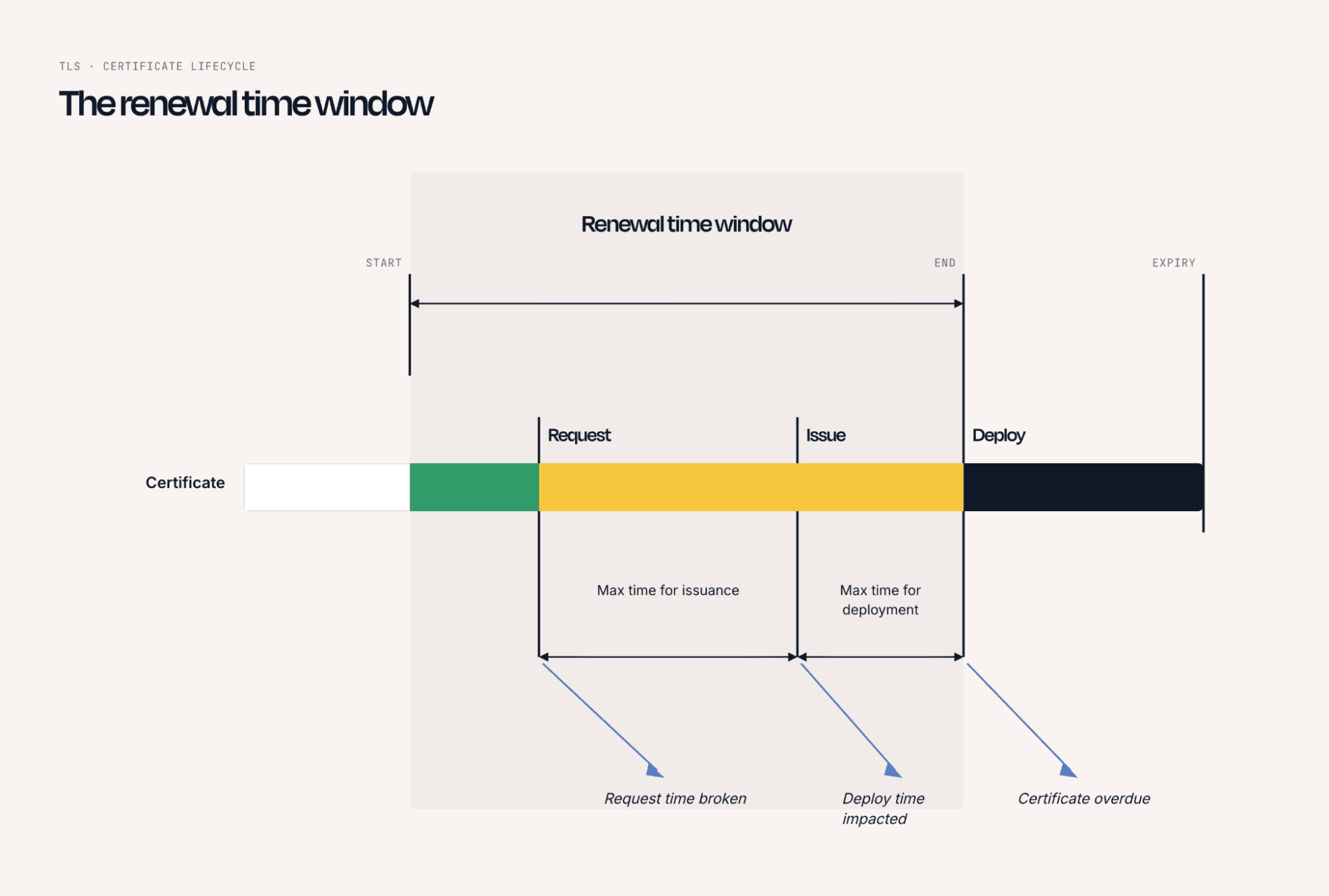
Renewal replaces a certificate before it expires without changing who trusts it; rotation goes further, periodically replacing the underlying CA or signing key itself to limit the damage a compromised key could do. cert-manager handles renewal automatically via renewBefore. A good rule of thumb is renewing at roughly one-third of the certificate's remaining lifetime, leaving a buffer for retries. Cluster-level rotation is less frequent, generally handled via kubeadm certs renew or your provider's control plane maintenance.
A few things worth watching for:
- Setting renewBefore too close to duration can trap a certificate in a permanent renewal loop
- Public CAs like Let's Encrypt enforce per-domain issuance limits that a misconfigured Certificate can burn through
- Some workloads cache certificates in memory and won't pick up a renewed Secret until restart, an issue best solved with a rolling-restart controller like Reloader
Cloud-Native Certificate Management for Managed Kubernetes Environments
Managed Kubernetes services shift some, but not all, of the certificate management burden away from platform teams. Knowing where that line sits matters for your renewal strategy.
Even on a fully managed control plane, workload-facing certificates (Ingress TLS, service mesh mTLS, app-to-database encryption) remain the customer's responsibility, exactly the layer cert-manager is designed to automate.
Kubernetes Certificate Management for Internal Microservice Communication
External-facing TLS gets the most attention because it's the layer users see. But traffic between services inside the cluster often carries just as much sensitive data, and increasingly needs the same protection through mutual TLS (mTLS), where both sides of a connection present a certificate. Two common patterns handle this at scale:
- Service mesh sidecars (Istio, Linkerd) issue and rotate short-lived workload certificates automatically, often hourly, via their own internal CA.
- cert-manager with private issuers (Vault, a self-signed ClusterIssuer) can issue longer-lived certificates directly to pods, without the overhead of a full mesh.
Either way, the workflow stays consistent: key generated, request submitted, certificate mounted into the workload, automated end to end.

Common Certificate Management Failures in Kubernetes
Most certificate incidents trace back to a handful of recurring root causes:
- Silent Expiration: No monitoring in place, so the first sign of trouble is an outage rather than an alert.
- Misconfigured Issuers: An Issuer referenced from the wrong namespace, or a ClusterIssuer typo, silently prevents issuance.
- DNS Validation Failures: ACME challenges fail because Ingress rules or DNS records changed after the issuer was configured.
- Rate-Limit Exhaustion: Repeated failed issuance attempts burn through Let's Encrypt's weekly limits, blocking legitimate renewals.
- Orphaned Secrets: A Certificate resource is deleted, but the old Secret persists and stays referenced by a workload that never gets updated again.
- Existing Certificates Not Migrated: Teams import certificates into Secrets manually during a cert-manager migration, then forget to bring them under a Certificate resource, leaving them outside the renewal loop.
Best Practices for Certificate Management in Kubernetes
Bringing this all together, here's what a mature certificate management practice tends to include:
Auditing and Monitoring Certificate Health in Kubernetes
Automation reduces the odds of an expired certificate, but doesn't eliminate them. A misconfigured issuer or exhausted rate limit can silently break the renewal loop cert-manager relies on. Certificate health needs its own layer of visibility, separate from trusting automation to "just work."
At minimum, effective monitoring should track days remaining until expiration for every certificate (not just Ingress-facing ones), failed CertificateRequest objects and their error conditions, Issuer and ClusterIssuer readiness, and Secret changes that don't correspond to an expected renewal event.
Many teams start with open-source exporters that expose expiration as Prometheus metrics, then layer alerting at 30-, 14-, and 7-day thresholds. That works, but it means stitching together yet another tool, and correlating a certificate failure with the actual service impact it's causing still requires manually cross-referencing dashboards.
Proactive Certificate Expiry Alerts and Visibility with groundcover
This is where having certificate health sit inside the same platform as the rest of your production telemetry pays off. groundcover is a full-stack observability platform built on an eBPF sensor, which means it can surface TLS and certificate-related signals directly from cluster traffic without instrumenting every workload or deploying a separate exporter per namespace.
Because groundcover already monitors your Kubernetes environment at the infrastructure layer, certificate-driven failures, a handshake error from an expired cert, a pod that can't reach a dependency because of a broken TLS chain, show up alongside the logs, traces, and metrics for the exact service affected, rather than as an isolated alert to manually correlate. That context matters most in the moment an incident happens, when engineers need to know not just that a certificate expired, but which services and users it's currently breaking.
groundcover's Agent Mode can also close the loop faster: given a goal like "investigate why this Ingress is failing," it pulls the relevant certificate status, correlates it with recent deploys, and surfaces the root cause. You can try this against your own cluster with groundcover's free tier, deployed inside your own AWS, GCP, or Azure environment through its BYOC architecture.
Conclusion
Certificate management in Kubernetes spans a wider surface than it first appears - from the internal PKI holding the control plane together, to the Certificates API and CSR workflow, to cert-manager automating TLS for every workload and Ingress you run. The teams that avoid certificate-related outages aren't the ones who never have a certificate come close to expiring; they're the ones who've automated issuance and renewal end to end and have real visibility into certificate health before it becomes an incident.
Getting cert-manager configured correctly, choosing the right issuer for each trust boundary, and pairing that automation with proactive monitoring is what turns certificate management from a recurring fire drill into background infrastructure that just works.














.svg)