Kubernetes Admission Controllers: How They Work & Best Practices



Key Takeaways
- Admission controllers act as Kubernetes’ final checkpoint before changes are applied, preventing unsafe or misconfigured workloads from reaching the cluster in the first place.
- Built-in admission controllers handle common safeguards, while dynamic webhooks let teams enforce custom security and operational policies such as requiring resource limits, blocking privileged containers, or automatically injecting configuration.
- Poorly designed admission policies can create operational problems of their own, so webhooks should be tightly scoped, highly available, fast to respond, and thoroughly tested before production rollout.
- Admission controllers are most effective when paired with observability, making it easier to identify why deployments were rejected, trace failures back to specific policies, and troubleshoot incidents quickly.
A developer pushes a container with root privileges and no resource limits to production on a Friday afternoon. By the time anyone notices, three nodes are under pressure and the on-call engineer is piecing together what happened from audit logs. An admission controller would have stopped that request before it ever reached the cluster.
If you've ever wondered how a Kubernetes cluster catches a misconfigured workload before it causes exactly that kind of incident, the answer is almost always an admission controller. According to Red Hat's State of Kubernetes Security Report 2024, nearly nine in ten organizations experienced at least one container or Kubernetes security incident in the prior 12 months, and misconfigurations were the single biggest driver. Admission controllers are one of the few native mechanisms built to catch these issues before a workload ever runs.
This guide covers what admission controllers are, how they slot into the Kubernetes API request lifecycle, the difference between static and dynamic admission control, and the practical steps for configuring, testing, and troubleshooting them, along with common pitfalls and best practices.
What Are Kubernetes Admission Controllers?
An admission controller is a piece of code that intercepts incoming requests to the Kubernetes API server after they've been authenticated and authorized, but before the object is persisted to etcd. It's the last checkpoint a request passes through before it becomes real in your cluster.
Admission controllers fall into two behaviors. Mutating ones can modify the incoming object, for example, injecting a sidecar or setting a default value. Validating ones can only accept or reject the request. A single request typically passes through several admission plugins in sequence, and any one can reject it outright.
Static vs. Dynamic Admission Controllers in Kubernetes:
| Type | How It Works | Examples |
|---|---|---|
| Static admission controllers | Compiled directly into the kube-apiserver binary; turned on or off with the \--enable-admission-plugins and \--disable-admission-plugins flags | NamespaceLifecycle, ResourceQuota, PodSecurity |
| Dynamic admission controllers | Registered at runtime as webhooks; run as separate services that the API server calls over HTTPS for each matching request, enabling custom policy without rebuilding kube-apiserver | Custom webhook servers, OPA Gatekeeper, Kyverno |
How Admission Controllers Fit Into the Kubernetes API Request Lifecycle
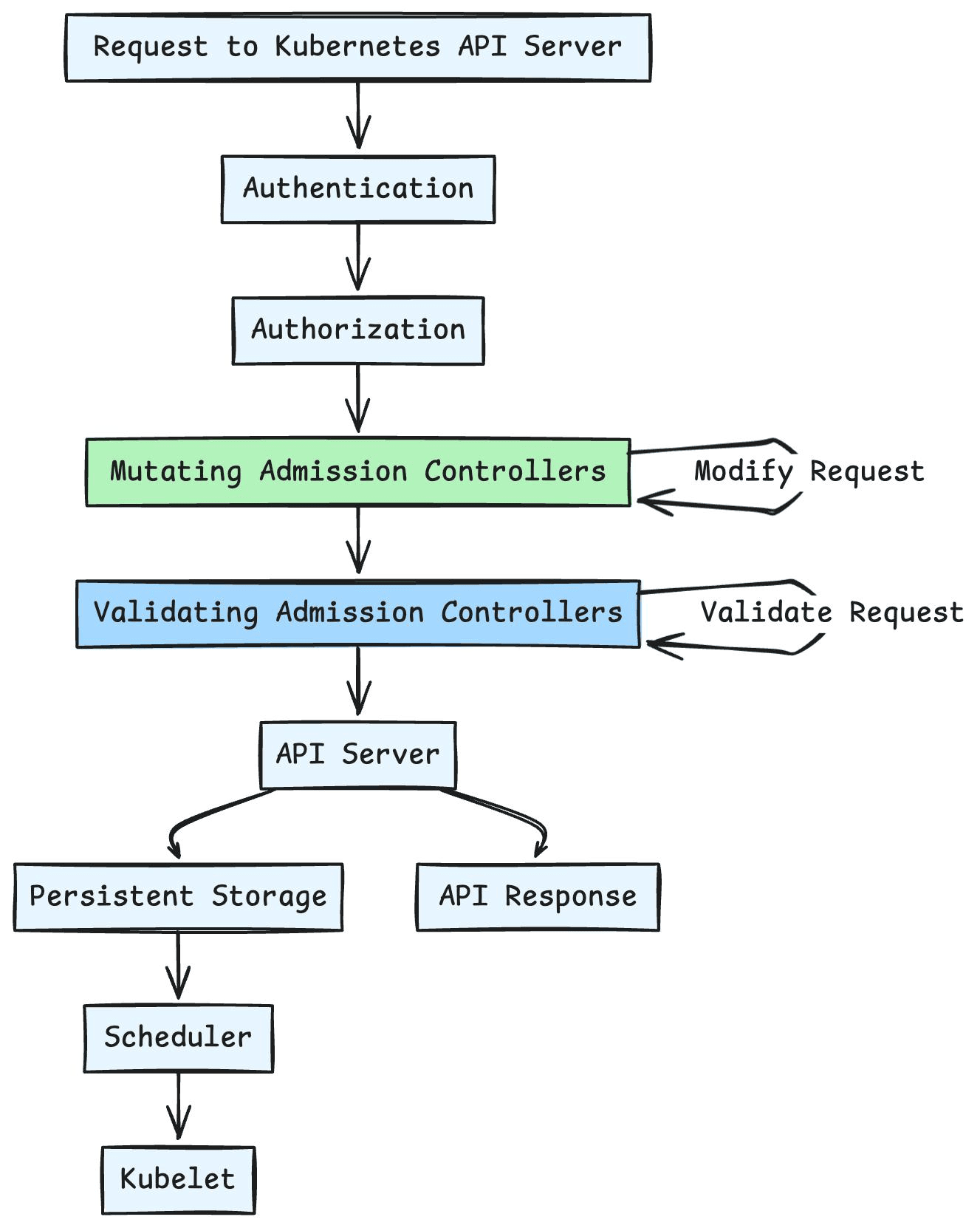
Every request to the Kubernetes API server, whether from kubectl, a CI/CD pipeline, or a controller, moves through the same pipeline. Admission control sits near the end, right before the object is written to storage:
Client request
-> Authentication (who are you?)
-> Authorization / RBAC (are you allowed to do this?)
-> Mutating admission controllers (can the object be modified?)
-> Object schema validation (does it match the OpenAPI schema?)
-> Validating admission controllers (accept or reject?)
-> Persisted to etcd
Mutating admission controllers always run before validating ones. This ordering matters: a validating webhook sees the fully mutated object, including any defaults or sidecars injected earlier, rather than the original submitted request.
Types of Kubernetes Admission Controllers
Kubernetes ships with a long list of built-in admission plugins, and the default set varies slightly by version and distribution. The table below covers the ones you'll encounter most often in a typical cluster:
| Admission Plugin | Purpose |
|---|---|
| NamespaceLifecycle | Prevents creation of objects in namespaces that are being terminated or don't exist. |
| LimitRanger | Enforces default and maximum resource requests/limits defined by a LimitRange. |
| ResourceQuota | Rejects requests that would exceed a namespace's configured resource quota. |
| PodSecurity | Enforces the Pod Security Standards (privileged, baseline, restricted) at the namespace level. |
| DefaultStorageClass | Automatically assigns the cluster's default storage class to PersistentVolumeClaims that don't specify one. |
| ServiceAccount | Automates the association of ServiceAccounts with pods, including token mounting. |
| NodeRestriction | Limits what a kubelet can modify to only the Node and Pod objects bound to it. |
| MutatingAdmissionWebhook | Calls out to registered mutating webhooks for dynamic, custom object modification. |
| ValidatingAdmissionWebhook | Calls out to registered validating webhooks for dynamic, custom policy enforcement. |
MutatingAdmissionWebhook and ValidatingAdmissionWebhook deserve special attention: they're the bridge between static, in-tree admission control and the extensible, dynamic model most production clusters rely on today.
Dynamic Admission Control: Mutating and Validating Webhooks
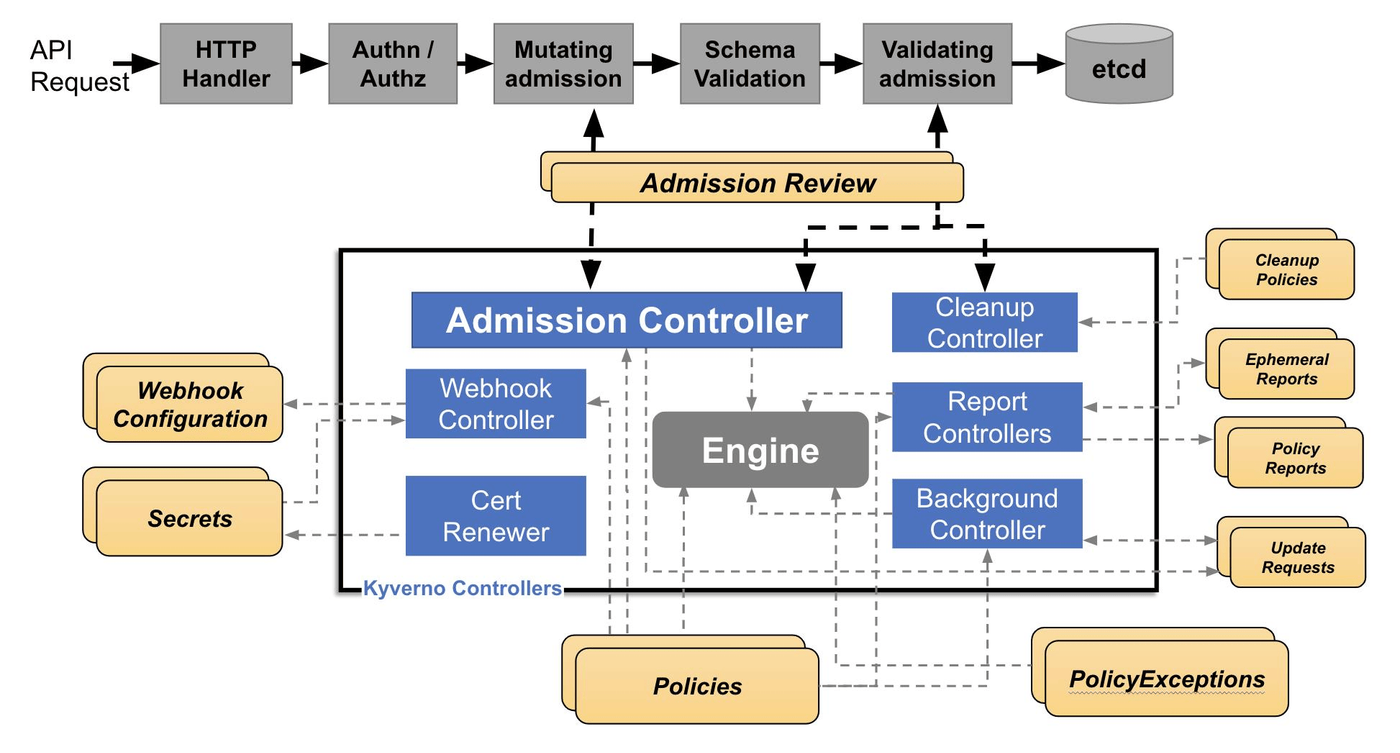
Dynamic admission control lets you plug custom logic into the request lifecycle without touching the API server binary. You register a webhook using a MutatingWebhookConfiguration or ValidatingWebhookConfiguration object, and the API server calls your webhook's HTTPS endpoint with an AdmissionReview payload for each matching request. A typical ValidatingWebhookConfiguration looks like this:
Two fields matter most here. failurePolicy determines what happens if the webhook is unreachable: Fail rejects the request, Ignore lets it through. timeoutSeconds caps how long the API server waits before falling back to that policy, which is why fast, highly available webhook servers are non-negotiable in production.
How to Enable and Configure Admission Controllers in Kubernetes
Configuring admission control mixes API server flags for static plugins with Kubernetes objects for dynamic webhooks. Here's a practical, four-step approach:
1. Check Which Admission Controllers Are Currently Enabled
Before changing anything, find out what's already running. On a self-managed cluster, inspect the kube-apiserver process directly:
On managed offerings such as EKS, GKE, or AKS, the cloud provider controls this flag directly, so check its documentation for which admission plugins are enabled by default and which you can toggle.
2. Enable or Disable Controllers via the API Server Flag
On a self-managed control plane, admission plugins are controlled with two kube-apiserver flags:
Most distributions enable a sensible default set out of the box, so you'll typically only touch this flag to add a specific plugin, like PodSecurity, or turn one off for a legacy workload.
3. Deploy and Register a Webhook for Dynamic Admission Control
For a custom policy, deploy your own webhook server, or adopt a policy engine such as OPA Gatekeeper or Kyverno, as a Deployment fronted by a TLS-enabled Service, then register it with a MutatingWebhookConfiguration or ValidatingWebhookConfiguration as shown earlier. Use the rules field to scope it to specific resources and operations, and namespaceSelector or objectSelector to keep it away from system namespaces like kube-system.
4. Test and Validate Admission Controller Behavior
Always test admission control changes before they hit production. A dry run is the fastest way to check behavior without creating a real object:
Follow up with a deliberately non-compliant manifest, like a pod with no resource limits, to confirm the webhook rejects it as expected. Then check the kube-apiserver audit logs to see which admission plugin made the call, often the fastest way to debug an unexpected rejection later.
Common Admission Controller Use Cases in Production
In practice, most teams rely on admission controllers for a consistent set of jobs across their Kubernetes cluster:
| Use Case | What It Does |
|---|---|
| Image Tag and Registry Control | Blocks pods that request the :latest image tag or pull from unapproved registries |
| Resource Limit Enforcement | Requires CPU and memory requests and limits on every container |
| Label Governance | Enforces mandatory labels, such as team or environment, for chargeback and governance |
| Image Signature Verification | Verifies image signatures before a pod is allowed to run |
| Sidecar Injection | Automatically injects sidecars, as service meshes like Istio do |
| Privilege Restriction | Rejects privileged containers or host namespace access outside approved namespaces |
Admission Controllers for Kubernetes Security and Policy Enforcement
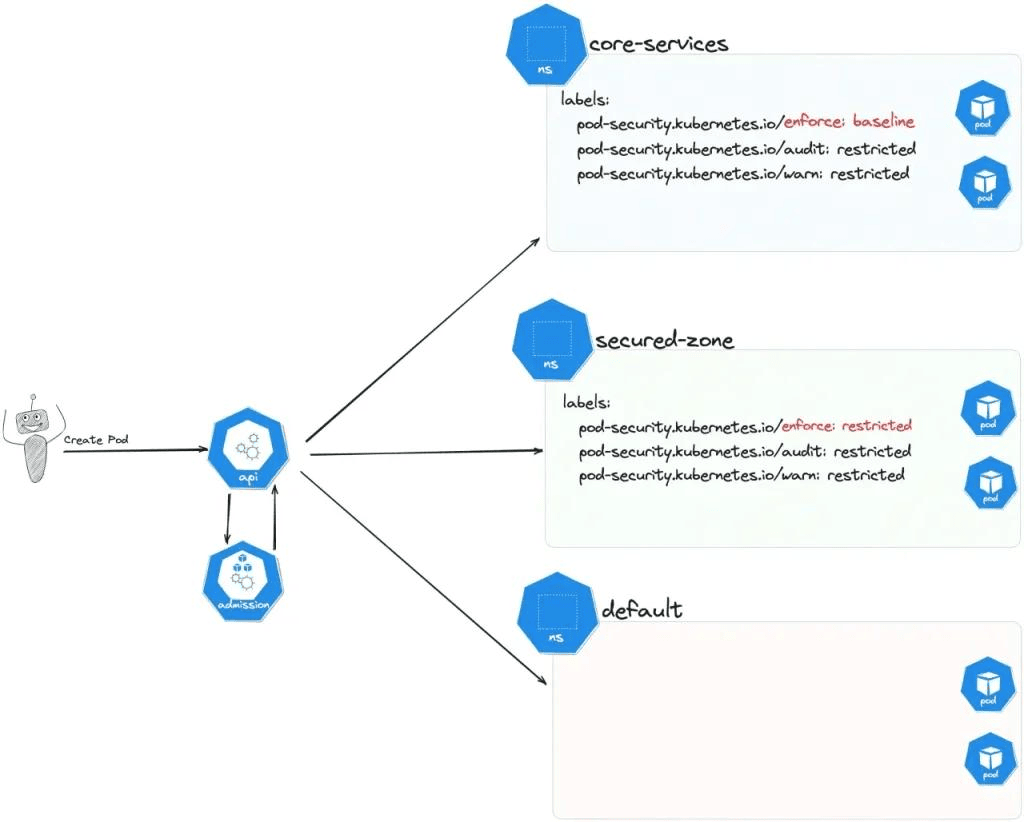
Security is where admission control earns its keep. Since Kubernetes deprecated PodSecurityPolicy, the built-in PodSecurity admission controller is the default way to enforce the Pod Security Standards at the namespace level, covering baseline protections like disallowing privileged containers and host networking.
For anything more granular, most teams reach for a policy-as-code engine such as OPA Gatekeeper or Kyverno, both of which run as validating and mutating admission controller webhooks under the hood. These let teams write policy as declarative Kubernetes resources instead of custom webhook code, making it easier to version, review, and audit reject requests. The OWASP Kubernetes Security Cheat Sheet is a solid reference for mapping these controls to broader cluster hardening.
Admission Controllers for Resource Governance and Configuration Management
Beyond security, a handful of static admission controllers quietly keep resource usage and configuration consistent across a Kubernetes cluster:
- ResourceQuota: Caps total CPU, memory, and object count per namespace
- LimitRanger: Sets default and maximum per-container resource requests and limits
- DefaultStorageClass: Ensures PVCs without an explicit storage class still get provisioned correctly
- DefaultTolerationSeconds: Standardizes how long pods tolerate node NotReady/Unreachable taints before eviction
These plugins rarely make headlines the way security policy does, but they're often the difference between a cluster that degrades gracefully under pressure and one where a single misconfigured deployment exhausts a node.
Writing a Custom Admission Controller Webhook
When an off-the-shelf policy engine doesn't fit, you can write your own webhook. At its core, it's just an HTTPS server that reads an AdmissionReview request and returns an AdmissionReview response. Here's a simplified handler in Go:
Get three things right: the TLS certificate presented to the API server, matching the request UID in your response, and keeping the handler fast, since it sits directly in the critical path of every matching request.
Challenges and Pitfalls of Kubernetes Admission Controllers
Admission control is powerful, but it introduces real operational risk if it isn't managed carefully:
- Added Latency: Every webhook call adds round-trip time, and a slow webhook slows down every matching API call in the cluster.
- Availability Coupling: A webhook set to failurePolicy: Fail becomes a hard dependency; if it's down, matching requests are rejected cluster-wide.
- Ordering Complexity: Multiple mutating webhooks can conflict or overwrite each other's changes.
- Silent Scheduling Failures: A rejected request often surfaces as a vague error, leaving on-call engineers to dig through audit logs.
- Blast Radius: A misconfigured cluster-wide webhook without a namespaceSelector can block traffic across every namespace at once.
Best Practices for Kubernetes Admission Controllers
A few habits go a long way toward keeping admission control reliable rather than becoming its own incident source:
| Best Practice | Details |
|---|---|
| Scope Webhooks Tightly | Use rules, namespaceSelector, and objectSelector so webhooks only see the requests they're meant to evaluate. |
| Set Short Timeouts | Set short timeoutSeconds values and monitor webhook latency; a slow webhook is a slow API server. |
| Choose FailurePolicy Deliberately | Use failurePolicy: Ignore for non-critical webhooks, and reserve Fail for controls where a bypass is genuinely unacceptable. |
| Run Webhooks as Highly Available | Deploy webhook servers as highly available Deployments with multiple replicas, since they sit in the critical path of cluster operations. |
| Test Before Rollout | Always test with \--dry-run=server in a staging cluster before rolling a new webhook out to production. |
| Prefer Established Policy Engines | Choose OPA Gatekeeper or Kyverno over hand-rolled webhooks for common policy patterns. |
| Keep Audit Logging On | Keep kube-apiserver audit logging enabled so rejected requests can be traced back to the responsible admission plugin or webhook. |
| Exclude System Namespaces | Keep custom webhooks away from the kube-system to avoid interfering with core cluster components. |
Real-Time Admission Controller Observability with groundcover
Even a well-designed admission control setup eventually causes a confusing incident: a deployment silently fails, a pod never schedules, or a webhook times out mid-rollout, and nobody on-call can tell whether the root cause was a rejected request, a quota, or something else entirely. This is where observability closes the gap between having good policy and operating it confidently.
groundcover is a full-stack, eBPF-based observability platform that captures logs, traces, metrics, and Kubernetes events without code changes. Because it runs inside your own cloud account through its BYOC architecture, it correlates kube-apiserver activity, pod scheduling events, and webhook responses in one place instead of leaving teams to stitch together audit logs after the fact. Kubernetes monitoring surfaces rejected requests alongside the rest of your cluster's health signals, and Kubernetes troubleshooting workflows help teams work backward from a stuck deployment to the specific admission controller that blocked it, and Agent Mode can investigate the issue autonomously, pulling relevant admission logs and correlating them with recent changes without requiring manual query construction.
Getting started is self-service: groundcover offers a free tier alongside a 14-day trial that unlocks the full platform before downgrading automatically. Worth planning ahead of time: BYOC deployment runs inside your own AWS, GCP, or Azure environment, rather than as hosted SaaS. You can start free and connect it to your cluster in minutes.
Conclusion
Admission controllers are one of the most underrated parts of the Kubernetes control plane. They turn cluster policy from a wiki page into something the API server actually enforces, whether that's blocking a container running as root, assigning a default storage class, or requiring resource limits on every pod. Static admission controllers give you a solid baseline out of the box, and dynamic admission control, through mutating and validating webhooks, lets that baseline grow into policy tailored to your organization. When used carefully with tight scoping, sane timeouts, and real observability into what's being rejected and why, admission control becomes one of the most reliable guardrails a Kubernetes cluster has.
FAQs
RBAC controls who can submit requests, while admission controllers control what those requests are allowed to contain.
- A developer may legitimately have permission to create Pods but still accidentally deploy an insecure configuration.
- Admission controllers enforce organization-wide security and operational standards regardless of who submits the workload.
- Combining authentication, RBAC, and admission control creates defense in depth rather than relying on a single security layer.
- Treat admission policies as preventive controls instead of relying on runtime detection after deployment.
Because every matching API request waits for the webhook response, slow or unavailable webhooks can delay or block cluster operations.
- Deploy webhook services with multiple replicas across failure domains.
- Keep timeoutSeconds short so API requests don't stall unnecessarily.
- Use failurePolicy: Ignore for advisory or governance policies where temporary bypasses are acceptable.
- Continuously monitor webhook latency since API responsiveness depends directly on webhook performance.
Explore our guide to Kubernetes troubleshooting.
Introduce policies gradually by validating behavior first, then progressively enforcing them once compliance is proven.
- Test policies in staging using kubectl apply --dry-run=server before production rollout.
- Scope policies initially with namespaceSelector or objectSelector to limit blast radius.
- Audit rejected requests to identify recurring violations before switching from permissive to strict enforcement.
- Version-control policy definitions so every change follows the same review process as application code.
Learn more about Kubernetes events.
groundcover correlates Kubernetes events, logs, traces, and infrastructure telemetry so rejected deployments can be traced back to the specific admission decision instead of investigating isolated audit logs.
- View admission-related events alongside scheduling failures and application health.
- Correlate webhook responses with kube-apiserver activity during failed deployments.
- Reduce manual log hunting by connecting infrastructure and workload signals in one investigation workflow.
- Speed up incident response by following a deployment from rejection to underlying policy trigger.
Learn more about groundcover’s Kubernetes monitoring solution.