

Kubernetes Pod Security Standards: Profiles, Enforcement & Best Practices



Often, the various workloads in a Kubernetes cluster require differing degrees of security. For example, security-critical applications may need greater levels of isolation and fewer privileges than an application that doesn’t handle sensitive data.
Pod Security Standards (PSS) make it easy for admins to assign the right level of security to varying workloads. Keep reading for details as we explain the nitty-gritty of how Pod Security Standards work, which ones are available, how to apply them, and how they relate to other types of security controls available in Kubernetes.
What are Pod Security Standards in Kubernetes?
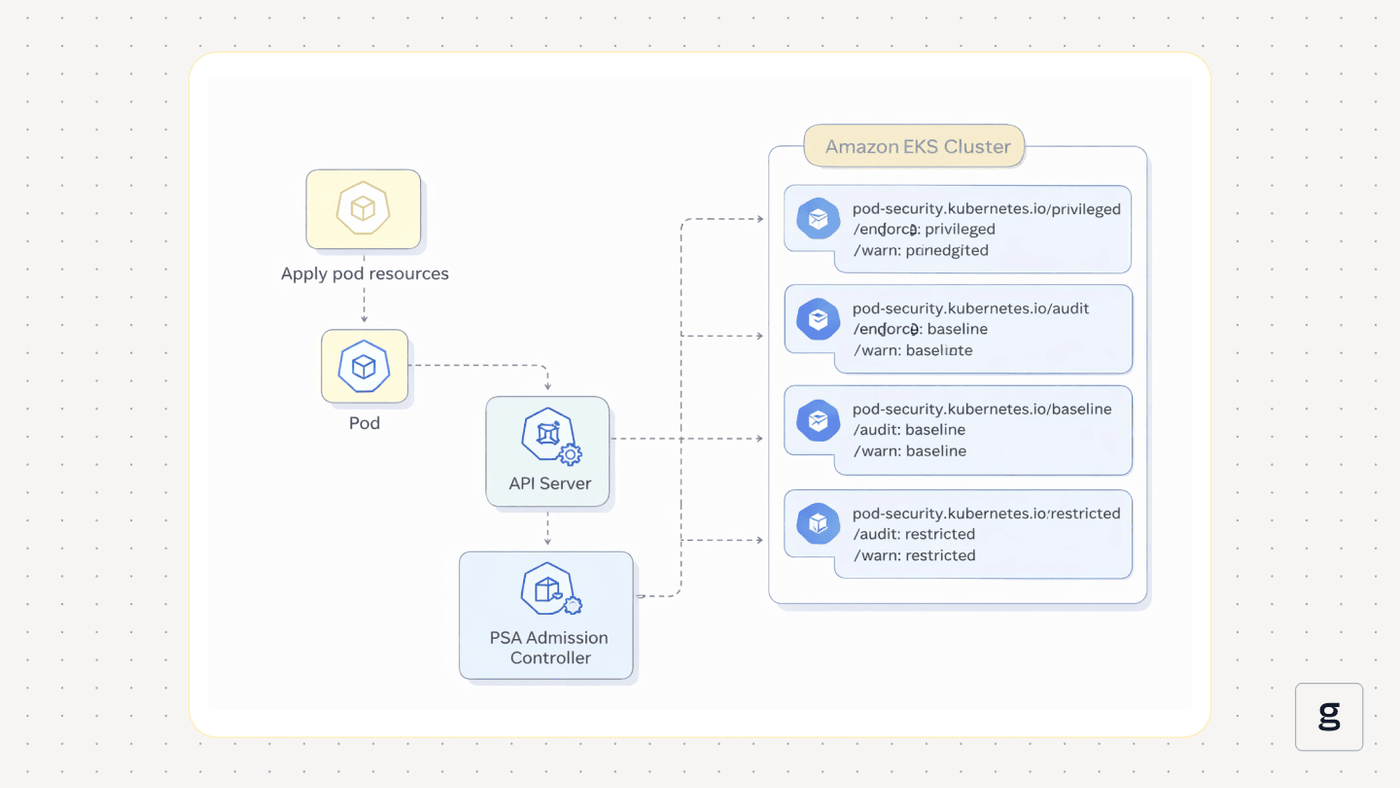
Pod Security Standards (PSS) are a Kubernetes feature for assigning varying levels of security to Pods.
Each PSS security level corresponds to what is known as a “profile.” As we explain in more detail in the next section, three security profiles are available: Privileged, baseline, and restricted. Each level imposes a distinct set of security guardrails on Pods.
PSS profiles are enforced using a built-in Kubernetes admission controller known as Pod Security Admission (PSA).
Pod Security Standards replace Pod Security Policies, an earlier Kubernetes feature that allowed admins to establish guardrails for Pods, but that was more complex to work with. Security Policies are no longer supported as of Kubernetes version 1.25; Security Standards are now the only way (short of using external add-ons) to enforce security rules for Pods.
Understanding Pod Security Standard Profiles
As we mentioned, Pod Security Standards support three profiles, each with a different set of access controls. Here’s a closer look.
Privileged profile
Privileged is the least restrictive PSS profile – hence why it’s called privileged, because it grants Pods the broadest set of privileges. The privileged profile is appropriate for workloads that pose a low security risk. It’s also useful for running administrative tools or services that require access to virtually all resources across a namespace or cluster.
Baseline profile
The baseline profile allows Pods and containers to perform most actions, but it blocks certain high-risk activities, such as containers running in privileged mode and accessing host-level resources. Typically, you’d assign the baseline profile to workloads that you generally trust and that don’t require strict isolation, but that also don’t have a reason to require privileged access.
Restricted profile
As the term implies, the restricted Pod Security Standard profile grants the fewest privileges. Not only does it block containers from running in privileged mode and access host-level resources, but it also requires containers to mount their file systems in read-only mode (which can help prevent the execution of malware or exploits). It also requires the use of seccomp profiles (a Linux kernel feature that controls the execution of system calls), and it blocks all Linux capabilities except NET_BIND_SERVICE.
Restricted profiles are best for workloads that require strict isolation or manage highly sensitive data.
| Profile type | How it works | Ideal use case |
|---|---|---|
| Privileged | Grants virtually all privileges | Trusted workloads that need access to all workloads across a cluster or namespace (such as workloads that perform administrative activities). |
| Baseline | Allows most privileges, but not those that involve access to host-level resources | Workloads that need to interact with external resources (like data volumes), but have no reason for host-level access |
| Restricted | Blocks virtually all privileges by default | Workloads that are highly sensitive from a security standpoint |
How to apply Pod Security Standards in Kubernetes
Kubernetes applies Pod Security Standards profiles at the namespace level (there’s no way to apply a policy to just one specific Pod unless you run the Pod within its own namespace). To deploy a profile for Pods within a namespace, you use the kubectl label command to apply a label.
For example, the following command applies the baseline profile to Pods within the namespace my-namespace:
kubectl label ns my-namespace pod-security.kubernetes.io/enforce=baseline
This label configures the profile to use enforce mode, which rejects pods that do not meet the specified Pod Security Standard. For more on how enforcement modes operate, see the next section of the article.
Note that if a label already exists for the namespace, you’ll see an error and the label won’t be applied. To avoid this, run the kubectl command with the --overwrite flag, which overwrites existing labels.
Pod Security Standard enforcement modes
A potential challenge of deploying Pod Security Standards is that they could prevent workloads from running properly. This could happen if a workload requires more privileges than its profile grants it. In that case, Kubernetes will block actions that the workload needs to take to run normally.
To address this issue, Kubernetes supports three “enforcement modes” for Pod Security Standards:
- Enforce: This mode blocks workload requests or actions that violate a PSS profile. This is the enforcement mode to choose if you actually want to enforce a PSS profile fully.
- Audit: Under this mode, violations are recorded in the Kubernetes audit log, but they are not blocked.
- Warn: This mode generates a user-facing message about violations, but does not block them.
These options are useful because they allow you to test how a profile will affect Pods before actually enforcing it fully. For instance, you could use the audit option to check whether a Pod’s normal operations violate a PSS profile. Once you’ve confirmed that a Pod should run normally under a given profile, you can begin enforcing the profile with the confidence that any violations that occur at that time are likely to result from anomalous events that could pose a real security risk.
Configuring enforcement modes
Like PSS profiles, enforcement modes are applied on a namespace-by-namespace basis. To set them, you label the namespace using kubectl.
For example, to tell Kubernetes to audit PSS violations for privileged profiles in the namespace my-namespace, you’d run:
Note that it’s possible to set multiple enforcement modes for the same namespace at the same time. For instance, if you wanted to enforce profiles while also recording violations to the audit log, you could apply labels that do both.
Best practices for implementing Pod Security Standards
To use Kubernetes Pod Security Standards to maximum effect, consider the following best practices:
- Validate profiles early in the development lifecycle: Rather than waiting until you’ve already deployed a Pod to determine which PSS profile it will use, make this determination early in the development lifecycle based on the Pod’s intended use cases. Then, you can validate your chosen PSS prior to deployment.
- Start with the audit enforcement mode: Instead of enforcing a PSS profile right off the bat, use the audit enforcement mode option first to check whether the enforce mode will disrupt your workload.
- Update PSS profiles when workloads change: It’s possible that updates to a workload will require PSS profile changes, especially if the updates introduce a new type of resource or capability to the workload. Here again, it can be useful to validate a profile using the audit or warn enforcement modes after making a change.
- Use multiple enforcement modes: Even for workloads for which you want to enforce a PSS policy fully, it can be helpful also to enable the audit or warn enforcement mode options so that you are aware when a violation takes place. Otherwise, Kubernetes will enforce the PSS profile “silently” by blocking violations but not recording them (apart from generating a short message saying that violation took place, but without details).
- Design workspaces strategically: Since PSS profiles work on a namespace-by-namespace basis, it’s important to consider which workloads you deploy to which namespace. As a rule of thumb, it helps to establish at least three namespaces - one for each of the PSS profile types (privileged, baseline, and restricted) that you plan to use.
Common challenges when working with Pod Security Standards
While Pod Security Standards are a powerful tool, they can also be challenging to work with. Here are some common issues and suggested fixes:
- Pod Security Standards are not working: If you set a PSS profile but it’s not working at all, it’s likely because the Kubernetes Pod Security Admission controller, which enforces PSS profiles, is not enabled in your cluster. PSA is enabled by default in most modern Kubernetes distributions, but if it’s not running in yours, check the documentation to determine how to turn it on. You may need to enable it using the --feature-gates flag when starting kube-apiserver.
- Problems with legacy workloads: Legacy Pods may fail to work properly if they require privileges (like running containers as root) that most PSS profiles disallow. One solution is to run these workloads using the privileged profile, but a better, more secure approach is to reconfigure the workload so that it works without special privileges.
- Namespace dependencies: While the ability to apply PSS profiles on a per-namespace basis makes them easier to manage centrally, it also limits their granularity because it makes it challenging to apply profiles to specific Pods. Unfortunately, there’s not a good workaround to this issue; the best you can do if you want to apply a profile just to one Pod is to run that Pod in its own, dedicated namespace.
Complementary security controls that enhance PSS
PSS profiles are a great baseline for mitigating security risks in Kubernetes. But they’re even more powerful when paired with other Kubernetes security tools and capabilities, such as the following:
Image scanning and vulnerability management
PSS profiles can help to make it more difficult to exploit vulnerabilities in some cases, but they won’t detect malware or vulnerabilities within container images. To do that, you need to scan images prior to deploying them, then mitigate any vulnerabilities that the scanner reports. Kubernetes doesn’t provide native tooling for scanning container images, but a variety of third-party scanners are available.
Runtime threat detection
Threats that appear in runtime - meaning active threats that affect running containers - are also something that PSS profiles can help to mitigate by making it more challenging for threat actors to carry out an exploit. But PSS won’t identify the threat or investigate it for you. Neither will any other part of Kubernetes, since Kubernetes doesn’t offer built-in runtime threat detection.
Here again, runtime security requires the use of additional tools that can monitor Pods in real time and detect anomalous activity that may be a sign of a threat.
Network and identity segmentation
In addition to restricting the privileges available to Pods using PSS profiles, you can enforce further isolation based on network configurations and workload identities. To isolate workloads at the network level, use Network Policies, which control which network traffic can reach Pods. To isolate workloads based on identity, you can use the Kubernetes RBAC framework.
OPA Gatekeeper
OPA Gatekeeper is an admission controller that can enforce custom, admin-defined security policies on workloads. It works using Open Policy Agent (OPA) as its policy engine.
Gatekeeper offers a more flexible, customizable approach to configuring security rules for workloads. The drawback is that it’s more work to configure and deploy it because it’s not included by default with most Kubernetes distributions. Plus, you have to write custom policies, which is more complex than choosing from the three preconfigured profile types available through PSS.
That said, it’s possible to use Gatekeeper and PSS concurrently. You could, for example, use PSS profiles for most workloads, while using Gatekeeper to set security guardrails for ones that require highly customized policies that PSS doesn’t support.
How groundcover enhances Pod Security Standards compliance
One of the tricky things about Pod Security Standards is that they don’t provide much context when something goes wrong. They’ll simply block actions or generate short audit or warning messages.
But fortunately, groundcover does provide the comprehensive context that admins need to troubleshoot PSS issues effectively. By continuously monitoring everything that occurs within your cluster, groundcover clues you into events that could be related to PSS problems, like containers trying to access host-level resources or containers running as root.
These insights make it easier to determine which PSS profile is appropriate for each workload. They also provide early feedback about PSS violations, helping admins to troubleshoot issues before they get out of hand and prevent workloads from operating normally.
Pod Security Standards as a pillar of Kubernetes security
Kubernetes Pod Security Standards are not the only way to secure workloads in Kubernetes. Nor are they the most flexible or customizable.But they are one of the simplest and most effective tools available for establishing baseline security profiles for Pods, which is why they’re a key feature to leverage for virtually all clusters.
FAQs
Yes. PSS profiles are applied on a namespace-by-namespace basis, so if you want to use different profiles within the same cluster, you can do so by creating multiple namespaces and setting a different profile (using the kubectl label command) for each one.
If you plan to use the restricted profile for a workload that you’ve already deployed, the safest approach is to apply the audit or warn enforcement modes first, rather than the enforce mode.
This will generate log messages and warnings about violation actions without actually blocking them. In this way, you can determine whether the workload needs to access resources that would trigger a PSS violation, but you won’t actually block the actions and disrupt the workload. Once you’ve validated that your workload can run properly under a restricted profile, you can add the enforce enforcement mode option so that enforcement actually takes place.
By detecting events like containers accessing host-level files or running in privileged mode, groundcover alerts you to activity that is likely to violate PSS profiles (especially baseline or restricted profiles). In this way, groundcover can clue you into PSS violations before you’ve even noticed them within your audit logs, and if you haven’t enabled auditing or warnings for the violations at all because you forgot to set the appropriate enforcement modes, you’ll still know about the requests through groundcover.



