Kubernetes Storage Quotas: How to Set, Enforce & Monitor Them




Key Takeaways
- Kubernetes storage quotas prevent one namespace from consuming disproportionate persistent storage and affecting other workloads in the cluster.
ResourceQuotalimits total storage and PVC counts across a namespace, whileLimitRangecontrols how much storage each individual PVC can request.- StorageClass-specific quotas help control expensive storage tiers separately, making capacity and costs easier to manage.
- Quotas are enforced before a PVC is created, so requests that exceed configured limits are rejected instead of creating excess storage.
Production Kubernetes clusters expand in one direction: outward. According to the CNCF's 2025 Cloud Native Survey, 82% of container users now run Kubernetes in production, up from 66% in 2023. More clusters mean more namespaces, more self-service storage provisioning, and more chances for one misconfigured PersistentVolumeClaim to eat a node's disk or blow a cloud budget. Storage quotas are the guardrail that keeps that growth from turning into chaos.
This article covers what storage quotas do, how Kubernetes enforces them, and how to configure, test, and monitor them so usage stays predictable at scale.
What Are Storage Quotas in Kubernetes?
A storage quota is a namespace-scoped policy that caps how much persistent storage, and how many storage-related objects a team can request. Instead of letting every namespace pull from a shared pool of cluster storage unchecked, storage quotas set a hard ceiling on resource consumption so one noisy namespace can't starve everyone else.
Kubernetes gives you two tools for this: ResourceQuota and LimitRange. They're often confused since both touch storage, but they operate at different levels.
ResourceQuota vs. LimitRange for Storage in Kubernetes
Here's how the two compare side by side:
Most teams use both together: LimitRange stops any single claim from being absurdly large or small, while ResourceQuota caps the namespace's total footprint.
Key Components of Kubernetes Storage Quotas
A few building blocks make storage quotas work:
- requests.storage: aggregate storage that can be requested across all PVCs in a namespace.
- persistentvolumeclaims: the maximum PVC object count allowed in a namespace.
- StorageClass-scoped keys: quotas like
<storageclass-name>.storageclass.storage.k8s.io/requests.storage, capping consumption per storage tier (fast SSD versus cheaper HDD, for example). - Admission control: the mechanism that intercepts and evaluates requests against the quota before they're persisted to etcd.
How Kubernetes Enforces Storage Quotas
Enforcement happens at admission time, not after the fact. When a user submits a PVC manifest, the API server runs it through the ResourceQuota admission controller before the object is written to the cluster's data store. The controller checks current usage against the defined hard limits, and if the request would push the namespace over its cap, the API server rejects it with a 403 Forbidden and an explanatory message.
This matters because storage quotas are preventative, not reactive. Kubernetes doesn't provision the volume and complain about it later; it refuses the request up front, avoiding the scramble of cleaning up over-provisioned volumes.
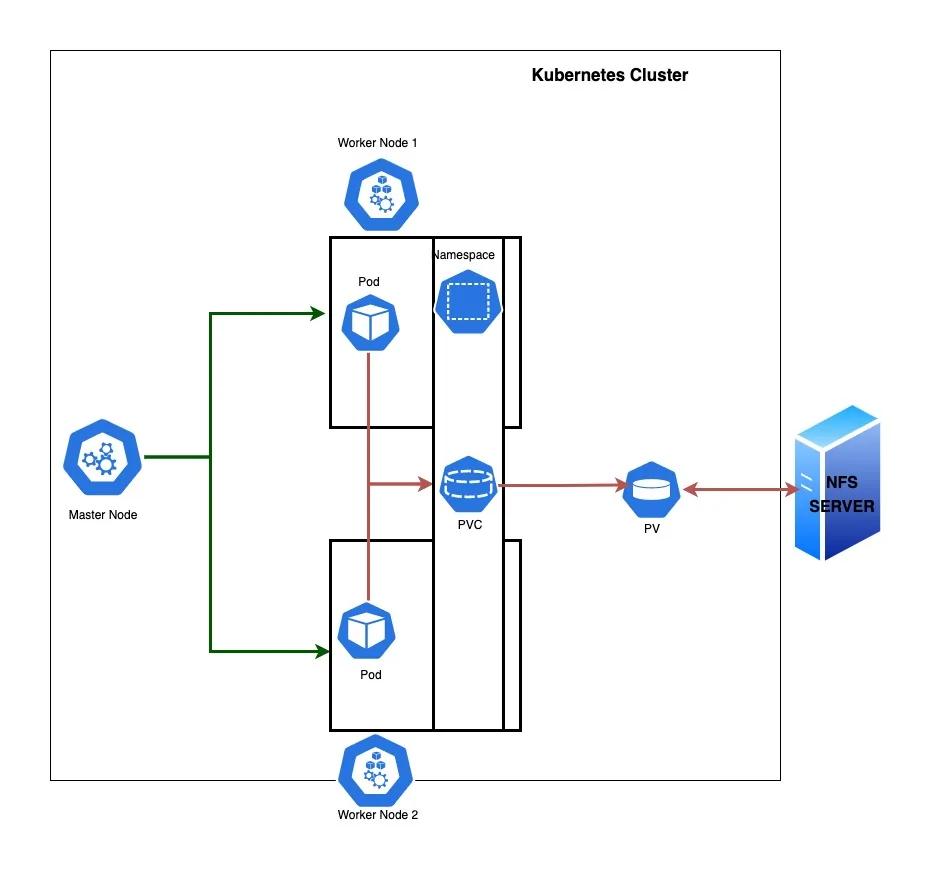
Source | NFS storage provisioning
Types of Storage Quotas in Kubernetes
Kubernetes supports a handful of quota types relevant to storage, each targeting a different dimension of consumption:
How to Configure Storage Quotas in Kubernetes
Setting up storage quotas is a layered process. Here's a practical sequence for rolling them out.
1. Define a ResourceQuota Object for the Namespace
Start with an aggregate cap on total storage and PVC count:
Apply it, then confirm it's active with kubectl describe resourcequota storage-quota -n team-payments.
2. Set PVC Count and Capacity Limits
Pair the ResourceQuota with a LimitRange so individual claims stay within a sane band:
This prevents both micro-claims that clutter the API server and runaway claims that eat the whole namespace quota in one request.
3. Apply StorageClass-Specific Quotas Where Needed
If your cluster offers multiple storage tiers (fast-ssd for databases, standard-hdd for logs), cap each independently so a team can't exhaust the most expensive tier:
4. Validate Quota Enforcement and Test With a Sample PVC
Always test enforcement before rolling a quota out broadly. Submit a PVC that exceeds the limit and confirm it's rejected:
Then submit one within bounds and confirm it binds normally. This two-sided check catches typos in quota keys before they silently fail to enforce anything.
Kubernetes Storage Quota Examples
A common pattern is tiering quotas by environment. A staging namespace might get a modest 100Gi cap with a 10 PVC limit, since it's meant for short-lived testing, not persistent datasets. A production namespace running a stateful database might get 2Ti with a 50 PVC limit instead, reflecting real capacity planning. Multi-tenant clusters often template these quotas per team via GitOps, so every new namespace inherits sensible defaults automatically.
Storage Quota Scope: Namespace-Level vs. Cluster-Level Controls
Kubernetes quotas are namespace-scoped by design, but cluster-wide storage governance isn't out of reach; it just needs a different set of tools layered on top.
For genuine cluster-wide control, most teams pair namespace ResourceQuotas with a policy engine like Kyverno or OPA Gatekeeper that auto-injects a quota into every new namespace, closing the gap where someone forgets to define one.
How Storage Quotas Interact With PersistentVolumeClaims
Every PVC a developer creates is checked against the namespace's active ResourceQuota before it proceeds. If the request stays within the requests.storage and persistentvolumeclaims limits, the PVC moves to Pending and waits for the Kubernetes storage subsystem to bind it to a matching PersistentVolume. If it doesn't, the request is rejected before a volume is provisioned.
This coupling means quota planning has to account for real PVC behavior, including one detail teams often miss: a deleted PVC doesn't always free up quota instantly if the underlying PV uses a Retain reclaim policy, since its storage may still count until cleanup finishes.
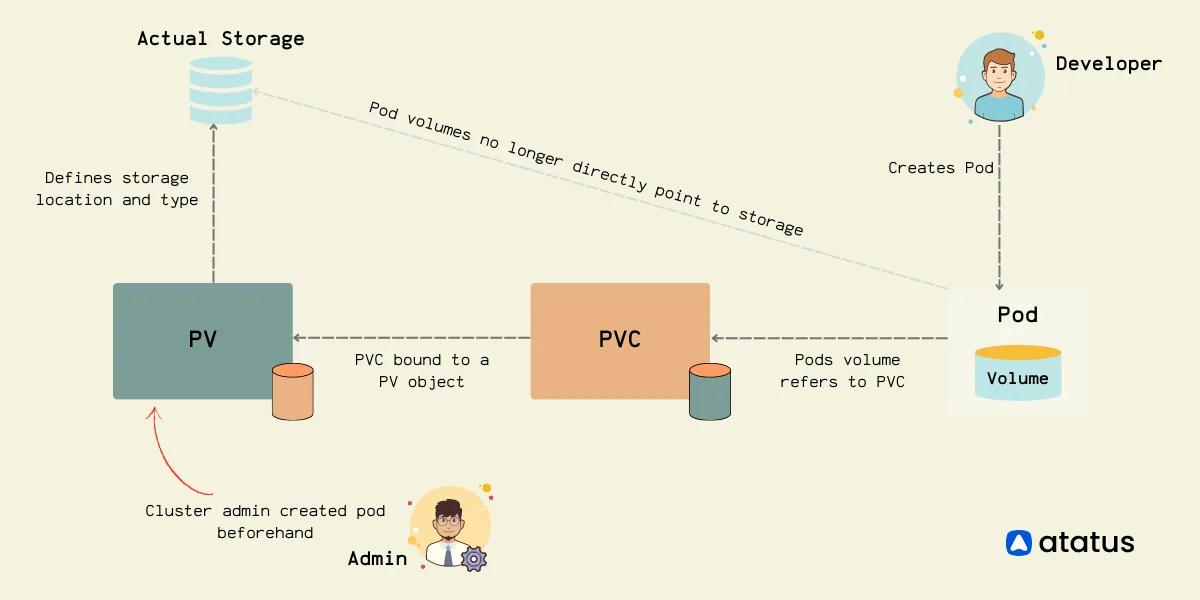
Source | PV PVC relationship
Storage Quota Monitoring and Capacity Planning in Production
Setting a quota is only half the job. Without visibility into usage, teams either get paged when a namespace hits its ceiling, or don't find out until a deployment fails. Effective capacity planning means tracking:
- Current
requests.storageusage as a percentage of the hard limit, per namespace - PVC count trends, to catch namespaces nearing their object count cap
- Per-StorageClass consumption, since SSD tiers deserve tighter oversight than archival storage
- Growth rate, not just current usage, so teams can raise quotas proactively
kubectl describe resourcequota gives a point-in-time snapshot but shows no trends and alerts no one. Most production teams export quota and PVC metrics to a pipeline and build dashboards around thresholds like 80% of the hard limit, giving lead time to request an increase before it becomes a blocker.
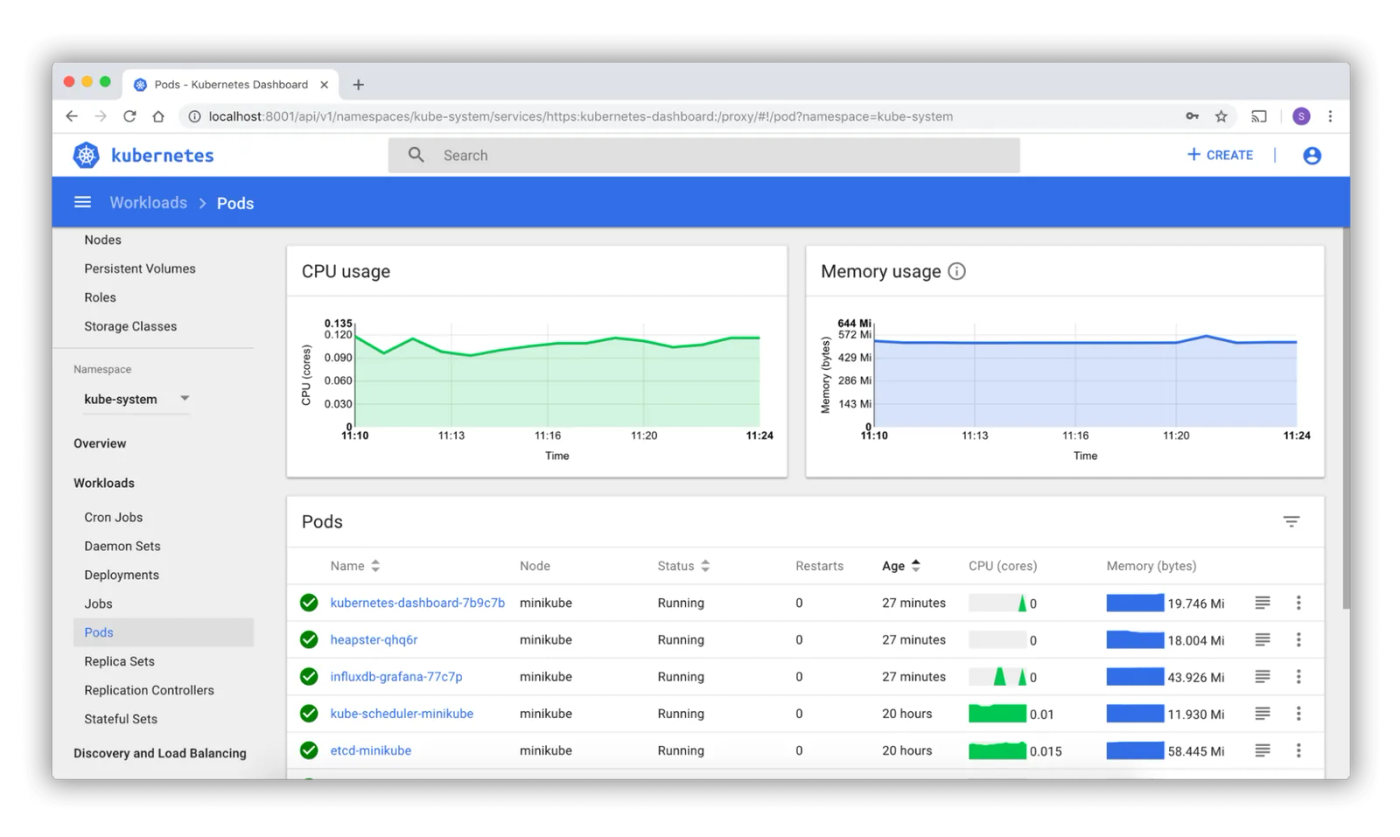
Source | Kubernetes monitoring dashboard
Common Storage Quota Misconfigurations and How to Avoid Them
A handful of mistakes show up again and again in real clusters, and most are easy to avoid once you know to look for them.
Best Practices for Storage Quotas in Kubernetes
A few habits separate teams that manage storage quotas smoothly from those that fight them constantly:
- Set ResourceQuota and LimitRange together; one without the other leaves a gap.
- Tier quotas by StorageClass so expensive storage gets tighter oversight than cheap storage.
- Automate quota provisioning through GitOps or an admission policy engine, rather than manual setup.
- Monitor utilization continuously and alert before limits are reached, not after.
- Revisit quota values on a regular cadence, since a quota that fits at launch rarely fits a year later.
- Document quota values and the reasoning behind them, so increased requests come with context, not guesswork.
Real-Time Storage Quota Visibility Across Namespaces with groundcover
Most of the friction around storage quotas isn't setting them, it's knowing when a namespace is approaching its limit before it becomes an incident. groundcover gives platform teams real-time visibility into PVC usage, StorageClass consumption, and quota utilization across every namespace, without manually querying kubectl or stitching together Prometheus rules.
With groundcover's Kubernetes monitoring, teams can track requests.storage trends against ResourceQuota limits as they happen, catching namespaces trending toward capacity days before a PVC gets rejected. groundcover's cluster observability layer correlates storage consumption with the workloads driving it, so a usage spike traces back to the deployment responsible.
Because groundcover runs inside your own AWS, GCP, or Azure environment through its BYOC architecture, quota telemetry never leaves your infrastructure. You can start with a 14-day free trial that unlocks the full platform, after which it steps down to a free tier, so there's no need to commit before seeing quota visibility in your own cluster.
Conclusion
Storage quotas turn Kubernetes storage from a first-come-first-served free-for-all into something predictable and governable. ResourceQuota caps the aggregate, LimitRange bounds individual claims, and StorageClass-specific keys protect your most expensive tiers. None of that matters much without monitoring, though. Quotas left unwatched just relocate the failure point from "unbounded storage growth" to "surprise rejected PVCs." Pair enforcement with real-time visibility, and storage quotas become a tool teams barely notice, right up until the moment they prevent a real problem.
FAQs
Existing PVCs and workloads normally keep running, but Kubernetes rejects new or expanded storage requests that would exceed the quota.
- Alert before the hard limit, typically around 70–80%, so teams have time to investigate growth.
- Monitor PVC creation failures alongside quota utilization; a failed deployment may otherwise look like an application problem.
- Define an escalation path for quota increases rather than granting developers permission to bypass controls.
- Treat quota exhaustion as a capacity-management signal, not simply a limit to raise automatically.
Explore our guide to Kubernetes alerting.
Start from expected workload storage, growth, and operational headroom rather than assigning the same quota to every namespace.
- Baseline existing workloads with PVC capacity and growth over at least one representative business cycle.
- Separate production, staging, and ephemeral environments so their quota policies reflect different availability requirements.
- Reserve headroom for predictable events such as database growth, deployments, migrations, and temporary PVCs.
- Review the quota after real usage data becomes available instead of treating the initial value as permanent.
At scale, quotas should become policy-as-code with centrally defined defaults, controlled exceptions, and automated validation rather than individually maintained Kubernetes objects.
- Generate
ResourceQuotaandLimitRangeresources through your namespace provisioning or GitOps workflow. - Use admission policies to reject namespaces that lack required storage controls.
- Version quota tiers such as
dev-small,prod-standard, andprod-data-intensiveso changes remain auditable. - Track exceptions with owners and expiration dates; otherwise temporary increases tend to become permanent capacity allocations.
groundcover's Kubernetes visibility can provide workload context around cluster telemetry, helping operators move from a namespace-level storage symptom toward the pods and services involved.
- Correlate storage-related signals with Kubernetes workload state rather than investigating quota metrics in isolation.
- Compare changes around deployments and Kubernetes events when storage growth suddenly accelerates.
- Build monitors around capacity trends so investigation starts before PVC admission failures affect releases.
- Keep quota enforcement in Kubernetes itself; use observability as the feedback loop that determines when policy needs attention.
Learn more about groundcover’s Kubernetes monitoring solution.