Kubernetes Volume Permissions: How They Work & Best Practices




Key Takeaways
- Volume permission errors usually come from mismatched container UID/GIDs and storage ownership.
fsGroupenables non-root access on supported volumes, whileOnRootMismatchcan speed up startup on large volumes.hostPath, NFS, and some CSI storage may require explicit UID/GID alignment or an init container.- Explicit non-root IDs and pre-production read/write tests make permissions more predictable and prevent runtime failures.
According to the CNCF's 2025 Cloud Native Survey, 82% of organizations that use containers now run Kubernetes in production, up from 66% in 2023. That growth means more teams than ever hit the same wall on their first real deployment: a pod that builds cleanly, passes every test, and then crashes on startup with a permission denied error the moment it tries to write to a mounted volume.
Volume permissions look simple until you have to debug them at 2 a.m. Kubernetes doesn't manage file ownership the way a single host does. Storage backends, container runtimes, and the Linux kernel each have their own opinions about who owns what, and Kubernetes sits in the middle trying to reconcile them. The result is that a config which works fine on a developer's laptop can fail the moment it's deployed against a real PersistentVolume with a different UID mapping. This article covers how volume permissions actually work, where they tend to break, and what a solid, production-ready configuration looks like.
What Are Volume Permissions in Kubernetes?
Volume permissions determine which user and group IDs can read, write, or execute files on a volume once mounted inside a container. Every file on a Kubernetes volume mount carries a standard Unix ownership model: an owning user ID (UID), an owning group ID (GID), and read, write, and execute bits for owner, group, and everyone else.
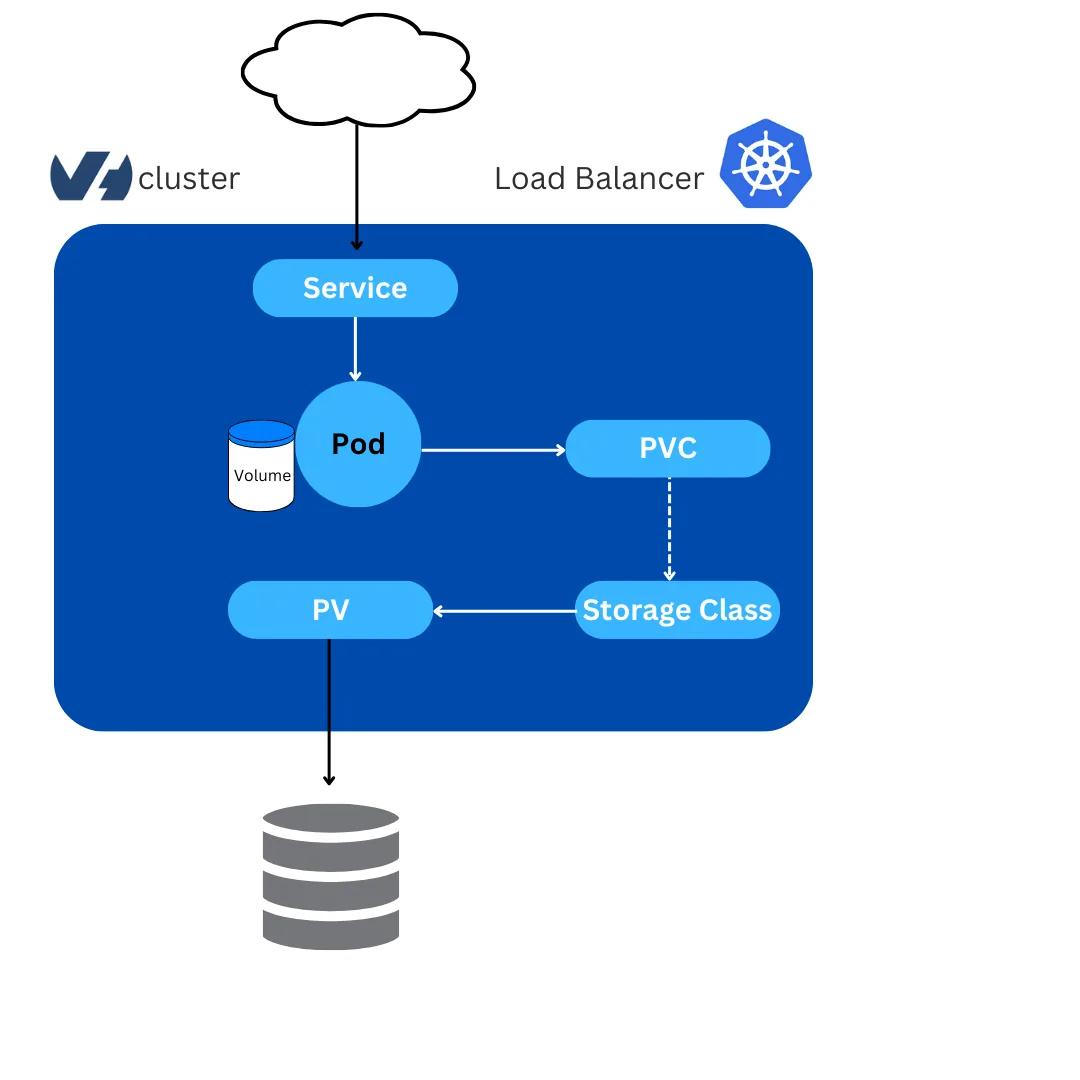
Source | PV PVC storage flow
The tricky part is that a volume mount isn't created by the container. It's provisioned by the underlying storage layer, whether that's an EBS volume, an NFS export, an emptyDir on the node's disk, or a ConfigMap rendered into a tmpfs. Each has different default ownership behavior, and none of them automatically know which user ID your container process will run as. A container running as UID 1000 has no special claim to a volume that was formatted and owned by UID 0, no matter how the pod spec is written. That mismatch is the root cause of nearly every volume permission error you'll encounter.
How Kubernetes Controls Volume Permissions
Kubernetes gives you a handful of levers to control who owns what on a mounted volume. The main mechanism lives in the pod's security context, but access modes and volume-specific settings also shape how permissions resolve. Understanding how these pieces fit together is the difference between guessing at a fix and knowing exactly which field to change.
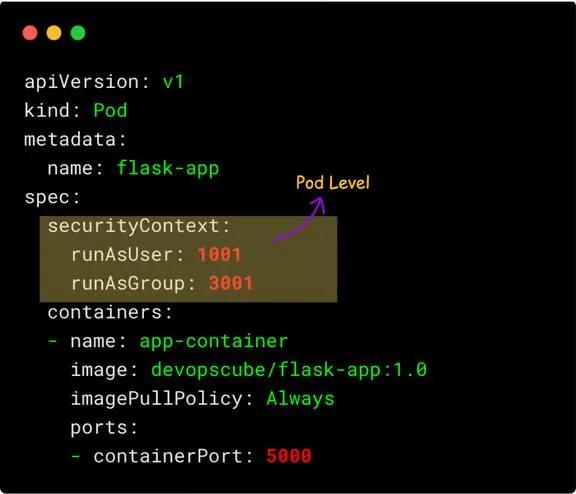
Source | Pod security context
The Security Context: fsGroup, runAsUser, and runAsGroup
The securityContext field, set at the pod or container level, is where most volume permission decisions get made. Three fields matter most:
- runAsUser: sets the UID the container process runs as, overriding whatever user is baked into the image
- runAsGroup: sets the primary GID for the container process
- fsGroup: tells the kubelet to change group ownership of files on supported volumes to this GID when the volume is mounted, and applies the setgid bit so new files inherit the same group
fsGroup solves the "my container can't write to this volume" problem for non-root containers. When set, Kubernetes recursively walks the volume, changes group ownership, and grants group read and write access. It only affects volume types that support ownership management, things like emptyDir, block storage PersistentVolumes, and most CSI volumes. It has no effect on hostPath or many NFS setups, covered shortly.
fsGroupChangePolicy and Large Volume Optimization
Recursively chown-ing every file on a volume sounds harmless until that volume has millions of small files. On a large persistent volume, this can add minutes to pod startup time, a real problem for autoscaling workloads or CronJobs with tight SLAs, and it can also trigger liveness probe failures if the startup delay pushes past the configured timeout.
fsGroupChangePolicy gives you a way to control this behavior:
Setting the value to OnRootMismatch tells Kubernetes to skip the recursive ownership change if the volume's root directory already has correct group ownership, which is typically true after the first pod startup. The default, Always, reapplies the change on every pod start regardless of the volume's current state. For stateful workloads reusing the same PersistentVolumeClaim across restarts, switching to OnRootMismatch meaningfully cuts cold start time.
Access Modes: ReadWriteOnce, ReadOnlyMany, and ReadWriteMany
Access modes control how a PersistentVolume can be mounted across nodes, and while not permission settings in the Unix sense, they directly shape what a container can do with the volume. Getting the access mode wrong tends to surface as a scheduling failure rather than a permission error, which can make it harder to diagnose at first glance.
A common mistake is assuming ReadWriteOnce means only one pod can ever touch the volume. In practice, it means the volume can only attach to one node, so multiple pods scheduled to that node can still share it, sometimes with unexpected write conflicts if those pods weren't designed to coordinate access to the same files. If you need single pod exclusivity, ReadWriteOncePod is the safer choice, since it's enforced by the scheduler rather than left to application-level assumptions.
Volume-Type Permission Behaviors and Special Cases
Not every volume type handles permissions the same way. Some are read-only by design, others depend on the external storage system, and a few need workarounds to get non-root containers working. Knowing which category a given volume falls into upfront saves a lot of trial and error later.
ConfigMap and Secret Volumes With defaultMode
ConfigMaps and Secrets, when mounted as volumes, are rendered as files inside a tmpfs- backed directory rather than pulled from persistent storage. You control their permission bits with defaultMode, expressed in decimal (Kubernetes converts standard octal notation internally). This matters most for Secret volumes holding credentials, where an overly permissive mode can expose sensitive files to processes that shouldn't have access:
This sets the mounted files to read-only for the owner and group. Unlike PersistentVolumes, fsGroup does apply to ConfigMap and Secret volumes for group ownership, but the files stay read-only at the OS level, since Kubernetes regenerates them from the API object rather than letting containers write back.
Using Init Containers to Fix Permission Issues
When a volume type doesn't respect fsGroup, or you need finer control than a GID change provides, an init container is the standard fix. Init containers run to completion before the main containers start, often as root, and can adjust ownership before handing the volume off.
This pattern is common for hostPath volumes, third-party Helm charts that don't expose fsGroup configuration, and legacy images never designed to run as a non-root user. It also gives you a natural place to run other one-time setup steps, like creating subdirectories or seeding default files, before the application container ever starts.
hostPath and NFS Limitations
hostPath volumes mount a directory directly from the node's filesystem, and fsGroup does not apply at all. Ownership is whatever exists on the node's disk, which means permission mismatches are common, and it's part of why hostPath is discouraged beyond node-level daemons like log collectors that already need direct node access.
NFS is its own category of pain. Most NFS servers use root_squash by default, mapping the root user inside your container to an unprivileged, unmapped user on the server side, silently blocking root-level writes even when your pod spec looks correct. fsGroup support on NFS depends entirely on the CSI driver in use, and many community drivers don't implement it consistently, so behavior that works fine in one cluster can fail in another running the same manifests. Plan on aligning UID and GID between the client and export explicitly, rather than relying on Kubernetes to reconcile it.
How CSI Drivers Affect Permission Handling Across Cloud Providers
The Container Storage Interface (CSI) standardizes how Kubernetes talks to storage backends, but permission handling still varies by provider. AWS EBS CSI, Google Persistent Disk CSI, and Azure Disk CSI support fsGroup for block-based volumes, since the filesystem is formatted fresh on first mount. Shared file storage drivers, like Amazon EFS CSI or Azure Files CSI, behave more like NFS and may need explicit mount options through the StorageClass for consistent ownership. Check your driver's docs before assuming fsGroup will "just work," per the Kubernetes CSI driver list.
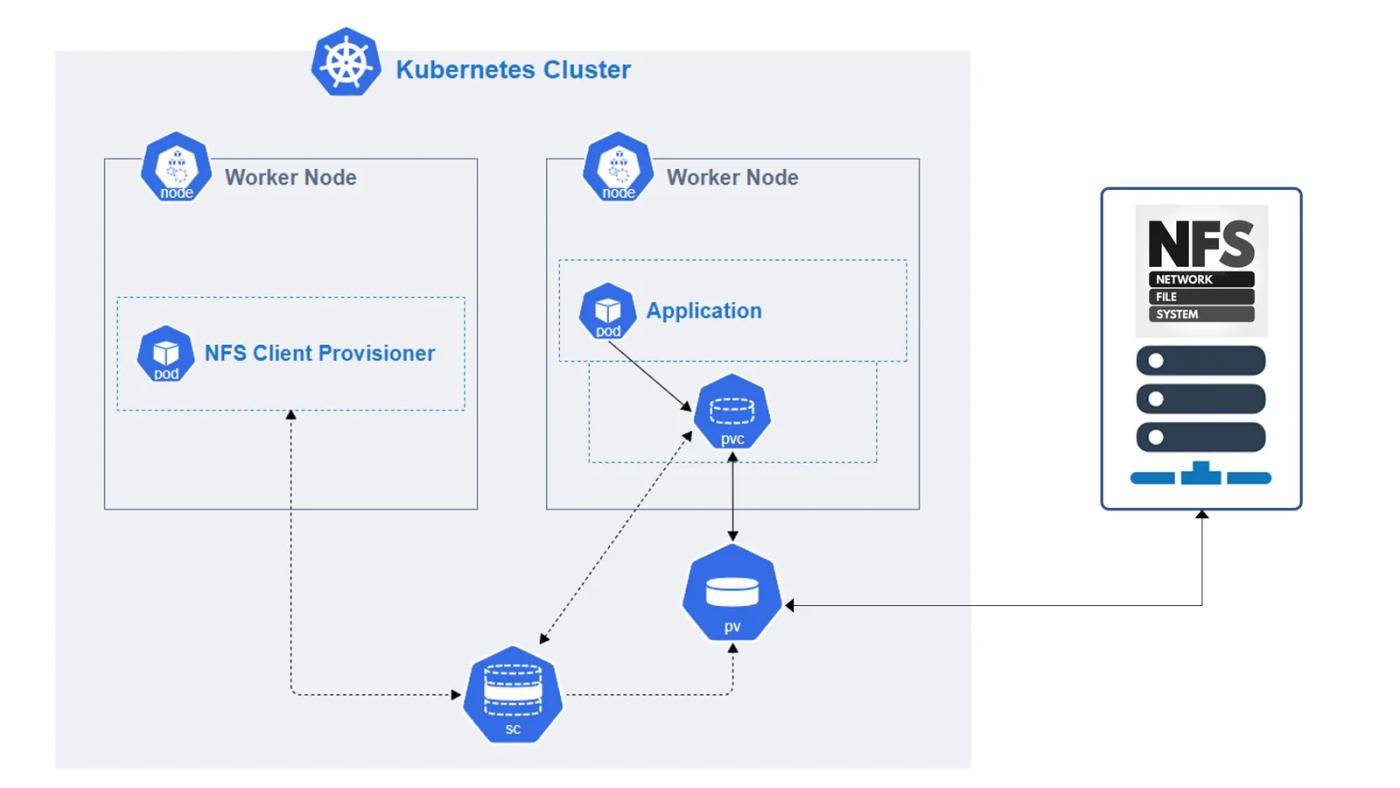
Source | NFS CSI provisioner
How to Configure Volume Permissions for Non-Root Containers
Running containers as a non-root user is one of the most effective, lowest-effort hardening steps available, and it's increasingly required by default in security-conscious clusters. It also happens to be one of the more common sources of confusion, since getting the identity right at the pod level doesn't automatically mean the volume will cooperate. Here's the sequence for getting it right.
1. Set the Pod-Level Security Context
Start at the pod level so every container inherits a consistent identity, unless a specific container needs to differ.
Setting runAsNonRoot: true adds a safety net: if the image's default user happens to be root and nobody overrides it, the kubelet refuses to start the container instead of silently running as root.
2. Assign fsGroup to Control Volume Ownership
Add fsGroup alongside runAsUser so the volume's group ownership matches the container's group ID.
With this in place, files on a supported volume are group-owned by GID 3000, and the container process, also running with GID 3000, gets read and write access without needing to run as root.
3. Validate Read and Write Access From the Container
Don't assume it worked. Exec into the running pod and confirm ownership directly:
If touch succeeds, your permission model is correctly wired end to end. If it fails with permission denied, check whether the volume type actually supports fsGroup, and confirm fsGroupChangePolicy hasn't skipped the ownership change on a mismatched volume.
Kubernetes Volume Permission Examples
Example Using fsGroup
Example with initContainer and chmod
Example for Non-Root Containers
Example for NFS Persistent Volumes
Since fsGroup support is unreliable on NFS, pair this with matching UID and GID on the export, or an init container that sets ownership after mount.
Common Kubernetes Volume Permission Errors and How to Fix Them
Most volume permission issues surface as one of a handful of recurring error messages. Recognizing the pattern quickly saves you from re-deriving the fix from scratch every time it happens.
Best Practices for Managing Volume Permissions in Kubernetes
Getting volume permissions right isn't a one time task, it's a pattern applied consistently across every workload, and it holds up best when it's baked into templates rather than re-decided per deployment. Teams that treat these as defaults rather than exceptions tend to see far fewer permission-related incidents over time. The table below summarizes practices worth building into your standard pod templates and CI checks.
Real-Time Volume Permission and Storage Visibility with groundcover
Permission errors rarely announce themselves clearly. More often, a pod sits in CrashLoopBackOff, with a vague error buried in logs and no obvious link back to the volume mount or security context that caused it. Correlating that manually, jumping between kubectl describe output, PersistentVolumeClaim status, and container logs across several restarts, eats up time you don't have during an incident.
groundcover is a full-stack observability platform powered by eBPF, capturing infrastructure and application telemetry without code changes or manual instrumentation. For Kubernetes environments, groundcover's Kubernetes monitoring surfaces pod events, container restarts, and storage-related failures alongside the metadata that explains them: the pod name, the namespace, the volume, and the security context in effect when the failure happened, so an on-call engineer doesn't have to reconstruct that context by hand from scattered log lines.
Because groundcover's infrastructure monitoring and log management live in one platform, you can go from a permission denied log line straight to the pod's full context, security context settings, volume mounts, and recent events, without stitching together separate tools. And since groundcover runs inside your own cloud environment through its BYOC architecture, that storage and permission data never leaves your infrastructure.
Getting started is self-service: sign up for groundcover's free tier or start a 14-day trial with full platform capability, no sales call required. The trial automatically downgrades to the free tier when it ends, so there's no risk of losing access to your own data, and since the platform runs inside your own cloud account, teams that already operate in AWS can be collecting Kubernetes and storage telemetry within minutes of signing up.
Conclusion
Volume permissions sit at the intersection of Kubernetes scheduling, Linux file ownership, and whatever quirks your storage backend brings. The fixes are usually straightforward once you know where to look: use fsGroup for supported volume types, reach for init containers when a volume type won't cooperate, pin explicit UIDs and GIDs instead of relying on image defaults, and validate access before you ship. Treat it as a standard part of pod spec review, not a one-off troubleshooting exercise, and permission denied errors stop being a recurring fire drill.
FAQs
Trace the failure from the container’s effective UID/GIDs through the mounted directory’s ownership and mode bits, then verify whether the CSI driver or storage server modifies those identities.
- Run
id,stat <mount-path>, and a controlledtouchormkdirtest inside the affected container. - Compare the pod's
securityContextwith the PVC, PV, StorageClass, and CSI driver being used. - Reproduce the test with the same PVC rather than
emptyDir; success onemptyDirbut failure on the PVC strongly points toward backend-specific behavior. - For NFS-style storage, inspect server-side ownership and export configuration because client-side root privileges may not translate to server-side root privileges.
Treat filesystem identity as a platform contract by defining supported UID/GID behavior for each storage class and validating workloads against that contract before deployment.
- Document whether every StorageClass supports
fsGroup,fsGroupChangePolicy, and multi-node access. - Add admission-policy checks for
runAsNonRoot, approved UID/GID ranges, privileged init containers, and riskyhostPathusage. - Test representative PVCs in CI or pre-production rather than validating manifests without their actual storage backend.
- Track root-running permission-fix init containers as explicit exceptions with owners, since they otherwise become permanent privilege escalation points.
Learn more about Kubernetes storage classes.
Recursive ownership changes can move permission handling onto the pod-startup critical path, turning large-volume metadata operations into rollout, autoscaling, and recovery latency.
- Measure container startup separately from volume-mount and initialization time when investigating unexpectedly slow deployments.
- Prefer
OnRootMismatchfor reused volumes where the root directory's ownership reliably indicates that initialization has already occurred. - Avoid broad recursive
chownoperations in init containers when only a small application directory needs modification. - Account for storage latency when configuring startup and liveness probes so slow filesystem initialization does not create a restart loop.
BYOC keeps the observability data plane inside the organization's cloud environment, which can reduce the data-movement and ownership trade-offs involved in retaining detailed Kubernetes telemetry for investigations.
- Evaluate observability architecture alongside storage security requirements when workload metadata or logs may contain sensitive operational information.
- Separate the operational need for high-fidelity telemetry from the assumption that all of that telemetry must be shipped to an external SaaS backend.
- Consider data location, retention requirements, network egress, and observability cost together when defining incident-data policies.
- Preserve enough telemetry for retrospective permission investigations without making external ingestion volume the primary constraint on what engineers collect.
Explore groundcover’s BYOC observability.