Elasticsearch Reindex: How It Works, Best Practices & Pitfalls



One of the tricky things about managing Elasticsearch indices is that admins can’t make major structural changes (like modifying the number of shards) to existing indices. What they can do, however, is perform an Elasticsearch reindex. Reindexing makes it possible to change Elasticsearch data types and modify fundamental index settings, while still keeping the original index data intact.
Keep reading for a full look as we explain how Elasticsearch reindexing works, when to use it, how to reindex in Elasticsearch, and best practices for reliable and efficient reindexing.
What is Elasticsearch reindex?
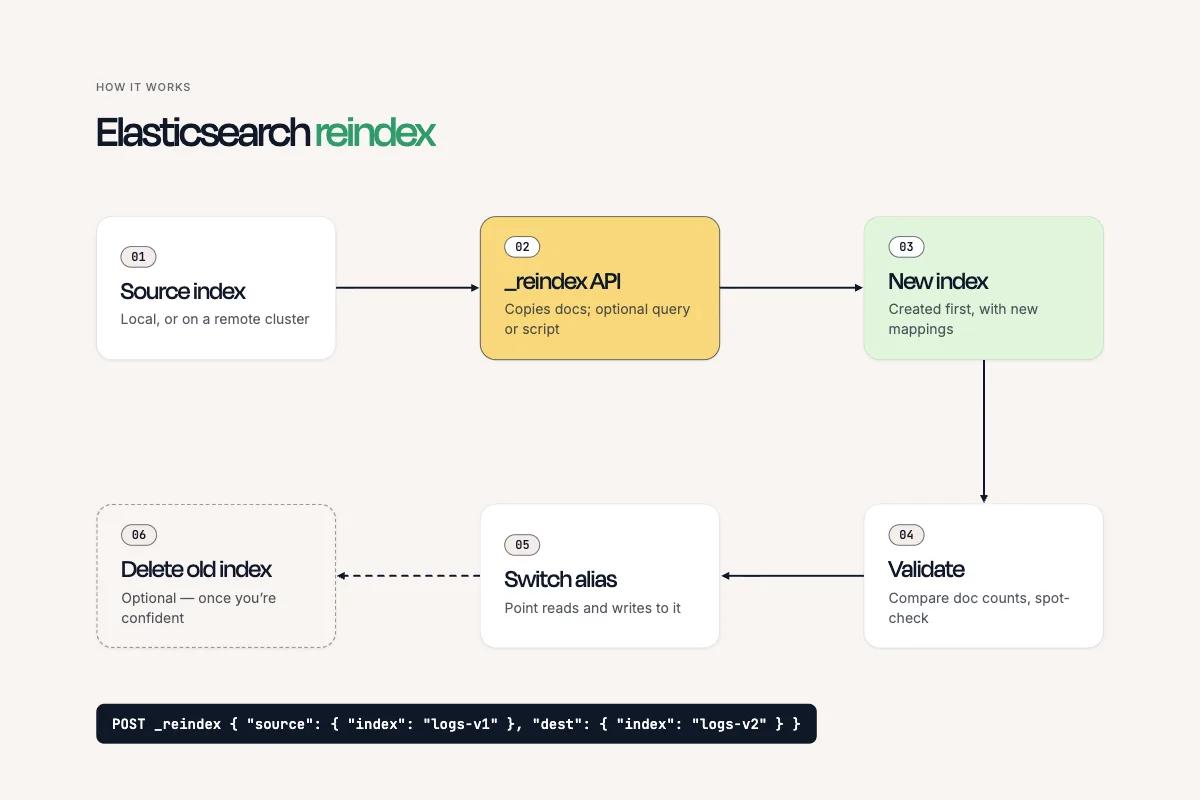
In Elasticsearch, reindex is an administrative function that copies data found in one index to produce a new index.
The new index will contain the same documents as the original one (at least initially – the documents can be modified once the new index is up and running), but it can have a different structure or performance configuration from the original index.
The original index remains unchanged during a reindex, and admins can safely delete it, if desired, after validating that the newly created index contains the data that it should.
Why is Elasticsearch reindexing necessary?
The main reason for performing an Elasticsearch reindex is to make changes to an index’s static mappings or settings.
While Elasticsearch allows changes to dynamic index settings (like the number of replicas or whether an index is read-only) without requiring reindexing, changes to parameters like the following are only possible via a reindexing operation:
- Field data types: Convert a field from one data type to another, such as text to keyword or long to integer.
- Primary shard count: Increase or decrease the number of primary shards by creating a new index with the required shard configuration.
- Analyzers: Replace or modify analyzers, tokenizers, and filters used to process text fields.
- Field mappings: Modify existing field definitions, including indexing behavior, doc values, and field properties that cannot be updated in place.
- Field names: Change field names by transforming document contents during reindexing.
- Field structures: Restructure documents by converting fields into nested objects, flattening objects, or changing field relationships.
- Routing strategies: Reassign documents to different shards by changing their routing values.
- Document IDs: Generate new document IDs or change the strategy used to identify documents.
- Index-level similarity settings: Replace the scoring algorithm used for relevance calculations.
- Index codecs: Switch between supported compression and storage codecs when the setting cannot be changed on the existing index.
How to reindex in Elasticsearch: A step-by-step guide
To carry out a reindex operation, Elasticsearch admins use the _reindex API. The process typically involves the following steps:
- Create the destination index: Optionally, admins can use the PUT API to create a new index with the necessary settings, mappings, and field definitions. Alternatively, they can allow Elasticsearch to create it automatically during reindexing.
- Run the reindex operation: To start reindexing, issue a POST request to /_reindex, specifying the source and destination indices. For example, the following code would reindex old-index to new-index:
- Monitor the operation: Check the response for the number of documents successfully copied and any failures. For large indices, you can run reindexing asynchronously using wait_for_completion=false and monitor progress through the Tasks API.
- Validate the new index: Compare document counts and verify mappings, settings, and data integrity.
- Switch over to the new index: Update application references or use an index alias to redirect queries and writes to the new index.
- Delete the old index: Once you've verified that the new index works correctly, delete the original if it is no longer needed and you want to free up space.
Elasticsearch reindex options and parameters
The _reindex API supports a variety of options and parameters.
Source index parameters
- index: Specifies the source index from which Elasticsearch copies documents.
- query: Filters the documents to reindex, allowing you to copy only documents that match specified criteria.
- size: Limits the number of documents retrieved per batch.
- sort: Specifies the order in which Elasticsearch retrieves source documents.
- slice: Divides the reindex operation into smaller, parallel tasks to improve throughput.
- _source: Specifies which source document fields to include or exclude during reindexing.
- remote: Identifies a remote Elasticsearch cluster from which to retrieve documents.
Destination index parameters
- index: Specifies the destination index where Elasticsearch writes the documents.
- routing: Controls the routing value used to determine which destination shard receives each document.
- op_type: Controls how Elasticsearch handles existing documents, such as using create to prevent overwriting existing documents.
- version_type: Determines how Elasticsearch handles document versions, including whether to preserve source versions or use destination versioning.
Reindex execution options
- wait_for_completion: Determines whether the API waits for reindexing to finish or returns a task ID immediately.
- refresh: Refreshes the destination index after reindexing so that newly indexed documents become searchable.
- requests_per_second: Throttles the reindex operation to limit its impact on cluster resources.
- max_docs: Limits the total number of documents Elasticsearch reindexes.
- conflicts: Determines how Elasticsearch handles version conflicts, such as proceeding with remaining documents when conflicts occur.
- timeout: Specifies how long Elasticsearch waits for certain operations before timing out.
- pipeline: Specifies an ingest pipeline to process documents before indexing them in the destination
Common Elasticsearch reindex use cases
As noted above, the main reason to reindex in Elasticsearch is to make changes to an index’s structure or configuration that aren’t possible without generating a new index. Specific use cases generally fall into the following categories:
- Elasticsearch version upgrades: Index mappings and settings can become deprecated during major Elasticsearch version upgrades. Reindexing enables conversion of indices to formats that work under a new version.
- Modifying field mappings: Reindexing allows changes to mappings like field types and analyzers.
- Modifying index settings: New index-level settings, like the number of primary shards, can be configured during reindexing.
- Merging indices: Reindexing makes it possible to merge multiple existing indices into one shared index.
- Splitting indices: Reindexing is also useful for distributing documents in one index across multiple new indices.
Does Elasticsearch reindexing cause downtime or data loss?
Reindexing doesn’t inherently cause downtime because the original Elasticsearch index remains available while reindexing occurs. However, under the following conditions, downtime or data loss may occur:
- Resource overhead: The resources consumed by the reindexing process can cause Elasticsearch to slow down or, in extreme cases, start dropping requests.
- Ongoing index operations: If applications continue to write to the original index while a new index is being created through reindexing, the new index may end up not containing the same data as the original index. This can lead to data loss if applications switch over to the new index after reindexing.
Zero-downtime Elasticsearch reindexing strategies
The most common way to avoid downtime during reindexing is to use an index alias combined with a dual-write strategy. The key steps are as follows:
- Creating an alias for the index that will serve as the original index during a reindexing operation. This is important because later in the process, you can use the aliases API to remap the alias from the original index to the new index.
- Configure applications to interact with the alias instead of using a hard-coded index name.
- Create a new index, which will serve as the target index during reindexing.
- Configure dual-writing so that changes made to the original index automatically apply to the new index.
- Begin reindexing.
- When reindexing is complete, use the aliases API to perform an “atomic swap” so that the alias you configured in step 1 points to the new index instead of the original one.
At this point, your applications will interact with the new index, since the alias mapping changed. The original index can be decommissioned or deleted if desired.
Performance considerations during an Elasticsearch reindex
Reindexing can consume large amounts of CPU and memory, especially if the index that undergoes reindexing is large. If reindexing operations tie up too many resources, they may degrade the performance of the Elasticsearch cluster.
Fortunately, it’s possible to mitigate this risk using tactics like the following:
- Disabling replicas during reindexing: Fewer replicas mean less data to copy and, by extension, less resource consumption. After reindexing is complete, you can re-enable replicas if desired.
- Request throttling: For reindexing operations that affect live traffic, modify the requests_per_second parameter to reduce the volume of requests and lighten resource consumption.
- Increase index buffer size: Larger buffers allow Elasticsearch to perform more batch writes in memory, which can speed up reindexing because it is much faster than pulling data. A challenge is that larger buffers increase memory overhead, but on systems that have a lot of memory to spare, larger buffers may lead to faster and more efficient reindexing.
- Scheduling reindexes during low-demand periods: If the load placed on your Elasticsearch cluster fluctuates between different times of the day or days of the week, wait until a low-traffic period to perform reindexing.
Common Elasticsearch reindex failures and errors
Failures and errors during reindexing typically stem from one of the following root causes:
- Configuration mismatches: Mapping inconsistencies between the original index and the new one (such as a value that is configured as a string in one index and an integer in the other) can cause conflicts that result in data loss or inconsistency.
- Resource constraints: Lack of sufficient CPU or memory can cause reindexing to be very slow or, in extreme cases, fail entirely. Insufficient disk space can also prevent successful reindexing in the event that there’s not enough space to accommodate the new index.
- Permissions issues: Reindexing will fail if permission settings prevent reading of the source data or writing to the new index.
Monitoring Elasticsearch reindex progress and cluster health
The main way to monitor Elasticsearch reindexing from within Elasticsearch itself is to track the task ID assigned to the operation.
You can generate a task ID by using the wait_for_completion=false option when starting reindexing. Then, to collect details about the task in real time, call GET /_reindex/<task_id>.
You can also use external telemetry and observability tools (like Prometheus) to monitor and analyze tasks. External tooling can also allow admins to configure alerts about reindexing problems, which isn’t possible to do using the native Elasticsearch APIs on their own.
Best practices for safe and reliable Elasticsearch reindexing
The following practices can help optimize Elasticsearch reindexing operations:
- Create and validate the destination index first: To reduce the risk of conflicts between the original and the new indices, explicitly define and verify mappings, shard counts, replica settings, and analyzers before starting the reindex operation.
- Test with a subset of documents: Run a small reindexing job first to identify mapping conflicts, script errors, and unexpected document transformations before migrating the entire index.
- Use throttling and slicing carefully: Control reindexing speed with requests_per_second and use slices to parallelize work without overwhelming cluster resources.
- Monitor progress and handle failures: Track reindex task status, version conflicts, indexing failures, disk utilization, and cluster health to identify problems early.
- Validate data before switching indices: Compare document counts, inspect representative documents, and verify mappings and query results before directing applications to the new index.
Elasticsearch reindex observability and troubleshooting with groundcover
Groundcover makes it easy to monitor and observe Elasticsearch reindexing operations in real time, without the hassle of querying Elasticsearch APIs directly. Not only does groundcover continuously track resource consumption data and highlight issues like CPU or memory constraints during reindexing, but it can also ingest data from Prometheus (or any OpenTelemetry-compatible data source) to scrape and analyze Elasticsearch metrics.
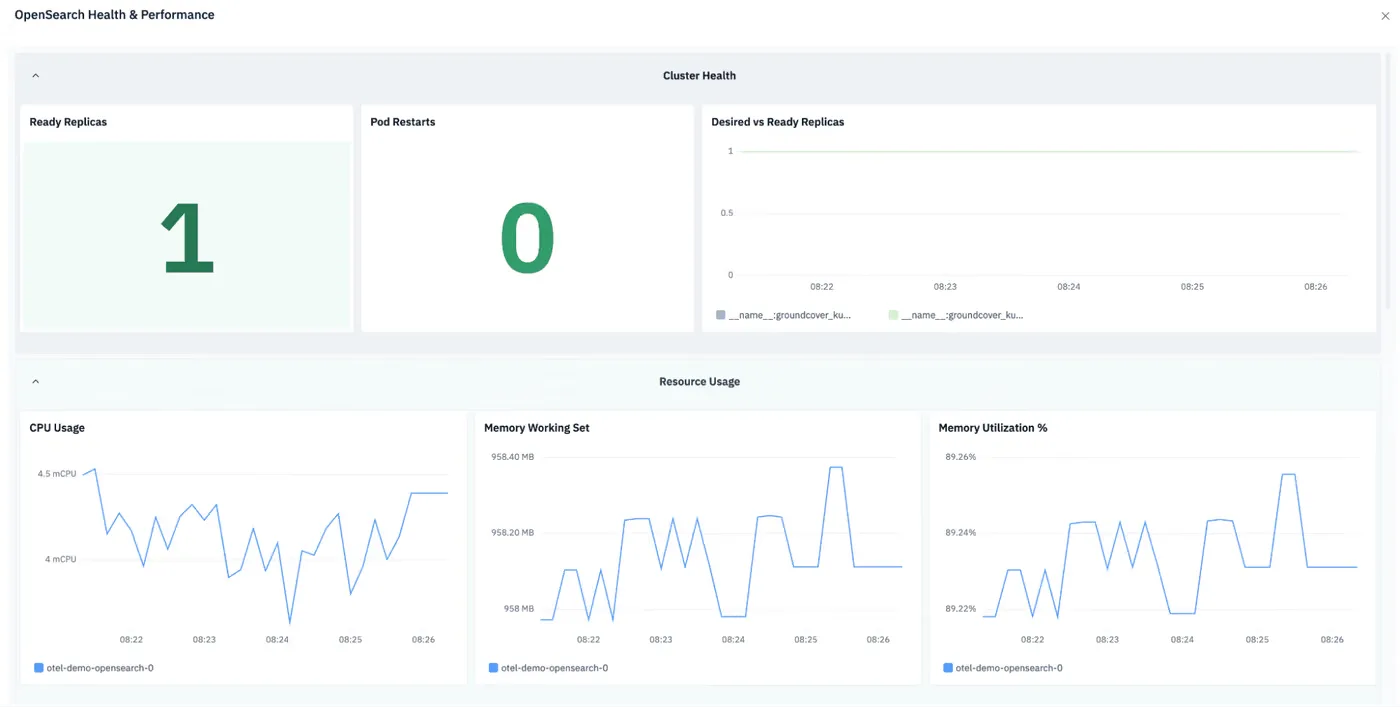
The result is simple and effective visibility into the health of Elasticsearch reindexing operations.
Reindexing as a pillar of Elasticsearch management
If you manage an Elasticsearch cluster long enough, you’ll likely find yourself having to restructure, merge or split up indices sooner or later. Hence why it’s valuable to know how to reindex – and how to mitigate the risk of failures, data loss, and performance issues during critical reindexing operations.
FAQs
Yes. While throttling can help to pace operations and reduce total resource consumption, reindexing can still consume significant CPU, memory, disk I/O, and network bandwidth despite throttling.
Create and validate the destination index beforehand, test with a subset of documents, use throttling and controlled slicing, monitor cluster health, and validate data before switching aliases.
Groundcover provides real-time observability to help admins identify reindex-related increases in CPU, memory, and disk I/O, then correlate them with changes in application latency and throughput. It can also interpret custom Elasticsearch metrics via an OpenTelemetry-compatible data scraper.