gRPC on Kubernetes: Deployment, Networking & Best Practices



gRPC gives service calls a contract, so clients and servers agree on the method being called and the data each call exchanges. In Kubernetes, that contract lets separately deployed services call each other without guessing what the API expects. For those calls to work reliably in production, the gRPC service must remain reachable as traffic grows, new versions roll out, and clients connect from outside the cluster.
In this guide, you’ll learn how gRPC on Kubernetes works, how to deploy and expose a gRPC service, the key networking and security decisions to make, and the best practices for managing gRPC traffic in production.
What Is gRPC and Why Use It on Kubernetes?
gRPC is a remote procedure call framework for building service-to-service APIs. Instead of relying on separate endpoint definitions, a gRPC service defines the methods a client can call and the request and response messages each method accepts. The gRPC server implements those methods, and the gRPC client calls them through generated code.
That contract usually starts in a `.proto` file. The file defines the service methods and message fields, then becomes the shared source of truth for both sides of the call. A payments service, for example, can expose an `AuthorizePayment` method, while an orders service calls that method through a generated client instead of manually assembling request fields.
When the same application is split across Kubernetes workloads, the `.proto` file keeps those service boundaries explicit. The orders, payments, and inventory services may run as separate deployments, change on different schedules, and use different languages. gRPC keeps those calls predictable, so one service does not have to reimplement another service’s API in its own code.
How gRPC Communication Works Inside Kubernetes
Inside Kubernetes, a gRPC client reaches another service through a stable Service name. The client sends the call to that name instead of tracking individual Pods, and Kubernetes routes the connection to one ready backend behind the Service.
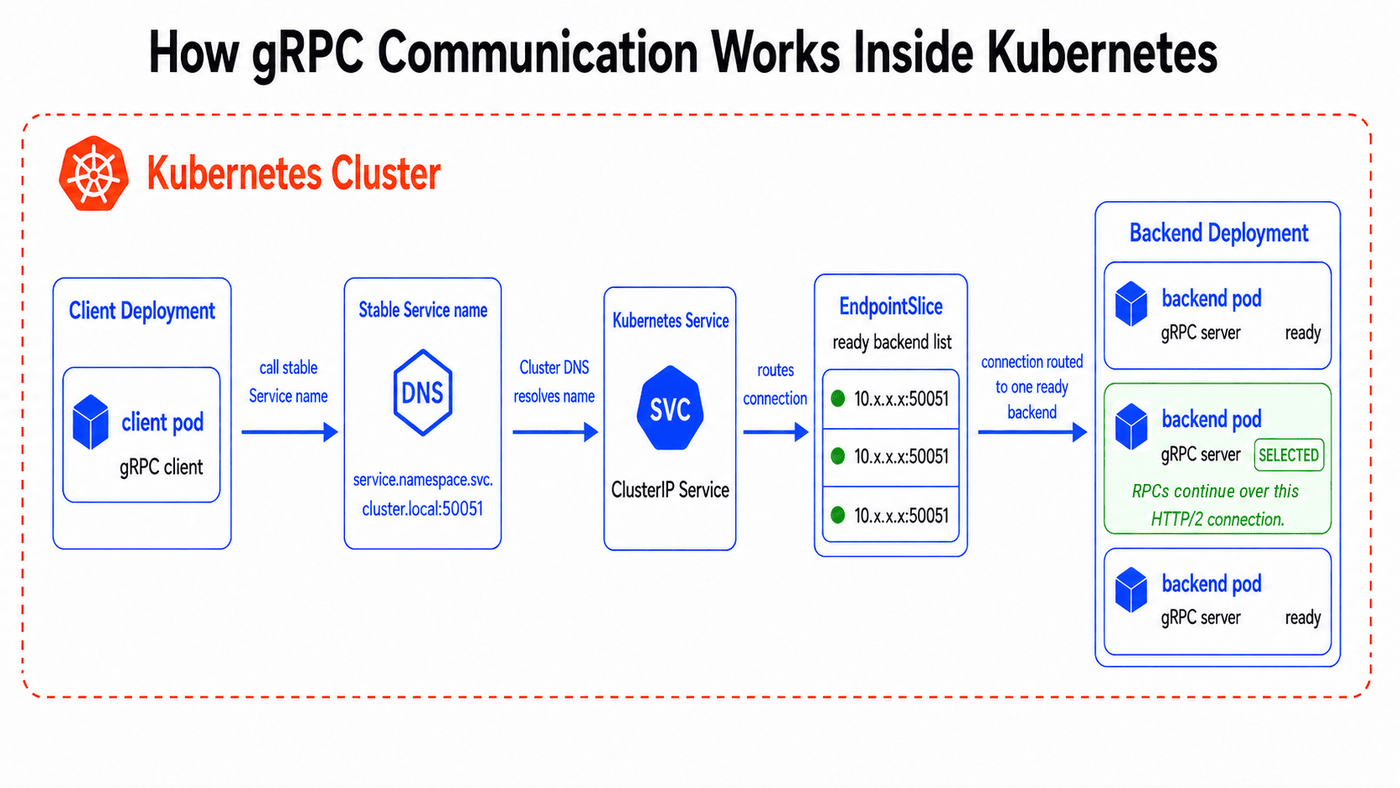
An order service, for example, can call `payments.default.svc.cluster.local:50051` when it needs payment authorization. Cluster DNS resolves that name to the payments Service, and EndpointSlices record the ready payments Pods behind it. Kubernetes networking then routes the connection to one of those Pods, where the gRPC server listening on port `50051` runs the requested method and returns the response.
This gives the client one stable address while Pods are replaced, restarted, or moved. Once the connection reaches a backend, gRPC carries calls over HTTP/2, which changes how traffic continues through that connection.
HTTP/2, Long-Lived Connections, and Request Multiplexing
HTTP/2 lets one connection carry multiple streams at the same time. gRPC uses that model, so a gRPC client can send many RPCs through the same connection instead of opening a new connection for every request. Each RPC gets its own stream, while the underlying connection stays open.
That makes repeated service calls efficient, but it also makes the first backend choice important. If Kubernetes routes the connection from the orders service to one payments Pod, the client can keep sending more RPCs through that same connection. Other payments Pods may be ready behind the Service, but they do not receive part of that client’s traffic unless the client opens additional connections or uses a balancing strategy that spreads calls across backends.
Why gRPC Behaves Differently Than REST in Kubernetes
REST traffic over HTTP/1.1 often gives Kubernetes more chances to spread work across Pods. Many clients open and close several connections over time, so new connections can land on different backend Pods behind the same Service.
gRPC behaves differently because it uses HTTP/2 with long-lived connections. A busy gRPC client can keep sending multiple RPCs through the backend selected when the connection was first created. The Service can have healthy Pods and ready endpoints, but traffic still looks uneven because Kubernetes made the backend choice for the connection, not for each individual RPC.
Deploying gRPC Services on Kubernetes
A gRPC service runs in Kubernetes as an application workload. A Deployment manages the replicated Pods for that workload, and a Kubernetes Service gives other workloads a stable address for calling it. For traffic to reach the right Pods, the application needs to listen on the port the Service targets, and the Service selector needs to match the Pod labels.
Step 1: Run the gRPC Service as a Kubernetes Deployment
Use a Deployment to run the gRPC service as replicated Pods. The example below runs three Pods for a payments gRPC service. Replace the image with the container image for your own gRPC application.
The `app: payments-grpc` label identifies the Pods that belong to this workload. The `containerPort` field documents the port the container is expected to use and gives that port a name. It does not start the gRPC server by itself, so the application inside the container must listen on `50051`.
Step 2: Expose the Pods Through a ClusterIP Service
Use a ClusterIP Service when the gRPC service only needs to receive traffic from inside the cluster. The Kubernetes Service gives clients a stable DNS name while Kubernetes tracks the matching Pods behind it.
The selector matches the Pod label from the Deployment. The Service exposes port `50051`, and `targetPort: grpc` points to the named container port instead of repeating the number. The `appProtocol` field marks this Service port as HTTP/2 over cleartext, which matches this internal plaintext gRPC example. It is only a protocol hint for implementations that use it, not the setting that makes the application speak gRPC.
Step 3: Apply the Manifest
Save the Deployment and Service in a file such as `payments-grpc.yaml`, then apply it to the cluster.
After applying the manifest, check that the Deployment reaches its desired state.
A completed rollout confirms that Kubernetes created the Pods for the gRPC workload. It does not prove that the gRPC method works yet, so the next checks confirm the Service and its backends.
Step 4: Check the Pods and Kubernetes Service
Confirm that the Pods are running and that the Kubernetes Service exists.
The Pod command checks the replicated workload. The Service command confirms that other workloads have an in-cluster address for the payments gRPC service. In the `default` namespace, clients can call `payments.default.svc.cluster.local:50051` when the cluster uses the standard `cluster.local` domain.
Step 5: Confirm the Service Has Backend Endpoints
A Kubernetes Service needs matching backend endpoints before it can route traffic to Pods. Check the EndpointSlices linked to the Service.
If no EndpointSlice contains backend addresses, start with the Service selector and Pod labels. In this example, both use `app: payments-grpc`, so Kubernetes can attach the Pods from the Deployment to the Service.
Step 6: Test the gRPC Service From Inside the Cluster
Run a temporary client Pod so the request uses the same cluster DNS and ClusterIP path that another workload would use.
The `-plaintext` flag matches the cleartext HTTP/2 setup shown in the Service. The `list` command depends on gRPC reflection. If the server does not enable reflection, test a known method with the matching `.proto` files or a protoset instead.
Exposing gRPC Services Outside the Cluster
Internal Services let workloads call each other inside Kubernetes, but external clients need a public entry point. A direct `LoadBalancer` Service works for TCP-level exposure. Use Ingress when the gRPC service needs a hostname, TLS termination, and routing through a controller that supports gRPC traffic.
For gRPC, the public entry point needs to preserve HTTP/2 behavior at the edge and forward traffic to the backend using the correct protocol.
Ingress Controller Requirements for gRPC and HTTP/2
An Ingress resource defines the external routing rule, but the controller provides the proxy behavior. For gRPC, the controller needs the following requirements in place before external calls work reliably.
- HTTP/2 support at the public endpoint: gRPC uses HTTP/2, so the controller must accept gRPC clients over HTTP/2 at the public hostname. With TLS configured on the Ingress, clients negotiate HTTP/2 with the controller during the TLS handshake.
- Correct backend protocol: the controller must forward the request to the backend as gRPC, not plain HTTP. In Ingress-NGINX, set `nginx.ingress.kubernetes.io/backend-protocol: "GRPC"` when the backend Service points to a plaintext gRPC server.
- Correct Service port: the Ingress backend must point to the Service port that maps to the gRPC listener. The example uses the named Service port `grpc`, which keeps the Ingress aligned with the Service definition from the deployment section.
- TLS Secret available before public traffic: the Secret referenced by `secretName` should exist before the Ingress serves the hostname. If the Secret is missing, the controller may serve its default certificate until the referenced Secret becomes available.
The example below uses Ingress-NGINX to expose the `payments` Service through `api.example.com`.
If the gRPC server terminates TLS inside the cluster, use `"GRPCS"` and configure any required upstream TLS settings for your Ingress-NGINX setup. That keeps the controller-to-backend connection aligned with the way the gRPC server expects to receive traffic.
Streaming RPCs add one more requirement because the connection may stay open longer than a unary request. Set read and send timeouts high enough for the expected stream duration, or the controller may close the stream before the server finishes sending data.
Use longer timeout values for streaming methods, not as a blanket default for every unary API. After DNS points to the controller and the certificate matches the hostname, test the public address.
Common Ingress Misconfigurations That Break gRPC
gRPC calls fail at the Ingress layer when the controller configuration does not match how the service receives traffic. The table below shows the most common causes and where to check first.
| Misconfiguration | What Breaks | What to Check |
|---|---|---|
| No matching Ingress controller | The Ingress rule does not serve traffic | Confirm the controller is installed and \ingressClassName\ matches it |
| Backend protocol left as HTTP | The controller does not forward the request as gRPC | Set the controller-specific backend protocol, such as \nginx.ingress.kubernetes.io/backend-protocol: "GRPC"\ |
| Backend expects TLS but the controller uses plaintext gRPC | The backend connection fails | Use \"GRPCS"\ when the gRPC server terminates TLS in the Pod, then configure the required upstream TLS settings |
| Ingress points to the wrong Service port | The controller forwards to a Service port that does not map to the gRPC listener | Match the backend Service port to the gRPC Service port |
| Rewrite rules change the request path | The server cannot match the requested service and method | Avoid rewrites that alter paths such as \/package.Service/Method\ |
| Stream timeouts are too short | Long-running streams close before completion | Increase read and send timeouts for streaming RPCs |
| Certificate does not match the hostname | The client fails before the request reaches the backend | Check DNS, hostname, certificate, and the referenced TLS Secret |
Securing gRPC Traffic in Kubernetes
Securing gRPC traffic starts with the connection, then moves to the identity behind each call. TLS protects the channel, while workload identity and policy decide which clients can call a gRPC server.
TLS, Certificates, and Kubernetes Secrets
gRPC uses TLS to encrypt traffic and authenticate the server. In Kubernetes, the certificate and private key can be stored in a TLS Secret, then mounted into the gRPC server Pod as files that the application reads at startup.
A TLS Secret stores the certificate as `tls.crt` and the private key as `tls.key`. The certificate’s Subject Alternative Name must cover the name clients use for the connection, such as the public hostname for external clients or the Kubernetes DNS name for in-cluster clients. If the certificate does not match that name, the client rejects the server during TLS verification.
This mount keeps certificate files out of the container image. Kubernetes will not mount a required Secret until it exists, so create the Secret before rolling out Pods that depend on it.
Kubernetes Secrets also need cluster-level protection. Limit who can read Secrets with RBAC, enable encryption at rest for Secret data, and mount each Secret only into workloads that need it. If the private key is exposed to unrelated workloads, TLS still encrypts traffic, but the certificate no longer identifies one service clearly.
Identity, mTLS, and Zero-Trust Considerations
Server-side TLS proves the client reached the expected gRPC server. It does not prove which internal workload is making the call. A payment service still needs a reliable way to distinguish an order's client from another workload in the cluster.
Mutual TLS adds that client identity by requiring the caller to present its own certificate. The gRPC server verifies the client certificate before it runs the RPC, then maps the authenticated identity to allowed methods. For example, the orders service may be allowed to call `AuthorizePayment`, while administrative methods remain blocked.
Zero-trust design keeps internal gRPC traffic from becoming trusted by default. A service mesh can automate certificate issuance, rotation, and mTLS policy, while a self-managed setup must handle those controls in the application or a sidecar process. Combine mTLS with NetworkPolicy, least-privilege ServiceAccounts, and application-level authorization so each request is authenticated, allowed, and limited to the method it needs.
Health Checks, Resilience, and Scaling gRPC Workloads
Reliable gRPC workloads need Kubernetes to know when a Pod can receive calls and when the Deployment needs more capacity. Health probes handle Pod state, while autoscaling and shutdown behavior determine how your service responds under load or during a rollout.
gRPC Health Probes vs HTTP Probes
You should check a gRPC service through the same server that handles its RPCs. An HTTP health endpoint can still be useful, but it may stay healthy while the gRPC server is blocked, misconfigured, or unable to serve a specific RPC service. Native gRPC probes avoid that mismatch when your application implements the gRPC Health Checking Protocol.
Use the readiness probe to decide when the Pod enters Service traffic, and keep it tied to the gRPC server’s actual serving state. Use the liveness probe only for failures that require a restart, such as a gRPC server that stops responding and cannot recover on its own. For slow-starting services, add a startup probe so certificate loading, dependency checks, or cache warmup do not trigger early liveness restarts.
gRPC probes have limits that affect the manifest. The port must be numeric, so `port: grpc` will not work even if the container port has that name. The built-in probe also does not accept TLS or authentication options, so use an `exec` probe when your health check needs certificates. HTTP probes remain usable only when the HTTP endpoint reflects the same readiness state as the gRPC server.
Autoscaling gRPC Services Without Breaking Traffic Distribution
Horizontal Pod Autoscaling changes the replica count for your gRPC Deployment. CPU and memory targets work when those resources match the real bottleneck, but many gRPC services hit limits through request concurrency, stream count, queue depth, or latency before CPU looks saturated. Use custom metrics when those signals describe load more accurately than resource utilization.
Adding replicas increases available capacity, but it does not move active RPCs away from existing HTTP/2 connections. New Pods help after they become ready and clients, proxies, or load-balancing policy begin sending work to them. Keep readiness strict during scale-up, then use client-side load balancing, a gRPC-aware proxy, or a service mesh when you need better distribution across replicas.
Scale-down needs the same care because active calls may still be running on a terminating Pod. During shutdown, your service should stop accepting new RPCs, finish active calls, then exit before the grace period ends. Set a termination grace period that matches your longest expected RPCs, and make the gRPC server handle shutdown gracefully instead of closing connections immediately.
Observability: Monitoring and Debugging gRPC in Kubernetes
Observability for gRPC in Kubernetes needs to connect each RPC outcome to the workload that served it. A Pod may look healthy while one method fails, and a gRPC status code may not show whether the problem started in the client, server, proxy, or rollout.
- Track RPC metrics by method and status code: Request rate, latency, message size, and error rate show how each gRPC method behaves under load. Method labels help you separate a slow `AuthorizePayment` call from a healthy `GetPaymentStatus` call, while status codes such as `DEADLINE_EXCEEDED`, `UNAVAILABLE`, `RESOURCE_EXHAUSTED`, and `UNAUTHENTICATED` show the failure type the client received.
- Compare client-side and server-side signals: The client may report a timeout while the server logs a cancelled request or finishes too late to return the response. Comparing both sides helps separate server failures from deadline, retry, and connection behavior.
- Use traces to follow calls across services: A trace should show the client span, server span, gRPC method, status code, and time spent in each service. Add Kubernetes metadata such as namespace, Pod, workload, and node so each failed RPC points back to the runtime object that handled it.
- Keep logs tied to RPC outcomes: Logs should include the gRPC method, status code, deadline, trace ID, and caller identity where available. Avoid logging request bodies, tokens, certificates, or metadata that may contain secrets.
- Debug from the RPC symptom back to Kubernetes: `UNAVAILABLE` errors point you toward readiness, endpoints, restarts, or Ingress forwarding. `DEADLINE_EXCEEDED` points toward slow handlers, overloaded Pods, downstream dependencies, or deadlines that are too short.
Common gRPC Kubernetes Issues and Fixes
gRPC Kubernetes issues often come from mismatches between the application, Service, Ingress, and client configuration. Here are common issues, their causes, and how to fix them.
| Common Issue | Likely Cause | Fix |
|---|---|---|
| Traffic does not reach the gRPC Pods | The Service selector does not match the Pod labels | Compare the Deployment labels with the Service selector, then check that EndpointSlices contain backend addresses |
| The Service points to the wrong port | The Service port or \targetPort\ does not map to the gRPC server listener | Use a named container port such as \grpc\, then reference it from \targetPort\ |
| Public calls fail through Ingress | The controller is forwarding backend traffic as HTTP instead of gRPC | Set the controller-specific backend protocol, such as \nginx.ingress.kubernetes.io/backend-protocol: "GRPC"\ |
| TLS works in one environment but fails in another | The certificate does not match the hostname or service name the client uses | Check the certificate Subject Alternative Name and the address used by the gRPC client |
| Native gRPC probes fail | The probe uses a named port, or the health service requires TLS or authentication | Use a numeric port for native gRPC probes, or use an \exec\ probe when certificates are required |
| New replicas receive traffic too early | Readiness does not reflect the gRPC server’s actual serving state | Tie readiness to the gRPC health service and required startup dependencies |
| Scaling adds Pods but traffic stays uneven | Existing clients keep using established HTTP/2 connections | Use client-side load balancing, a gRPC-aware proxy, or a service mesh for better call distribution |
| Terminating Pods drop active RPCs | The server closes before in-flight calls finish | Fail readiness during shutdown, stop accepting new calls, and allow enough termination grace time |
Best Practices for Running gRPC on Kubernetes in Production
gRPC Kubernetes deployments need clear service contracts, correct routing, and traffic signals that show where calls go. Follow these practices to keep grpc services reliable as traffic, replicas, and connection patterns change.
| Best Practice | Why It Matters | What to Check |
|---|---|---|
Design \.proto\ contracts for change | The \.proto\ file becomes the shared contract between the gRPC client and the gRPC server. Changing field numbers or reusing removed fields can break generated code across services. | Use clear package and service names, keep field numbers stable, and reserve removed field numbers and names. |
Make the \grpc\ server listening port explicit | Kubernetes can only route traffic correctly when the Deployment and Service agree on the port the gRPC server uses. | Name the container port grpc, expose the same port through the Service, and reference it with \targetPort: grpc\. |
| Choose the GRPC load balancing deliberately | gRPC can send multiple requests through one long-lived HTTP/2 connection, so replicas alone do not guarantee even traffic distribution. | Use client-side balancing, a headless Service with endpoint discovery, a gRPC-aware proxy, or a service mesh when gRPC load needs better distribution. |
| Set deadlines and retries carefully | Without deadlines, clients may wait too long, while unsafe retries can repeat writes or increase load during an incident. | Set realistic deadlines, propagate them across downstream RPCs, retry only safe operations, and use backoff. |
| Use native gRPC health checks | HTTP probes can report success even when the gRPC server cannot serve RPCs correctly. | Use the gRPC Health Checking Protocol for readiness and liveness when possible, and keep readiness and liveness separate. |
| Monitor method-level and Pod-level behavior | Service-level averages can hide slow methods, hot Pods, retries, and uneven gRPC traffic distribution. | Track method latency, status codes, retries, active streams, message size, and per-Pod request distribution. |
These practices keep the gRPC service contract, traffic path, and runtime signals aligned as the workload grows.
End-to-End gRPC Kubernetes Visibility without Instrumentation Using groundcover
gRPC gives Kubernetes services typed, efficient communication, but long-lived HTTP/2 connections make gRPC traffic difficult to inspect from service-level signals alone. groundcover reconstructs that traffic into Kubernetes-aware metrics, traces, and investigations without instrumenting every service.
Capture Supported gRPC Traffic Without SDK Changes
groundcover uses an eBPF sensor deployed as a DaemonSet to collect gRPC traffic from Kubernetes nodes. Because collection happens outside the application process, you do not have to add SDKs, maintain grpc-specific instrumentation, or redeploy every grpc client and grpc server just to start seeing traffic.
Reconstruct Long-Lived Connections Into Transactions
groundcover classifies observed traffic by protocol or library, then reconstructs connections into transactions. This is useful for gRPC because one HTTP/2 connection can carry many RPCs. Instead of stopping at Pod-to-Pod flow, groundcover turns request and response activity into service transactions that reflect how calls move between workloads.
Enrich gRPC Calls With Kubernetes Context
groundcover enriches every transaction with Kubernetes runtime metadata, including the client and server Pods, the nodes where those Pods run, and container state at request time. That context helps tie `UNAVAILABLE`, `DEADLINE_EXCEEDED`, or hot-Pod behavior to the workload, node, rollout, or container condition behind the call.
Turn gRPC Activity Into Method-Level Signals
groundcover aggregates reconstructed transactions into workload and resource metrics. Workload metrics show the service view, while resource metrics expose individual APIs with requests per second, error rate, and p50 or p95 latency. This separates a healthy-looking Deployment from one slow gRPC method.
Debug gRPC Failures With Runtime Context in Agent Mode
Agent Mode builds on the telemetry groundcover already collects. You can reference workloads, Pods, or nodes with `@mentions`, add a failing trace or table row as context, and ask follow-up questions without restarting the investigation. For a failing gRPC service, that means you can start from a slow method or status code spike, then narrow the question to affected Pods, recent changes, Kubernetes events, or resource pressure behind the failure.
Conclusion
gRPC on Kubernetes needs more than a service that responds to requests. Kubernetes gives the gRPC server a stable address, but the traffic does not stop at that address. After a client connects, HTTP/2 lets many RPCs continue through the same connection. That connection behavior shapes how traffic spreads across Pods and how the service behaves during rollouts.
That same behavior makes production issues harder to inspect. A slow method may hide behind normal Service metrics, and uneven gRPC traffic may not show up in the replica count. groundcover collects supported gRPC traffic from Kubernetes nodes, reconstructs it into transactions, and enriches each transaction with Pod and node details, which speeds up root cause analysis.
FAQs
gRPC traffic can overload a single Pod because Kubernetes typically selects a backend when the client opens the connection. After that, many RPCs can keep using the same HTTP/2 connection, so traffic may stay on the first selected Pod even when other replicas are ready. Use client-side balancing, a gRPC-aware proxy, or a service mesh when connection-level routing creates uneven load.
You do not need a service mesh for every gRPC Kubernetes deployment. A small internal gRPC service can run reliably with a correct Service, native gRPC health checks, deadlines, TLS, and client-side load balancing. A service mesh helps when you want mTLS, retries, traffic policy, observability, and gRPC-aware load balancing handled at the platform level.
groundcover observes supported gRPC traffic from Kubernetes nodes through an eBPF sensor. It reconstructs that traffic into transactions, enriches it with Pod and node details, and creates metrics and traces from the observed activity. This gives you gRPC visibility without adding SDKs or redeploying every gRPC client and gRPC server for instrumentation.