Kubernetes Endpoints: How They Work & How to Manage Them



Most Kubernetes workloads would not be very useful if they weren’t reachable over the network, which is why Kubernetes Endpoints are a key feature of the platform. Endpoints make it possible to map applications onto consistent IP addresses, which in turn exposes the applications on the network in a straightforward way.
For details, read on as we explain everything admins need to know about Kubernetes Endpoints, including how they work, how to manage them, how to troubleshoot Kubernetes Endpoint problems, and best practices for getting the most from Endpoints.
What are Kubernetes Endpoints?
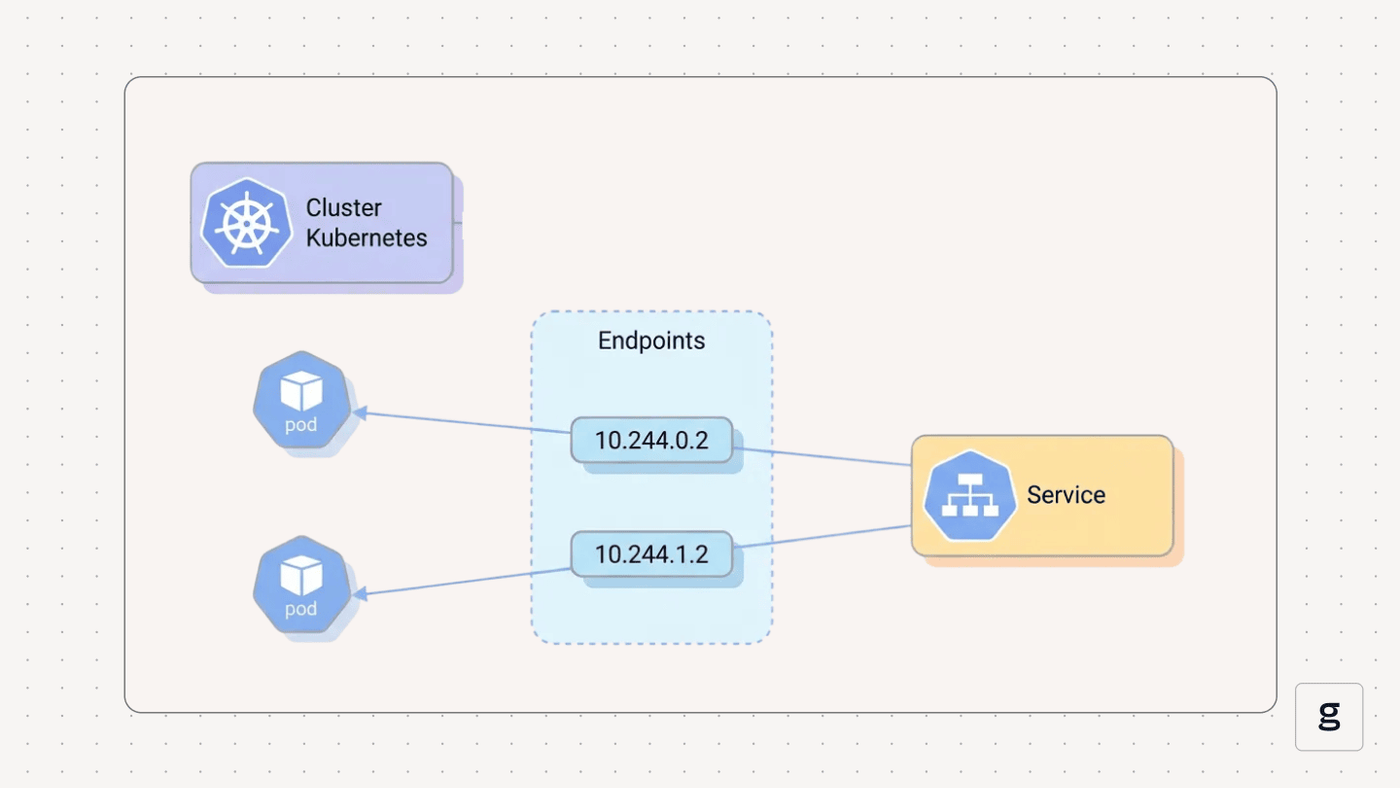
In Kubernetes, an Endpoint is an API object that stores networking configurations for Pods. The networking data includes an IP address and network port from which a Pod is accessible. In most cases, Kubernetes sets up corresponding Endpoint objects automatically when you create a Service (a resource that exposes Pods on the network). As we’ll explain below, however, you can define Endpoints manually if you wish.
Generically speaking, the term endpoint can also refer to any device that is connected to a network (such as a Kubernetes node). But that’s not what endpoint means in the context of Kubernetes. In Kubernetes, Endpoint (with a capital e) is a specific type of API object whose purpose is to store networking data for workloads.
Why Endpoints Matter in Kubernetes
Kubernetes Endpoints provide an easy way of making workloads accessible via the network. This is a big deal because the objects that host Kubernetes workloads are Pods, and most Pods can reside on any node within a Kubernetes cluster. Since each node has its own IP address, the address assigned to a Pod by default may not be consistent or predictable, because it would depend on the node that happens to host each Pod.
Endpoints solve this problem by abstracting IP addresses and ports away from the nodes that host Pods. With Endpoints, Pods receive a consistent networking configuration no matter which node hosts them. Thus, Endpoints mean that external traffic can easily connect to Pods using consistent network addresses, without having to update networking configuration every time a Pod moves to a new node.
Kubernetes Endpoints and service discovery
Endpoints also play an important role in Kubernetes service discovery - meaning the ability of Pods to find each other and communicate on the network.
Endpoints support this function by automatically generating and storing network address and port data for each Pod when it is created. Since this information is centrally managed via Endpoints, Pods that need to talk to each other don’t need to know one another’s direct IP address. They just have to refer to the Endpoint.
How Kubernetes Endpoints work in cluster networking
Under the hood, Kubernetes Endpoints work as follows.
First, incoming network traffic reaches the IP address defined in a Kubernetes Service. This is (in most cases) an externally routable address.
Then, Kubernetes forwards traffic from the Service to the Pods associated with it. It does this by using kube-proxy (a networking agent that resides on each node in Kubernetes) to define local networking rules on each node that route traffic to Pods based on the Endpoints defined for them. Hence, how Endpoints abstract underlying networking configurations from workloads. No matter which node a Pod or Pods happen to reside on, Endpoints make them reachable via the network.
Types of Kubernetes Endpoints
Kubernetes Endpoints can be categorized based on the type of Service they support. There are three main types of Endpoints in this respect:
- Pod-based Endpoints: The most common type of Endpoint. These enable the routing of traffic to Pods.
- ExternalName Endpoints: This type of Endpoint supports a Service that operates as a DNS alias for an external Endpoint, and doesn’t route traffic to Pods. You’d typically use this type of Endpoint in scenarios where you need to pass incoming traffic through Kubernetes and back out to an external resource.
- Headless Service Endpoints: This Endpoint also supports a specialized type of Service where traffic routes directly to the Pods associated with a service, without passing through the Service’s IP address first. This is useful if you don’t need the load balancing and routing features that come with a Service IP address.
| Endpoint type | Role and use case |
|---|---|
| Pod-based | Routes traffic to Pods. Used for most workloads. |
| ExternalName | Routes traffic to an external endpoint rather than Pods. Useful for passing traffic through Kubernetes. |
| Headless Service | Routes traffic directly to Pods, without using a virtual Service-level IP address. Useful for enabling direct connections to specific Pods. |
Understanding Endpoints vs. EndpointSlices
So far, we’ve explained Kubernetes Endpoints as a generic concept. But we haven’t touched on one key aspect of Endpoints in modern Kubernetes clusters: Their relationship to EndpointSlices.
EndpointSlices, a feature that became generally available in Kubernetes version 1.19, divides the IP addresses for Pods into smaller pieces (or slices), rather than storing all of them in a single list (as an Endpoint does).
EndpointSlices are beneficial because they make it easier to manage network address information for a large number of Pods. They can also improve performance because they reduce the need to update Pod networking configurations constantly whenever a Pod’s location within the cluster changes. Thus, EndpointSlices are especially useful in large-scale clusters that host hundreds or thousands of Pods.
As a generic concept, Endpoints still refer to the way Kubernetes manages addressing information for Pods. But in modern clusters, the formal name for the type of API object that does this is an EndpointSlice (although Kubernetes also still supports traditional Endpoints as an API object type).
Automatic vs. manual Kubernetes Endpoint management
In most cases, Kubernetes manages Endpoints automatically based on Service definitions. This means that admins don’t have to worry about specifying IP addresses or network ports. Kubernetes sets them up on its own.
The exception is situations where Endpoints expose an internal resource, rather than one hosted inside Kubernetes. In that case, you’d have to configure the Endpoints manually. You’d do this by creating a Service with no selector field defined. The selector defines which Pods a Service should route traffic to, so if there is no selector, the Service doesn’t map onto Pods – but you can still route traffic from the Service to external resources.
Then, you’d explicitly list the IP addresses and ports for the external resources you want to route the Service to by including it in the Endpoint metadata. For example:
This would create manually defined Endpoints that connect to a resource hosted outside your cluster (keep in mind as well that you’d need to update the manual Endpoint if the IP address of the external resource changes, since Kubernetes has no way of tracking its address configuration automatically).
Common use cases for Kubernetes Endpoints
The primary use case for Endpoints in Kubernetes is supporting the routing of traffic from external points of origin to individual Pods.
As we’ve explained above, Endpoints don’t do this on their own. They function as part of a Service, which (in most cases) exposes an external-facing network address that external resources can connect to. Then, inside the cluster, Endpoints are used to route traffic from that external address to actual Pods.
The other main use case for Endpoints is forwarding traffic from Kubernetes and out to an external resource. For example, if a workload inside Kubernetes needs to connect to a database that is hosted somewhere else, an external Endpoint could manage network information for the database, allowing the application to connect to it.
Common errors and failures in Kubernetes Endpoints
While Endpoints are an essential part of most Kubernetes application deployment scenarios, they can also be subject to a number of problems. Here’s a look at common Endpoint errors in Kubernetes.
Service has no Endpoints
If you’ve defined a Service but Kubernetes didn’t create Endpoints for it, the problem is most likely that the Pods defined within the Service selector either don’t exist or have failed to start. To troubleshoot, use the commands kubectl get pods and kubectl describe pod to check the status of the Pods.
A Service may also have no Endpoints if you define a Service without a selector but don’t specify any Endpoints manually. As we mentioned, Kubernetes doesn’t automatically create Endpoints for Services without selectors, so they won’t exist unless you set them up explicitly.
Endpoints not updating when Pods change
If a Pod changes (such as by moving to a different node) but Endpoint information doesn’t change, there are two likely causes.
One is that the Pod hasn’t changed its state successfully. For instance, it might be stuck in the pending state after moving to a new node. Check on the Pod details to confirm that this hasn’t happened. The other likely root cause is problems with the Container Network Interface (CNI) plugin you’re using. The CNI logs may contain insights into exactly why Endpoint updates haven’t taken place.
Service traffic not reaching Pods
The usual cause of errors where Service traffic is not reaching Pods is either a problem with the Pods (such as, again, a Pod stuck in the pending state) or network connectivity problems. To troubleshoot, check the status of the Service’s Pods. You can also run connectivity tests (such as simple pings) against the nodes that are hosting the Pods to ensure that the network connection is healthy.
Frequent Endpoint updates and flapping
Frequent Endpoint updates and “flapping” (meaning situations where the network status of an Endpoint changes constantly) usually stem from problems with the host node. Check that the node isn’t starved of available resources. Node operating system and networking logs may also provide insight into the root cause of the issue. Moving the affected Pods to a different, healthy node can help as well.
DNS issues affecting Endpoints
Kubernetes’s DNS can experience problems that impact Endpoints by making them map to the wrong IP addresses. In addition, errors in external DNS servers may cause problems when working with external Endpoints, since they could result in misidentification of the network addresses for external resources. To troubleshoot the issue, verify the status of DNS services. Switching to a different DNS server may also help in some cases.
Best practices for managing Kubernetes Endpoints
To get the most from Kubernetes Endpoints, consider the following best practices:
- Prefer automatic Endpoint management: Unless you have a specific reason to specify Endpoints manually, let Kubernetes manage them for you automatically. This is the default, preferred approach.
- Maintain Pod health: Since problems with Pods can lead to problems with Endpoints, keeping your Pods healthy and providing adequate resources to them is important for avoiding Endpoint problems.
- Prefer EndpointsSlices: As noted above, EndpointSlices are a more scalable way to manage network addresses. Unless you have just a handful of Pods, it’s typically better to define EndpointSlices rather than conventional Endpoints.
- Avoid unnecessary external network exposure: It’s a security risk to expose Pods unnecessarily to external traffic, so don’t create Services and Endpoints unless you actually need to connect to outside resources.
Security considerations for managing Kubernetes Endpoints
Speaking of security, the main consideration to bear in mind is that Endpoints make Pods reachable by external resources, which means that threat actors on the Internet can potentially connect to Pods and do bad things if Endpoints exist.
One way to mitigate this risk is to avoid exposing Endpoints directly to external traffic. Instead, define a Service that includes an external-facing address that can serve as an intermediary between Endpoints and external traffic. You can also manage traffic using external load balancers, if one is available for your Kubernetes environment.
If you do need to expose Endpoints directly to external connections, be sure to harden your Pods against attack. Avoid running unnecessary network services on the Pods that threat actors could compromise, and keep vulnerable ports closed.
Monitoring and observability for Kubernetes Endpoints
To monitor the status of Endpoints, you can use kubectl to generate a list of existing Endpoints:
Beyond this, the best way to monitor the overall health and status of Endpoints is to use external tools to observe Kubernetes network performance. These tools can tell you whether traffic is actually reaching Endpoints as intended. They can also alert you to issues like high network latency or dropped packets, which kubectl doesn’t report.
How groundcover enhances Kubernetes Endpoints reliability
Speaking of external Kubernetes observability tools, let’s talk about groundcover - a comprehensive Kubernetes monitoring solution that comprehensively tracks the health and status of all Kubernetes resources, including Endpoints and Services.
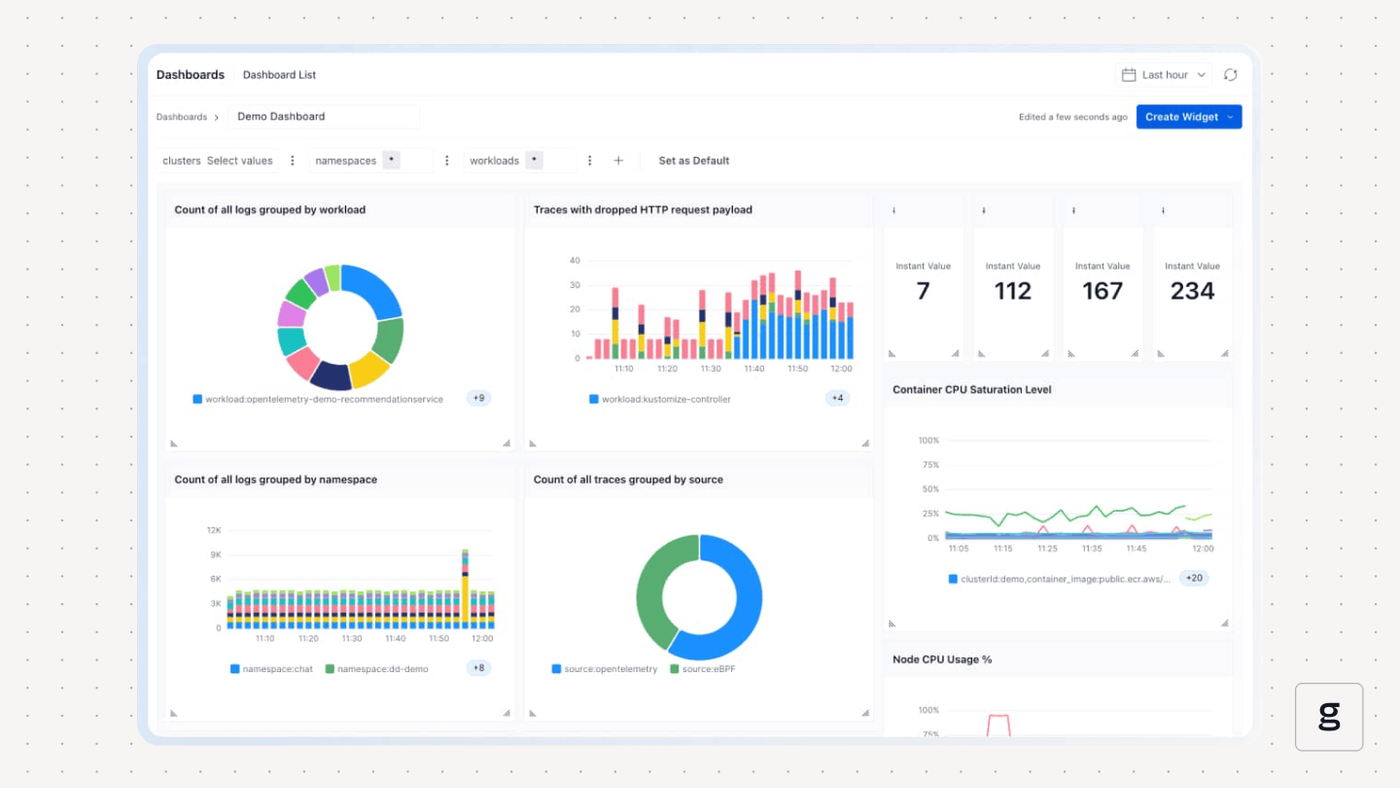
When there’s something wrong in your Kubernetes network, groundcover will clue you in to the problem, then deliver the context and data visualizations you need to resolve it quickly.
Long live Kubernetes Endpoints
You might not think a whole lot of Kubernetes Endpoints because they mostly operate automatically and in the background. But when something goes wrong with a Kubernetes network connection, Endpoint issues are often to blame, which is why tracking the status of your Endpoints and taking steps to mitigate Endpoint performance risks proactively are key aspects of an effective Kubernetes management strategy.
FAQ
How do Kubernetes Endpoints differ from ClusterIP, NodePort, and LoadBalancer Services?
ClusterIP, NodePort, and LoadBalancer Services are different methods of creating a stable, virtual network address that maps onto a Kubernetes workload. In contrast, Endpoints are the network identities that map these Services onto individual Pods.
Typically, Endpoints work in the background, with Kubernetes automatically generating and updating Endpoint data based on Pod status. As an admin, you’d configure network settings for workloads by defining a Service, then let Kubernetes manage Endpoints for you under the hood.
When should I use EndpointSlices instead of traditional Endpoints in Kubernetes?
EndpointSlices are best if you have a large number of Pods, or expect to scale Pods up significantly over time. EndpointSlices are preferable in this situation because they split Endpoint data into smaller units, which are more efficient for Kubernetes to manage.
Put another way, EndpointSlices avoid situations where Kubernetes must constantly update a long list of IP addresses every time a single Pod’s configuration changes, since with traditional Endpoints, an update would be required in this case - and if you have hundreds of Pods, it’s likely that they’ll be changing constantly, resulting in constant Endpoint changes that place a heavy load on your cluster.
How does groundcover help troubleshoot missing or misconfigured Kubernetes Endpoints in real time?
By continuously tracking the status of all resources in your Kubernetes cluster, groundcover identifies network routing and latency issues, which could result from missing or misconfigured Endpoints. It also clues you into problems with Pods (such as a Pod that has failed to start normally), another common cause of Endpoint misbehavior.