Idle Workloads in Kubernetes: Causes, Costs & How to Fix Them



Human workers sometimes need to take breaks, which means they’re idle for a while. That’s natural. Kubernetes workloads, however, are not humans, and they certainly shouldn’t idle. When they do, they waste resources – and, by extension, money.
Hence the importance for Kubernetes admins of knowing how to detect and correct idle workloads in Kubernetes clusters. Read on for guidance as we explain what idle workloads are, what causes them, why they are a problem, and how to mitigate challenges associated with idle workloads.
What are idle workloads in Kubernetes?
Idle workloads in Kubernetes are applications that are not currently handling requests or performing other actions, but that remain active nonetheless. In this context, remaining active means that the applications continue to operate and tie up resources.
For example, imagine that you create a Pod that hosts a Web server. If no one is actually accessing the Web server for an extended period, the Pod that hosts it would be considered an idle workload.
For clarity’s sake, it’s worth noting that running workloads are almost never completely idle; they’re always doing something, even if it’s simply listening for new requests. But if the amount of work they’re performing is very limited because they’re not handling a significant amount of active tasks, they’re considered idle.
Idle workload vs. idle infrastructure
It’s important not to conflate idle workloads with idle infrastructure.
In Kubernetes, idle infrastructure refers to resource components (like nodes) that are operational, but whose compute resources, memory resources and/or storage resources are not being fully utilized – typically because the cluster’s workloads don’t require the resources.
In contrast, an idle workload is an application that is running but not actually performing work or handling load.
| Resource type | What causes idling | The consequences of idling |
|---|---|---|
| Workload | Excess resource allocations. Forgetting to shut down workloads when they’re no longer necessary. | Wasted resources and money. Other workloads may experience poorer performance due to a lack of available resources. |
| Infrastructure | Assigning more nodes to a cluster than necessary to support its workloads. | Wasted resources and money. Will not impact workload performance, however, since infrastructure idling typically occurs when there are too many, not too few, resources available. |
Why idle workloads accumulate in Kubernetes clusters
Idle workloads can appear within a Kubernetes cluster for a variety of reasons. Here are the common causes:
- Overprovisioning: In a bid to avoid downtime or performance degradations, admins may assign significantly more CPU or memory to a workload than it needs. This can lead to idle workloads in the sense that the workloads tie up many more resources than they actually require.
- Forgotten workloads: Users may launch Pods or other types of workloads for purposes like testing, then forget to turn them off when they’re no longer needed.
- Failed applications: Issues like CrashLoopBackOffs may cause workloads to never start successfully. In this case, the workloads are not exactly “idle” because they’re continually trying to restart, but they are idle in the sense that they’re not doing any productive work and are tying up resources.
- Load fluctuation: The load placed on workloads may vary significantly; for instance, an application that processes data in batches may only be active when there is a new batch of data. During other periods, it sits idle.
Common types of idle workloads
Idle workloads in Kubernetes can be organized by type, with the main examples including the following.
Underutilized Pods
Underutilized Pods are those whose resource allocations are higher than what they require to process the number of requests or tasks they must handle. This typically occurs when admins overestimate how many resources the workload will need – or when they deliberately assign excess resources because they are worried about downtime or performance issues.
Unused Deployments
Unused Deployments are workloads that should no longer be running, but that no one has shut down. A common cause of this issue is applications that were deployed for testing purposes, and that developers forgot to shut off after testing completes.
Idle StatefulSets and Jobs
StatefulSets and Jobs can become idle when the tasks they were created to perform have been completed.
Somewhat paradoxically, Job idling can also occur when the CPU resources allocated to a Job are very low. In that case, the Job may never actually be able to complete its assigned tasks due to a lack of sufficient CPU – effectively idling it – but it still ties up some amount of CPU and memory.
Over-provisioned resources
Any type of Kubernetes workload can be over-provisioned if admins assign more CPU, memory, and/or storage resources to it than it requires. As we’ve mentioned, this commonly happens when admins miscalculate how many resources a workload will use, or when they assign excess resources because they believe that doing so will reduce the risk of downtime or performance issues.
| Idle workload type | Description |
|---|---|
| Underutilized Pods | Pods whose CPU or memory allocations are significantly higher than actual usage, typically because administrators overestimated resource requirements or intentionally overprovisioned them to reduce the perceived risk of downtime or performance issues. |
| Unused Deployments | Deployments that continue running even though they are no longer needed, often because test or temporary applications were never removed after development or validation activities ended. |
| Idle StatefulSets and Jobs | StatefulSets or Jobs that remain in the cluster after completing their intended tasks, or Jobs that never finish because insufficient CPU resources prevent them from making progress while they continue consuming cluster resources. |
| Over-provisioned resources | Workloads that have been assigned more CPU, memory, or storage than they actually require, leading to wasted cluster capacity and unnecessary infrastructure costs. |
The real cost of idle workloads in Kubernetes
Idle workloads in Kubernetes create two major “costs”:
- In a literal sense, idle workloads cost money because they tie up infrastructure resources. CPU, memory and storage resources cost money, and even if they’re not actively used, you still have to pay for what you consume (especially in cloud-based Kubernetes environments with pay-as-you-go billing models).
- Idle workloads reduce the resources available for other, active workloads to use, leading to potential performance degradations across the cluster.
How to detect and measure idle workloads in Kubernetes
Kubernetes doesn’t automatically alert admins to idle workloads, but it’s possible to detect them using the following techniques:
- Use the kubectl top pods command to display data about actual memory and CPU utilization, then compare this to the CPU and memory allocated via Kubernetes requests.
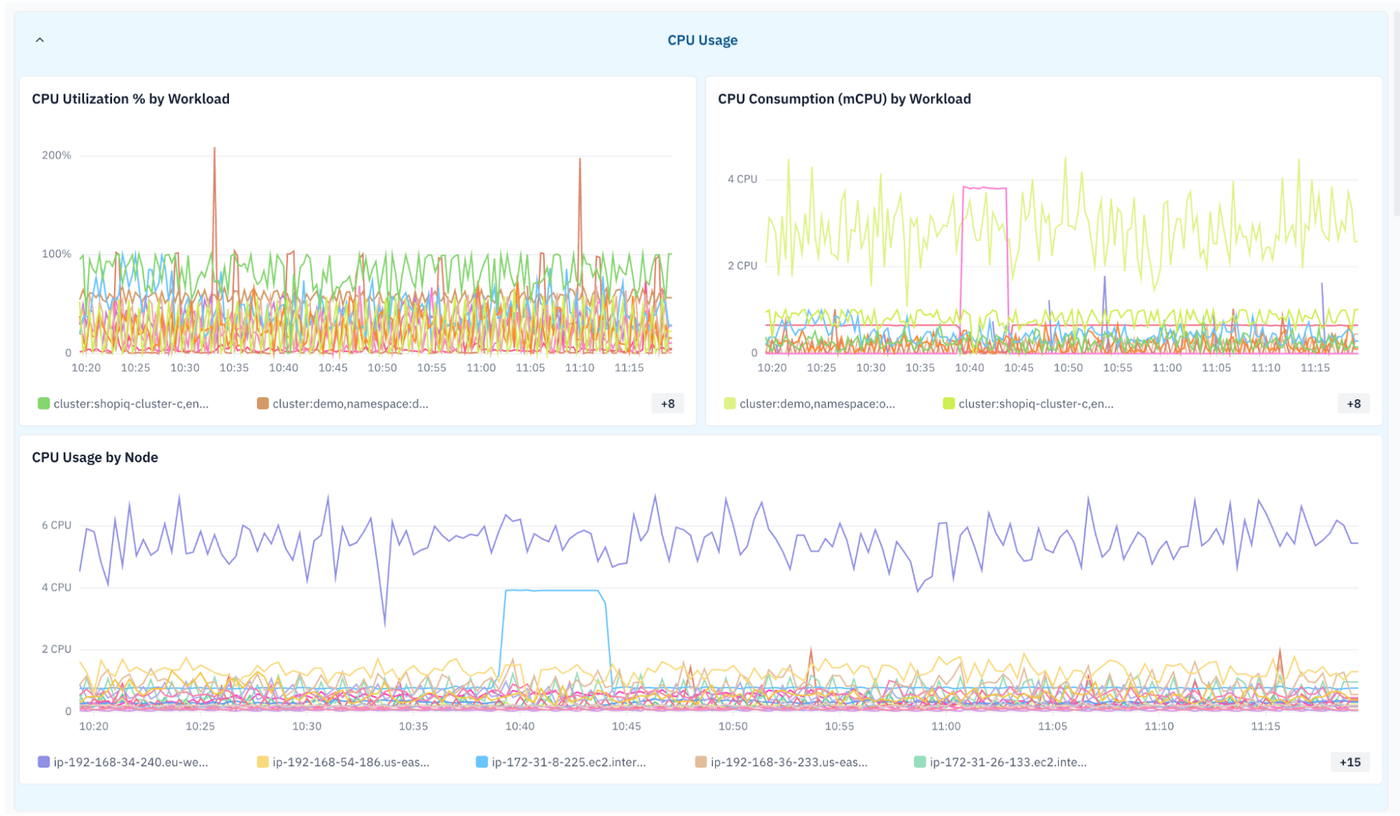
- Use a monitoring tool or observability platform (like groundcover) to track the CPU and memory resource usage of resources and compare it to request allocations. This method allows you to track workload activity visually, which can make it easier to identify idle workloads in large-scale clusters. You can also track incoming workload requests so that you can correlate resource consumption with actual application load.
Right-sizing Kubernetes workloads to eliminate idle resources
If you identify an idle workload, you should “right-size” it by modifying its allocated resources to prevent waste (or, if the workload should no longer be running at all, you can shut it off). The process typically involves the following.
1. Audit current resource requests and actual usage
First, using kubectl top or an observability tool, compare Kubernetes requests to actual workload resource consumption. This allows you to identify workloads that may be idling.
2. Apply Vertical Pod Autoscaler (VPA) for request right-sizing
The VPA automatically changes resource requests for Pods based on their usage. It’s one way of right-sizing workloads to eliminate idle resources.
3. Use Horizontal Pod Autoscaler (HPA) to scale down replicas under low traffic
The HPA modifies the number of Pod replicas to keep it aligned with application load. This is another way of right-sizing workloads to consume resources more efficiently.
4. Validate changes and monitor for regressions
Using an observability tool, monitor workload performance and load following changes to ensure that resource utilization remains efficient and that workloads continue to operate as expected.
Scaling idle Kubernetes workloads to zero
One way of handling a workload that is completely idle is to delete it entirely. However, if you do this, you have to recreate it if you want to redeploy the workload at a later time.
As an alternative, you can scale idle workloads to zero. To do this, configure the setting minReplicas: 0. This tells Kubernetes that it should reduce replica count to zero – effectively turning the workload off – if it’s idle. If you want to make the workload active again, you can simply increase the replica count.
Managing idle development and staging workloads in Kubernetes
If you’re dealing with idle dev/test or staging workloads, first decide whether you may need to reuse them in the future. If you will, you can scale them to zero, then scale them back up when you want them to become active again. Alternatively, use a command like kubectl delete pod to remove dev/test workloads permanently if you have completed testing them.
Either way, it helps to keep development and staging workloads in their own namespace. Doing so reduces the risk of accidentally removing production workloads. It also makes it easier to detect and manage idle dev/test and staging workloads because you can monitor for them within a specific namespace rather than across your cluster.
GPU and AI workload idling: A growing problem in Kubernetes
While all types of workloads can idle and waste resources, AI workloads that consume GPUs can be especially costly when they idle, due to the high cost of GPUs. This is a growing issue as Kubernetes becomes more and more popular as a way to train and host AI models.
Fortunately, handling idling GPU and AI workloads in Kubernetes involves the same basic approach as any other type of workload. The only difference (and it’s a big one) is that you need to use special tools and techniques to monitor GPU usage and detect idle GPU resources. Check out our guide to Kubernetes GPU monitoring for details.
Kubernetes idle workload patterns across multi-tenant clusters
Detecting and resolving idle workload issues is especially important within multi-tenant clusters because if one tenant’s workloads waste resources, it can undercut the performance of other tenants’ applications.
Here again, however, the process for detecting idle workloads is essentially the same as it would be in a single-tenant cluster: You compare actual resource consumption to resource allocations to detect idle workloads, then adjust allocations as necessary. Note, however, that if you’ve guaranteed a tenant a certain amount of CPU, memory or storage, you may not be able to change Pod requests without violating the contractual guarantees you’ve made.
Tools and native solutions for identifying idle workloads in Kubernetes
Although there is no single command that you can use to detect idle workloads in Kubernetes, it does offer a couple of native tools to help with this process:
- kubectl top, which reports CPU and memory usage for workloads.
- kubectl describe, which displays data including the resource requests for workloads.
By comparing the information provided by these commands, you can detect idle workloads.
It’s also possible – and desirable, if you need to monitor more than a handful of workloads or want to automate alerting – to use external monitoring and observability tools. These can collect data about workload resource consumption in real time, compare it to requests and, if desired, generate alerts when a workload appears idle.
Best practices for preventing idle workloads in Kubernetes
As part of an effective Kubernetes resource management strategy, the following best practices help prevent idle workloads from occurring in the first place within a Kubernetes cluster:
- Implement automatic workload scaling: Use Horizontal Pod Autoscalers (HPA), Vertical Pod Autoscalers (VPA) where appropriate, and event-driven scaling to reduce or eliminate workloads that are no longer serving requests.
- Regularly audit and remove unused resources: Periodically review deployments, pods, Jobs, CronJobs, and other Kubernetes objects to identify and delete workloads that are no longer needed.
- Right-size resource requests and limits: Continuously adjust memory and CPU limits and requests based on actual usage patterns to prevent overprovisioning and reduce idle resource consumption.
- Monitor workload utilization continuously: Track workload activity with Kubernetes metrics and observability tools, then use alerts and automated policies to detect and remediate idle workloads before they generate unnecessary costs.
| Best practice | Description |
|---|---|
| Implement automatic workload scaling | Use Horizontal Pod Autoscalers (HPA), Vertical Pod Autoscalers (VPA) where appropriate, and event-driven scaling to reduce or eliminate workloads that are no longer serving requests. |
| Regularly audit and remove unused resources | Periodically review deployments, pods, Jobs, CronJobs, and other Kubernetes objects to identify and delete workloads that are no longer needed. |
| Right-size resource requests and limits | Continuously adjust CPU and memory requests and limits based on actual usage to prevent overprovisioning and reduce idle resource consumption. |
| Monitor workload utilization continuously | Track workload activity with Kubernetes metrics and observability tools, then use alerts and automated policies to detect and remediate idle workloads before they generate unnecessary costs. |
Instant idle workload visibility across every Kubernetes node with groundcover
As we’ve mentioned, the most scalable and efficient way to get ahead of idle workload risks in Kubernetes is to use an observability platform that automatically detects workload idling.
This is where groundcover comes in. By continuously collecting resource consumption data across every node and for every workload, groundcover detects idle workloads in real time. Just as important, it provides the critical context for admins to make informed judgments about how workload activity is likely to vary over time and how many resources they should consequently assign to workloads to ensure that they remain stable, while also avoiding waste.
Putting idle workloads to rest
Some amount of workload idling is unavoidable because workloads almost never max out on activity. But if you have workloads that sit idle for extended periods, you’re wasting resources and money –which is why every Kubernetes admin should know how to detect and respond to idle workload issues with Kubernetes clusters.
FAQs
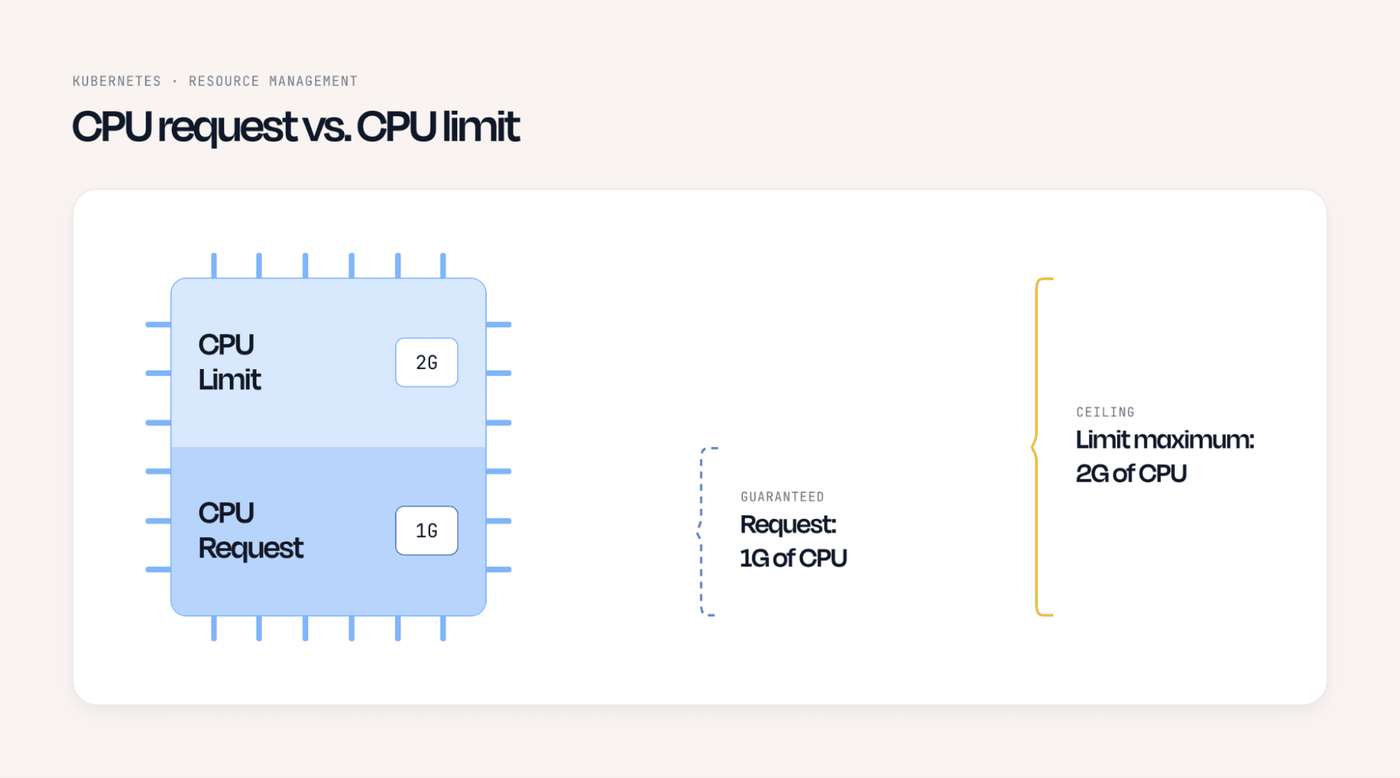
Resource requests define the minimum amount of resources that Kubernetes should reserve for a workload, while limits establish the maximum amount it can consume. Limits won’t lead to resource idling (although they can cause performance issues by depriving workloads of sufficient resources), but requests that are too high can lead to idling because they tie up resources that the workload doesn’t actually need.
Yes. If you scale a workload to zero, then scale it back up when you want it to be active again, it will take some time for the reactivated workload to become fully operational. The delay could be anywhere from a fraction of a second to several minutes, depending on how long it takes to spin up a new replica and schedule it on a node. (In a worst case, it may be impossible to schedule the replicas at all due to not having enough nodes available, causing the workload never to reactivate successfully.)
As an admin, you have to judge whether the risk of cold-start latency issues is worth the resource savings of scaling a workload to zero. For mission-critical workloads, it may be preferable to let the workloads idle as a way of avoiding downtime or delays.
Unlike traditional observability platforms, groundcover uses eBPF – a hyper-efficient, minimum-overhead Linux kernel framework – to collect data. This approach allows it to detect idle workload patterns with minimal resource consumption. This means you don’t have to tie up significant amounts of resources just to detect wasted resources.