

Prometheus TSDB Explained: How It Works, Scales & Optimizes



When you first add Prometheus to your stack, things feel straightforward. You scrape a few services, connect them to dashboards, and wire up some basic monitors. Queries return quickly, disk usage looks reasonable, and the storage layer hardly crosses your mind. Prometheus sits in the background collecting time series, and everything appears under control.
As more teams adopt metrics and new services appear, that picture shifts. Labels multiply, histograms get finer, and cardinality starts to climb. Disk usage grows faster than expected, restarts take longer, and PromQL queries that once felt instant begin to lag. At that point, you are dealing directly with Prometheus Time Series Database (TSDB), the engine that ingests, organizes, and retains your metrics. This guide explains how Prometheus TSDB works, how its architecture scales, where it struggles at higher volumes, and what you can do to tune, extend, and monitor it so your metrics remain dependable as your systems grow.
What Is Prometheus TSDB and How It Works
Prometheus TSDB is the time series database built into the Prometheus server. It stores the continuous stream of metric samples that Prometheus scrapes and makes them available to PromQL. Instead of depending on an external database, Prometheus ships its own TSDB so it can optimize for append-heavy writes, numeric samples, and label-based queries.
A Prometheus time series is a sequence of values over time that shares the same metric name and the same set of labels. Monitoring workloads generates many of these sequences, for example, CPU usage per node, request latency per service, or error rates per endpoint. Prometheus TSDB is built around this pattern. It expects high ingestion rates, almost no updates, and filters based on labels like `job`, `instance`, or `status` rather than ad hoc joins or transactions.
This focus lets Prometheus keep storage simple and predictable. The TSDB assumes data arrives in order, grows over time, and is mostly read through aggregations and label selectors. That allows it to use append-only files, compact layouts on disk, and efficient compression schemes that fit monitoring data well.
How Prometheus TSDB Works
Prometheus uses a pull model to collect data for the TSDB. You define scrape targets, usually exporters or instrumented services that expose `/metrics`, and Prometheus polls them at fixed intervals. Each scrape returns all metrics for that target in one response. This gives you a single place to control what is scraped, how often, and with which labels. It makes missing data easy to spot because failed scrapes show up immediately.
Inside the TSDB, new samples first land in an in-memory head block. For every scrape, Prometheus appends the samples to the relevant time series in this head block and records them in a write-ahead log (WAL) on disk. The WAL lets Prometheus replay recent data after a crash, so you do not lose the latest scrapes. Once enough data accumulates or a configured time window passes, Prometheus cuts a new block on disk that contains compressed chunks of samples, a label index, and metadata about the block time range. Background compaction then merges smaller blocks into larger ones to keep both storage usage and query performance under control, as shown:
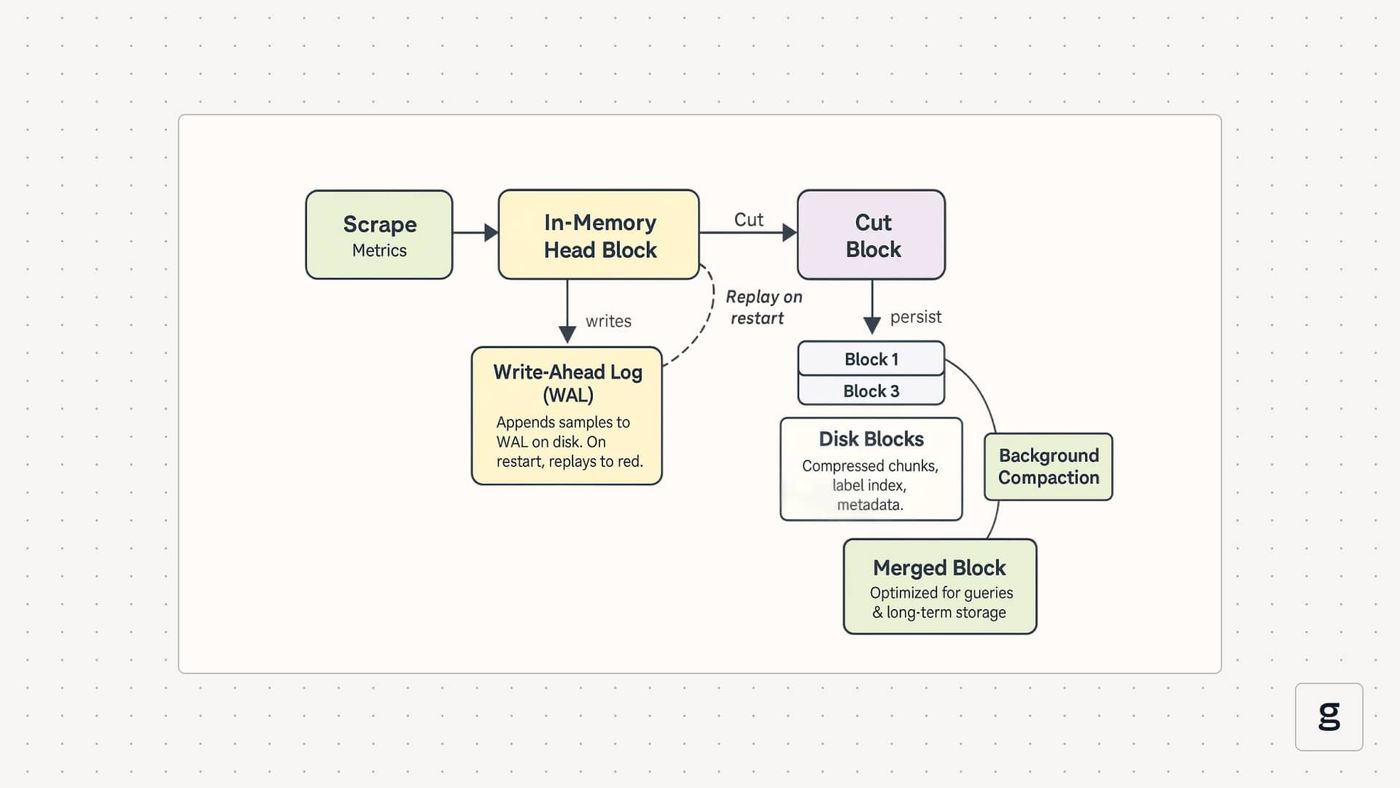
For example, in a simple microservice. Suppose Prometheus scrapes an API server every 15 seconds and collects a latency metric:
Each scrape adds one more sample to this time series in the head block. Older samples are gradually moved into compressed blocks on disk. Here is a minimal configuration that feeds data into Prometheus TSDB:
Even with a setup this small, Prometheus TSDB is already handling ingestion, durability through the WAL, and block lifecycle behind every query you run.
Core Components of the Prometheus TSDB Architecture
Prometheus TSDB looks simple from the outside, but it has a clear internal lifecycle. Samples move from memory to disk blocks, get compressed into chunks, indexed by labels, and periodically compacted.
Block Structure and On-Disk Layout
Prometheus stores data in time-based blocks on disk, typically covering a few hours each. Every block lives in its own directory and contains three main things: compressed chunks of samples, an index file, and metadata that describes the time range and basic statistics. As time passes, new blocks are created for fresh data while older blocks are merged or removed according to your retention settings.
Chunks and Time Series Compression
Inside a block, each time series is split into chunks, which hold consecutive samples for that series. Prometheus uses delta-style compression for timestamps and values so it can pack many samples into a small space. This design keeps disk usage low while still allowing the TSDB to read ranges of samples efficiently for queries.
Index Structure and Label Management
Prometheus relies heavily on labels, so TSDB uses an inverted index to map label pairs like `status="500"` to the series that match them. When you run a PromQL query with label filters, Prometheus looks up matching series through this index instead of scanning all data. Good label design keeps this index compact and predictable, while overly granular or unbounded labels cause a blowup in series count and memory usage.
Write-Ahead Log (WAL)
Before data lands in a persistent block, new samples are written into an in-memory head block and appended to the WAL on disk. If Prometheus crashes, it replays the WAL to rebuild recent state so you do not lose the latest scrapes. WAL files are rotated and checkpointed over time so recovery stays fast and disk usage does not grow unchecked.
Compaction Strategy and Block Merging
Background compaction keeps the TSDB from accumulating too many small or fragmented blocks. Prometheus regularly scans blocks, merges adjacent ones into larger time ranges, and applies retention rules by dropping blocks that fall outside your configured window. Compaction also rewrites data to clear tombstones and reduce wasted space, but it needs some headroom on disk while new blocks are being built.
Benefits of Using Prometheus TSDB for Monitoring Reliability
Prometheus TSDB has one primary role. It stores and serves metric samples from your systems. The design is built around steady appends, numeric values, and label-based filters. This setup brings several benefits:
- Ingestion that keeps up with active systems.
The write path is simple. New samples go into memory and are appended to disk in order. A single Prometheus TSDB instance can handle a high rate of incoming metrics, as long as hardware and label cardinality are in a reasonable range. This is enough for many teams to scrape thousands of targets on short intervals without special clustering. - Storage that stays compact.
Samples are stored in compressed chunks, taking advantage of regular scrape intervals and gradual changes in values. That keeps the number of bytes per sample low and makes it realistic to hold several days or weeks of metrics on local disks before you need to think about remote storage or downsampling. - Responsive queries for recent data.
Most dashboards and alerts focus on what happened in the last few minutes or hours. Prometheus TSDB keeps the freshest samples in the head block and the nearest blocks on disk, so instant queries and short-range PromQL expressions stay snappy. The label index lets you slice by `job`, `instance`, region, status code, and other dimensions without scanning every series. - Straightforward operations.
TSDB runs inside the Prometheus process. There is no external database to manage, and backups are file-based. The write-ahead log protects recent data from crashes by letting Prometheus replay the latest samples on restart. This keeps the operational model simple, which matters when you are already under pressure during an incident. - Good value for typical Prometheus use.
For many environments, one Prometheus TSDB instance per cluster or region is enough. You get solid visibility from modest hardware and can delay more complex setups until you clearly need longer retention, more capacity, or global queries.
These make Prometheus TSDB work well as a starting point. The same traits, however, also define where it begins to struggle as metric volume, label cardinality, and retention grow.
Common Challenges and Limitations in Prometheus TSDB at Scale
Prometheus TSDB works well in its comfort zone: single node, moderate retention, and controlled label cardinality. Once metric volume, labels, and retention grow, the same design that keeps it simple starts to show several limits.
| Challenge | Impact on production | Solution |
|---|---|---|
| High label cardinality | Rising memory usage, slower queries, possible OOM kills and restarts | Restrict unbounded labels, use relabeling to drop noisy dimensions, and add per metric cardinality budgets |
| Single-node storage and scale limits | One machine becomes a bottleneck for CPU, memory, and disk I/O | Shard Prometheus by target groups, split environments, and use remote storage for long-term data |
| Slow queries on long retention | Dashboards time out, heavy PromQL overlaps with ingestion and compaction | Keep local retention short, move history to remote storage with downsampling, and precompute key views with recording rules |
| TSDB corruption and WAL or block issues | Prometheus fails to start or loses recent data around corrupted files | Use reliable disks, clean shutdown procedures, regular backups, and promtool repair, plus selective block removal |
| Cost and complexity of manual federation | Configuration overhead, duplicated work, and harder global views | Limit federation depth, define clear aggregation layers, or replace ad hoc federation with a dedicated long-term store |
| Lack of native multi tenancy | Hard to isolate teams or workloads and apply separate SLAs or limits | Run separate Prometheus instances per team or domain, and centralize long-term data in a shared remote backend |
These limits do not make Prometheus TSDB a bad choice. They define when a single Prometheus instance stops being enough and when you should consider sharding, remote storage, or other time series databases.
Prometheus TSDB vs Other Time Series Databases
Prometheus TSDB is not the only option for time series data. There are other databases that aim at broader analytics, long-term storage, or tighter integration with SQL. The table below shows where Prometheus fits and when another system may complement it.
| Aspect | Prometheus TSDB | InfluxDB | VictoriaMetrics | TimescaleDB |
|---|---|---|---|---|
| Data model | Metric name plus labels | Measurement with tags and fields | Prometheus compatible metrics and labels | Relational tables with time-based partitions |
| Collection model | Pull-based scraping from /metrics endpoints | Both push and pull via HTTP, agents, Telegraf and its Python Processing Engine | Remote write or scrape, Prometheus compatible | Standard SQL ingest pipelines and connectors |
| Deployment style | Single node per cluster or environment | Single node or clustered | Single node or clustered (often as remote storage) | PostgreSQL cluster with an extension |
| Query language | PromQL | InfluxQL or SQL | PromQL compatible, plus extra functions | SQL with time series functions |
| Main strength | Simple, strong for cloud native metrics and alerts | Flexible time series analytics from many sources | High compression and throughput for large Prometheus data | Rich joins and analytics mixing metrics with other data |
| Best use case | Recent metrics, alerting, and dashboards per environment | Mixed time series workloads and custom analytics | Long-term, high-volume Prometheus storage and queries | When you need SQL and time series in the same place |
Prometheus TSDB usually works best as the primary store for recent metrics and alerting, while systems like VictoriaMetrics or TimescaleDB cover longer history or more complex analytics.
Best Practices for Optimizing Prometheus TSDB Performance
As your data grows, choices in how you use Prometheus TDSB start to matter more. Certain patterns in what you store, how often you scrape, and how you query can slow Prometheus TSDB down if you do not account for them.
Optimize Label Cardinality
Every unique label set is a separate series, so unbounded labels like user IDs, request IDs, or raw IPs quickly explode memory and slow queries. Treat labels as shared dimensions such as path, status code, region, and tier, and avoid values that grow with traffic or user count. Regularly reviewing which metrics create the most series helps you catch problems before they turn into incidents.
Optimize Scrape Configuration
Scrape frequency drives ingest load and resolution. Short intervals everywhere overload the TSDB, while long intervals hide fast failures. Give short intervals to critical health metrics, slower ones to background metrics, and choose timeouts and concurrency so scrapes are steady rather than spiky.
Optimize Heavy Queries with Recording Rules
Complex PromQL expressions are expensive when dashboards hit them repeatedly. Recording rules precompute rates, percentiles, and aggregates, then store them as simple metrics. Using these precomputed series for dashboards and alerts cuts CPU usage and keeps graph loads predictable.
Optimize Memory Usage and Capacity Planning
Memory mostly depends on active series, head block size, and query cost. Use retention limits, WAL compression, and reasonable block durations to keep usage stable, and remove exporters or metrics that nobody uses. Base capacity planning on ingestion rate and series count, then add headroom for bursts and busy periods.
Optimize Service Discovery and Target Management
Service discovery defines what you monitor and how it is labeled. Loose discovery scrapes dead or noisy targets, while overly strict rules miss real services. Aim for a clean mapping between workloads and targets, with stable labels like environment, region, and service, and use relabeling to drop junk and standardize context before data reaches TSDB.
These practices make Prometheus TSDB more predictable and reduce the number of issues during busy periods.
Strategies for Long-Term Data Retention and Remote Storage for Prometheus TSDB
Prometheus TSDB is best at holding recent data on local disk. Long-term history is easier to manage when you let TSDB focus on live traffic and push older data to a backend built for scale.
Define Local Retention Limits
Give local TSDB a clear time window, usually days or a few weeks. Set time and size-based retention so blocks cannot grow indefinitely. Local storage then stays focused on alerts and day-to-day dashboards instead of acting as an archive.
Add a Remote Storage Backend
Use remote storage for months or years of data while keeping Prometheus TSDB as the source for fresh metrics and alerts. Prometheus writes recent samples to its own TSDB and streams them to a backend such as Thanos, Cortex, or VictoriaMetrics, which handles large volumes and heavier historical queries.
Use Downsampling Tiers
For a very long history, keep multiple resolutions instead of raw samples forever. Keep full detail for recent periods, medium granularity for the last few months, and coarse aggregates for older data. This keeps costs down while preserving enough signal for trends and capacity planning.
Filter Metrics Before Remote Write
Decide which metrics deserve long-term retention and which can stay local or be dropped. Focus on service health, latency, errors, volume, and a small set of key business or capacity metrics. Avoid sending high-cardinality debug series to remote storage, or you will pay for data nobody reads.
Monitor Remote Write and Backend Health
Treat the remote pipeline as part of your observability stack. Watch queue sizes, error rates, and lag on remote write, and keep an eye on the remote backend’s storage and query performance. You want to spot gaps or slowdowns early, not when someone needs a report from months ago.
Align Retention with Teams and Compliance
Set retention policies in terms of how teams actually use data and what compliance requires. Some metrics may only need weeks of history, while others need months or years. Align local and remote retention with those needs so you do not over-store low-value data or under-store audit-critical metrics.
This split between short-term local storage and long-term remote storage makes Prometheus TSDB stay lean and responsive.
How to Monitor and Troubleshoot Prometheus TSDB Status and Health
Prometheus TSDB needs visibility like any other critical service. If you track a small set of storage metrics and know how to react to their changes, you catch most issues before they affect alerts and dashboards.
Tracking Core TSDB Health Metrics
Focus on a few metrics that describe size and background work: total chunks and samples, head samples, compaction duration, and WAL or checkpoint errors. Together, they show how fast TSDB is growing, how much sits in memory, and whether background jobs keep up.
Diagnosing High Memory Usage
Sustained high memory usually means too many active series. Check overall series counts and break them down by metric to find those with the most distinct label sets. Then trim or redesign the worst offenders so they stop creating unnecessary series.
Recovering From TSDB Corruption
Corruption often appears as startup failures with errors about blocks, chunks, or meta.json. Always back up the data directory first, then inspect which blocks are broken, try repair tools, and remove only the blocks that cannot be fixed. You lose some data in that window, but keep the rest of TSDB intact.
Fixing Slow Queries and Degraded Performance
Slow dashboards and heavy CPU usage point to expensive queries or large time ranges. Shorten query windows where possible, move complex expressions into recording rules, and rely on downsampled data or long-term storage for wide historical views. This reduces the amount of data Prometheus needs to scan per request.
Troubleshooting Scraping and Discovery Issues
Missing or sparse data is often a scrape or discovery problem, not a storage one. When metrics stop arriving, check target status, scrape errors, and configuration changes, especially permissions in dynamic environments. Fixing endpoints, credentials, or discovery rules usually restores data without touching TSDB.
Setting Up Preventive TSDB Alerts
Alert on trends that lead to outages rather than on failures alone. Watch for rapid increases in series or chunks, high TSDB disk usage, repeated WAL errors, and rising query latency. That gives you time to adjust labels, retention, or load before Prometheus itself becomes unreliable.
Once TSDB health is visible and guarded by alerts, the next step is to extend what you see beyond metrics alone. This is where a tool like groundcover adds deeper insights on top of Prometheus TSDB.
How groundcover Enhances Prometheus TSDB Insights
Prometheus TSDB offers reliable, label-based metrics, but it remains a metrics-only approach that you also need to deploy and maintain yourself. groundcover, in contrast, delivers full-stack observability by combining metrics, logs, traces, and more, all enriched with deep context and no required code changes. With its Bring Your Own Cloud (BYOC) model, you can gather every signal you need while keeping the data in your own environment, with the groundcover team handling all ongoing management for you.
eBPF Technology and Zero-Code Instrumentation
groundcover uses eBPF programs running in the Linux kernel to watch system calls, sockets, and packets. That means it can see HTTP traffic, DNS lookups, database queries, and process activity without SDKs, sidecars, or code edits in each service. The work happens in kernel space, so it stays efficient while capturing signals as soon as workloads run.
groundcover Architecture and Prometheus Integration
The platform is built from an eBPF sensor DaemonSet on each node, a collector, and a backend. Sensors stream logs, traces, metrics, and Kubernetes events to the backend, which organizes everything per tenant and cluster, and can run fully in your own cloud. For Prometheus, groundcover exposes standard Prometheus-format metrics, so Prometheus can scrape them or receive them over remote write. You keep Prometheus TSDB for storage and PromQL for queries, and gain extra metrics enriched by kernel and trace data.
Enhanced TSDB Insights Through Trace Correlation
Prometheus shows you that error rates or latency have changed. groundcover links those metrics to the actual traces and events behind them. When an API latency alert fires, you can jump from the TSDB time series to specific slow requests, see which endpoint was affected, which database query consumed most of the time, and which pods or Kubernetes events lined up with the spike. Metrics stay your high-level signal, but you get a direct path from a graph to the concrete cause.
Cost Efficiency of groundcover
In a large Kubernetes cluster, manual instrumentation means adding agents or SDKs to every service, maintaining them over time, and wiring separate pipelines for logs, traces, and metrics. groundcover replaces that effort with one eBPF sensor per node and a single pipeline for all telemetry types. There are no per-service code changes, and resource usage is shared at the node level instead of duplicated in each pod, which keeps both engineering time and observability cost easier to control.
Zero-Instrumentation Full-Stack Observability
With groundcover deployed, you see application, database, and infrastructure layers through the same eBPF feed. HTTP, gRPC, and GraphQL traffic is traced automatically, while database queries gain timing and slow-query visibility without driver changes. At the same time, you track CPU, memory, disk, network behavior, and Kubernetes events per pod or container. A slow GraphQL API, for example, can be broken down into individual operations, the queries each resolver executes, the external calls involved, and the node-level resource usage during that window, all without adding new instrumentation over time.
Together, Prometheus TSDB and groundcover turn metrics into an entry point for full-stack observability. TSDB handles efficient metric storage and PromQL queries, while groundcover supplies the depth needed to move quickly from an alert to the exact request, query, or node behind it.
Faqs
How do I reduce the memory usage of Prometheus TSDB?
Reduce label cardinality by dropping or reshaping unnecessary labels, especially user IDs and other unbounded identifiers. Increase scrape intervals for non-critical metrics so fewer samples land in the head block. Enable WAL compression, and set clear time or size-based retention policies so TSDB does not keep more data in memory and on disk than it needs to.
What’s the difference between TSDB compaction and retention?
Retention deletes old data once a time or size limit is reached, removing entire blocks that fall outside your configured window. Compaction is background work that merges adjacent blocks into larger ones and cleans up tombstones so storage stays efficient without changing the overall retention period.
How does groundcover reduce instrumentation burden?
groundcover uses eBPF to capture observability data at the kernel level instead of relying on SDKs in each application. It automatically traces HTTP traffic, database calls, and network activity from the node, so you get detailed metrics and traces without adding or maintaining custom instrumentation in your services.
Conclusion
Prometheus TSDB works best when you treat it as what it is. A focused, single-node engine for fresh metrics and alerting, not a one-stop solution for every storage problem. If you keep label cardinality in check, tune scrapes with intent, use recording rules smartly, and move long-term data to remote storage, it stays fast and predictable instead of becoming a bottleneck.
groundcover builds on that foundation. Prometheus TSDB continues to store and serve metrics, while groundcover adds kernel-level visibility, traces, and database insight without extra instrumentation. Together, they provide deeper observability for Prometheus-monitored systems.



