

OpenTelemetry Collector in Kubernetes: Architecture, Challenges & Best Practices



When Kubernetes services send logs, metrics, and traces directly to a backend, observability depends on too many export paths. Each workload has to know where its telemetry should go, how to retry failed delivery, and what to filter before data leaves the cluster. This setup is manageable in development, but consistency breaks down as production telemetry spreads across more services, namespaces, clusters, and teams.
The OpenTelemetry (OTel) Collector gives your Kubernetes environment a shared pipeline for telemetry data before it reaches your backend. In this guide, you’ll learn what the OpenTelemetry Collector does in Kubernetes, how its architecture and deployment modes work, and how to configure it for metrics, logs, and traces at scale. You’ll also see how common failures, performance trade-offs, and cost decisions shape how Collector deployments evolve at scale.
What Is the OpenTelemetry Collector in Kubernetes
The OpenTelemetry Collector is an open-source service for receiving, processing, and exporting telemetry data. In Kubernetes, you deploy it inside the cluster as the collection layer between workloads and your observability backend, so application and infrastructure telemetry follow one cluster-level path before export.
The Collector runs as one or more pods managed by Kubernetes. Those pods use their own configuration and access permissions, which makes telemetry collection part of the cluster’s observability infrastructure rather than logic embedded separately in every application.
Why the OpenTelemetry Collector Is Used in Kubernetes Environments
Kubernetes workloads scale, restart, and move across nodes, so telemetry export cannot depend on each service carrying its own backend setup. The OTel Collector addresses that by moving telemetry control into shared cluster infrastructure instead of repeating the same setup across every workload.
Export Control Outside Application Code
Direct export ties application code to backend delivery. Each service needs endpoint details before it sends telemetry, then the same service needs retry behavior when delivery fails. The Collector moves that delivery work into the cluster’s observability layer, where workloads send telemetry to a shared collection path while the Collector handles retries, batching, encryption, and sensitive data filters.
Shared Telemetry Policy Before Export
Telemetry policy becomes unreliable when every service applies its own export rules. One workload may remove a sensitive field before export, while another sends the same field unchanged and increases risk or backend volume. The Collector gives the cluster one policy point before telemetry leaves the environment, so logs, metrics, and traces follow the same handling across services, namespaces, and clusters.
Kubernetes Resource Identity
Kubernetes telemetry needs a link back to the resource that produced it. A trace span, metric, or log record carries more value when it includes the pod, namespace, workload, and node behind the signal. The Kubernetes Attributes Processor adds that identity to incoming telemetry, which makes it one of the main reasons the Collector is used in Kubernetes environments.
Cluster Data Beyond Application Signals
Application telemetry only shows what the process emits. Kubernetes also exposes data from the infrastructure around that process, such as kubelet metrics, container logs, cluster metrics, Kubernetes objects, and host metrics. The Collector supports these Kubernetes data sources through dedicated components, so platform teams can collect application and infrastructure telemetry through the same OpenTelemetry model.
Backend Flexibility Without Service Releases
Backend changes become expensive when every service exports telemetry on its own. A new endpoint, credential, or routing rule turns into work across multiple application repositories. A Collector gateway gives workloads one OpenTelemetry Protocol (OTLP) endpoint inside the cluster, while Collector configuration controls the path from the cluster to one or more backends.
How the OpenTelemetry Collector Works in Kubernetes
The OpenTelemetry Collector works through pipelines defined in its configuration file. In Kubernetes, those pipelines run inside one or more Collector pods, while receivers act as the functional entry point for telemetry data.
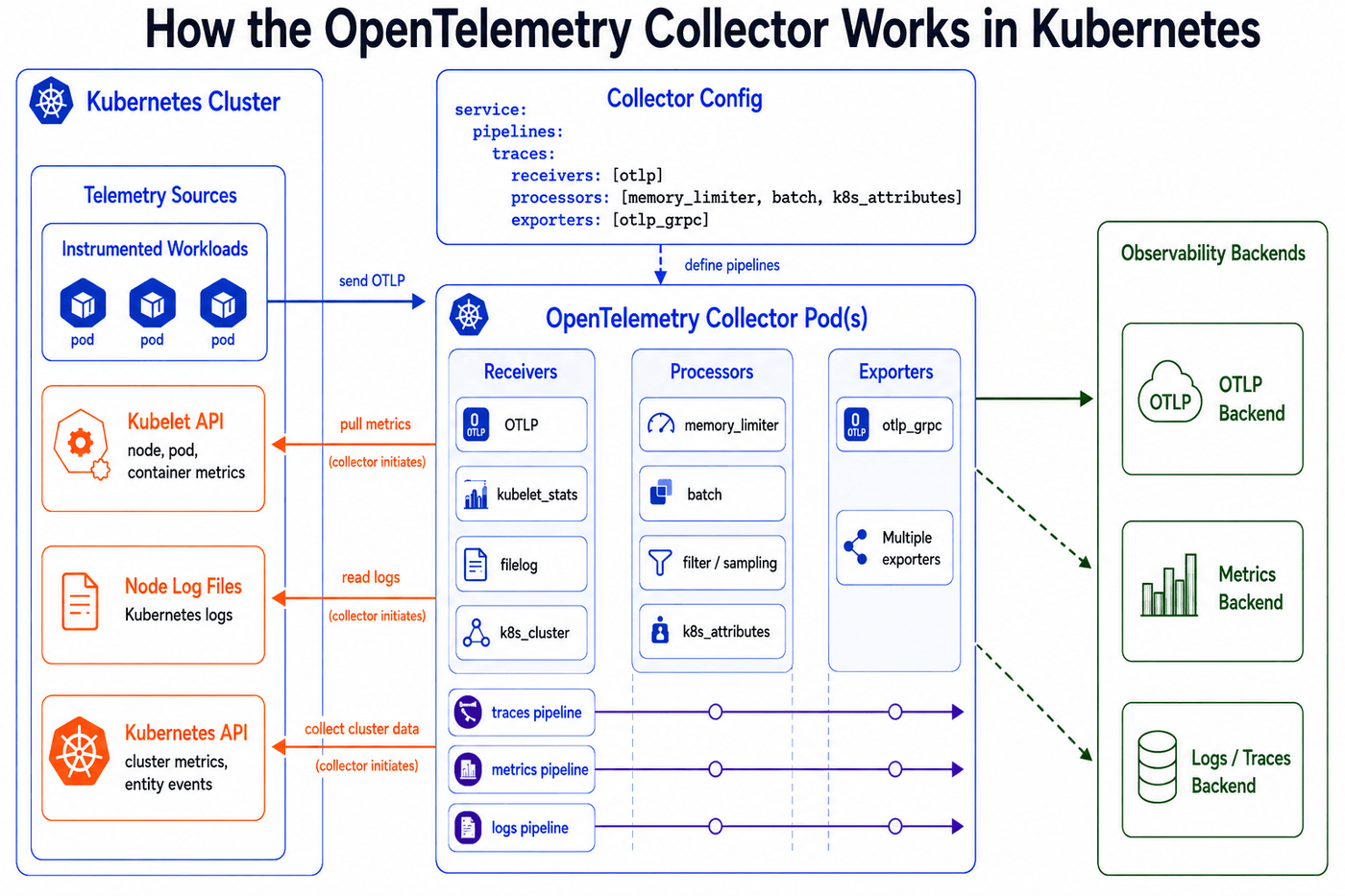
Receivers Ingest Telemetry
Receivers collect or accept telemetry before it moves through the Collector. An OTLP receiver accepts application telemetry from instrumented services, while Kubernetes-focused receivers collect data from the environment around those services. A receiver only becomes active when a pipeline references it, so the configuration file controls which data sources the Collector uses.
Pipelines Define the Collector Path
A pipeline connects receivers, processors, and exporters into one path for a specific signal type. Traces, metrics, and logs each need their own pipeline because each signal moves through components that support its data model. The Collector builds these paths when it starts, which means the configuration file defines the data flow inside each Collector instance.
This pipeline receives traces through OTLP, applies memory and batch processing, then exports them onward.
Processors Prepare Telemetry Before Export
Processors sit between receivers and exporters. They prepare telemetry by applying rules for memory protection, batching, filtering, sampling, or attribute changes. In Kubernetes, the Kubernetes Attributes Processor adds resource details such as namespace, pod, deployment, and node, so telemetry stays connected to the workload that produced it.
Exporters Send Data Out of the Collector
Exporters send processed telemetry to the configured destination. A pipeline supports one exporter or multiple exporters when the same telemetry needs more than one destination. That keeps backend routing inside the Collector instead of placing it in every workload.
Kubernetes Sources Use Dedicated Receivers
Kubernetes telemetry comes from several source types, so the Collector uses dedicated receivers for each one. The `kubelet_stats` receiver pulls node, pod, and container metrics from the kubelet API. The filelog receiver reads Kubernetes logs from node log files, while the `k8s_cluster` receiver collects cluster-level metrics and Kubernetes entity events from the Kubernetes API.
OTLP Carries Telemetry Between Components
OTLP carries telemetry between instrumented workloads, collectors, and backends. It is the wire protocol used at the Collector's ingress and egress points, where receivers use it to accept telemetry and exporters use it to send data onward, rather than a processing stage inside the pipeline.
OpenTelemetry Collector Kubernetes Architecture Options
OpenTelemetry Collector architecture in Kubernetes depends on where telemetry starts, where the Collector needs node access, and how data leaves the cluster. The same Collector can run in different Kubernetes modes, but each mode fits a different collection role.
- Architecture patterns and Kubernetes run modes: A Collector architecture pattern defines the Collector’s role in the telemetry path. A Kubernetes run mode defines how Kubernetes runs the Collector as pods. The OpenTelemetry Helm chart supports DaemonSet, Deployment, and StatefulSet modes, while Collector architecture is usually described through patterns such as agent, gateway, agent-to-gateway, sidecar, and dedicated cluster-level collection.
- Agent pattern for node-local telemetry: The agent pattern places a Collector close to the source that produces telemetry. In Kubernetes, node-local collection maps to a DaemonSet because each node gets its own Collector pod. DaemonSet is the preferred deployment pattern for `kubelet_stats`, `filelog`, and `hostmetrics` because each Collector instance needs access to node-local metrics and log files.
- Gateway pattern for application telemetry: The gateway pattern gives workloads a stable telemetry endpoint inside the cluster. Deployment mode fits this pattern because it supports horizontal scaling and replica management, while a Service gives workloads one stable in-cluster address. The gateway then handles shared processing, routing, and export to one or more backends.
- Agent-to-gateway pattern for local collection and central export: The agent-to-gateway pattern combines node-local collection with centralized export. Agent Collectors collect telemetry close to workloads or nodes, then forward it to gateway Collectors for shared processing, routing, and backend delivery. This keeps node collection close to the source while giving the cluster one controlled egress path for telemetry.
- Dedicated Collector for cluster-wide Kubernetes data: The `k8s_cluster` and `k8sobjects` receivers both pull from the Kubernetes API server, which exposes the same cluster-wide data to every replica. Running several replicas means each one independently collects and exports the same data. One Collector instance is enough. This duplication concern is specific to receivers that pull from cluster-singleton APIs and does not apply to receivers such as `otlp` that handle separate slices of incoming traffic.
- Sidecar pattern for workload-level isolation: A sidecar Collector runs beside a specific application workload. This pattern fits workloads that need isolated telemetry handling close to the application, but it adds a Collector container to each selected pod. That makes sidecars a targeted architecture choice rather than the default shape for cluster-wide OTel Collector Kubernetes deployments.
- StatefulSet mode for specialized stable identity: StatefulSet is a Kubernetes run mode supported by the OpenTelemetry Helm chart, not a default architecture pattern for most Collector deployments. Use it when the Collector design needs a stable pod identity or StatefulSet rollout behavior. For most Kubernetes environments, DaemonSet mode fits node-local collection, Deployment mode fits gateway ingestion, and one dedicated Collector instance fits each cluster-wide Kubernetes API receiver.
How to Deploy the OpenTelemetry Collector in Kubernetes
To deploy the OpenTelemetry Collector in Kubernetes, map each telemetry source to the Collector role it needs. A standard OTel Collector Kubernetes deployment uses a DaemonSet collector for node-local telemetry, a single-replica Deployment for cluster-wide Kubernetes API data, and a gateway Deployment when the Kubernetes cluster needs centralized processing and export.
Create the Collector Namespace
Create a dedicated namespace before deploying the Collector. This keeps Collector pods, Services, configuration, and access permissions separate from application workloads.
This setup uses the `observability` namespace. But you can use another namespace if your RBAC, Services, and application endpoints point to the same place.
Deploy the DaemonSet Collector
The DaemonSet collector handles node-local telemetry. This deployment mode creates one Collector pod per eligible node, so it fits container logs, kubelet metrics, and Kubernetes metadata enrichment.
Add the OpenTelemetry Helm repository before the first install.
Apply the DaemonSet collector with Helm.
This configuration gives each node its own Collector pod. The logs preset enables container log collection, the kubelet metrics preset adds node and pod metrics, and the Kubernetes attributes preset adds workload metadata to telemetry.
Deploy the Cluster-Level Collector
The cluster-level collector handles data from the Kubernetes API server. Run this Collector as one replica so cluster metrics and events are collected once.
Apply the cluster-level collector with Helm.
This setup keeps cluster-wide Kubernetes API data separate from node-local collection. The single replica prevents duplicate cluster metrics and duplicate Kubernetes events.
Deploy the Gateway Collector
The gateway collector gives applications and agent collectors one stable OTLP endpoint inside the cluster. This deployment mode centralizes processing, backend routing, and export control.
Apply the gateway collector with Helm.
This exposes OTLP endpoints for application telemetry. The `debug` exporter helps you validate the data flow by printing telemetry instead of sending it to a backend. After the Collector receives telemetry correctly, replace `debug` with your backend exporter.
Deploy the Collector With the Operator
The OpenTelemetry Operator is another deployment path for the same Collector roles. It lets you manage the Collector through an `OpenTelemetryCollector` custom resource instead of Helm values.
The Operator depends on cert-manager for its admission webhooks, so install cert-manager before installing the Operator.
Install the Operator after cert-manager is ready.
Then define the Collector as a Kubernetes custom resource.
The `image` field keeps the Operator deployment on the Kubernetes Collector distribution. Without that field, the Operator uses its bundled default Collector image.
Verify the Collector Deployment
Check that each Collector role is running as intended. The DaemonSet should create one pod per eligible node. The cluster-level Deployment should run one replica. The gateway Deployment should expose a Service for OTLP traffic.
Check the gateway logs.
Check the gateway Service.
The gateway Service should expose OTLP gRPC on port `4317` and OTLP HTTP on port `4318`. Keep the `debug` exporter only for validation, then replace it with the exporter that sends telemetry data to your backend.
How to Configure OpenTelemetry Collector for Kubernetes
After deployment, configure the OTel Collector to control what each instance receives, processes, and exports.
Define the Collector Pipeline
A Collector pipeline turns component definitions into an active telemetry path. Receivers accept telemetry data, processors modify or enrich it, and exporters send the result to a backend. A component listed in the configuration file does nothing until a pipeline references it in the `service` section.
This pipeline receives trace data through OTLP, applies memory protection and batching, then sends the result to the `debug` exporter. Metrics and logs use the same structure, but each signal needs its own pipeline.
Receive Application Telemetry With OTLP
Use the OTLP receiver for instrumented services that emit OpenTelemetry data. The receiver exposes gRPC and HTTP endpoints, providing applications with a stable destination for traces, metrics, and logs. Node and cluster signals use Kubernetes-specific receivers because they do not enter the Collector through application instrumentation.
Point application SDKs or auto-instrumentation to the Collector Service rather than a pod IP. This is because the Service name stays stable while Kubernetes replaces Collector pods during rollout.
Protect and Batch Telemetry Before Export
Add memory and batch processors before sending production traffic through the Collector. `memory_limiter` protects the Collector process from memory pressure, while `batch` groups telemetry before export. Use both as baseline processors for OTel Collector Kubernetes deployments.
Placing `memory_limiter` before `batch` lets the Collector apply memory protection before it groups data for export.
Attach Kubernetes Metadata
Add Kubernetes metadata so telemetry stays connected to the workload that produced it. The Kubernetes Attributes Processor discovers pods, extracts metadata, and adds it to spans, metrics, and logs as resource attributes. These attributes include namespace, pod name, pod UID, pod start time, deployment name, and node name.
Then add the processor to each application telemetry pipeline.
The processor uses the Kubernetes API, so the Collector service account needs read access to pods, namespaces, nodes, and deployments.
Collect Node-Level Signals
Put node-level receivers in the DaemonSet collector.
The Filelog Receiver reads Kubernetes container logs from node log files, while the Kubelet Stats Receiver collects node, pod, and container metrics from the kubelet. A DaemonSet fits these receivers because each Collector instance reads from the node where it runs.
Collect Cluster-Level Signals
Place cluster-level receivers in a single-replica deployment. The Kubernetes Cluster Receiver collects cluster-level metrics and entity events, while the Kubernetes Objects Receiver collects objects such as events from the Kubernetes API server.
Keep these receivers separate from the node DaemonSet. A DaemonSet would run the same cluster receiver on every node, which turns one cluster signal into duplicate telemetry.
Export Telemetry to Your Backend
Replace the `debug` exporter after the Collector receives telemetry correctly. Use the OTLP gRPC exporter to send data to your backend while keeping the backend destination out of application code.
Validate the Collector Configuration
Validate Collector YAML before you roll it into the cluster. The validation command catches configuration errors before Kubernetes starts pods with a broken pipeline.
After validation, roll out the configuration through your chosen deployment path. With Helm, update the values file and run a release upgrade. With the Operator, update the `OpenTelemetryCollector` resource. With raw manifests, update the ConfigMap or pod template that provides the Collector configuration.
Managing Metrics, Logs & Traces with the OpenTelemetry Collector in Kubernetes
Metrics, logs, and traces need different management decisions because they come from different parts of the cluster.
- Manage metrics by ownership: Put each metric source in the Collector deployment that has the right access to it. Application metrics belong in OTLP or Prometheus-based collection because the service owns those measurements, while node and pod metrics belong in the DaemonSet collector because kubelet exposes node-local data. Cluster metrics need one collector instance because the Kubernetes API server exposes the same cluster-wide data to every replica.
- Manage logs at the node boundary: Treat container logs as node-local data before they become backend volume. The DaemonSet collector reads those files with the Filelog Receiver, then adds pod, namespace, workload, and node metadata before export. Filtering noisy records at this stage keeps the logs useful without moving that logic into application code.
- Manage traces through a shared OTLP path: Keep trace export separate from application deployment concerns. Instrumented services send spans to the OTLP receiver, and the gateway collector handles batching, routing, sampling decisions, and backend credentials. That keeps the trace policy in one Collector layer instead of repeating it across workloads.
- Manage correlation before export: Apply the same Kubernetes resource attributes across all three signals. Shared namespace, pod, deployment, and node fields let metrics lead to related logs and traces without guessing which workload caused the issue.
The Collector works best when each signal is collected where the data is produced, enriched before export, and routed through a pipeline built for that signal.
Common Challenges With OpenTelemetry Collector in Kubernetes
OTel Collector issues usually come from placement, resource limits, pipeline design, or backend pressure. The table below shows the main failure patterns and how to control them.
| Challenge | What Happens | How to Fix It |
|---|---|---|
| Duplicate cluster data | Cluster receivers run in several Collector pods and export the same API server data. | Run cluster-level receivers in a single-replica Deployment. |
| Missing Kubernetes metadata | Telemetry lacks namespace, pod, deployment, or node identity. | Add \k8s_attributes\ before exporters. |
| Collector memory pressure | Spikes or slow exports lead to refused telemetry. | Use \memory_limiter\, resource limits, and queue metrics. |
| Export queue buildup | Backend slowness fills queues and drops data. | Tune queues and retries; use persistent storage for critical paths. |
| Broken trace sampling | Gateway replicas split spans from the same trace. | Use trace-aware routing before tail sampling. |
| Log volume growth | Noisy logs raise backend cost. | Filter low-value logs in the DaemonSet collector. |
| Configuration drift | Collector roles get mismatched settings. | Keep separate versioned values files per role. |
Performance & Cost Considerations for OpenTelemetry Collector Kubernetes Deployments
The OTel Collector adds control before telemetry data leaves a Kubernetes cluster, but every receiver, processor, and exporter uses CPU, memory, and network capacity. Performance and cost depend on what you collect, where the collector instance runs, and how much data you export.
Size Collectors by Signal Load
Metrics, logs, and traces do not grow at the same rate. Logs often create the highest volume, while traces need careful routing when sampling is involved. Size DaemonSet, gateway, and cluster-level Collectors separately so one signal does not pressure every pipeline.
Watch Memory and Export Queues
Memory pressure shows up when the memory_limiter starts rejecting incoming telemetry to keep the Collector within its configured limit. Export pressure appears when queue size stays close to the queue capacity or send failures rise. Add resources or replicas only after checking whether the bottleneck is the Collector, the network, or the backend.
Reduce Volume Before Export
Filtering noisy logs, trimming high-cardinality metric labels, and sampling traces before export lowers backend ingest and storage costs. Keep Kubernetes metadata that helps correlation, but avoid labels that create many unique series without improving troubleshooting.
Scale Stateful Processing Carefully
A stateless gateway deployment mode scales well behind a Service, but stateful processors need more care. Tail sampling needs span from the same trace to reach the same decision point, so use trace-aware routing before scaling that data flow.
This keeps each Collector role focused on its own data flow without adding unnecessary cluster cost.
Best Practices for Running the OpenTelemetry Collector in Kubernetes at Scale
OTel Collector Kubernetes deployments at scale need clear ownership, stable configuration, and signals that point to the next action. Follow these practices to keep telemetry data reliable as Collector usage grows across services, namespaces, and clusters.
Keep Collector Roles Separate
Use separate Collector roles for node-local, cluster-level, and gateway data flow. The DaemonSet collector handles node sources, the single-replica Deployment handles Kubernetes API data, and the gateway handles centralized export. This keeps one busy pipeline from affecting every telemetry path.
Monitor the Collector Itself
Track the Collector’s own metrics, not only the telemetry that reaches your backend. Watch memory usage, rejected telemetry, exporter queue size, queue capacity, enqueue failures, and send failures. These signals show whether the bottleneck is the collector pod, the network, or the backend.
Scale OTLP Gateways With gRPC-Aware Load Balancing
OTLP over gRPC uses long-lived connections, so traffic may not spread evenly across gateway replicas. Use gRPC-aware load balancing when a gateway deployment mode handles high-volume OTLP traffic.
Shard Pull-Based Metric Collection
Pull-based metric receivers should not run the same scrape configuration across several Collector replicas. Each replica would scrape the same targets and create duplicate metrics or out-of-order samples. Split scrape targets by namespace, label, or a target allocator so each Collector scrapes a different slice.
Keep Tail Sampling Behind Trace-Aware Routing
Tail sampling needs span from the same trace to reach the same Collector layer before the sampling decision happens. Use trace-aware routing before the tail-sampling processor so scaling does not split traces across collectors. This keeps sampling decisions consistent as gateway traffic grows.
OpenTelemetry Collector Kubernetes vs eBPF-Based Observability Approaches
OTel Collector Kubernetes deployments and eBPF-based observability solve different parts of the same visibility problem. The Collector gives you a configurable telemetry pipeline, while eBPF captures workload and system activity closer to the kernel.
| Aspect | OpenTelemetry Collector Kubernetes | eBPF-Based Observability |
|---|---|---|
| Collection model | Runs as collector pods that receive, process, and export telemetry data. | Runs an eBPF sensor in the cluster to capture workload and system activity from kernel-level events. |
| Application changes | Works best when applications emit OTLP through SDKs, agents, or auto-instrumentation. | Reduces application changes because data is collected outside the application process. |
| Configuration model | Uses a configuration file with receivers, processors, exporters, and pipelines. | Uses a cluster-level sensor to capture activity with little or no per-service configuration. |
| Kubernetes coverage | Collects application telemetry, kubelet metrics, logs, cluster metrics, and Kubernetes events through configured components. | Captures workload, network, and runtime behavior across services without configuring every application separately. |
| Processing point | Processes telemetry in Collector pipelines before export. | Processes captured data inside the sensor before storage or export. |
The Collector fits teams that need pipeline control over telemetry data, but eBPF addresses a different problem: getting broad Kubernetes visibility without instrumenting every workload.
Lower-Overhead Kubernetes Observability Beyond the OpenTelemetry Collector with groundcover
The OpenTelemetry Collector gives you pipeline control, but large Kubernetes clusters can turn that control into more collector pods, configuration files, queues, and scaling work. groundcover reduces that overhead without asking you to abandon OpenTelemetry. If your services already emit OTLP, groundcover ingests it directly; for everything else, an eBPF sensor fills in coverage. Here is how that works.
Keep Your OpenTelemetry Data, Skip the Collector Fleet
groundcover does not replace OpenTelemetry; rather, it ingests it. If your services are already instrumented with OpenTelemetry SDKs, you can point their OTLP exporters straight at groundcover's DaemonSet sensor instead of standing up and scaling your own Collector deployment. The sensor accepts both OTLP/HTTP (port 4318) and OTLP/gRPC (port 4317), so you keep your existing instrumentation and simply change the export endpoint.
As it receives spans and logs, the sensor automatically enriches them with Kubernetes metadata — pod-level attributes such as k8s.namespace.name, k8s.node.name, and k8s.pod.name, plus container-level attributes like container.name and container.image.tag — all named according to OpenTelemetry's semantic conventions. One behavior to know in advance: groundcover sets the service.name attribute to the name of the Kubernetes Deployment that owns the pod, so if your SDK assigns a different service name, that is where your traces and logs will appear. You can also sample traces at the sensor (5% by default, configurable up to 100%) rather than maintaining sampling logic in a separate Collector stage. groundcover does not instrument your services for you, so your OTel SDKs stay exactly where they are; what changes is that you no longer run, configure, and scale a Collector fleet to receive and route that data.
Capture Signals Without Code Changes
For workloads that are not instrumented, groundcover uses an eBPF sensor to collect Kubernetes and Linux host signals without per-service instrumentation. Because the sensor observes workload activity outside the application process, you get visibility across services that do not yet have SDKs — without adding code or maintaining exporters for them. Combined with OTLP ingestion, this means already-instrumented and not-yet-instrumented workloads can flow through the same observability layer.
Consolidate Signals in One Place
groundcover brings logs, metrics, traces, and events into one observability layer instead of pushing each signal through separate Collector routes and backend paths. This reduces the routing, storage, and query setup your team would otherwise manage across multiple telemetry pipelines.
Lower Backend Load Before Telemetry Piles Up
groundcover applies real-time aggregation, compression, and cardinality management before observability data turns into backend pressure. This reduces the work your team would otherwise manage through Collector filters, storage tuning, retention rules, and ingest controls as telemetry volume grows.
Speed Up Investigations With Agent Mode
Agent Mode builds on the telemetry groundcover already collects. You can @mention it from the page you are using, and it continues with that context instead of starting a separate investigation. From there, it uses gcQL to query logs, metrics, traces, and events, then creates outputs such as dashboards, monitors, queries, and OTTL pipelines.
Conclusion
OpenTelemetry Collector Kubernetes deployments need more than a working pipeline. You need the right Collector role for each telemetry source, consistent Kubernetes metadata, and enough control to prevent duplicate data, memory pressure, and export failures.
The Collector gives you control over telemetry before it leaves the cluster, but that control adds configuration and scaling work. groundcover reduces that overhead without replacing OpenTelemetry: it ingests your existing OTLP data directly at the sensor, captures additional Kubernetes signals through eBPF, brings everything into one observability layer, and uses Agent Mode to help you move from telemetry to investigation faster.
FAQs
Yes. groundcover's sensor ingests OTLP signals directly from Kubernetes pods over both HTTP and gRPC, so services already instrumented with OpenTelemetry can export to groundcover without a separate Collector. The sensor enriches incoming data with Kubernetes metadata and follows OpenTelemetry's semantic conventions. Note that groundcover receives and enriches OTel data but does not instrument your services for you; your existing SDK instrumentation is what produces the traces and logs.
Use the OpenTelemetry Collector when telemetry needs to leave application code and pass through one shared control point. Direct instrumentation still produces the data, but the Collector gives you a central place to batch, filter, enrich, and export it without changing every service each time the backend path changes.
The Collector adds its own pods, memory use, queues, and network traffic to your Kubernetes cluster. That overhead grows when telemetry volume rises or when a slow backend causes queues to fill and exports to take longer. Each Collector role needs enough resources and clear metrics for memory pressure, queue buildup, and failed exports.
groundcover reduces Collector complexity in two ways. For services already instrumented with OpenTelemetry, pods export OTLP straight to groundcover's sensor, removing the need to deploy and scale a separate Collector to receive and route that data. For services that are not instrumented, the eBPF sensor captures Kubernetes signals without code changes. Either way, logs, metrics, traces, and events land in one observability layer instead of being managed through a Collector pipeline for every signal.



