ContainerCreating Status: Causes, Fixes & Best Practices



Kubernetes has to create containers before it can run them. While this is happening, a container sits in the Waiting state with the reason ContainerCreating, a normal part of container startup. In kubectl output this shows up in the STATUS column as ContainerCreating, which is where the informal name comes from. Sometimes, though, containers stay in this state and never successfully start. This signals a problem that you need to troubleshoot to get your workloads up and running.
Read on for guidance as we unpack what ContainerCreating means in Kubernetes, what can cause containers to get stuck in this state, and how to troubleshoot the issue.
What is ContainerCreating status in Kubernetes?
ContainerCreating isn't a formal state of its own. Kubernetes defines three container states (Waiting, Running, and Terminated), and ContainerCreating is one of the reasons the kubelet reports while a container is in the Waiting state. A container in Waiting still runs its required setup operations, like pulling images and applying Secrets, and reports a reason alongside the state to explain what it's doing.
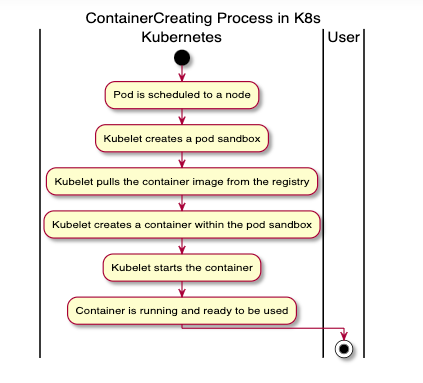
ContainerCreating appears once a Pod has been scheduled to a node and the kubelet begins setting up the Pod sandbox (the environment where a Pod's containers will run). During this window, Kubernetes performs steps like pulling container images, configuring networking through the Container Network Interface (CNI) plugin, and mounting persistent volumes. Throughout all of this, the Pod's overall phase is still Pending.
You can check the state and reason for a container by running:
In the output, look for the container states and the events that describe what's happening within the Pod.
How ContainerCreating status works in the Pod lifecycle
ContainerCreating is part of the broader Pod lifecycle. It takes place after the default scheduler has assigned a Pod to a node but before the Pod's containers have started.
Because ContainerCreating is reported per container, some containers in a Pod can show it while others are already Running. It's worth clearing up a common point of confusion here: ContainerCreating and Pending aren't alternatives to each other. Pod phase and container state are different layers of the same lifecycle. A Pod whose containers show ContainerCreating is, at the Pod level, still in the Pending phase. The official definition of Pending explicitly covers the time spent before scheduling as well as time spent downloading images over the network, which is exactly the work happening during ContainerCreating.
Again, ContainerCreating is a normal part of container startup. Seeing containers in this state doesn't necessarily indicate a problem.
If a container spends more than a few minutes here, however, there is likely an issue preventing it from starting. It's worth noting that Kubernetes has no built-in timeout that moves a stuck container to Failed; the kubelet keeps retrying indefinitely, so nothing resolves on its own and you have to intervene. Common reasons containers get "stuck" in this phase include:
- Image pull delays: While an image is downloading, the container shows ContainerCreating, especially if images are large, registries are slow, or network connectivity is limited. Note the distinction: a slow but working pull shows ContainerCreating, whereas a failed pull (wrong image name or tag, missing pull secret, unreachable registry) flips the reason to ErrImagePull or ImagePullBackOff. If you see those instead, you're past a delay and into an error.
- Volume mounting problems: PersistentVolumes, PersistentVolumeClaims, or other storage resources that are unavailable, misconfigured, or slow to attach can prevent containers from starting.
- Container network setup issues: Problems configuring the Pod network, such as failures in the CNI plugin or RPC errors, can delay container creation.
- Node resource constraints: Insufficient CPU, memory, ephemeral storage, or other node resources can cause Kubernetes to fail to create a Pod sandbox.
- hostPort scheduling limits: Binding a container to a hostPort limits where a Pod can be scheduled, since each host port can only be used once per node. This is really a Pending/scheduling cause, but it commonly surfaces in the same investigation. If you don't specifically need it, exposing the Pod through a Service instead avoids the constraint.
| Common cause | Description |
|---|---|
| Image download delays | The container shows ContainerCreating while the node retrieves images from a registry. Large images, slow registries, or network problems increase startup time. A failed pull instead reports ErrImagePull / ImagePullBackOff. |
| Storage and volume issues | Containers cannot start until all required volumes are attached and mounted. Problems with PersistentVolumes, PersistentVolumeClaims, or storage providers often cause delays here. |
| Network initialization failures | Kubernetes must configure networking for each Pod before launching containers. Errors in the CNI plugin, IP assignment, or network configuration can stall progress. |
| Insufficient node resources | A node lacking adequate CPU, memory, or ephemeral storage may be unable to create a Pod sandbox, holding the container in ContainerCreating. |
How to troubleshoot ContainerCreating status
If you encounter a ContainerCreating problem, the following steps can help you troubleshoot and resolve it.
1. Check Pod events using kubectl describe
First, run kubectl describe pod <pod-name> and read the Events section at the bottom, which shows what the kubelet is trying to do and where it's failing. Pay particular attention to warnings about mounts, image pulls, and sandbox creation.
2. Verify volume binding and claims
If there are persistent volumes associated with the container, check their status to verify they bound correctly. Run kubectl describe pvc <pvc-name>, and look for a STATUS of Pending or events explaining why binding failed. Volume problems are one of the most common reasons a container stays in ContainerCreating.
3. Check container runtime and node health
To rule out issues with the host node and its runtime, run kubectl describe node <node-name>. You can also SSH into the node and use operating system utilities to verify the health of the container runtime.
4. Validate image registry access and credentials
Verify that the image name and tag are correct, that the registry is reachable over the network, and that any required image pull secrets are configured properly. Keep in mind that a genuinely failed pull typically shows as ErrImagePull or ImagePullBackOff rather than ContainerCreating.
Note that in some cases, image files are simply very large or bandwidth is limited, so pulls take a long time. In that situation no error has occurred; you just need to be patient. As a general guideline, though, pulling images shouldn't take more than a few minutes.
It may help to log in to the node and attempt to pull and run the container manually using your container runtime's CLI. This helps determine whether the root cause lies with Kubernetes and the way it is trying to start the container, or with the container image itself.
Step-by-step fixes for ContainerCreating status
After determining the cause of ContainerCreating problems, you can resolve it by working through the appropriate resolution steps. Here’s a look at common fixes.
Fix image pull issues
Image pull issues often result from an unreachable registry, a missing image, mistyped tags, or permissions problems. Determine the root cause of the failed pull, then adjust your container or registry configuration to fix it. (Remember that a hard failure here usually shows as ImagePullBackOff rather than ContainerCreating.)
Resolve volume mount failures
The solution depends on what's causing the failure: often typos, a missing StorageClass, an unbound PVC, or permissions issues. Check kubectl get pvc and kubectl get pv to confirm binding, and see our guide to Kubernetes volumes for details.
Adjust resource requests and limits
If the container can’t start because it doesn’t have enough resources, modify its manifest to adjust the resource requests allocated to it. You may also need to modify resource limits for other workloads, if there aren’t enough free resources to allocate to the container.
Correct network configuration
Inspect the Container Network Interface (CNI) plugin, network policies, and node networking to ensure Pods can receive IP addresses and establish connectivity. Resolve any CNI errors, misconfigurations or IP allocation issues before restarting the workload.
Restart or recreate the Pod
If all else fails, simply restarting or recreating the Pod that hosts the container may fix ContainerCreating issues. This is particularly true if the root cause of the problem is a one-off failure, like a temporary network connectivity blip that caused a node or image registry to be unreachable for a short period.
Key metrics and signals to monitor ContainerCreating status
As noted, containers generally shouldn't be in ContainerCreating for more than a few minutes. For more specific, quantitative insight, track the following:
- Pod startup time: Track how long Pods remain in the ContainerCreating state to identify delays that could indicate infrastructure, storage or networking problems.
- Image pull duration: Measure the time required to download container images, as increasing pull times often point to registry performance, network latency or oversized images.
- Volume attachment and mount latency: Monitor how long it takes for storage volumes to attach and mount, since prolonged delays can signal issues with PersistentVolumes, storage backends or cloud provider integrations.
- Container creation events: Review Kubernetes events for recurring warnings and error messages related to image pulls, volume mounts, scheduling, and network initialization to identify the root cause of startup failures.
- Node resource utilization: Monitor CPU, memory, ephemeral storage and disk pressure on cluster nodes to detect resource shortages that can delay container creation.
- Container network health: Track RPC errors, CNI plugin status, IP address allocation, and network initialization errors to ensure Pods can complete networking setup successfully.
| Metric or signal | Why to monitor it |
|---|---|
| Pod startup time | Measure how long Pods remain in the ContainerCreating state to detect abnormal startup delays and identify trends over time. |
| Image pull duration | Track the time required to download container images to identify slow registries, network bottlenecks, or excessively large images. |
| Volume attachment and mount latency | Monitor how quickly storage volumes are attached and mounted to detect problems with PersistentVolumes, PersistentVolumeClaims or the underlying storage platform. |
| Container creation events | Review Kubernetes events for recurring warnings and errors related to image pulls, storage, scheduling, or networking to pinpoint the root cause of ContainerCreating issues. |
| Node resource utilization | Monitor CPU, memory, ephemeral storage, and disk pressure to ensure nodes have sufficient resources to initialize new containers. |
| Container network health | Track CNI plugin performance, IP address allocation, and network initialization errors to verify that Pod networking is completing successfully. |
Challenges in diagnosing ContainerCreating status in distributed systems
While it’s possible to troubleshoot ContainerCreating issues effectively, doing so can be tricky. This is due in large part to the fact that containers don’t generate logs or output until they’ve started, and they haven’t yet started when they’re in the ContainerCreating phase. As a result, there is no detailed information available about what might be causing containers to be stuck in this state; admins are limited to generic events information produced by the Pod.
Diagnosing the issue is all the more difficult in large-scale, distributed clusters. In these environments, complexities like nodes that are configured in different ways (with varying operating systems and resource allocations) can lead to situations where the same container starts successfully on some nodes but not on others. Having multiple registries, persistent volumes, and so on adds even more complications.
This is why it’s important to have a systematic approach to detecting and troubleshooting ContainerCreating status problems. You need to be able to identify these issues reliably, then have the information necessary to get to their root cause.
Best practices to prevent ContainerCreating status in production
Of course, better than troubleshooting ContainerCreating status is avoiding the issue in the first place. The following best practices can help:
- Optimize container images: Keep images as small as practical, remove unnecessary dependencies and use trusted registries to reduce image download times and improve startup performance.
- Validate storage configurations: Regularly verify that PersistentVolumes, PersistentVolumeClaims, and storage classes are configured correctly and functioning as expected before deploying production workloads.
- Right-size resource requests and limits: Configure realistic CPU, memory, and ephemeral storage requests and limits to ensure Pods can be scheduled without wasting cluster resources.
- Monitor node and cluster health: Continuously track resource utilization, storage capacity and networking health so potential issues can be identified and resolved before they delay Pod creation.
- Test deployments before production: Validate manifests, container images, storage settings and networking configurations in staging environments to catch configuration errors before they impact production workloads.
| Best practice | Description |
|---|---|
| Optimize container images | Use lightweight images, remove unnecessary packages, and host images in reliable registries to reduce image download times and speed container startup. |
| Validate storage configurations | Verify that PersistentVolumes, PersistentVolumeClaims, and storage classes are configured correctly and tested before deploying workloads to production. |
| Right-size resource requests and limits | Configure CPU, memory, and ephemeral storage requests and limits based on actual workload requirements to improve scheduling success and avoid resource contention. |
| Monitor node and cluster health | Continuously monitor node resources, storage capacity, and networking components to detect issues before they prevent containers from starting. |
| Test deployments before production | Validate application manifests, storage settings, and network configurations in a staging environment to identify configuration problems before release. |
Scaling observability for ContainerCreating status across Kubernetes environments
You can use kubectl commands like describe pod and describe node to generate insight into ContainerCreating issues, as shown above. But to diagnose and troubleshoot these problems systematically and at scale, you need an automated observability solution that continuously tracks the state of every container across your cluster and flags those spending an unexpectedly long time in the ContainerCreating phase.
Observability solutions should also correlate ContainerCreating issues with other anomalies in your cluster, such as node health or networking problems. This context is critical for reaching the root cause quickly.
Faster root cause detection for ContainerCreating status with groundcover
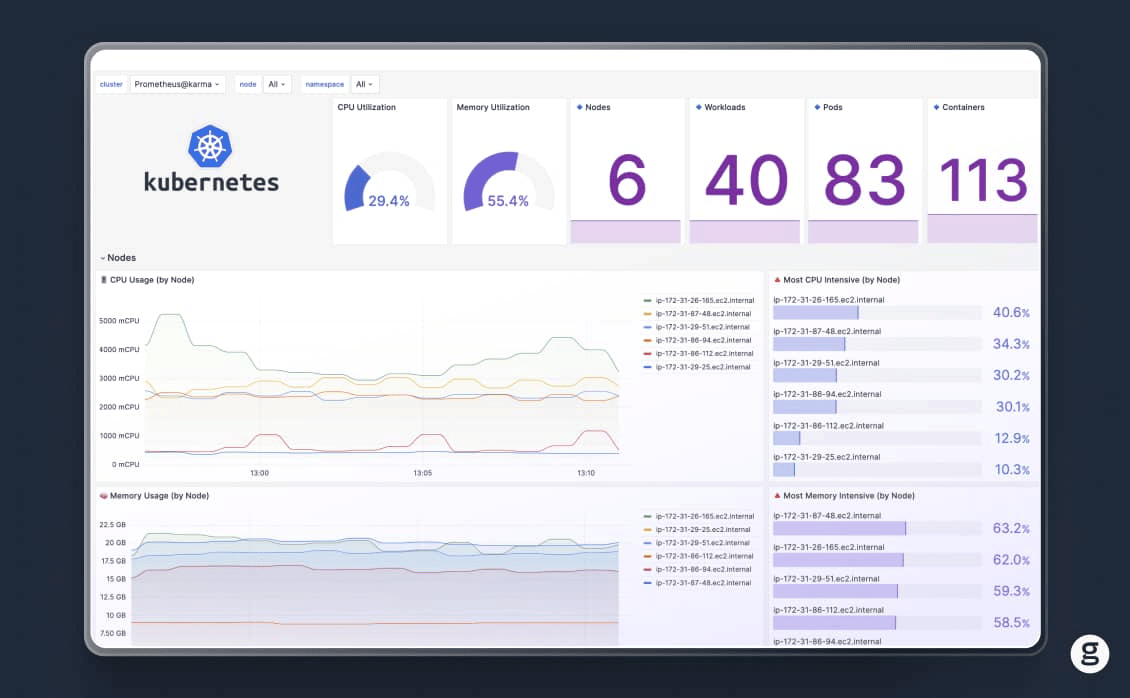
Diagnosing ContainerCreating status problems quickly and at scale is where groundcover comes in. As a comprehensive Kubernetes observability solution, groundcover not only monitors containers during all stages of their lifecycle to detect issues like hung ContainerCreating status, but it also correlates this data with other cluster events to help admins get to the root cause of ContainerCreating failures quickly.
What’s more, because groundcover collects data using the hyper-efficient eBPF framework, it places minimal load on your cluster – so you don’t have to pay a major price (in terms of resource availability) to gain critical observability insights.
Detect ContainerCreating problems with groundcover
All containers will enter the ContainerCreating status at some point. But when they’re in this state longer than they should be, admins need to take action to prevent workloads from failing to start normally. That’s why automated, scalable observability solutions that can detect ContainerCreating problems is critical for maintaining overall Kubernetes cluster health and performance.
FAQs
Common causes include slow or failed container image pulls (often the result of networking or permissions issues), unbound or misconfigured persistent volumes, CNI/networking failures, and node health or resource problems. Note that a failed image pull typically reports ErrImagePull or ImagePullBackOff rather than ContainerCreating.
As a general guideline, Pods shouldn’t report ContainerCreating status for more than a few minutes; longer than this usually signals a problem. However, there are situations (like containers whose images are large in size and therefore take a long time to pull, or containers that need to mount a large number of volumes) that could cause ContainerCreating status to last for longer without resulting from an error.
No. Pod phases are Pending, Running, Succeeded, Failed, and Unknown. ContainerCreating is a reason reported for a container in the Waiting state. A Pod whose containers show ContainerCreating is still in the Pending phase.
Groundcover detects ContainerCreating problems quickly by continuously monitoring the state of all containers, Pods, and nodes, then identifying anomalies like containers that are stuck in ContainerCreating for longer than normal. It also correlates these events with information from throughout the cluster (like data on network and node health) to help admins determine the root cause of ContainerCreating problems.