Pod Stuck in ContainerCreating: Causes, Fixes & Best Practices



Just as you can lead a horse to water but not make it drink (as the saying goes), you can deploy a Pod in Kubernetes but not force the containers inside to start successfully. Indeed, due to a variety of underlying issues, it is sometimes the case that a Pod becomes stuck in the ContainerCreating phase – meaning the Pod itself has been successfully scheduled on a node, but the container or containers inside the Pod aren’t able to start.
Read on for guidance on what it means when a Pod is stuck in ContainerCreating status, what the root causes of this type of error are, and how to debug and troubleshoot ContainerCreating problems.
What does “Pod stuck in ContainerCreating” mean in Kubernetes?
In Kubernetes, having a Pod stuck in the ContainerCreating phase means that the default scheduler has been able to assign the Pod to a node, but one or more containers inside the Pod haven’t started successfully due to issues like an RPC error or failure to create the Pod sandbox or sandbox container (meaning the virtual environment in which a Pod’s containers will run).
You can check whether a Pod is stuck in ContainerCreating by running the command:
All Pods pause through the ContainerCreating phase during their startup cycle; Pod status messages that mention ContainerCreating are not necessarily a sign of a problem. However, in cases where containers never successfully start, a Pod can become stuck in this phase indefinitely. This is a problem because it means the workload hosted in the Pod never actually becomes fully operational.
Note as well that Kubernetes will not automatically restart Pods if they become stuck in the ContainerCreating state. Unlike with some other types of errors, there is no built-in false restart count to trigger a restart attempt.
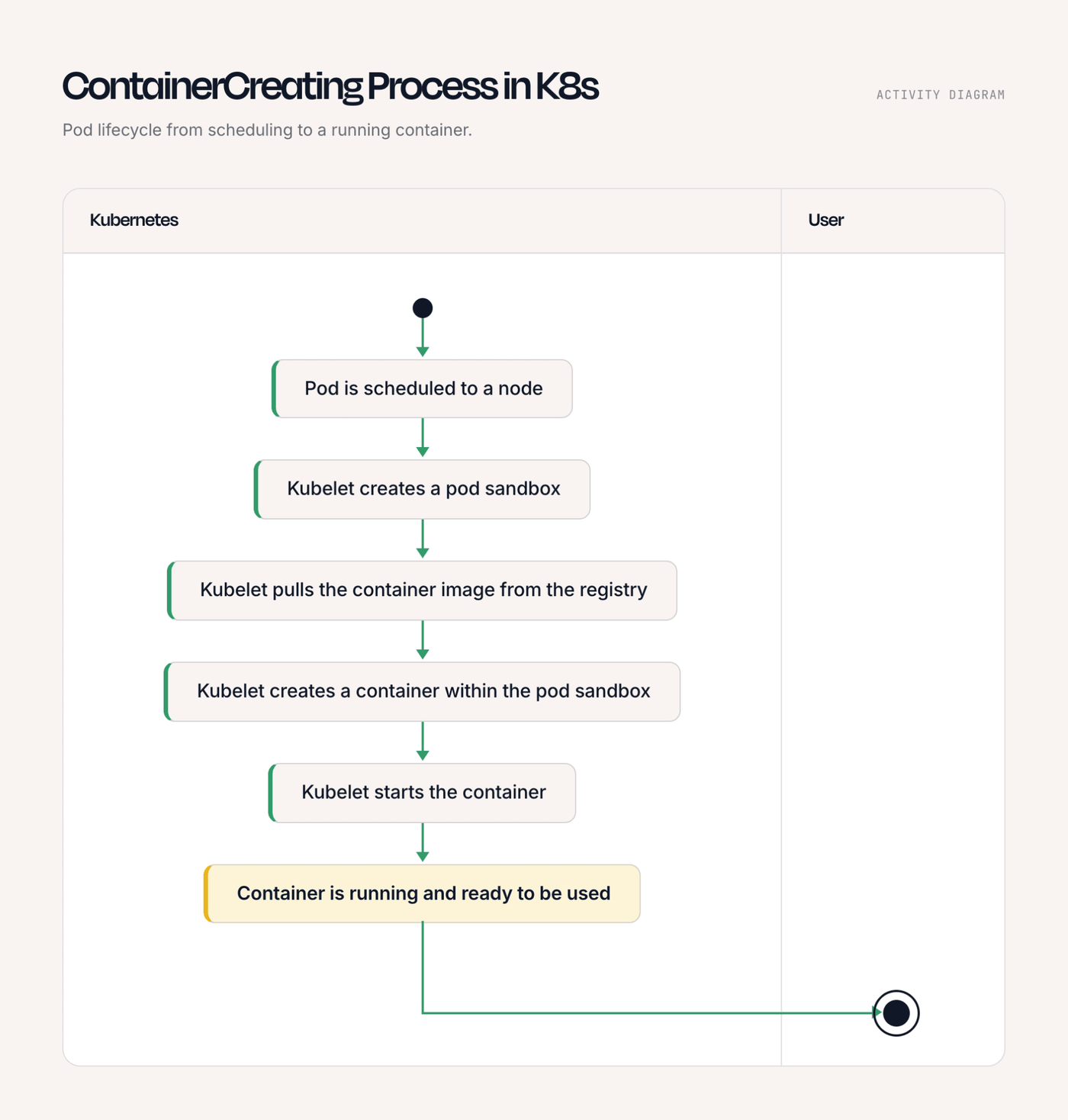
Key signals and metrics to monitor for Pods stuck in ContainerCreating
As noted above, you can run kubectl describe pod to check whether a Pod is stuck in ContainerCreating status. However, it’s also helpful to monitor the following signals and metrics to gain context on the issue:
- Pod phase and status conditions: For Pods that remain in the ContainerCreating phase for longer than expected, monitor Pod status conditions that indicate whether initialization steps, scheduling, volumes, or networking are preventing startup.
- Pod startup duration: Measure the time it takes for Pods to transition from creation to running status. Increasing startup times can indicate image pull delays, storage problems, network failures, or node resource constraints.
- Kubernetes events: Monitor events such as FailedMount, FailedCreatePodSandBox, ErrImagePull, ImagePullBackOff and container runtime errors to quickly identify the component blocking container creation.
- Container image pull metrics: Track image download failures, pull latency, and image registry access errors to detect issues with unavailable images, authentication failures, or slow container registries.
- Node resource utilization: Monitor CPU, memory and disk usage on cluster nodes to identify resource pressure that may prevent containers from being created or initialized successfully.
- Volume and storage metrics: Monitor PersistentVolume and PersistentVolumeClaim status, mount failures and storage latency to identify issues preventing applications from accessing required data.
- CNI and network metrics: Track network plugin health, Pod IP allocation failures and CNI errors to detect problems with creating Pod network interfaces and connectivity.
Common causes of Pod stuck in ContainerCreating
Being stuck in the ContainerCreating phase is a generic symptom that can have multiple underlying causes. Here’s a look at the most common.
Image pull failures
In most cases, Kubernetes has to “pull” a container’s image from a repository before it can start the container. If the registry is unreachable due to network connectivity issues, or if the specified image can’t be found, the pull will fail, and the Pod will end up stuck in ContainerCreating mode.
Volume mount and persistent storage issues
When containers have persistent storage assigned to them, the storage volumes must be mounted during the container startup process. Storage volumes may fail to mount for various reasons (for details, see our explanation on persistent volume pending issues). Mounting failures will cause container startup failures, which in turn trigger ContainerCreating failures for Pods.
Network and CNI errors
Network and Container Network Interface (CNI) errors can prevent Kubernetes from completing the setup required for a Pod to start, causing it to remain in the ContainerCreating state. If the CNI plugin fails to assign an IP address, configure network routes, or create the required network namespace, the kubelet cannot finish initializing the container and will generate RPC errors.
Common underlying causes of this category of failure include misconfigured CNI settings, unavailable network plugins, exhausted IP address pools, or connectivity issues between cluster nodes.
Resource constraints and node-level issues
Resource constraints and node-level issues can prevent Kubernetes from successfully creating containers when nodes lack the CPU, memory, disk space, or other resources required to launch a Pod. More specifically, problems such as insufficient capacity, disk pressure, kubelet failures, or unhealthy nodes can block container startup and leave Pods stuck in the ContainerCreating state.
Issues with init containers and Security Context
Issues with init containers and Security Context settings can prevent Kubernetes Pods from completing the initialization steps required before application containers start. Failed init containers, incorrect permissions, restricted security policies, or invalid user and group configurations can block container creation and keep Pods stuck in the ContainerCreating state.
Steps for debugging Pods that are stuck in ContainerCreating
1. Get Pod details and events using kubectl describe
The first step in troubleshooting a Pod stuck in the ContainerCreating state is to gather detailed information about the Pod and review the events generated by Kubernetes. Running kubectl describe pod <pod-name> provides information about the Pod configuration, container status, assigned node, volume attachments, image pulls, and recent events from the kubelet.
The Events section is often the fastest way to identify the root cause because Kubernetes records failures related to image pulls, volume mounts, scheduling, permissions, and networking. Messages such as FailedMount, ErrImagePull, ImagePullBackOff, or CNI-related errors can point directly to the component preventing the container from starting.
2. Check image pull status and registry access
Container images must be successfully downloaded from a registry before Kubernetes can start a container. If a Pod remains in ContainerCreating because of image-related issues, administrators should check for errors such as incorrect image names, missing tags, unavailable registries, or authentication failures.
Reviewing Pod events and container runtime logs can help identify image pull problems. Teams should verify that image pull secrets are correctly configured, registry credentials are valid, and cluster nodes can reach the required image repositories. Resolving registry connectivity or authentication issues allows the kubelet to retrieve the image and proceed with container startup.
3. Verify volume mounting and claims
Kubernetes must successfully attach and mount all required volumes before application containers can run. Problems with PersistentVolumeClaims (PVCs), PersistentVolumes (PVs), storage classes, or volume permissions can cause a Pod to remain stuck during the ContainerCreating phase.
Administrators should use kubectl describe pod and kubectl describe pvc to identify volume-related errors, such as unbound claims, failed mounts, or unavailable storage backends. Checking the status of storage resources and ensuring that nodes have access to the required volumes can help resolve startup failures caused by storage configuration issues.
4. Inspect node resources and disk availability
Resource shortages or unhealthy nodes can prevent Kubernetes from creating containers even when the Pod configuration is correct. Nodes with insufficient CPU, memory, or available disk space may be unable to allocate resources, extract container images, or create required container files.
To troubleshoot node-level issues, review node conditions with commands such as kubectl describe node and check for warnings related to memory pressure, disk pressure or kubelet problems. Monitoring node resource usage and cleaning up unused images, logs, or workloads can restore capacity and allow affected Pods to start.
5. Analyze network plugin and CNI health
Kubernetes relies on the Container Network Interface (CNI) plugin to configure networking for Pods before containers become fully operational. If the CNI plugin cannot assign an IP address, create network namespaces, or configure routes, the Pod may remain stuck in ContainerCreating.
Troubleshooting network-related failures involves checking CNI plugin components, reviewing node networking logs, and verifying that cluster networking resources are healthy. Common fixes include restarting failed CNI components, correcting network configuration issues, resolving IP address exhaustion, and ensuring that nodes can communicate with required cluster services.
Step-by-step fixes for ContainerCreating issues
As the troubleshooting guidance above implies, the best way to fix ContainerCreating issues depends on the type of issue at stake. Here’s a look at the main resolutions for various types of problems.
1. Fixing image pull problems
To resolve issues related to image pulls, verify that the image name, tag, and registry location are correct, then check Pod events for errors such as ErrImagePull or ImagePullBackOff. If the image is stored in a private registry, confirm that the Pod has a valid image pull secret and that the credentials have the required permissions.
You should also validate network connectivity between cluster nodes and the container registry, especially in environments with firewalls, proxies, or restricted outbound access. Updating incorrect image references, restoring registry access, or refreshing expired credentials allows the kubelet to successfully download the image and continue container startup.
2. Resolving storage issues
To resolve storage issues, ensure that claims are correctly configured, storage resources are available, and the cluster has access to the required storage backend. Administrators may need to update storage class settings, fix access permissions, or restore connectivity to external storage systems before the Pod can complete initialization.
3. Fixing network configurations
Resolving network issues requires checking the health of CNI components, reviewing networking logs, and confirming that nodes can communicate properly across the cluster. Fixes may include restarting failed CNI agents, correcting network configuration files, expanding available IP ranges, or adjusting network policies that unintentionally block required traffic.
4. Adjusting resource limits
To address resource-related failures, review Pod resource settings and compare them with available node capacity. Reducing overly large resource requests, increasing cluster capacity, scaling workloads appropriately, or moving Pods to nodes with sufficient resources can help Kubernetes successfully create the containers. Regular monitoring of resource utilization also helps prevent recurring scheduling and startup problems.
Challenges in diagnosing Pods stuck in ContainerCreating status in distributed systems
Although it’s pretty simple to determine whether your Pod is stuck in the ContainerCreating state, diagnosing the root cause of the issue can be tricky, especially in a distributed, multi-node Kubernetes cluster.
One reason is that failure conditions may be unique to certain nodes. For example, a node may face memory pressure issues that prevent it from starting a container. As a result, although a Pod may work just fine on other nodes, it won’t get past ContainerCreating when it happens to be scheduled on the node that is short on available memory. Similarly, differences in how a given namespace is configured could cause a Pod to work successfully on nodes located in the same namespace, but not outside a particular namespace.
The problem can also be difficult to identify and diagnose because, as we mentioned, all Pods go through the ContainerCreating phase as a normal part of their lifecycle. It’s only when they sit in this phase for an excessively long period that a problem has occurred. However, determining exactly how long is too long for a Pod to be in ContainerCreating is difficult because some containers naturally take longer to start than others due to variables like how large their images are (and therefore how long they take to pull) or whether or not they need to mount persistent storage. As a result, context is crucial when determining what actually constitutes a ContainerCreating problem, versus what is normal and expected behavior.
Best practices for preventing Pods from being stuck in ContainerCreating in production
Consider the following best practices to reduce the risk of having Pods become stuck in the ContainerCreating phase:
- Optimize container images: As a best practice, use small, efficient images with only the required dependencies. This reduces image pull times and minimizes startup delays.
- Monitor and manage cluster resources proactively: Track CPU, memory, storage, and network utilization to identify capacity issues before they prevent Pods from starting. Set appropriate resource requests and limits to improve scheduling decisions and avoid resource exhaustion.
- Maintain reliable storage and networking: Regularly validate PersistentVolume configurations, storage class settings, and CNI plugin health to prevent failures during Pod initialization. Test storage and network changes before applying them to production environments.
- Automate monitoring and alerting: Create alerts for ContainerCreating states that last longer than an expected period, image pull failures, volume mount errors, and node health problems. Early detection helps teams resolve issues before they impact applications or end users.
Scaling observability for ContainerCreating issues across Kubernetes environments
It’s simple enough to identify and troubleshoot individual Pods that are stuck in the ContainerCreating state. However, to operate at scale, admins need to be able to track instances of this issue across all Pods and nodes.
Doing so requires visibility across all layers of a Kubernetes environment, including applications, containers, nodes, storage systems, and networking components. In small clusters, teams may be able to troubleshoot issues manually using kubectl describe and Kubernetes events, but large production environments require centralized monitoring solutions that aggregate metrics, logs and events across multiple clusters and namespaces. Key signals such as Pod startup duration, image pull failures, volume mount errors, CNI failures, and node resource pressure help teams quickly identify patterns and prioritize remediation.
Hence why, as Kubernetes environments grow, it becomes essential to combine automated alerting with detailed telemetry to reduce manual investigation. Observability platforms can correlate Kubernetes events with infrastructure metrics and application behavior, making it easier to determine whether ContainerCreating failures are caused by image registry issues, resource constraints, storage problems, or network failures. Standardized dashboards, automated anomaly detection, and consistent monitoring practices across clusters help teams maintain reliability while operating complex multi-cluster and cloud-native environments.
Faster root cause analysis for Pods stuck in ContainerCreating with groundcover
Since there are many possible underlying causes of ContainerCreating failures, deep visibility, combined with the ability to contextualize and correlate diverse data points, is critical for getting to the root cause quickly.
This is where groundcover comes in. By comprehensively monitoring all components and layers of a Kubernetes cluster, groundcover provides the telemetry and context necessary to determine whether a container is failing to start due to, say, an image pull problem or a failure mounting a persistent volume.
By extension, groundcover helps teams resolve ContainerCreating issues more quickly, leading to a lower risk of downtime and fewer resources wasted running Pods that are not actually operating normally.
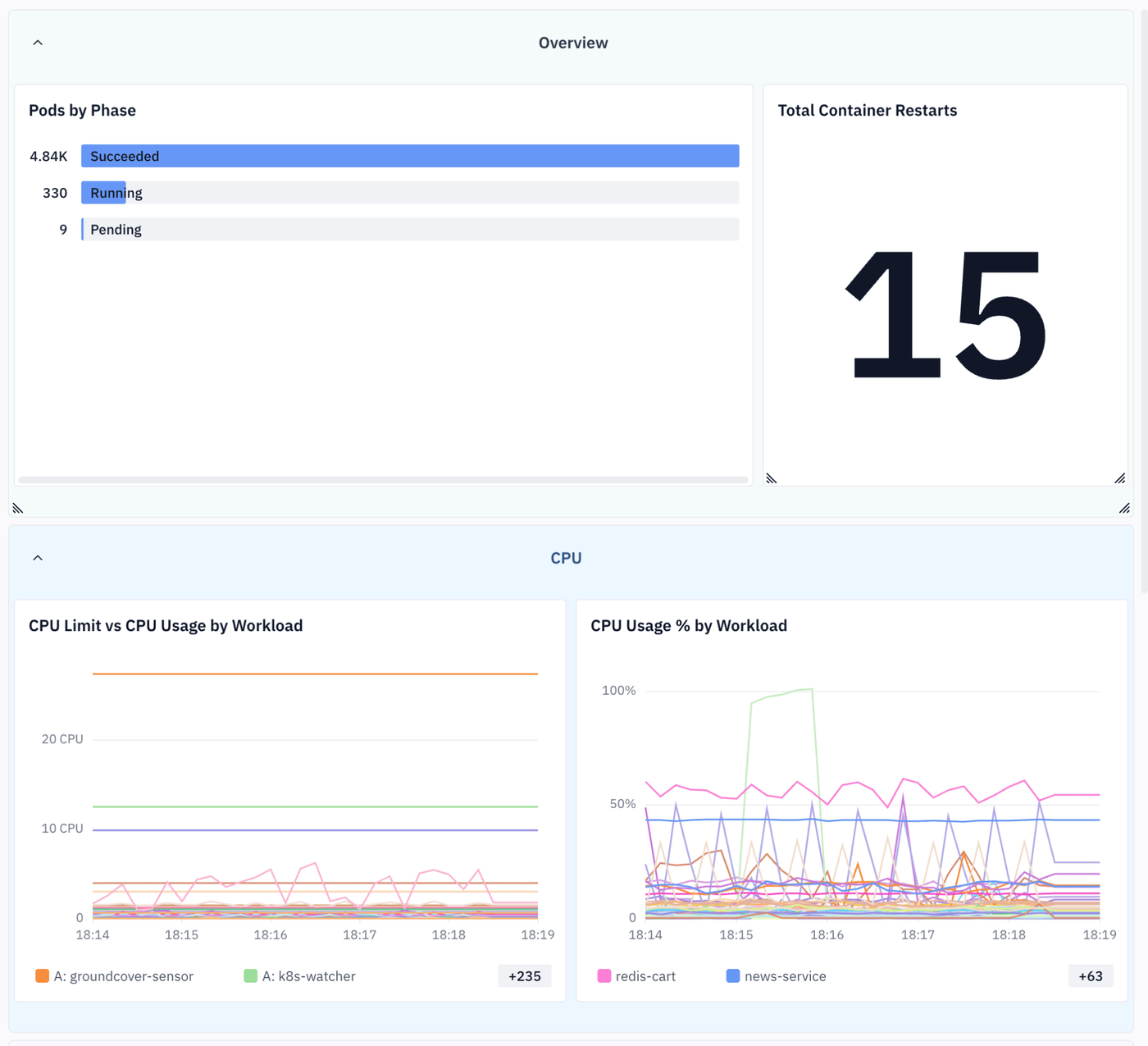
Getting ahead of Pod ContainerCreating failures
ContainerCreating status is like taking a shower: It’s a normal activity most of the time. But when it lasts too long, it’s a sign of a problem – and for Kubernetes admins, knowing when excessive ContainerCreating status signals a Pod performance issue is just as important as it is for parents to know when, for example, their teenagers let the shower run for 45 minutes.
We can’t tell you how to prevent teenagers from taking overly long showers, but we can tell you how to detect and troubleshoot ContainerCreating status issues in Pods. The keys are to collect the right signals and metrics, then correlate and analyze them effectively using observability solutions like groundcover.
FAQs
Pods commonly remain stuck in ContainerCreating due to image pull failures, storage mount problems, CNI networking errors, insufficient node resources, or Security Context configuration issues.
As a generic rule of thumb, a Pod should typically be investigated if it remains in ContainerCreating for more than a few minutes. Note, however, that it’s normal for Pods to take longer to start up due to factors like their containers having large images or needing to mount persistent storage – so it’s important to establish an expected baseline for container creation time for each Pod, then use it to judge when the ContainerCreating state has lasted too long.
groundcover helps teams quickly identify ContainerCreating issues by correlating Kubernetes metrics, logs, and events with infrastructure context to pinpoint failures across images, nodes, storage, and networking.