
Prometheus Memory Usage: Causes and How to Reduce It



Prometheus is an open source monitoring and alerting platform that organizations can use to detect problems like workloads that are using too much memory. It’s a bit ironic, then, that Prometheus itself can also end up consuming more than a reasonable amount of memory. When that happens, the tool that teams rely on to detect memory utilization problems (among other issues) becomes the source of memory problems itself.
Hence the importance of preventing excessive Prometheus memory usage. Read on for tips as we explain what causes high memory utilization in Prometheus, how to detect the problem, and best practices for reducing overall memory usage in Prometheus.
What is Prometheus memory usage?
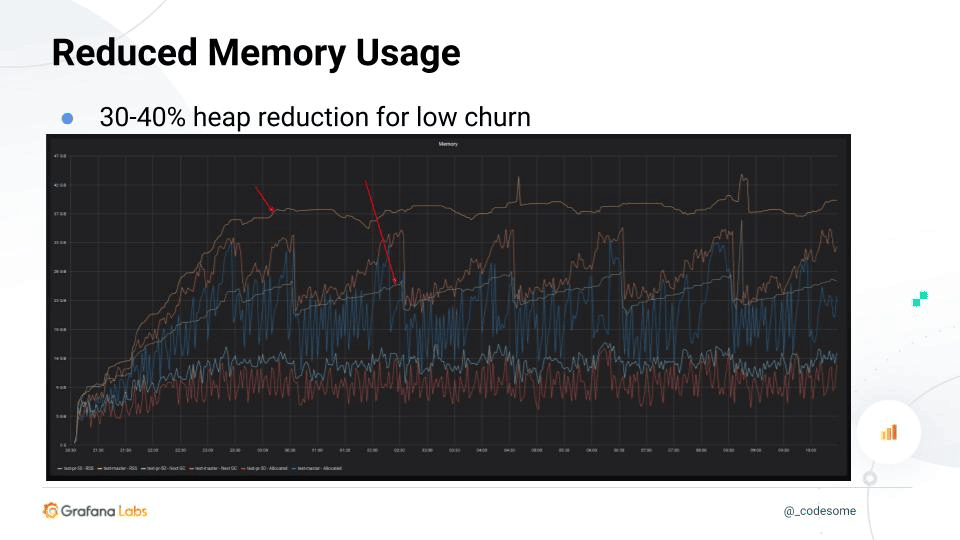
Prometheus memory usage refers to the memory (i.e., RAM) resources consumed by Prometheus, the open source monitoring and alerting tool. Like any other type of software, Prometheus requires some memory to run because it needs a place to store data temporarily. It’s not as if you can deploy Prometheus with zero memory usage.
However, certain situations (which we discuss in detail below) can trigger high Prometheus memory usage. This is a problem because, as we mentioned above, the main point of using Prometheus in the first place is to monitor workloads to identify issues like excessive memory usage. If Prometheus ends up consuming too much memory, it leaves less memory available for production applications, which can degrade the performance of workloads.
To be clear, when we refer to Prometheus memory usage, we’re talking only about the consumption of volatile memory, not persistent storage or disk space. The amount of disk space used by Prometheus could also become a challenge if you retain too much monitoring data, but that’s a topic for a different day.
How to check Prometheus memory usage: Key metrics to monitor
The easiest way to check how much memory Prometheus is using is to view the performance metrics that Prometheus reports about itself. These are available through a Web UI, which is typically accessible at the URL http://localhost:9090. Key metric names reported here include:
- process_resident_memory_bytes: Total memory consumed by Prometheus.
- go_memstats_alloc_bytes: Memory allocated to heap objects.
Alternatively, if you run Prometheus in Kubernetes, you can view memory usage data using the command:
This will tell you how much memory the Prometheus Pod is consuming (along with some other performance data).
Comparing Prometheus memory usage to available memory
On its own, data about current Prometheus memory usage is not all that useful. You typically also need to know how much memory is actually available, so that you can calculate how much memory Prometheus is using as a percentage of total memory.
Prometheus can report the amount of available host server memory data directly if you deploy the Node Exporter, an optional component that monitors server performance data. In that case, you can view node_memory_MemTotal_bytes and node_memory_MemAvailable_bytes through the Web UI.
If you don’t have Node Exporter installed, you can also directly view information about server memory availability by running the following command on the host server operating system:
This reports (in megabytes) total server memory, as well as total memory currently used.
In a Kubernetes cluster, you can get similar data about node memory availability using:
This command displays information about memory usage by nodes, allowing you to determine which percentage of total memory is being consumed by the node that hosts your Prometheus Pod.
Once you know how much memory Prometheus is using and how much is available on its host server, you can calculate Prometheus memory consumption as a percentage of total memory using the following query:
100 * (1 - ((node_memory_MemFree_bytes + node_memory_Cached_bytes + node_memory_Buffers_bytes) / node_memory_MemTotal_bytes))
Key factors that affect Prometheus memory usage
If Prometheus is consuming more memory than you think it should, or if memory utilization creeps up over time, it’s likely a result of one of these factors:
- Ingestion rate: A higher ingestion rate means more samples are buffered and processed per second. A high count of samples increases short-term memory consumption (it can also trigger high CPU usage).
- Time series cardinality: Higher cardinality increases the number of unique time series stored in memory, directly raising Prometheus’s memory usage.
- Scrape interval configuration: Shorter scrape intervals (meaning the intervals between when Prometheus pulls performance data from the systems it’s monitoring) generate more frequent samples, leading to greater memory usage over time.
- Remote write configuration: Enabling and buffering remote write queues consumes additional memory, especially during backpressure or slow remote endpoints.
- Query complexity and recording rules: Complex queries and recording rules require more in-memory data processing and intermediate results, increasing memory usage during execution.
Memory leaks in Prometheus
High memory utilization by Prometheus can also result from memory leaks - meaning situations where an application keeps data in memory when it no longer has a reason to do so, typically due to programming bugs or poorly designed application logic.
That said, major memory leaks are not a common problem in Prometheus. The platform is written in Go, which has quite good garbage collection capabilities (which automatically removes used data from memory). While it’s possible for memory leaks to occur in Prometheus, resulting in high memory usage, it’s much more likely that one of the factors described above is the cause of higher-than-expected memory consumption.
There is no simple way to detect Prometheus memory leaks, but if one is occurring, you’ll typically see a steady increase in Prometheus memory usage over time that does not correlate with an increase in the amount of data you’re ingesting or querying. Otherwise, if memory usage increases at the same time as data consumption, it’s safe to assume that a memory leak is not the cause.
How to estimate Prometheus memory usage requirements
Of course, just because Prometheus is using a lot of memory doesn’t necessarily mean there’s a problem. It’s only when the platform consumes more memory than it reasonably should that you have an issue.
Thus, to manage Prometheus memory utilization effectively, you need to estimate how much memory Prometheus should consume, then compare this to actual memory usage.
There is no simple formula for calculating expected Prometheus memory usage. But you can typically make reasonable estimations by considering:
- How many time-series you’re working with: As a rule of thumb, you’ll need about 7.5 kilobytes of memory per time-series.
- Buffer requirements: To avoid running out of memory during times of peak activity, it’s a best practice to plan for buffer, meaning that you should allocate 30-40 percent more memory than you expect Prometheus to consume during normal operations.
Based on these factors, you can multiply your total number of time-series by 10 (which reflects the average amount of memory usage per time-series in kilobytes, with a buffer added in) to get a basic estimate of Prometheus memory usage requirements. So, if you have 100,000 time-series, expect to require about 1 million kilobytes (or 1 gigabyte) of memory.
How to reduce Prometheus memory usage
If Prometheus is consuming more memory than it should, or if you’re running short on memory and are worried about performance degradations, the following steps can help to cut back on Prometheus memory utilization:
- Reduce time series cardinality: Lowering the number of unique label combinations reduces the total number of time series held in memory. This is the single most effective step you can take to cut back on Prometheus memory usage.
- Drop unused or high-cardinality metrics: Eliminating unnecessary or overly granular metrics prevents memory from being wasted on irrelevant or excessive time series.
- Increase scrape interval: Scraping less frequently decreases the number of samples stored, reducing memory consumption over time. The trade-off is that it may also decrease visibility and accuracy because less frequent scraping increases the risk of not capturing important anomalies or outliers within monitoring data.
- Optimize recording and alerting rules: Simplifying rules reduces the amount of intermediate data and computation stored in memory during evaluations.
- Reduce data retention period: Keeping less historical data shortens how long samples are stored. This mainly reduces disk usage (because historical samples are stored on disk, rather than in short-term memory); however, it can help to lower overall memory usage, too, because longer retention periods can increase memory used during query processing.
- Tune Prometheus configuration flags: Adjusting settings like memory chunks, query limits, and Write-Ahead Log (WAL) behavior can help control and reduce memory usage.
Prometheus memory usage in Kubernetes environments
The main factors that impact Prometheus memory consumption rates are the same no matter how you host it. However, certain special considerations apply if you deploy Prometheus in Kubernetes:
- Tooling differences: As we’ve mentioned, Kubernetes makes it possible to use different tools and commands (like kubectl top pod and kubectl top nodes) to monitor Prometheus memory usage.
- Pod churn: Pod churn (meaning the restarting of Pods) can cause Prometheus to consume more memory. This can occur if the Pod or Pods that host Prometheus frequently restart. The restart process is memory-intensive, so many restarts will raise Prometheus’s overall memory usage in Kubernetes. This issue doesn’t apply to more traditional Prometheus deployments, where restart events are rare because Prometheus is hosted statically.
- Request and limit capabilities: In Kubernetes, you can take advantage of requests and limits to help manage Prometheus memory allocations. Similar features are typically not available in traditional Prometheus hosting environments.
- Inconsistent node memory allocations: In a typical Kubernetes environment, there are multiple nodes, and the amount of memory available on each one can vary. As a result, it can be more challenging to predict exactly how much memory will be available to Prometheus, since it depends on which node happens to host the Pod. You can control this behavior using requests or limits to tell Kubernetes that the Prometheus Pod should have a certain amount of memory available (in which case the Kubernetes scheduler will deploy the Pod on a node with sufficient memory resources). You can also use capabilities like nodeName to assign the Prometheus Pod to a specific node (although this doesn’t guarantee that the node you choose will actually have enough memory available to host the Pod).
Challenges of managing Prometheus memory usage in dynamic, cloud-native systems
We just touched on one of the fundamental challenges of managing Prometheus memory consumption in fast-changing, distributed, cloud-native environments like Kubernetes: The fact that memory availability can vary widely depending on which server happens to host Prometheus at a given time.
The ability to distribute workloads across clusters of servers is part of what makes cloud-native architectures so powerful. But it can also reduce predictability and consistency when dealing with applications that require a certain amount of resource availability.
There is no simple way to solve this problem. But as we noted, cloud-native platforms like Kubernetes offer ways to control how much memory is allocated to Prometheus (regardless of which server hosts it), or specify which server it should run on. Leveraging these features is important for running Prometheus effectively in cloud-native setups.
Scaling strategies to manage Prometheus memory usage in cloud-native environments with federation
Cloud-native architectures can also provide a way to help manage Prometheus memory usage more effectively by taking advantage of the scalability capabilities of cloud-native infrastructure.
Specifically, you can implement Prometheus federation, allowing you to run multiple Prometheus instances. Since each instance operates independently, it uses less memory than a single, centralized, larger-scale Prometheus instance would consume.
Total memory consumption across all instances under a federated model is likely to be similar to having one centralized instance, but you don’t have to worry as much about running out of memory and causing your entire Prometheus environment to crash. You also benefit from more granular insight into how memory is being consumed because you can track it on an instance-by-instance basis.
Real-time Prometheus memory visibility and reduced cardinality risk with groundcover
Understanding Prometheus memory usage can be challenging. It requires the ability not just to know how much memory Prometheus is consuming, but also how this correlates with queries, and how it relates to total available memory. In other words, there’s a lot of data to look at, and you need to track all of it in real time to detect problems.

That’s where groundcover comes in. By continuously monitoring Prometheus, as well as the infrastructure that hosts it, groundcover provides detailed, context-aware visibility into Prometheus memory usage, as well as other critical performance data. Using these insights, you can detect and troubleshoot excessive memory usage issues and determine when cardinality is too high - and you can do this even if you’ve deployed Prometheus across a complex, cloud-native environment.
An effective approach to Prometheus memory management
Prometheus needs memory to do its job. But there’s no need for it to consume an excessive amount of memory. When Prometheus memory usage exceeds a reasonable rate based on the amount of monitoring data it’s working with, it’s important to mitigate the problem so that Prometheus doesn’t become the weakest link in overall workload performance.














.svg)